Hi all,
I've been building a wall-panel dashboard for our Hubitat house, and it's far enough along that I'd like other people to try it and tell me what they think. It's called Skypane. It's self-hosted: it runs in a small Docker container only option currently (I run it on Unraid), and any tablet or screen shows it in a browser or a kiosk app.
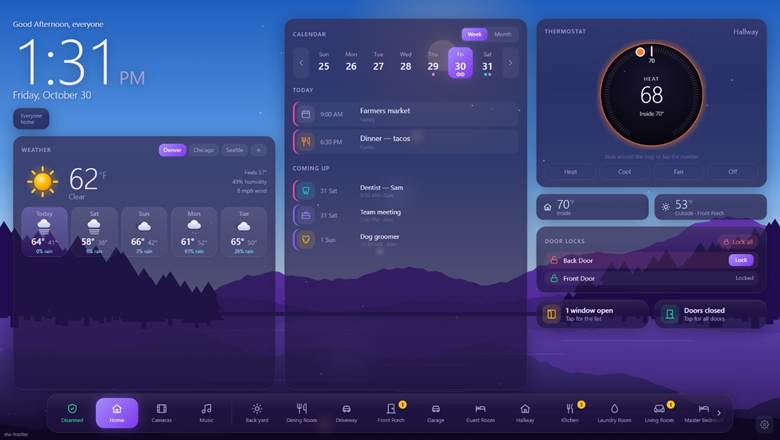
It's a work in progress. Things change often and some parts are still rough. That's why I'm posting now: I'd rather hear what's confusing or missing before it's "done".
Try the demo
https://skypane.huskyserver.us — sign in with demo / Skypane-Demo.
- It's a pretend house. Nothing you do reaches a real home, so switch anything, build layouts, break things.
- You get your own private sandbox. Nobody else sees your changes.
- Up to 10 people can use it at once. After 15 minutes without doing anything you're signed out, so the next person gets a turn.
- The Feedback tab on the right edge of every demo page sends me a note straight from the page you're on.
- Some parts are switched off in the demo: the Hubitat connection, MQTT, real cameras, calendar links, accounts and guest Wi-Fi. Camera pictures, calendars and weather places are samples.
It isn't up for download yet — the demo is the way to try it for now.
What it does today
Built from your Hubitat. It connects through Maker API and builds the panels from your own rooms and devices. You review and adjust in a web page (the "Manager"): what each device is, which room it's in, which devices a panel may never switch. No YAML, no code. A change on the hub shows up without touching the tablet.
Panels. A Home page and a page for every room: lights (dim, white tones, colour), fans, outlets, shades, appliances, sensors and that room's cameras. Several panels (one per tablet), each with its own rooms, layout, theme and alerts, all set up from the one Manager.

Alerts from Hubitat. Your rules (Rule Machine, webCoRE) send alerts to the panels through a small Hubitat driver, the Skypane Notifier: a leak, smoke, the freezer, a garage left open. Each has a level from 1 to 5 and the panels it goes to. Levels 1–3 are a line on Home; levels 4 and 5 fill the screen and sound until dismissed, with the panel PIN. Every dismissal goes back to Hubitat, so a rule can turn the sirens off. The panels can also speak.

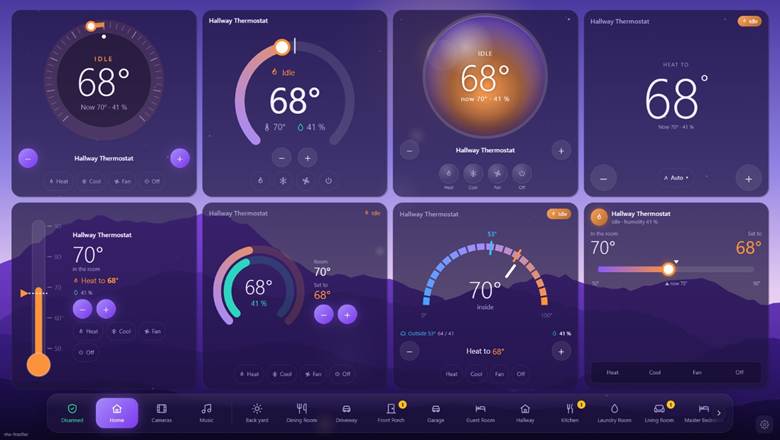
A layout builder. Drag-and-drop in the Manager, with the real panel live in the middle: drag cards in, move and resize them, undo and redo. About 44 card types (devices, values, thermostats, who's home, locks, doors & windows, weather, calendar, clock, cameras, scenes, modes, the alarm, timers, energy, batteries, shared lists and notes, a photo frame) and blank cards you fill with your own pieces. Every card has its own style and its own tap / double tap / press-and-hold actions. The thermostat card has 12 looks — halo ring, arc with a knob, slider, thermometer, glass orb, twin rings and more — and every look works the thermostat the same way.

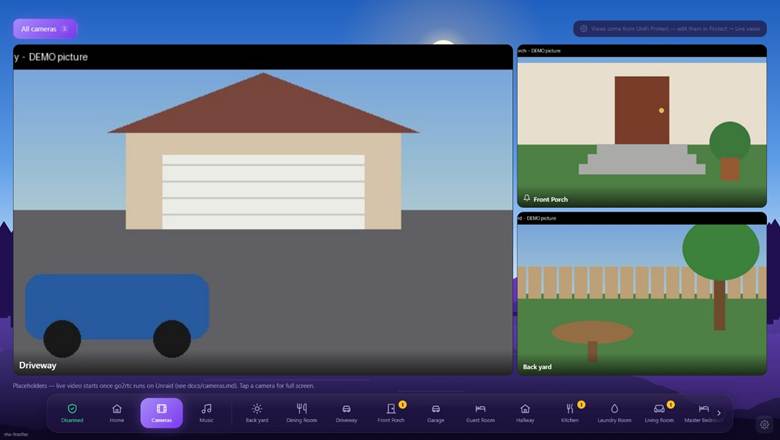
Cameras. UniFi Protect cameras show up by themselves; any other RTSP camera works through the built-in go2rtc. Live grids, full screen, camera views, a room's own cameras, and "show the door cameras when the doorbell rings". (The demo shows still pictures, not live video.)
Looks. An animated sky with sun, moon and clouds and live weather effects (rain, snow, fog, storms), color themes, built-in backgrounds or your own pictures, icon sets and your own icons.

Also: calendars from any iCal link (read only), a guest Wi-Fi QR card, a child lock, the panel PIN for anything risky (unlocking, the garage, the alarm), Manager accounts with their own permissions, and a health check that tells you (and Hubitat) when something stops working.
It fits with my other projects
- Switchboard — a Hubitat app for announcements, notifications and sirens. Also still in development: GitHub - almulder/Switchboard: Switchboard for Hubitat · GitHub
- Sonos Panel — a touch panel for people with Sonos systems. A Skypane panel's Music button can open it.
- Cameras — the UniFi Protect / RTSP (go2rtc) camera support is shared with the panels.
What I'd love to hear
- Your wall: which tablet or screen (model, size, landscape or portrait) and which kiosk app? Does the demo look right at that size?
- Where did you get stuck? Anything in the Manager or the layout builder that didn't make sense on the first try.
- What's missing for your house? Devices that need their own card (energy, EV charging, irrigation, pool, robot vacuum, 3D printer…) — please name the brand and the Hubitat driver or app.
- Alerts: would you send alerts from Rule Machine or webCoRE with levels 1–5? What would you send, and to which panels?
- Looks: which thermostat look, theme and background would you actually put on your wall — and which would you never use?
- Running it: would you run it on Unraid, plain Docker, a Raspberry Pi or something else?
Reply here or use the Feedback tab in the demo. Screenshots of your current dashboard are welcome too — the good and the bad.
Thanks for trying it!