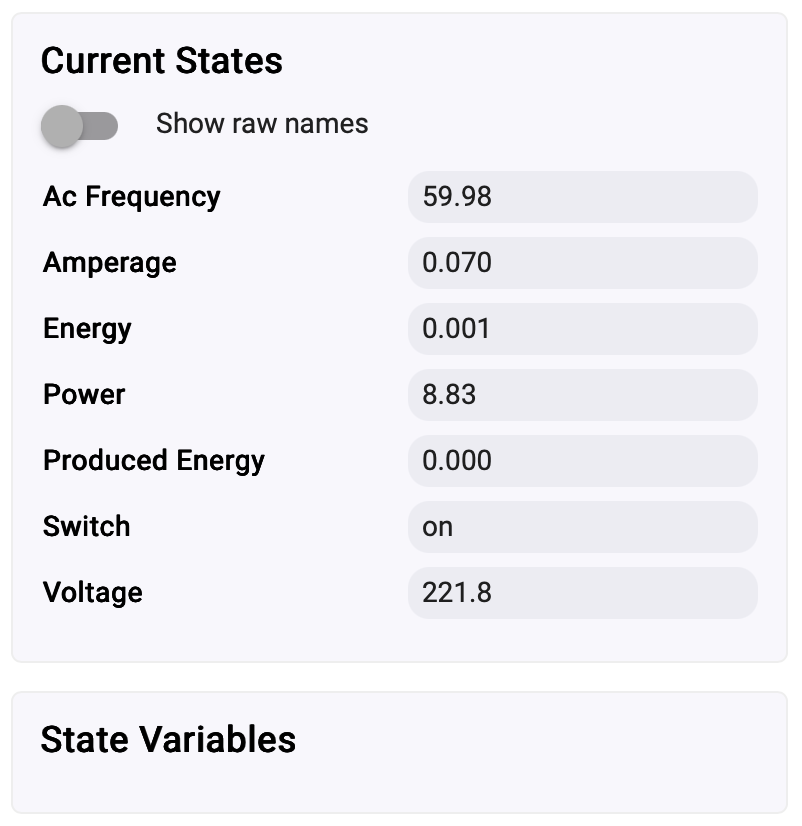
Shelly 1 PM Gen 4 Zigbee Driver

This zigbee driver for the Shelly 1PM Gen 4 Switch was created with the help of AI (Manus AI). Small corrections were needed and some improvements were made by @kkossev (thanks). The device pairing was done in the C8-PRO using the "Double Luck Voodoo”. The driver is being tested.

The driver can be installed from

https://raw.githubusercontent.com/joaomf/hubitat/refs/heads/master/Shelly%201PM%20Gen%204%20Zigbee%20Driver.groovy


Driver update history:

  • version 1.0.0 2025-04-17 Joao - Initial version
  • version 1.1.0 2025-04-02 kkossev - Small improvements
  • version 1.1.1 2025-05-19 Joao - Translation to English
  • version 1.2.0 2025-08-21 kkossev - Shelly RPC cluster tests (Hubitat platform have a bug preventing the RPC cluster from working correctly)
  • version 1.2.1 2025-08-22 kkossev - added wifiInfo; added runRpcStateMachine()
2 Likes

Curious if you had any designs on implementing the Shelly RPC cluster.

2 Likes

I passed to Manus AI the URL in zigbee2mqtt of Shelly 1PM Gen 4

1 Like

Not really an answer I guess, but if you only use Ai I guess someone else can do the same and point it at the rest of the documents. Thanks for prompting.

1 Like

I just referenced the Zigbee2MQTT link using AI. The idea was to have a quick solution, and it really was. It’s been working very well so far. Since the driver is open source, anyone is welcome to contribute, including implementing the RPC cluster if needed or desired.

2 Likes

Thanks anyway.

Unfortunately, at the moment, implementing the RPC protocol (encapsulated in Shelly endpointId 0xEF, custom cluster 0xFC01, non-standard Zigbee Profile 0xC001) is not possible on Hubitat.

There is a HE platform bug, where Data Type: Character String (0x42) is truncated before being parsed into DescMap - the last 4 bytes are 'eaten' somewhere :


On Hubitat :


Giving up ... :frowning:


Actually, it may be not very difficult to fix in HE platfor: there is a 4 positions displacement :


@mike.maxwell

3 Likes

As I have already spent a lot of time working on the Shelly RPC via Zigbee implementation, and as it is partially working (despite of the HE decoding bug), I have published the new version on GitHub - same repository as in the first post :

https://raw.githubusercontent.com/joaomf/hubitat/refs/heads/master/Shelly%201PM%20Gen%204%20Zigbee%20Driver.groovy

  • version 1.2.0 2025-08-21 kkossev - Shelly RPC cluster tests (Hubitat platform have a bug preventing the RPC cluster from working correctly)
  • version 1.2.1 2025-08-22 kkossev - added wifiInfo; added runRpcStateMachine()

The interesting new experimental command is "Run Rpc State Machine" :

It expects a valid JSON object, containing a valid Shelly RPC command.

Some sample commands that you can experiment with :

:mag_right: Device Information

  • Device Info
{"id":1,"method":"Shelly.GetDeviceInfo"}
  • Device Status
{"id":2,"method":"Shelly.GetStatus"}
  • Firmware Info
{"id":3,"method":"Shelly.GetDeviceFW"}

:zap: Energy & Power Monitoring

  • Energy Meter Status
{"id":4,"method":"EM.GetStatus","params":{"id":0}}

(Voltage, current, active power, frequency, total energy)

  • Reset Energy Counters
{"id":5,"method":"EM.ResetCounters","params":{"id":0}}

:wrench: Switch Control

  • Turn Relay ON
{"id":6,"method":"Switch.Set","params":{"id":0,"on":true}}
  • Turn Relay OFF
{"id":7,"method":"Switch.Set","params":{"id":0,"on":false}}
  • Toggle Relay
{"id":8,"method":"Switch.Toggle","params":{"id":0}}

:stopwatch: Automation Features

  • Set Auto-Off Timer (5 sec)
{"id":9,"method":"Switch.SetConfig","params":{"id":0,"auto_off":true,"auto_off_delay":5}}
  • Clear Auto-Off
{"id":10,"method":"Switch.SetConfig","params":{"id":0,"auto_off":false}}
  • Set Auto-On Timer (10 sec after OFF)
{"id":11,"method":"Switch.SetConfig","params":{"id":0,"auto_on":true,"auto_on_delay":10}}

:test_tube: Advanced / Debug

  • Reboot the device
{"id":12,"method":"Shelly.Reboot"}
  • Get current timezone & time
{"id":13,"method":"Sys.GetTime"}
  • Ping (health-check)
{"id":14,"method":"Shelly.Ping"}

The bad news are that the most wanted functionality - detached relay mode is not working for now.

2 Likes

Nice work.

I like the idea of detached relay with a failsafe that when the network/connection is down the Shelly fails back to relay mode automatically. I've seen Shelly scripts that do it. I've also seen people request it as a built in feature. I'd prefer the latter, but haven't seen if Shelly has implemented that yet. I have not seen a script that shows it works with zigbee.

Dear joaomf and kkossev,

I'm using a C7 with a collection of wifi, zigbee and zwave devices.
I got two Shelly 2 PM Gen 4, to install at a spot where Wifi is weak but inside a Zigbee mesh.

They pair as Zigbee, I see them in Zigbee details, but I tried every driver that might work ( starting with kossevs driver for the 2PM Gen4) and I get zero reaction from the devices.

In wifi mode, they work fine, but not in the spot where I need them.

So I thought, lets look at the code for the 1PM driver from joaomf, and compare it to the code for the 2PM driver from kkossev, and see what goes wrong. Gave that up real quickly...

Now I'm at a loss... could I use ManusAI to build a driver ? Where do I start ? Any new versions of the 2PM driver ?

Help would be much appreciated

Hi,

Most probably your Shelly 1PM has left the HE Zigbee network shortly after joining it. The problem is not in the driver - the basic on/off switching should work also with the HE inbuilt Generic Zigbee Switch driver.

Try pairing the device again to your C-7 hub. If possible, bring it temporarily close to the hub. Then, reboot the hub. Start the pairing as soon as the HE web interface becomes responsive after the reboot.

You can use the HE inbuilt ‘Device’ driver for testing, clicking on the ‘Get Info’ button from the Commands tab should show the device fingerprint info in the live logs. When the ‘Get Info’ works on every click you can change the driver. Make sure the device continues to work after you power it off and then back on, Then you can move it to the final destination away from the hub, and test it again before you finally mount it inside the wall switch box.

Update: I hadn't had my morning coffee yet, so I missed that you are asking for Shelly 2PM (not 1 PM). :slight_smile:

Here is Joao's driver for Shelly 2PM Gen4 :

https://raw.githubusercontent.com/joaomf/hubitat/refs/heads/master/Shelly%202PM%20Gen4%20Zigbee%20Driver.groovy

Update2: It may turn out that Shelly Gen4 devices will not work with Hubitat C-7 (and older) models, because of the older, non-Zigbee 3.0 compliant Zigbee stack :

At the end of this thread is the link to Joao's driver for Shelly 2PM, that works with the C-8 hubs. It may be a good idea to continue in that thread in order to avoid further confusion between 1PM and 2PM drivers.

2 Likes