Question 01:
It is possible that this icon has went AWL Within the last two months I have upgraded 15 leak sensors and 17 double plugs from 700 to 800 series devices. When re-adding them back to the dashboard I was unable to locate the icon below. After checking the list of icons several times I noticed in the forum there was an instance of missing icons in 2022 before. Fearing I somehow deleted the icons, I checked my 2nd hub and could not locate it there either. Any help appreciated.
Question 02:
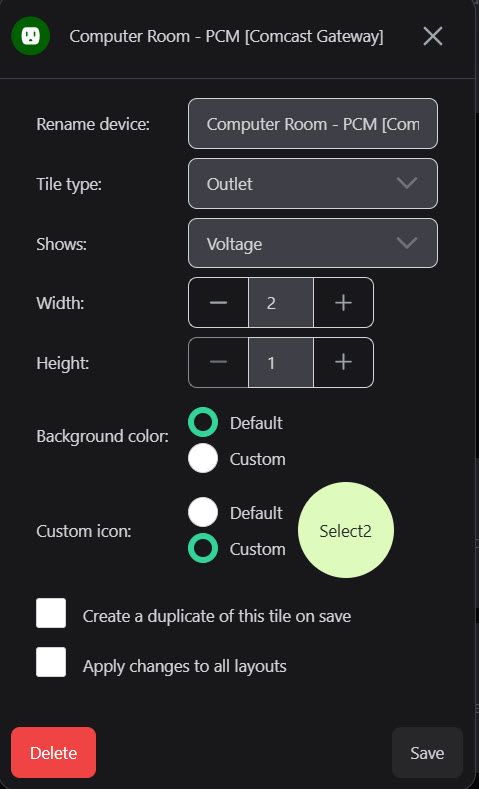
After an icon has been assigned to a tile, would it be possible for the icon name permanently remain as a part of that tile's components? What seems to happen now is that the custom icon definition reverts back to select. The icon name that was used is removed. The icon does remain however. See below.
As of the 1st round of 800 series device replacement initiative, I have started keeping a separate list of the icon names so that I have those names somewhere in the future for future such projects or even some type of catastrophic failure.
Rebuilding the components is not as much the problem as is looking through all the icons to find them without the names. See below:
Question 03:
Would it be possible to for each individual to either individually determine the icon placement on the tile (probably preferred by those designing their desktops) or if that presents a programming or maintenance nightmare have a standardized placement. Granted I acknowledge this is my OCD kicking in. My thought would be either left or right since when in the middle you cannot see the icon (blocked by directional arrows) when the desktop is opened in edit mode. See screenshots below.
My first thought was it was being determined by the width of the tile. I am providing two tiles of the same with that may rule this out. First set shows; same width, with the icons in the middle. The second set; same width, icons on the left.
Mostly in answer to your Q2, when I assign a custom icon to a given tile, this assignment sometimes appears only after the 3rd or 4th attempt, but does eventually show up:
Then again, I'm not using the mobile app, but Chrome web browser on Windows to edit the tile. Removing it is likewise hit-or-miss for me. Why it takes several attempts for these to become permanent I cannot say.
Anyway, once it does take hold, I then see a corresponding entry for that tile in the Dash's Advanced > Layout textbox:
This gives a clue as to how you could (theoretically, anyway) reposition the custom icon, using CSS.... since that element gets assigned the same Class (using the F12 menu to inspect):
After sleeping on this and looking around even more I think I know what is happening.
I am using the the easy-dashboard app so I am not sure if this rules out the ability for me to use the advanced tile layout option with that being unique to the legacy dashboard. Please let me know if I am mistaken.
What I have found is that many of the icons do retain their icon assignments while some do not. The ones that do not I am unable to locate those icons in the available icon set . This could be for many reasons I am sure. I am going to have to ask for support's help here. It could be simply because they are missing; or much worse, a corrupted database. I sure hope it is not the 2nd issue .
I did some reading about recovering from a corrupted database. Backup, soft-reset, restore.
I would like to ask support or the group to see if they can find the missing plug. Re-supplying the image (see below).
I have others but before I take such a "drastic" action I would like to see if it simply a mission icon 1st. Have others done the corrupted database process process? If so what has been their lessons learned, success rate, and experiences?
Lastly, how do I engage support on this issue; albeit somewhat minor in their list of of priorities :-).
 Within the last two months I have upgraded 15 leak sensors and 17 double plugs from 700 to 800 series devices. When re-adding them back to the dashboard I was unable to locate the icon below. After checking the list of icons several times I noticed in the forum there was an instance of missing icons in 2022 before. Fearing I somehow deleted the icons, I checked my 2nd hub and could not locate it there either. Any help appreciated.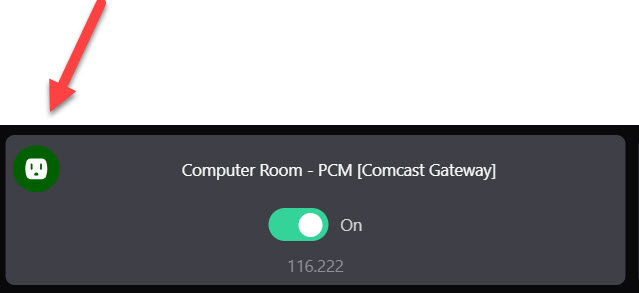





 .
.