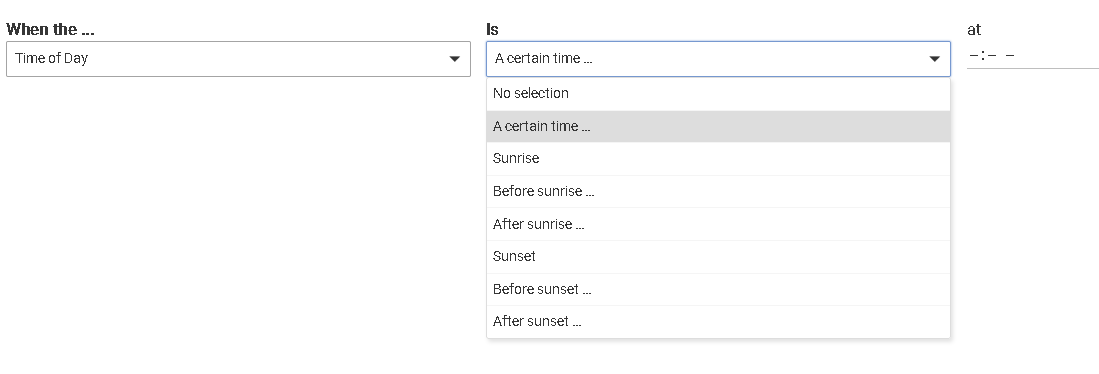
For Basic/Simple Rules, please add a feature for a device state to be active only BETWEEN certain times.
This might be different than triggers/actions. Triggers can be missed do to power outages, devices offline, hub offline, etc.
Hubitat should check the status of the device between the time period, and change the device status to match the expected state (i.e. on/off) for that time window.
For example:
If lights are only to be on/active between 1:00 AM and 6:00 AM, and the 1:00 AM trigger is missed, then the light's status = off when the lights should be "on". Hubitat should notice the light's status is supposed to be "on", and turns the lights "on".
Similar scenarios for sprinklers, pumps, heating, and others.
These are two different apps, and Simple Automation Rules already works like how it sounds you're describing. Basic Rule is an ordered list of actions, with the first essentially being the trigger, and while anything is possible, I would not expect that design to change soon. Two separate rules will avoid the specific problem we've already discussed in your other post, though as also discussed there, such occurrences would only happen under very specific circumstances in the first place.
I also have security lighting. If the security lights aren't on when they are supposed to be on, then that's a problem. If an event was skipped because the hub and/or device was offline at the time of the trigger, and will remain off until the next trigger, then that's a problem.
I see no reason why technology cannot automate this for me, and do it easily. If I'm going to do it manually, then an automation hub can automate it for me.
I'm asking the technology to do what I tell it to do so I don't have to manually do it. After the power/hub/device outage, I have to manually check my devices and manually trigger the expected device state. I'll also need to eventually figure out a way to be notified of a skipped event when I'm away from home, so then I can manually evaluate the device state and trigger the missed events.
Until then, I'll be manually performing the above actions.
To address this in an appropriate manner via automation, you should:
Put your hub on a UPS. It will protect against database corruption due to sudden power loss.
Setup a sensor that detects mains power being lost and then restored. There are several threads on the Hubitat community on where to purchase such a sensor (or make one).
Setup a rule, with power being restored as the trigger. This rule should turn on the lights you need to be turned on using a range of time as a condition.
How do you expect to detect this automatically? You can trigger a rule when the hub reboots, using 'systemStart' location event. But, device outage? How would you propose to detect that? Reliably enough to hang an automation on it.
aaiyer has the best advice above -- those are all excellent precautions to take. Another option to consider is to creating a rule triggered by system start, and have that check whatever status(es) are important and then perform the desired corresponding response action.
I have a system-start rule that (after a brief delay to let the start-up settle) refreshes a few devices and resets some stuff as necessary if it's found not to be in the right status for whatever reason.
I would have the hub do what a human being would do.
The hub has the needed info to know when itself and/or a device was offline (past tense, it can figure it out on startup).
The hub has the needed info to know the device state.
If the hub knew the "between" time range for the expected state, then it would know the intended state.
If the current state doesn't match the expected state, then trigger the expected state.
I am manually going to do this by looking at the dashboard. I already know when the power is restored
Already on a UPS, but the UPS isn't going to last long enough. Not sure if Hubitat can detect the power outage and initiate a clean shutdown (just like my Unraid server does).
I am going to check into a power restored/lost sensor. Great idea.
I need to learn how to create a startup rule for an unclean shutdown.
It can if you set it up this way. @aaiyar suggested one way above. Create a rule triggered on system start, use conditional actions based on time (or whatever other criteria you may need; that is all you've mentioned so far), and perform whatever actions inside those blocks that you want.
You can supplement this with a rule or other app "triggered" at a specific time that does what you want at that time. These are different automations, at least with any built-in app you'll find. (It wouldn't be impossible for someone to write an app that does both in one -- this reminds me of a new-ish option you can use in Mode Manager that checks time on startup and sets the mode based on your settings table; but nothing like this exists that I am aware of for lights/switches/etc. But it's also simple to do yourself.)
Not for most devices it doesn't (the hub itself, yes, as above). Zigbee, Z-Wave, and Matter devices -- and likely other kinds of devices you may use -- do not maintain some always-on connection with the hub that can simply be checked to see if it "dropped." For the most part, they just transmit messages when needed and, in the case of mains-powered devices, are generally listening to receive them. Battery devices get even more complicated. The best you can do is guess (or try to "ping" a device if it's the kind that will respond and see it does). Some community drivers attempt this for certain devices; otherwise, apps like my Device Activity Check can give you a best-guess based on metadata and your own knowledge of how the device normally works, among other options.
That looks good. I'd be curious what other fellow systemStart rule users have to say about this, but I have a 2-minute delay as my first action... My goal there is just to give the hub time to do what it needs to do to get settled in after a start event.
2 minutes just seemed reasonable to me, but it's probably on the long (conservative) side.
Your (single) conditional statement will work fine in this case here, but as a good practice, I'd encourage you to get in the habit of ending every "If..." statement with an "End If". That way, you'll never get burned by missing one (since doing so with multiple conditionals will bork up your rule).
All of these things you are stating about "hub has" provide the fuel for automations you must define yourself. And, just so you know, the hub in general does not know when a device is offline. It knows what it thinks the state of the device is, but that may not be the actual state of the device if a report from the device either didn't happen, or got lost in a mesh network, or otherwise did not reach the hub, or conversely the hub commanded the device and that command was lost or not completed for whatever reason. The hub could think the device was on, when it never actually turned on.
The hub has no automatically built-in automations, But, it provides the platform upon which you can define whatever automations you want. The operative phrase being "you can define whatever automations".
Why are you checking if the switch is off first? Here are two reasons you may not want to:
If the switch was turned on manually when the hub was off, the hub won't know. It wouldn't have been on to hear that message. So, the state as shown on the hub may not match the actual device state, and your expression will evaluate to the wrong value, preventing the actions you care about from running.
A "Refresh" command will normally (depending on the specific device, protocol, etc.) make the device (if it is functioning) respond to the hub with its current state, but that doesn't seem necessary to really care about on account of the next point.
Sending an "on" to a switch that is already on generally does not have an effect (if you are doing something unusual like using something as an effectively momentary device for a garage door, relay, etc., this may not apply, but it doesn't look like you are).
That first point seems particularly concerning given that this is the exact situation about which you seem to be concerned about working around. I'd just check the time, turn on the switch if you always want it on during that time (and don't have some exceptional behavior to concern yourself about like the above) ... and and an END-IF, as mentioned above, to practice good syntax, even though it does not matter in this particular rule as-is.
In case the hub did not get a response (an updated status) from the device how many retries are attempted (if any)? Detection of multiple failure on status update could be a good indicator for device offline condition.
Not yet because I had a massive failure on a first and second update attempt and rolled back the platform to 2.4.0.151. But I just found a message from Mike Maxwell for this new feature. Now for sure I will try hard to get new platform installed.
As @bravenel has pointed out the hub really doesn't know the current device state of any type of device when power is restored.
As @aaiyar and @bertabcd1234 have said, the current state doesn't really matter.
My start up logic just looks at the time of day, to send the most likely last state to each device. The specific updates for lights and shades based on sun position, lux and presence will come within a couple minutes. Then everything will be sorted out.