Hi, everyone I'm trying to create this rule to run my extractor fan the only issue I'm having is if I turn the light switch on and off and back on again with in the fan 0ff delay period it isn't cancelling the delay timer so will shut off the fan even though the lights is back on, have I done something wrong with in the rule? I've only set the delay to 30 seconds for testing purpose I will change this to 10 minutes once I have it working correctly.
Many thanks Mike
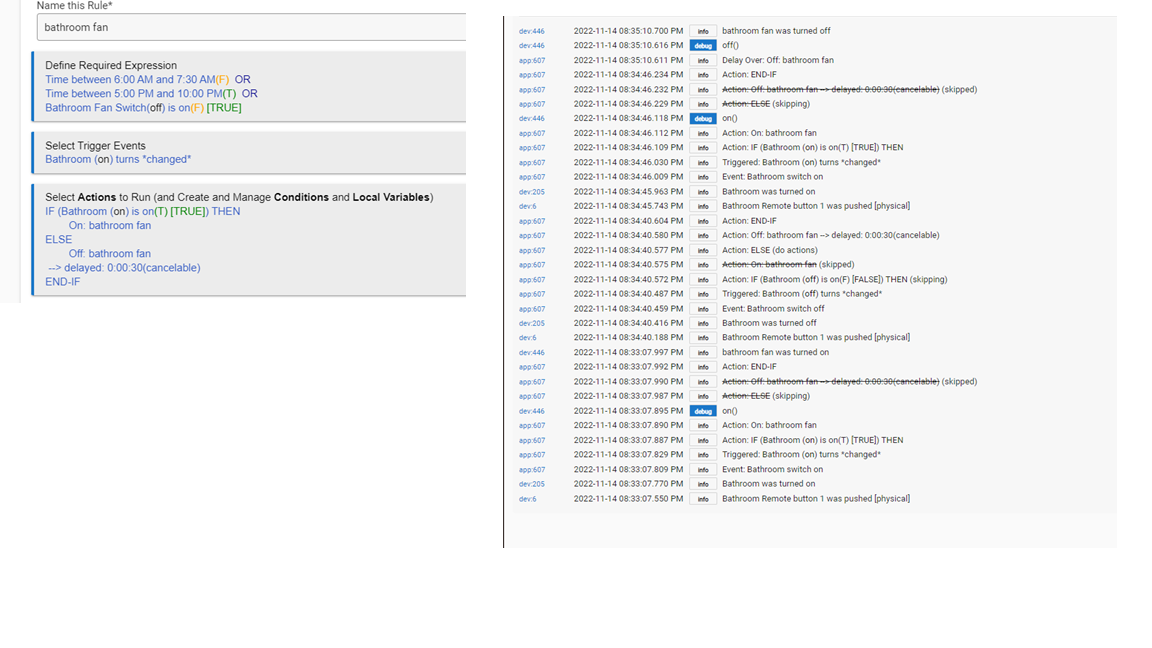
One issue is that nothing cancels a delay unless you use a "Cancel Delayed Actions" action somewhere (the "cancelable?" flag simply marks it as eligible for cancellation via this action but does not do anything on its own). So, you'll need to add this somewhere. Either at the beginning of the rule or (because this is the only time it should have been scheduled in the first place) right before or after your "On" action are two places that would work.
(EDIT: Was going to say something else might be odd, but that was me mis-reading device names, so I think that is actually OK...)
I've just done the changes you said and its now working perfectly thanks so much I really appreciate it. I was trying to get it to work for about 3 hours prior to posting on here, sometimes it just pays to ask for help.
FYI another option is to use a wait for event Elapsed time before the off. Then you don't need to have a cancel delay in the code as a wait is always canceled by a new trigger.
Thanks for the info terminal3 I will look into that as well

I've now found another issue with this rule. if I turn the light on for e.g at 7.29am and then off at 7.31 my fan stays on as its outside of the time frame I've set. Is there a better way of writing this rule? or do I just have to create another rule to say turn fan off outside of those set hours ?
A false required expression prevents your rule from triggering, so if that's not the behavior you want. remove the time-based required expressions and create similar but more flexible logic in your actions. Maybe something like:
Cancel Delayed Actions
IF (Bathroom is on AND Time between 6:00 AM and 7:30 AM OR Time Between 5:00 PM and 10:00 PM) THEN
On: Bathroom Fan
ELSE:
Off: Bathroom Fan --> delayed 0:10:00 (cancelable)
END-IF
Note that this will turn the fan off any time after 10 minutes, not just if it was turned on during those times or it was recently those times and the fan was on during one of the ranges. But it won't turn it on outside that range, which I'm guessing was your concern. If not, more complicated logic could address that, too, though nothing I feel like figuring out right now if you don't need it. 
By writing it the way you suggested does the time frame only apply to the part of the rule until the (ELSE:) ? so all day it would run the bottom part of the rule e.g
Off: Bathroom Fan --> delayed 0:10:00 (cancellable)
END-IF
Yes, an IF THEN will run the actions after the THEN if the expression is true at that moment; otherwise it will run the actions inside the ELSE (or a matching ELSE-IF, whichever comes first, or nothing at all if that's the end this IF THEN...END-IF block). This is why your original rule (mostly) works, too: the "On" action runs if Bathroom is on, otherwise the ELSE runs. Same idea here, just a more complicated expression.
I've just re-done the rule and its now working exactly how I want it to. I will be more careful in the future adding stuff to the required expression tab. Thanks so much bertabcd1234 I really appreciate your help.
bertabcd1234 Could you help me with this rule please ? I cant work out why its not working.
I'm trying to get a pir to trigger my hallway lights but only with in a certain time frame, also In the second half of the rule (the broken part) I've chosen that the hallway lights need to = 20% I've done this so if I change the brightness of the light via a button on my touch screen it will stop the pir from turning off the light, (well that's the theory in my head haha) but I just cant get it to work. any help would be much appreciated.
pir|690x388

1 Like
The first thing I would do is fix the "Broken Condition," which you may need to erase the whole expression and start over in order to do. This line will likely never evaluate correctly and is likely to cause problems.
If that doesn't help, I'd enable all logging for the rule and see if what gets sent out to "Logs" helps you figure out another problem.
I thought it was something I had done with in the rule but I deleted the broken condition line and re-done it written the same way and its now working, I'm not sure why it went faulty. Thanks Bertabcd1234
This topic was automatically closed 365 days after the last reply. New replies are no longer allowed.