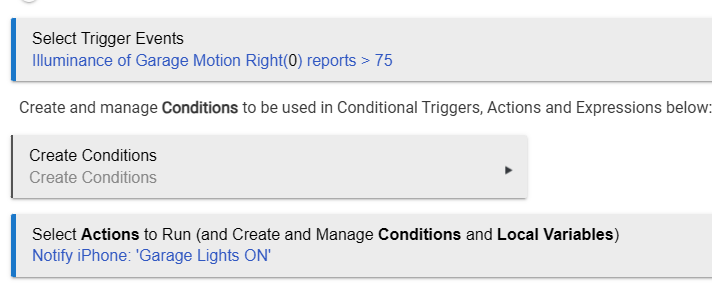
My challenge is that any time the lux value is updated and changes even a little bit, the rule runs again and sends me the push notification. So in all actuallity it sends me push notifications every few mintues when the garage lights are on.
I want it to send me only one for the first time the lux goes above 75.
I can think of a solution where this is acomplished with boolian variable and 2 separate rules. One rule turns the variable ture/false and then the other is for the push notification. However, for the sake of organization, I'd love this to be encompased into a single rule.
It does. I've been using this for years in the rules that determine when it's dark for my curtains to close/open. It catches the transition past that value.
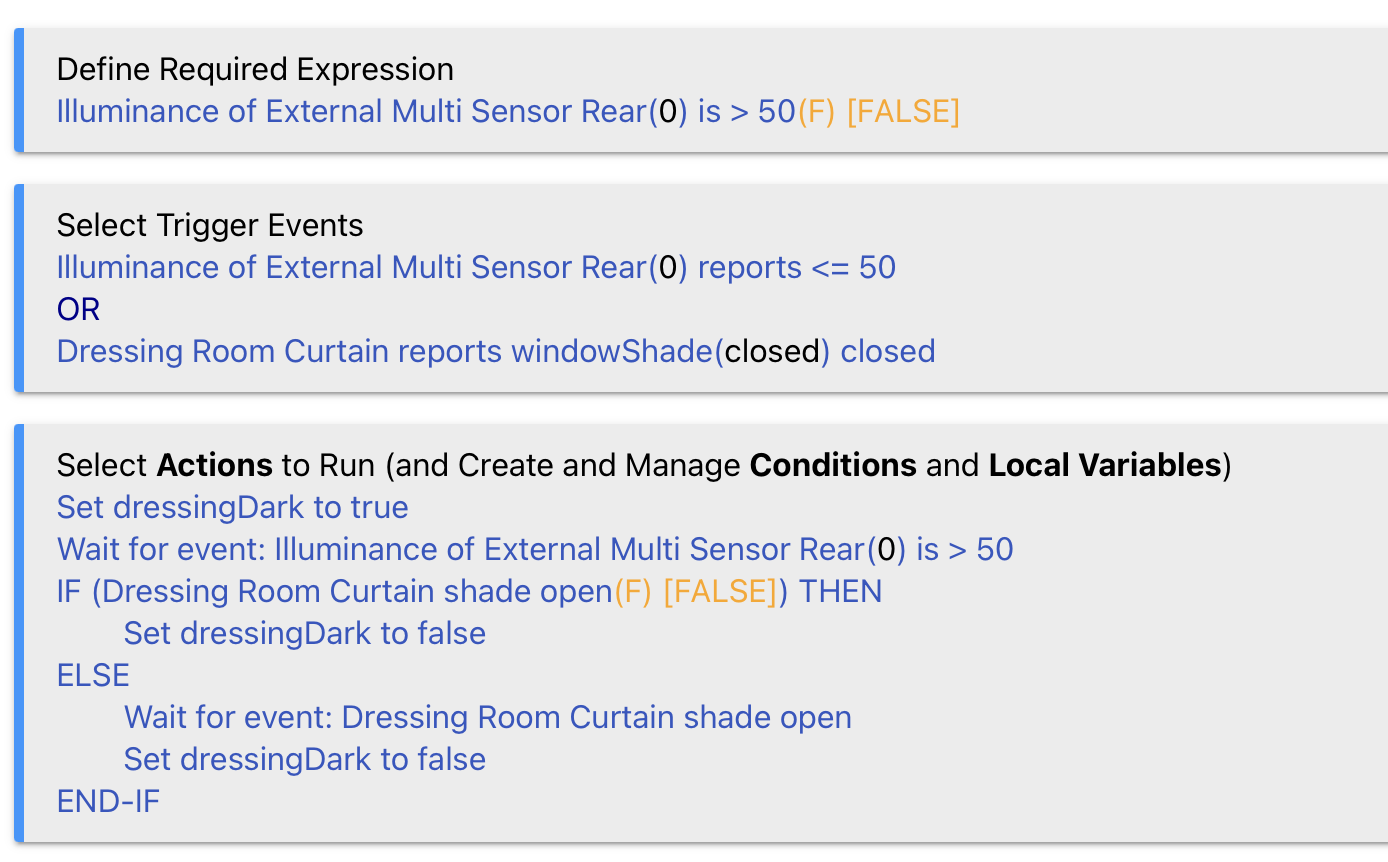
I think it was @bertabcd1234 who gave me this idea a few years back. I've got to say I didn't think it looked as though it should work either! I do use it in a seperate rule to change a boolean as I'm using illuminance and the position/level of my curtains. This catches the transition in both directions and I use the boolean to limit room lighting automation:
Ok.....@johnwill1 Maybe you can educate me a little bit here.
I can fully understand how this opens the shades in the morning; Illum is >50 satisifing the req expression and then the 2nd of the OR trigger events is satisified (closed) so it runs the rule and opens the shades.
Where I get lost is at sunset......Illum drops. While it is dropping yet still above 50, it satifies the req expression so it "looks" for trigger events.....but none are satisified. The moment it drops below or equal to 50, the required expression is no longer met so rule would nullify the trigger events, right?
I have no doubt I'm not fully understanding how the Req Expression and the Trigger Events interact. I feel like your code is a good lesson for me to expand my knowledge set a bit.
Or is it a case that while it is greater than 50 it satisfies the req expression and then just waits for one of the 2 trigger events to happen (even if the req expression changes and is no longer satisified)???
From the Hubitat documentation:
"If the required expression evaluates to false at the moment when a trigger event happens, the rule will not actually trigger — and, in turn, the specified actions will not run."
Knowing this, I don't understand how your rule would ever run at all at sunset. I can't see a scenario where one of your 2 triggers would be true AND your req expression would also be true.
I have no doubt I'm def making a rookie mistake in understanding here. Thank you in advance in helping teach this old dog a new trick.
Trust me it works. It's looking for an event and it is momentary. It captures the state transition.
The required expression in my case is that it must be greater than 50 to run the rule. The sensor reports every minute. Scenario - the light is falling minute by minute - 60, 58, 56 etc. At the moment that it passes the threshold of 50, it CAN trigger because its previous value of 51 or whatever satisfies the required expression (over 50). So if it was 51 and goes to 50 or below at the next report, it both triggers the rule and sets the required expression false so it cannot trigger again.
Here's a test rule using the illuminance of a Virtual Omni device to show that the logic does work. When illuminance becomes 75 the action is run. Anything reported above 75 doesn't trigger further action. It'll need to drop below 75 to reset for another notification.
I was thinking that both had to be true at the same time. However, if I'm understanding it correctly, that once the Req Exp is true a single time, even if it goes false shortly after, the rule now only needs the trigger event to run the rule. In other words.....it is almost like having a 2 stage trigger.....they don't need to both be true at the same time....but Req Exp does need to be true before Trigger Events is true to have the rule run.
Remember that Conditions (which is what a Rqd Exp is) are always states, and Triggers are always events.
This is an oversimplification, but I think of Reqd Expressions as an on/off gate for the rule. When the Reqd Exp is false, it's as if the rule doesn't exist -- though a trigger event can of course still occur, it won't actually trigger the rule. But when the Reqd Exp is true, then the rule is live -- a trigger event will trigger the rule.
This wording does sink into my thick skull. Where I'm getting a little brain F'd is the fact that the Reqd Expression and the Trigger don't need to be true at the same time.
From looking at the Log's of pseudonym's example code, at 11:28:00 the required expression is true (lux is les than 75)
28:06, it is no longer less than 75 so the required expression is no longer true.....however at 28:10, lux is now 75 which meets the criteria for the trigger event.
The Req Expression WAS met a bit ago and so that, for a lack of better words, "Unlocked" the rule allowing the triggers to be "seen". Even though a few seconds later the Req Expression was FALSE, the rule still remained "Unlocked" and then a few seconds later when the trigger went true, the rule ran....even though at that exact moment, the Req Expresoin was false. The rule was still unlocked from 10 seconds prior.
I think what is important here is the timing for the Required Expression evaluation.
11:28:10.948 Lux is 75 and rule event logged at 10.976
11:28:10.992 Rule trigger occurs and actions will be executed
11:28.11.093 Required Expression now evaluated as false
The ~150 ms between the illuminance becoming 75 and the evaluation of the rule's RE is what allows this logic to work.
Actions don't wait for triggers. However, executing actions to completion doesn't happen instantaneously; there may be delays, waits, etc. This is what the toggle is for. All this is covered in the docs btw.
I was curious so tried it - if the toggle is turned on, the "trick" fails.