Buddy of mine just got bit by the sideband interference effect. He'd always run his ST hub within a foot or so of his wi-fi router with no issues; seemingly overnight his Zigbee network became flaky. A bit of experimenting showed that moving the 4 antennas on his AX router away from the non-optimal 'all straight up' orientation (which he had recently done trying to optimize wi-fi coverage) coincided with the Zigbee problems. Moved his ST hub a couple of feet further away and Zigbee began functioning normally again.
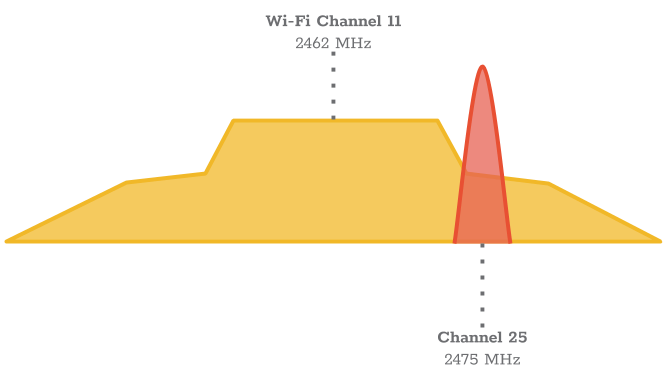
What's notable is that the sideband interference effect can be a concern (within a 3 ft or so area of the router) even you choose normally non-interfering wi-fi and Zigbee channels, as shown in the Metageek illustration below-- you normally expect that Wi-fi 11 and Zigbee 25 wouldn't interfere.
All of that said, I've always had my Zigbee hub and router in fairly close proximity without problems, but it was interesting to see the cause/effect of this phenomenon played out in real life.
Sideband Interference
An 802.11g/n signature in the spectrum has two components: The 20 MHz "square" section that contains the data subcarriers Sideband lobes on each side, which are a normal side effects. Sideband lobes might not carry Wi-Fi data, but they are fully capable of drowning out ZigBee transmissions.
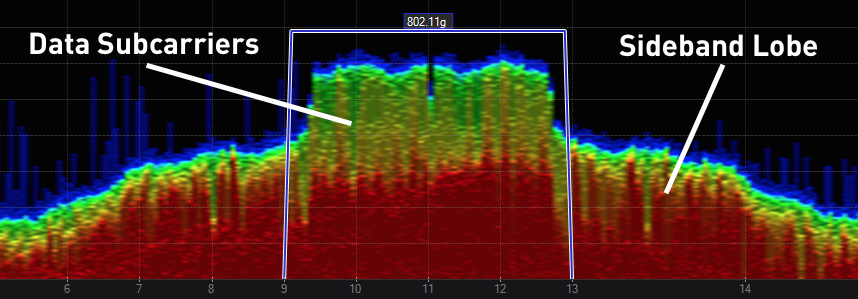
Data Subcarriers and Sideband Lobe