Room lighting with RGB confusion, why does "activate" test button work but virtual switch does not?

5 RGBW bulbs in a bathroom. Normally they toggle on/off with a single dumbswitch. When on they are color controllable, of course. I've created a room lighting app that sets each one to a different rainbow color for a "party mode" and the "activate" button in the room lighting app works perfectly 100% of the time to set the bulbs to the correct RGB states, as long as they have power. I've then create a virtual switch and I've configured the lighting app to detect that switch's ON state and activate the party colors... except... it doesn't work. Toggling the virtual switch turns the lights on and off perfectly but it never adjusts the colors.

I've captured logs and just can't understand what's going on. At 23:31 I tried to toggle using the virtual switch but things didnt work, then at 23:32 I used the app's ACTIVATE button and it was flawless.

dev:4772026-01-26 23:32:02.860infoMaster Bathroom Recessed Toilet color is Rose
dev:4772026-01-26 23:32:02.538infoMaster Bathroom Recessed Toilet is 100%
dev:4772026-01-26 23:32:02.391infoMaster Bathroom Recessed Toilet saturation is 100%
dev:4772026-01-26 23:32:02.148infoMaster Bathroom Recessed Toilet hue was set to 92%
dev:4842026-01-26 23:32:01.538infoMaster Bathroom Shower PAR saturation is 100%
dev:4842026-01-26 23:32:01.534infoMaster Bathroom Shower PAR hue is 68%
dev:4842026-01-26 23:32:01.531infoMaster Bathroom Shower PAR color is Blue
app:5302026-01-26 23:32:01.043infosetColor: Master Bathroom Recessed B, level: 100, sat: 100
app:5302026-01-26 23:32:01.027infosetColor: Master Bathroom Recessed D, level: 100, hue: 34, sat: 100
dev:4842026-01-26 23:32:01.018infoMaster Bathroom Shower PAR level is 100%
app:5302026-01-26 23:32:01.015infosetColor: Master Bathroom Recessed Tub, level: 100, hue: 13, sat: 100
app:5302026-01-26 23:32:00.988infosetColor: Master Bathroom Recessed Toilet, level: 100, hue: 92, sat: 100
app:5302026-01-26 23:32:00.971infosetColor: Master Bathroom Shower PAR, level: 100, hue: 68, sat: 100
app:5302026-01-26 23:32:00.952infoActivating for All Modes
app:5302026-01-26 23:32:00.923infoActivate from 'Master Bathroom Lights (Active)'
dev:4772026-01-26 23:31:29.663infoMaster Bathroom Recessed Toilet colorMode is RGB
dev:4772026-01-26 23:31:29.660infoMaster Bathroom Recessed Toilet color is Magenta
dev:4772026-01-26 23:31:29.343infoMaster Bathroom Recessed Toilet saturation is 100%
dev:4842026-01-26 23:31:29.035infoMaster Bathroom Shower PAR was turned on
dev:4842026-01-26 23:31:29.031infoMaster Bathroom Shower PAR saturation is 100%
dev:4842026-01-26 23:31:29.027infoMaster Bathroom Shower PAR was turned on
dev:4842026-01-26 23:31:29.024infoMaster Bathroom Shower PAR hue is 68%
dev:4842026-01-26 23:31:29.021infoMaster Bathroom Shower PAR color is Blue
dev:4772026-01-26 23:31:28.987infoMaster Bathroom Recessed Toilet hue is 83%
dev:4772026-01-26 23:31:28.826infoMaster Bathroom Recessed Toilet is 100%
dev:4772026-01-26 23:31:28.477infoMaster Bathroom Recessed Toilet was turned on
app:5302026-01-26 23:31:27.837infosetColor: Master Bathroom Recessed B, level: 100, sat: 100
app:5302026-01-26 23:31:27.821infosetColor: Master Bathroom Recessed D, level: 100, hue: 34, sat: 100
app:5302026-01-26 23:31:27.806infosetColor: Master Bathroom Recessed Tub, level: 100, hue: 13, sat: 100
app:5302026-01-26 23:31:27.791infosetColor: Master Bathroom Recessed Toilet, level: 100, hue: 92, sat: 100
app:5302026-01-26 23:31:27.776infosetColor: Master Bathroom Shower PAR, level: 100, hue: 68, sat: 100
app:5302026-01-26 23:31:27.757infoActivating for All Modes
app:5302026-01-26 23:31:27.743infoActivation Event: 'Master Bathroom Rainbow' switch on
dev:5342026-01-26 23:31:27.710infoMaster Bathroom Rainbow was turned on

Here's the config itself:
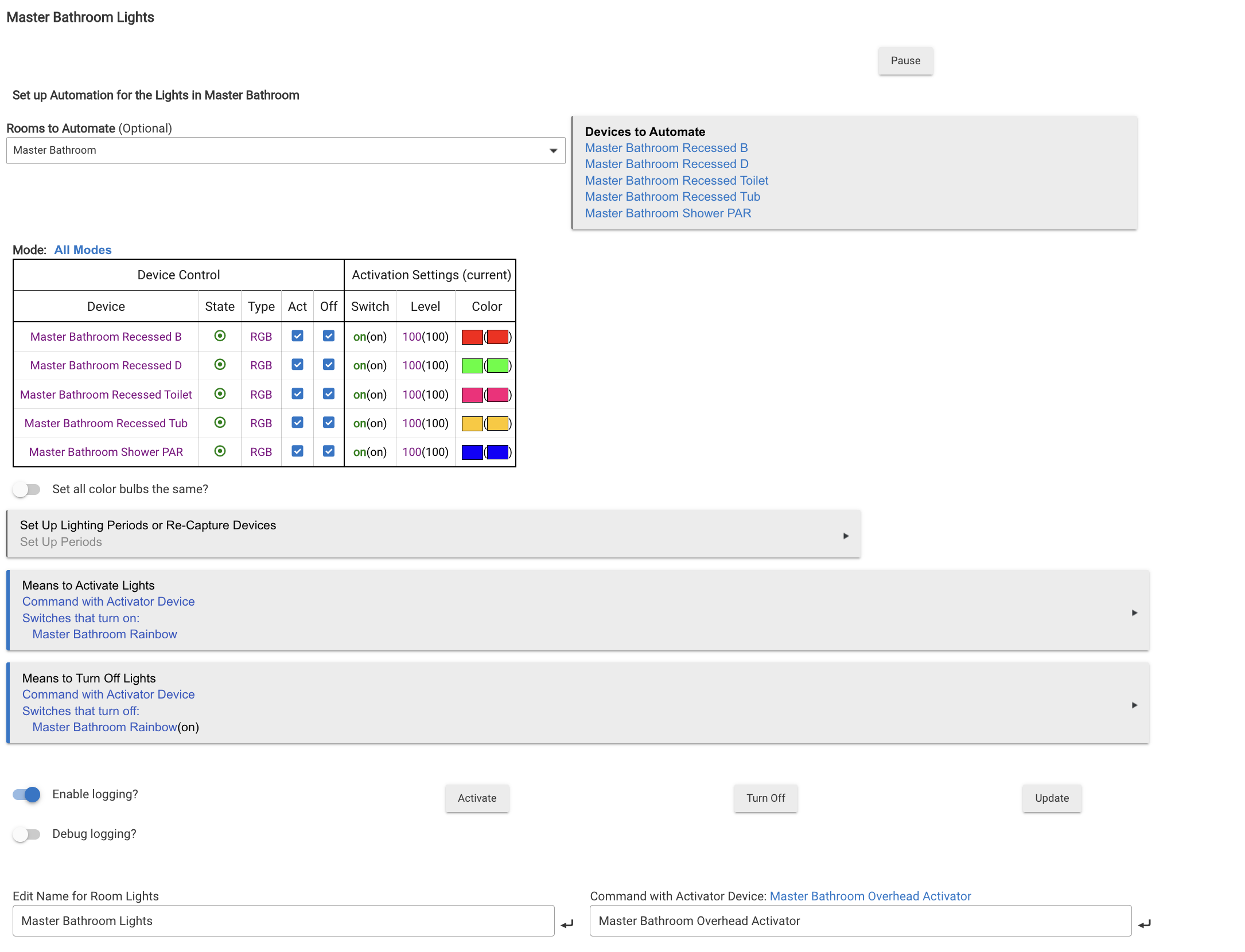
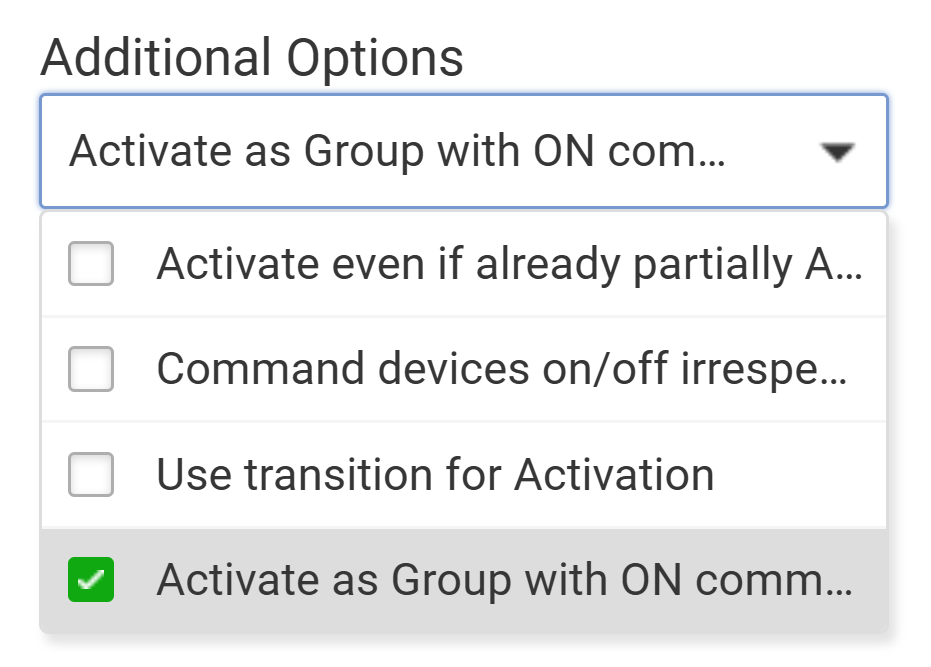
I've tried both options below (all 4 permutations of none, one each, and both on). They seem to have no impact whatsoever

  • Activate even if already partially Activated
  • Command devices on/off irrespective of reported state (Force)
I've been using Room Lights a lot more recently and am finally getting to understand its quirks/complexity a bit

I think the solution to your problem will be in getting the correct setting for the 'indicator for' setting under activation options. I would try "scene - all set per table" first. You may also need 'activate if partially activated' on. I don't think the force option is needed unless the bulbs sometimes don't correctly report their state.

Also, probably not the issue, but making an Activator Device at the bottom right creates a virtual switch with that name. You don't need a second virtual switch (rainbow). Just give the activator the name you want and delete the other virtual switch.

1 Like

Thanks for the tips but no dice - even with your recommended settings the magic "Activate" button inside the lighting app is the only way to reliably get the scene to activate.

You say the lights are on a dumb switch but this automation is controlled by "Master Bathroom Rainbow". Is that your virtual switch? The Activator Device is also a virtual switch, so you don't need 2. What brand bulbs are you using? Try setting the lights manually then use the "Re-Capture" button to set your Room Lighting color settings.

Turn on logging for both the app and the activator device, then try to control it from The device page for the activator. Post the logs from using the activate button (and also the turn off button) in the app, and from turning the activator device on and off.

I had a[n apparently unnecessary] virtual switch but I got rid of it, per the advice in this thread. Now I'm using the activator that automatically came with the lighting app.

The first 4 bulbs are Philips Hue Smart Recessed 5/6 White and Color bulbs and the final bulb is a Sengled BR30 zigbee.

Done. I start with the bulbs on and in their normal state (3000k white?). I used the device page for the activator to try to activate the color effects, which failed. I then used the same device page to turn the bulbs off, which worked. I then used the same page, again, to use the on button (again) and this time 4 came up white (the Hue 5/6 recessed bulbs) and 1 properly changed color (the Sengled):

dev:5332026-01-29 00:04:15.109infogroupState someOn
dev:5332026-01-29 00:04:15.100infoMaster Bathroom Rainbow Activator indicator off
app:5302026-01-29 00:04:12.053debugEvent: Master Bathroom Recessed D colorMode CT
dev:4772026-01-29 00:04:10.920infoMaster Bathroom Recessed Toilet is 100%
app:5302026-01-29 00:04:10.636debugEvent: Master Bathroom Recessed B colorMode CT
app:5302026-01-29 00:04:10.420debugEvent: Master Bathroom Recessed Tub colorMode CT
app:5302026-01-29 00:04:10.352debugEvent: Master Bathroom Recessed Toilet colorMode CT
dev:4772026-01-29 00:04:10.309infoMaster Bathroom Recessed Toilet colorMode is CT
dev:4772026-01-29 00:04:10.306infoMaster Bathroom Recessed Toilet color is Horizon
app:5302026-01-29 00:04:10.195debugEvent: Master Bathroom Recessed Tub saturation 55
app:5302026-01-29 00:04:10.072debugEvent: Master Bathroom Recessed D saturation 55
app:5302026-01-29 00:04:09.863debugEvent: Master Bathroom Recessed D hue 13
app:5302026-01-29 00:04:09.713debugEvent: Master Bathroom Recessed Toilet hue 13
dev:4772026-01-29 00:04:09.672infoMaster Bathroom Recessed Toilet hue was set to 13%
dev:4842026-01-29 00:04:09.649infoMaster Bathroom Shower PAR saturation is 100%
dev:4842026-01-29 00:04:09.642infoMaster Bathroom Shower PAR hue is 68%
dev:4842026-01-29 00:04:09.639infoMaster Bathroom Shower PAR color is Blue
app:5302026-01-29 00:04:09.383debugEvent: Master Bathroom Recessed D switch on
app:5302026-01-29 00:04:09.282debugEvent: Master Bathroom Recessed Tub switch on
app:5302026-01-29 00:04:09.133debugEvent: Master Bathroom Recessed Toilet switch on
app:5302026-01-29 00:04:09.054debugEvent: Master Bathroom Shower PAR switch on
dev:4772026-01-29 00:04:09.042infoMaster Bathroom Recessed Toilet was turned on
dev:4842026-01-29 00:04:09.019infoMaster Bathroom Shower PAR level is 100%
dev:4842026-01-29 00:04:09.007infoMaster Bathroom Shower PAR was turned on
app:5302026-01-29 00:04:08.537infosetColor: Master Bathroom Recessed B, level: 100, hue: 100, sat: 100
app:5302026-01-29 00:04:08.518infosetColor: Master Bathroom Recessed D, level: 100, hue: 34, sat: 100
app:5302026-01-29 00:04:08.499infosetColor: Master Bathroom Recessed Tub, level: 100, hue: 13, sat: 100
app:5302026-01-29 00:04:08.481infosetColor: Master Bathroom Recessed Toilet, level: 100, hue: 92, sat: 100
app:5302026-01-29 00:04:08.459infosetColor: Master Bathroom Shower PAR, level: 100, hue: 68, sat: 100
app:5302026-01-29 00:04:08.423infoActivating for All Modes
app:5302026-01-29 00:04:08.391infoActivation Event: 'Activation Device' Master Bathroom Rainbow Activator on
dev:5332026-01-29 00:04:08.369infoMaster Bathroom Rainbow Activator was turned on
dev:5332026-01-29 00:04:05.137infogroupState allOff
app:5302026-01-29 00:04:02.075debugEvent: Master Bathroom Recessed Toilet switch off
dev:4772026-01-29 00:04:02.030infoMaster Bathroom Recessed Toilet was turned off
app:5302026-01-29 00:04:00.765debugEvent: Master Bathroom Recessed B switch off
app:5302026-01-29 00:04:00.686debugEvent: Master Bathroom Recessed D switch off
app:5302026-01-29 00:04:00.563debugEvent: Master Bathroom Recessed Tub switch off
dev:4772026-01-29 00:04:00.538infoMaster Bathroom Recessed Toilet is on
app:5302026-01-29 00:03:59.615debugEvent: Master Bathroom Shower PAR switch off
app:5302026-01-29 00:03:59.460infooff: Master Bathroom Recessed B
dev:4842026-01-29 00:03:59.452infoMaster Bathroom Shower PAR was turned off
app:5302026-01-29 00:03:59.442infooff: Master Bathroom Recessed D
app:5302026-01-29 00:03:59.428infooff: Master Bathroom Recessed Tub
app:5302026-01-29 00:03:59.414infooff: Master Bathroom Recessed Toilet
app:5302026-01-29 00:03:59.400infooff: Master Bathroom Shower PAR
app:5302026-01-29 00:03:59.364infoTurn Off Event: 'Activation Device' Master Bathroom Rainbow Activator off
dev:5332026-01-29 00:03:59.342infoMaster Bathroom Rainbow Activator was turned off
app:5302026-01-29 00:03:42.973infoActivation Event: 'Activation Device' Master Bathroom Rainbow Activator on
dev:5332026-01-29 00:03:42.956infoMaster Bathroom Rainbow Activator was turned on

I still thing the oddity is that the activate button on the app page (works perfectly every time) behaves differently from the activate button on the virtual device's page (doesn't work).

edit:
I went back to the app and used the activate button there just to be sure it worked - of course it did! here are the logs

dev:5332026-01-29 00:13:19.484infoMaster Bathroom Rainbow Activator indicator on
app:5302026-01-29 00:13:16.442debugEvent: Master Bathroom Recessed D colorMode RGB
app:5302026-01-29 00:13:16.327debugEvent: Master Bathroom Recessed Tub colorMode RGB
app:5302026-01-29 00:13:16.112debugEvent: Master Bathroom Recessed D saturation 100
app:5302026-01-29 00:13:15.900debugEvent: Master Bathroom Recessed Tub saturation 100
app:5302026-01-29 00:13:15.772debugEvent: Master Bathroom Recessed Toilet colorMode RGB
dev:4772026-01-29 00:13:15.699infoMaster Bathroom Recessed Toilet colorMode is RGB
dev:4772026-01-29 00:13:15.687infoMaster Bathroom Recessed Toilet color is Rose
app:5302026-01-29 00:13:15.660debugEvent: Master Bathroom Recessed D hue 34
dev:4772026-01-29 00:13:15.417infoMaster Bathroom Recessed Toilet is 100%
app:5302026-01-29 00:13:15.266debugEvent: Master Bathroom Recessed B colorMode RGB
dev:4772026-01-29 00:13:15.239infoMaster Bathroom Recessed Toilet saturation is 100%
app:5302026-01-29 00:13:15.065debugEvent: Master Bathroom Recessed Toilet hue 92
dev:4772026-01-29 00:13:15.027infoMaster Bathroom Recessed Toilet hue was set to 92%
app:5302026-01-29 00:13:14.546debugEvent: Master Bathroom Recessed B switch on
app:5302026-01-29 00:13:13.938infosetColor: Master Bathroom Recessed B, level: 100, hue: 100, sat: 100
app:5302026-01-29 00:13:13.921infosetColor: Master Bathroom Recessed D, level: 100, hue: 34, sat: 100
dev:4842026-01-29 00:13:13.917infoMaster Bathroom Shower PAR level is 100%
app:5302026-01-29 00:13:13.899infosetColor: Master Bathroom Recessed Tub, level: 100, hue: 13, sat: 100
app:5302026-01-29 00:13:13.882infosetColor: Master Bathroom Recessed Toilet, level: 100, hue: 92, sat: 100
app:5302026-01-29 00:13:13.860infosetColor: Master Bathroom Shower PAR, level: 100, hue: 68, sat: 100
app:5302026-01-29 00:13:13.839infoActivating for All Modes
app:5302026-01-29 00:13:13.808infoActivate from 'Master Bathroom Lights'

I don't have an answer, but maybe a few more things to try:

Check the device page for one of the lights that's ending up white. Look at the Events tab. Does it show anything other than the room lighting app sending commands to the light? I'm thinking there could be a second conflicting app that is triggered by the activator device but not by the activate button.

Last resort is to create a new room lighting app and try to set it up the same and see if you get the same results. Once in a while an app gets corrupted and the easiest fix is just to start over.

Also, screenshots of logs are actually easier to read tham a cut and paste of the text, so use screenshots if you need to post more logs.

I can't help thinking you also need this option checked...