Good afternoon, i bought 6 Ring v2 contact sensors new from Amazon yesterday. They didnt work with my c5 hub, so i bought a c8 hub. I am in the app as a local connection and i see smartstart as an option. No matter what i do, adding via zwave or smartstart, the contact sensor never finishes adding itself. I get prompted for the pin on zwave, it sees the device on smartstart but udually just sits on pending for at least 2 hours. Ive tried it with all 6 sensors now, and none of thrm are working. My c8 hub is on the latest build, the c5 hub is off. Ive tried all the connection guide steps i can find in search. Nothing is working. I dont get it. Any ideas what might be going on????
Also having the same issue with a pack of 6 newer ring contact sensors (with small reset button on back).
After resetting the Ring Sensor the LED button flashes red and enters acquire mode where it blinks 3 times in a row pauses and blinks 3 times again. Put the Hubitat in Z-WAVE inclusion and nothing happens.
Open the app, use smartstart and it pretty immediately grabs the QR code and asks for a new device name. Enter a name but the device does not show up on the hubitat even after it pairs and no longer shows pending. A device does show up in the Z-wave details table however there is no name on the device therefore you cannot change the driver as some have suggested.
Under Edit SmartStart Device in the app I have tried setting boot mode to Long Range (which is automatically added) to S2 boot mode and it does not help. The default setting seems to be Security 2 Class 1 - Authenticated but even adding others there is no change.
This seems like a problem where the driver is not being detected correctly but with no device name you cannot make the change.
1 Like
I never did get that working. I also couldnt get the new hubitat to interact with my older leviton zwave light switches correctly so i got annoyed and gave up and ordered the ring security hub instead, which works fine but costs monthly.
I think this is a bug where Hubitat doesn't get a name for the device therefore it gets lost. I was actually wrong in that it is pairing fine however without a name the device is not configurable.
I have both the Ring V2 Contact Sensor and the Ring V2 LR Contact Sensor. The LR did not have a name come through.
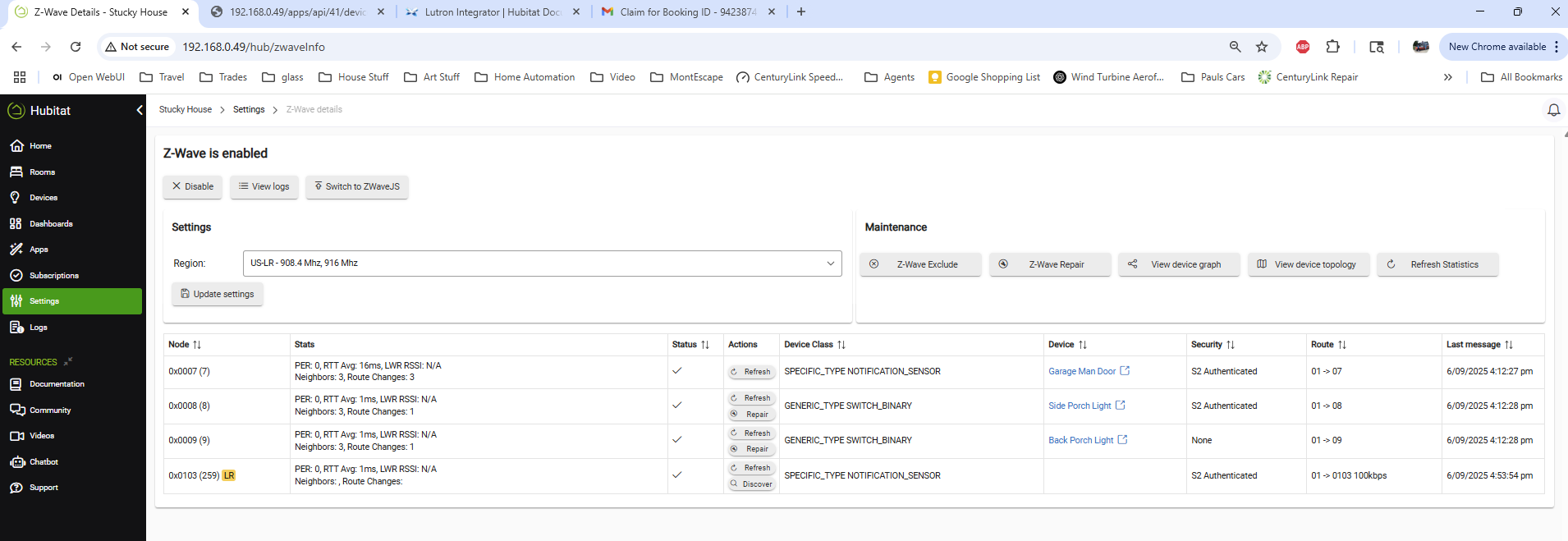
In the screenshot the 0x0007 device is the non-LR sensor.
The last one 0x0103 is the LR device notated by the yellow LR.
So this seems like a Hubitat bug. How do we get attention to this issue?
If you previously tried to pair a Ring Alarm Contact Sensor (2nd Generation / G2) and it failed, this process should get it working.
 Important Notes
- The sensor does not pair correctly using SmartStart from the app.
- Hubitat may add a ghost device in Z-Wave Details without asking for security or a device name — this needs to be cleaned up first.
Preparation
- Open Settings → Z-Wave Details.
- Remove any devices that appear in the table without a device name (ghost devices from failed pairing attempts).
Reset and Prepare the Sensor
- Run Z-Wave Exclude on Hubitat.
- This may not be required, but it’s recommended to clear any partial pairing.
- Open the back of the contact sensor.
- Perform a hard reset:
- Press and hold the reset button with a paper clip.
- Keep holding until the LED turns orange (about 10+ seconds).
- Wait until the sensor starts flashing green again.
- (Optional but recommended) Remove the batteries briefly, then reinstall them.
- The sensor should now flash green three times slowly.
Pair the Sensor
- Verify your Z-Wave Region is set to US-LR.
- Go to Add Device → Start Z-Wave Inclusion.
- Press and hold the front button on the sensor until the LED turns orange.
- The LED will begin flashing green quickly.
- Hubitat should detect the device and present two pairing options:
- Follow the suggestion on the screen as this is a secure device and choose Secure Link (recommended for security devices).
- Enter the 5-digit code printed on the sensor.
- Assign a device name — pairing complete!
Notes
- During testing, the magnet must be roughly 4–5 inches away before the contacts register as open.
- Add the device’s battery reporting to any battery-monitoring automations you use.
1 Like
I have several of these and they pair and work just fine for me, I've had them working without any issues on on my Z-Wave C8 Pro hub (worked fine on C7 and C8 before) for a few years now.
Something to note about all Ring devices, they will only work if pairing using the QR Code within the Hubitat mobile app like the instructions above shows, Ring devices will not work if pairing using Add Device option when logged into your Hub.
I only recently started doing smart start for ring devices, after they started supporting LR.. If you aren't planning on using them in LR mode, you can include them the old way..
All my production contact sensors are the ring v2