I was part way through a new matter device add when the Hubitat hub lost power and rebooted. The device being added is not listed anywhere in devices and re-adding results in the following error: "Pairing failed @ SendNOC with code 126 (Trying to add a NOC for a fabric that already exists)". Is there any way to delete an orphaned device in matter or reset matter database data altogether. I have very few matter devices so resetting that component is irrelevant, resetting the hub of zigbee and z-wave would be far too painful so can't lose those devices. I tried rebuilding the database and that was no help. Any help is greatly appreciated. I'd prefer to not have to throw away the affected matter device?
forgot to mention that the device in question is not listed in the "matter" settings detail configuration area of the hub. So can find no way to remove this corrupt device entry?
To resolve this issue I was required to reinitialize and wipe the matter device. This error seems to indicate that the Hubitat device is already associated with the matter device versus the other way around. I did restore the hubitat device from a previous backup, so I'm unsure whether any action was required on the Hubitat hub end to resolve this error.
I lost communication on2 of my matter bulbs. I deleted the device. Reset the bulb then re commissioned it. Then I tried to pair it with Hubitat and got the same error.
Pairing failed @ SendNOC with code 126 (Trying to add a NOC for a fabric that already exists)
I am hoping that this isn't going to be an issue with matter devices since I have started to implement them.
For now I have 2 matter device that I cant control with my HE.
The above all sound like incomplete pairings. I'm not sure if removing anything on Hubitat's side could help. Does the controller you're using to put it into pairing mode list other pairings? Apple Home does and calls this something like "Connected Services," and you'll see everything listed (Hubitat is still using a test ID, so that's how it shows up, possibly pending certification). I'm not sure Alexa did last tune I looked, and others may vary in terms of what they call it or if or where they show it. But removing it from there (or really the device, this being your view into that) might help.
I have 4 Matter Orion Bulbs. 2 I lost all communication with. I deleted the device and retried to pair it. That's when I got the error. (Pairing failed @ SendNOC with code 126 (Trying to add a NOC for a fabric that already exists).
I can still control the bulb on the device it was commissioned on.
To be clear, this is my expectation. What I'm wondering is if that controller still shows the device with a connection to Hubitat (or any other controller/service/etc.).
I am not sure what you mean. The bulbs were originally commissioned using the 3R installer. It doesn't show a connection to Hubitat. As a matter of fact its an app on my phone that is not active when not in use.
After commissioning I took the pairing code and they were paired in hubitat.
Matter devices store information about what they are paired with. In Apple Home, you can see this using "Connected Services," as I mentioned above:
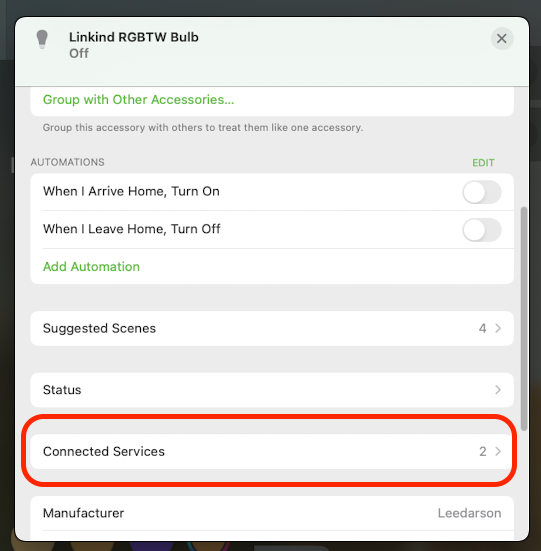
It sounds like your ThirdReality hub does not have this feature. My suspicion is that if it did, you'd find Hubitat (or really the Matter test ID) there and could remove the device's knowledge of this pairing (which is apparently not actually on Hubitat, so nothing that can be done there), allowing it to pair again. Without that, a device reset would also do the trick but is often more work and would similarly disrupt other pairings.
OK what I did was delete all the devices on the 3R Installer and re commissioned both bulbs on my amazon dot. And now I see in"Other Assistants" [Test vendor#1] must be the HE.
They are both back alive again .
What I wonder is if I delete it from the amazon dot will it stop working.
But that doesn't explain why I lost all communication with the 2 bulbs.
This topic was automatically closed 365 days after the last reply. New replies are no longer allowed.

