It really is. I have a Giex sprinkler controller, it failed on SmartLife Tuya hub, fell off my C8, but on Z2M so far it's excellent
2 Likes
Being still somewhat new to all this, could anyone kindly offer some use case examples, ie, MQTT devices that are desirable, and how/why this driver helps integrate those devices into a Hubitat-based home automation/security system?
There are Zigbee devices that are not supported by Hubitat. For example, older Aqara devices and Zigbee Green Power devices. These devices are supported by zigbee2mqtt. This integration permits devices paired to z2m to be used within Hubitat.
If all your zigbee devices are supported by Hubitat, then you have no need for this integration.
1 Like
Yes I understand why I wouldn't need it. I'm wondering, do the class of MQTT devices generally available provide a different set of functionality than regular Zigbee devices? I've seen bits here and there explaining that the MQTT devices have higher data rates in some cases, etc. Just trying to understand if there's an MQTT device I might want/need that would thus also be supported by this driver. Like, what's some of the most popular MQTT stuff? Is it an older spec supplanted by "modern Zigbee"?
I think you need to go to the link in my post above.
MQTT is a messaging protocol. I think it was initially developed for use in process engineering. There is no such thing as an “MQTT device“.
Z2M generally supports a superset of zigbee devices supported by Hubitat.
Z2M functions as a “translator” between zigbee devices and a MQTT broker.
The integration written by @birdslikewires permits Hubitat to interact with an MQTT broker and import devices paired to Z2M.
2 Likes
Yup, @aaiyar has nailed it. Essentially, you'd want this if there are some Zigbee devices you'd like to use with Hubitat which aren't supported, or for some reason give you trouble. In that situation there are a huge number of people out there who use Zigbee2MQTT with numerous other platforms already, so we can lean on their efforts in order to bring those devices onto Hubitat.
I wrote this integration because, at the time, Hubitat didn't support my Xiaomi Aqara light switches well. They'd always drop off the mesh. On Z2M they're rock solid, so for me this was the easiest solution. I added a function (called processMQTT) to the Xiaomi drivers I'd already written which dealt with the incoming messages and the job was done.
It's especially easy (comparatively speaking) to write drivers for the MQTT messages because they're far more standardised than what comes in raw over Zigbee, where you may have to deal with weird manufacturer-specific data and configuration. With this, Z2M has already done most of the work.
That doesn't mean there's nothing to do, though. The more specialised the device, the more it necessitates its own receiving driver to be well-behaved on Hubitat. This current setup deals with switches pretty well because they're so generic (on, off, how many relays on the device). I'm planning on doing a few generic drivers, but other developers are very welcome to add processMQTT functions to their existing drivers alongside the Zigbee message parsing should they wish to.
3 Likes
I see the link now - thank you for that. Sorry - I had no idea what MQTT was but had seen it mentioned repeatedly and decided it was time to figure out what all you more experienced folks were discussing. Looks like I've got use cases that will work for me. I'll dig in further. Thank you again!
2 Likes
I needed to rewrite a function for some of my other drivers and thought I may as well create a template driver... and then thought I may as well test that template. 
Once you've found the keyfob and got it back on Z2M, give this a try with Drivers code > Add driver and assign it to the device created by Zigbee2MQTT Routing.
Not having the device I can't test it myself, but it should do something. 
Awesome , just found it and connected to Z2M. While it paired Z2M said something about it only being "compliant with pre-21 version Zigbee spec (current revision 23)" All buttons work instantly on Z2M
Will load driver now and see what happens. Thanks so much !
These are all the button presses:
Summary
info 2025-08-20 23:24:59z2m:mqtt: MQTT publish: topic 'zigbee2mqtt/Key fob Swann', payload '{"action":"disarm","action_code":"","action_zone":0,"device":{"dateCode":"20150306 ","friendlyName":"Key fob Swann","hardwareVersion":1,"ieeeAddr":"0x00124b000610d56e","manufacturerID":0,"manufacturerName":"SwannONe","model":"SWO-KEF1PA","networkAddress":64359,"powerSource":"Battery","type":"EndDevice","zclVersion":1},"last_seen":"2025-08-20T23:24:58-04:00","linkquality":91}'
info 2025-08-20 23:24:59z2m:mqtt: MQTT publish: topic 'zigbee2mqtt/Key fob Swann/action', payload 'disarm'
info 2025-08-20 23:25:12z2m:mqtt: MQTT publish: topic 'zigbee2mqtt/Key fob Swann', payload '{"action":"arm_all_zones","action_code":"","action_zone":0,"device":{"dateCode":"20150306 ","friendlyName":"Key fob Swann","hardwareVersion":1,"ieeeAddr":"0x00124b000610d56e","manufacturerID":0,"manufacturerName":"SwannONe","model":"SWO-KEF1PA","networkAddress":64359,"powerSource":"Battery","type":"EndDevice","zclVersion":1},"last_seen":"2025-08-20T23:25:10-04:00","linkquality":76}'
info 2025-08-20 23:25:12z2m:mqtt: MQTT publish: topic 'zigbee2mqtt/Key fob Swann/action', payload 'arm_all_zones'
info 2025-08-20 23:25:18z2m:mqtt: MQTT publish: topic 'zigbee2mqtt/Key fob Swann', payload '{"action":"arm_night_zones","action_code":"","action_zone":0,"device":{"dateCode":"20150306 ","friendlyName":"Key fob Swann","hardwareVersion":1,"ieeeAddr":"0x00124b000610d56e","manufacturerID":0,"manufacturerName":"SwannONe","model":"SWO-KEF1PA","networkAddress":64359,"powerSource":"Battery","type":"EndDevice","zclVersion":1},"last_seen":"2025-08-20T23:25:16-04:00","linkquality":72}'
info 2025-08-20 23:25:18z2m:mqtt: MQTT publish: topic 'zigbee2mqtt/Key fob Swann/action', payload 'arm_night_zones'
info 2025-08-20 23:27:40z2m:mqtt: MQTT publish: topic 'zigbee2mqtt/Key fob Swann', payload '{"action":"panic","device":{"dateCode":"20150306 ","friendlyName":"Key fob Swann","hardwareVersion":1,"ieeeAddr":"0x00124b000610d56e","manufacturerID":0,"manufacturerName":"SwannONe","model":"SWO-KEF1PA","networkAddress":64359,"powerSource":"Battery","type":"EndDevice","zclVersion":1},"last_seen":"2025-08-20T23:27:39-04:00","linkquality":72}'
info 2025-08-20 23:27:40z2m:mqtt: MQTT publish: topic 'zigbee2mqtt/Key fob Swann/action', payload 'panic'
1 Like
Well that's interesting, the actions sent are disarm, arm_all_zones, arm_night_zones, and panic, which is somewhat different to the Z2M documentation. 
Grab the updated v0.02 driver and you should see the "action" attribute update (which can be used in Rule Machine's custom attributes feature) along with the usual numbered button pushes that can be used in all the Hubitat automations. 
I left the documented actions in there too, in case there's some other version or edge case we're not seeing here. Don't worry about that compliance message from Z2M. Even many recent devices aren't, and don't need to be, Zigbee 3.0 spec.
Ignore- apparently in the configuration.yaml for Z2M there was a password set, though on the frontend it wasn't displayed. Got it connected.
However seeing errors now in HE logs, but only for the keyfob,my 2 tradfri buttons work without errors:
ev:22952025-08-21 11:34:54.781 AM
error
java.lang.RuntimeException: CronExpression '1 0/120 * * * ? *' is invalid. on line 189 (method processMQTT)
dev:22952025-08-21 11:34:54.737 AM
info
Key fob Swann : Driver : Updating configuration from v1.08 (20th August 2025) to v0.01 (21st August 2025).
dev:22952025-08-21 11:34:45.215 AM
error
java.lang.RuntimeException: CronExpression '7 0/120 * * * ? *' is invalid. on line 189 (method processMQTT)
dev:22952025-08-21 11:34:45.161 AM
info
Key fob Swann : Driver : Updating configuration from v1.08 (20th August 2025) to v0.01 (21st August 2025).
dev:22952025-08-21 11:34:45.003 AM
error
java.lang.RuntimeException: CronExpression '40 0/120 * * * ? *' is invalid. on line 189 (method processMQTT)
dev:22952025-08-21 11:34:44.950 AM
info
Key fob Swann : Driver : Updating configuration from v1.08 (20th August 2025) to v0.01 (21st August 2025).
I used HPM and the Z2M rotuing driver wasn't instaIled, I did it manually, but getting unauthorized. I do not have security for my mqtt broker on HA
dev:22902025-08-21 09:47:40.774 AM
error
___Z2M : mqttConnect : Not authorized to connect
dev:22902025-08-21 09:47:31.606 AM
trace
___Z2M : Trace Logging : false
dev:22902025-08-21 09:47:31.605 AM
debug
___Z2M : Debug Logging : false
dev:22902025-08-21 09:47:31.572 AM
info
___Z2M : Info Logging : true
dev:22902025-08-21 09:47:31.570 AM
info
___Z2M : Preferences updated.
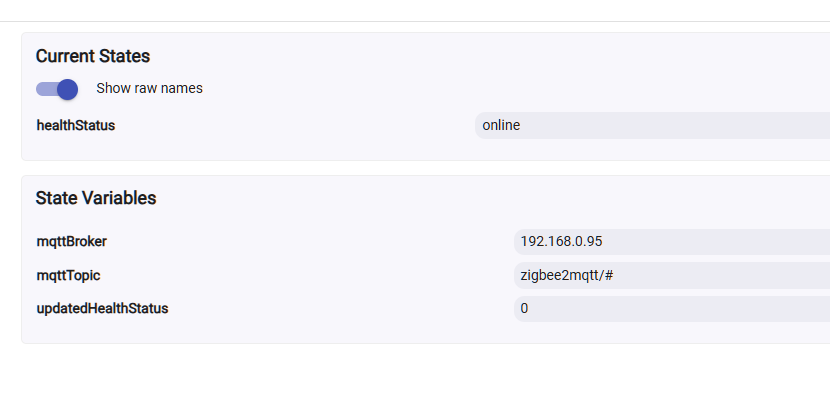
Just back in the hotseat... haha, I know why that cron error is happening. Some idiot changed the way healthStatus is handled, but hasn't put a safety range on the value for the cron job. 
Oopsie!
This fault is not in the driver, but in my library that the driver uses, so to fix this one head to the sidebar, click on Libraries code, click library against the BirdsLikeWires namespace and you can then update to v1.44 from this URL. Either use the import function, or just copy-paste over the code that's there.
The driver should be able to reconfigure itself properly when the next message is received.
1 Like
Hey Andrew, That fixed it. 1 challenge left, the LQI on this FOB isn't great. I'm using a UZG-01 POE Zigbee coordinator, which I thought would have better LQI. Maybe I need to swap the antenna
1 Like
Is it possible to get motion sensors added? Here is what the json is looking for:
"0x54ef44100081aca3": {
"voltage": 3010,
"battery": 100,
"detection_interval": 30,
"motion_sensitivity": "high",
"trigger_indicator": false,
"occupancy": false,
"illuminance": 10,
"device_temperature": 29,
"power_outage_count": 0,
"last_seen": "2025-08-27T08:25:06-07:00",
"linkquality": 192
I only care about the "occupancy" (can just be represented as on/off) as the rest can be used/configured through the Z2M front end anyway.
Yes, that's a good use case for a generic driver, and you caught me at a good time!
If you update to the latest release there's now a 'Zigbee2MQTT Motion' driver bundled in. Just change the device Type over to that driver, hit 'Configure' for good measure and it should be working. It adds the 'battery' and 'motion' attributes.
New devices on Z2M that expose 'occupancy' should use this driver by default from now on. There's always a chance the first message received by Hubitat won't have that attribute, but it's no great shakes to change it manually should that happen.
1 Like
Ok motion is working great now!, Thanks for that. The last one 's I have are temperatures that don't work. These are devices that don't work with the Hubitat zigbee. Can you have a look?
"0xa4c13856fb97c002": {
"voltage": 3000,
"battery": 100,
"temperature": 25.83,
"humidity": 35.26,
"last_seen": "2025-08-27T08:08:15-07:00",
"linkquality": 255
This is where I get a bit stuck, because I need to keep an eye on when a generic driver is going to start sweeping up things that aren't just a temperature sensor. I can't target something with only temperature without building some list of exclusions, because it would also hoover in other items, like smart plugs that report their own operating temperature.
I do need to make this driver for myself anyway, so let me chew on it a minute. The nice thing is I can filter everything Z2M supports on their devices website, and I see your device also reports humidity. Those two combined don't look like a bad shout.
OK sounds good. While you are chewing I have moisture sensors, not on the current Z2M instance I'm linked to but another one. If you can have a look I'll put one on the instance I have Hubitat connected to and test it. Here's the json:
"0xa4c13836165f1f77": {
"temperature_unit": "fahrenheit",
"soil_moisture": 0,
"temperature": 18.2,
"last_seen": "2025-08-28T07:20:32-07:00",
"linkquality": 176,
"battery": 60,
"battery_state": "high"
I think your plant needs watering. 
HaHa! It needs a plant for the sensor in the pot too. I'm just going to let it be and once you have something to test I'll fill it up with water and put it on the HT system.
Here's the one it is: Tuya TS0601_soil_3 control via MQTT | Zigbee2MQTT