appreciate the response - althought I've noted this before I never really cared until recently as it's become annoying with the extra notification. I'll began gathering more specific data for the next couple of days and try to track this PITA down.
Released version 2.11.0 with the following changes:
Added
- Add option to modify the attribute list for already monitored devices - @Kulfsson
- Add "index" custom attribute behaving like an ever-increasing counter
Changed
- Refactor the "Remove device" functionality
- Groovy code cleanup
Note: If you change the monitored attributes list, the CSV files will reflect the new changes when they are first updated (next 5 minutes, at the start of the new hour, day, or week).
I would suggest to test the new "modify attribute list" feature with one, or a small set of devices, and wait for the end of the week, to make sure the data in the CSV files is updated correctly. I tested this feature for a couple of weeks now, but better be save than sorry 
Have fun!
my post got tickled - and it reminded me I ought to put a follow up.

The spike that occurred hasn't returned. 4 days of 'watching' (get the pun? watch tower?) and nada. I'm just shrugging and going with 'it is what it is'.
I'm logging three attributes from a Third Reality Multi-Function Night Light. The device sometimes goes completely quiet and I end up with gaps in the graph. I turned on debug logging and this is what I see during these gaps:

Would it make sense, when there are no events in the interval, to either:
- have the option to fill in the gaps when rendering (maybe that can already be done via a Chart user script?)
- log the device's current attribute value - or have the option to do so.
Yes.
$config.data.datasets[0].spanGaps = true;
Never mind !
Thanks again for this app, which will allow me to transition out of a (fairly complex) InfluxDB - Grafana setup.
A couple of things I noticed when using it to debug the night light automations:
- Many times I forgot to save the dashboard and lost my tile changes. Probably in part because I work with the left drawer closed. I wonder if there could be some sort of indicator that changes are pending on the main canvas or on the changed tile(s).
- Auto-refresh resets the zoom (and leaves the zoom icon behind) which can be jarring if you're in the middle of digging into something.
Cheers
Fair enough, I'll see what I can do about this.
I'm thinking to disable auto-refresh for zoomed tiles. Or maybe disable auto-refresh alltoghether if there was some user interaction detected in the last 15 minutes or so; auto-refresh is usefull only when the dashboard is loaded on a wall tablet/screen.
Thanks for sharing!
Maybe a toggle?
Been thinking about this. "Zoomed" currently means looking at less than the full data set available, correct? So, say I keep 5000 samples for the 5 minute interval, the fully zoomed out window will stretch out over time to cover over 17 days. I might want to keep that much data to be able to go back and troubleshoot something at that level of granularity, but maybe in the general case I would want to set the dashboard to only display and refresh the last day.
Released version 3.0.0 with the following changes:
Added
- UI refactor: Add top toolbar with some of the options from the left menu
- Add predefined zoom position (last 1 hour, last 1 day, etc) - @hubitrep
- Ask confirmation when leaving the page and dashboard changes were not saved - @hubitrep
Changed
- Hide the "Reset Zoom" button when the tile is not hovered
Note: I moved the code from GitHub to a nicer location, I hope this won't cause any problems with HPM updates. In case of problems, first backup your hub to make sure you don't lose any WT csv files, then mess away with HPM (un-match, match-up, etc.).
Have fun!
Noticed that your old repository had been removed from HPM, but hadn't looked for it's replacement. This should have the effect of disconnecting the app from HPM update notifications for anyone who installed it under the old repository; so, everyone, who hasn't already, should go through the unmatch and match exercise to reconnect the app to your new location.
Easy fix, but does need to occur.
Well, I had no issues unmatching, but it is not finding it anymore with the matching… might it have to do with its name changing? (Watchtower 2.11.0 to Watchtower 3.0.0) - I am assuming the name change…
That would do it. Easiest way to fix would be to edit the app code and search for the line that reads
@Field static final String APP_VERSION = x.x.x
and change it to 3.0.0, then save. And then re-run your match.


Thanks for this update. I am really getting a lot of use out of this app!
I wonder if you would consider adding an option to turn off the "null if false" data collection behaviour. I have several devices which send valid sensor data while their switch attribute state is off (valve, water heater controller, the TR night light, etc).
This option could be global, but best I suppose if it could be configured per device (when applicable as per the capabilities for which you configured this behaviour).
I know a little Groovy and wanted to code it up myself (so I could contribute more than just feedback  ) but not finding an obvious way to do it (I saw the d${i} and a${i} setting patterns, so perhaps a p${i} pattern would make sense for device parameters?).
I also wonder if it would be best if the data collection was unaffected and that this setting should only impact the rendering, however, I don't know much JS and even less CSS so I have no idea what that would entail.
p.s. I can't seem to be able to change the title of a "BYOD" tile after it was created with a blank title. Other tile types don't have this problem.
I have it implemented on my hub, testing for a while... Configuration is per device, with default "null if false" (current behavior).
I'll see what I can do about it, thanks for reporting.
Counting or skipping the values of other attributes, when the device is turned off, is directly impacting how the lower resolution (1h, 1d, 1w) values are aggregated, and this is done in the groovy app (the "backend").
Awesome, thanks, that will definitely age better than my single-line comment (which I forgot about when I updated to 3.0.0  )
)
Thanks, I realized this only after I posted. Makes sense.
Released version 3.1.0 with the following changes:
Added
- Add option to collect the selected attributes, even when the device is turned off -
@hubitrep - Add "thermostatSetpoint" to supported attributes list
Changed
- Fade chart grid lines a little more
Fixed
- Fix Bring-Your-Own-Data tile title -
@hubitrep

Note: If you added custom attributes by modifying the app source code, the attributes definition changed slightly (state -> app); please adjust your code accordingly.
Have fun!
Hi @dandanache ,
I am using this great app for a long time now. Currently running version 3.1.0.
In the last days i have made some changes so i am not sure what causing my new problem.
I have 4 hubs and each has the Watchtower app installed. On each hub I have created a Watchtower dashboard with 3 tiles presenting hub's data.
I then created an additional (called MONITOR) Watchtower dashboard on my main hub containing 4 (one per hub) iFrame tiles.
On my main hub I have created a monitor iFrame device to present the MONITOR dashboard on my Hubitat dashboard app.
Problem is that now when ever I present the dashboard on my browser, when trying to leave this page I get a message asking for confirming leaving the page without saving the changes made. But i made no changes and not sure what changes could be done???
I have made sure none of the involved Watchtower dashboard is set for auto update.
Do you think this is app related?
Another issue introduced in the last update is a minor thing with spacing on the hubitat dashboard app. It seems like the Iframe tile is not positioned at the top of the tile (see red lines on the attached screen capture).
I really hope i explained the issues well enough
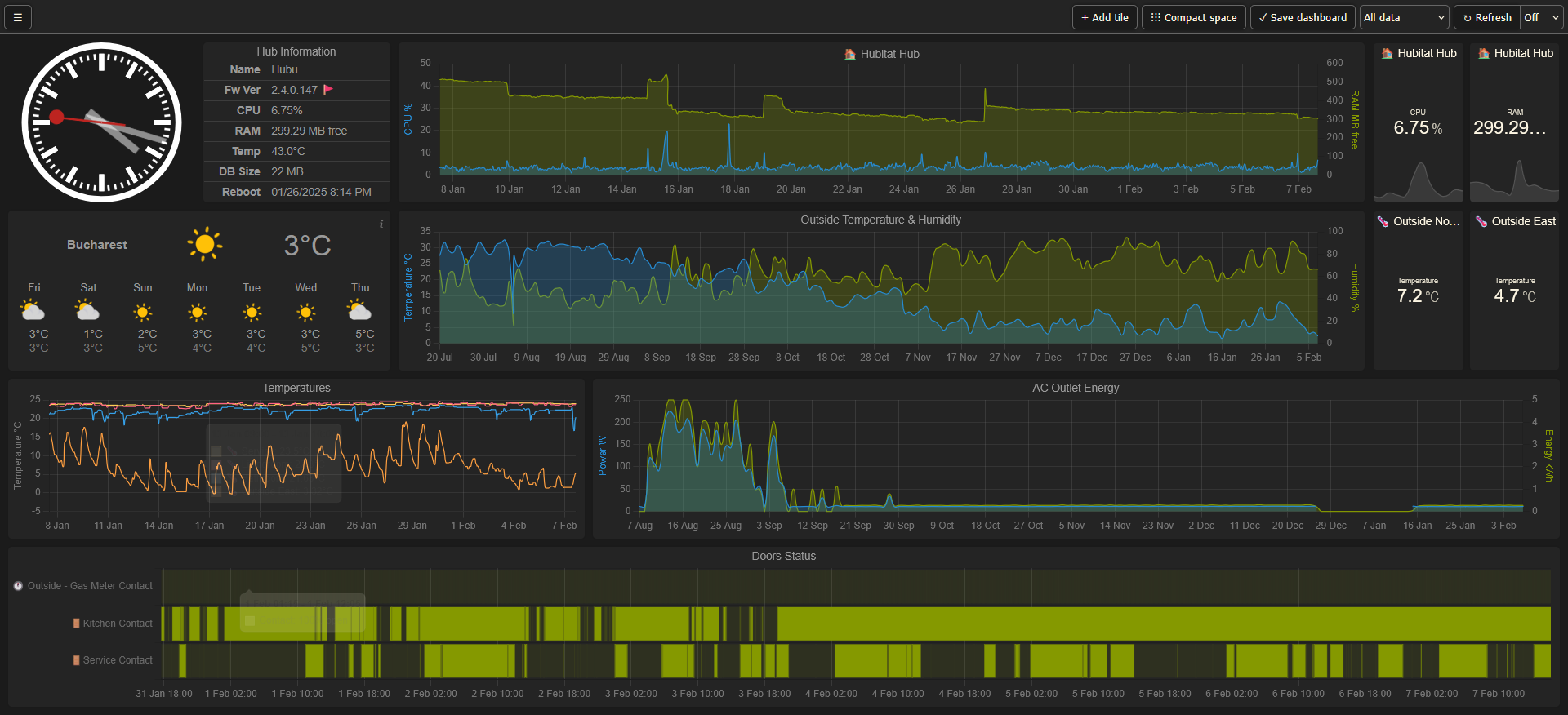
This is how my monitor dashboard looks like:
