[RELEASE] Vacation Lighting Simulator

:christmas_tree: Vacation Lighting Simulator — Now With More Chaos (the good kind)

Because perfectly-timed lights scream “robot house.”


What is this thing?

The Vacation Lighting Simulator helps your house lie convincingly while you’re away.

Instead of rigid schedules or obvious patterns, it creates semi-messy, human-looking light behavior:
• Random start times
• Variable on-durations
• Natural overlaps
• Controlled unpredictability

This release is a crazy but ultimately fun rewrite of the SmartThings Vacation Lighting Director app, that makes the app more powerful, more flexible, hubitat-tuned to run on even old hardware like my C5, and easier to grow and maintain.

I went about this adventure as I long ago I used Home Sitter on Wink, then when I moved to HE I used Alexa guard's away lighting. But ultimately really wanted an all local and better experience, which I've been procrastinating on for... forever, but finally got time to do over this holiday season.

More Details on exact features, troubleshooting, and installation can be found on the GitHub page:


✨ What this app does

The Vacation Lighting Simulator is a flexible occupancy-simulation app that combines randomness, structure, and visibility.

Key features:

• Multiple independent lighting simulations (morning, evening, weekend, etc.)
• Per-simulation time windows (start / stop)
• Optional arming via Hubitat Modes or a virtual switch
• Per-simulation device selection
• Human-like random on/off timing with ±20% jitter
• Natural light overlap (no synchronized behavior)
• Configurable minimum and maximum on-durations
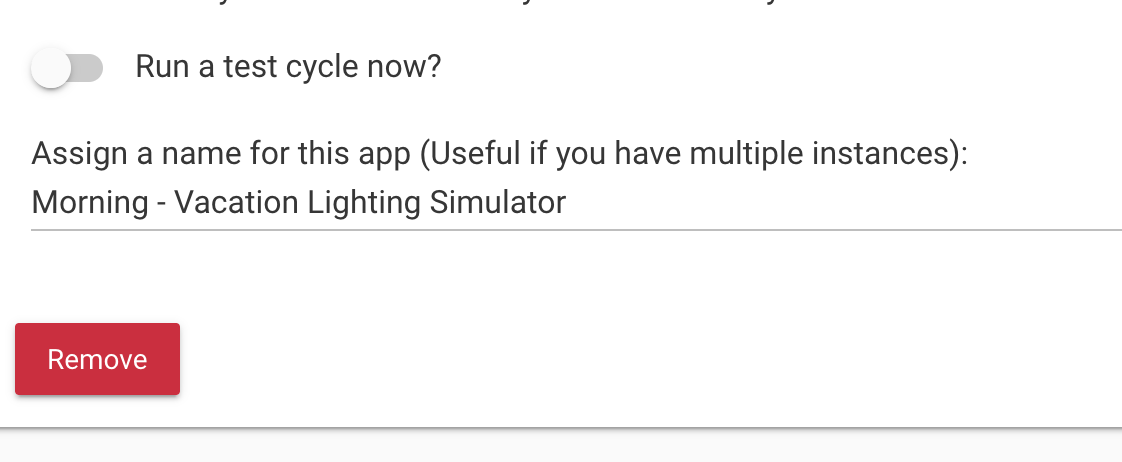
• Test mode to safely validate behavior without waiting
• Automatic cleanup when a simulation ends
• In-app status and summary view
• Optional notifications:
– Simulation start / stop
– Per-cycle activity
– Daily summary notifications
• Built-in Analyzer (optional child) to review historical lighting behavior
• Designed to scale cleanly as your setup grows

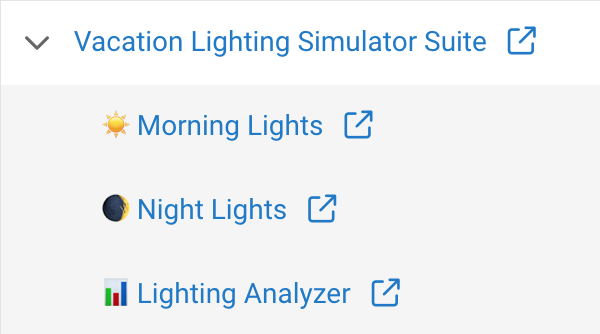
[App List Screenshot]
(:camera_flash: Parent app showing multiple Simulator children)
image

The goal is simple:
Make your home look naturally occupied — without obvious patterns or micromanagement.

:bar_chart: Perfect your simulations with Analyzer
The Analyzer is an optional child app you can add alongside simulators.

For now, it’s focused and simple:
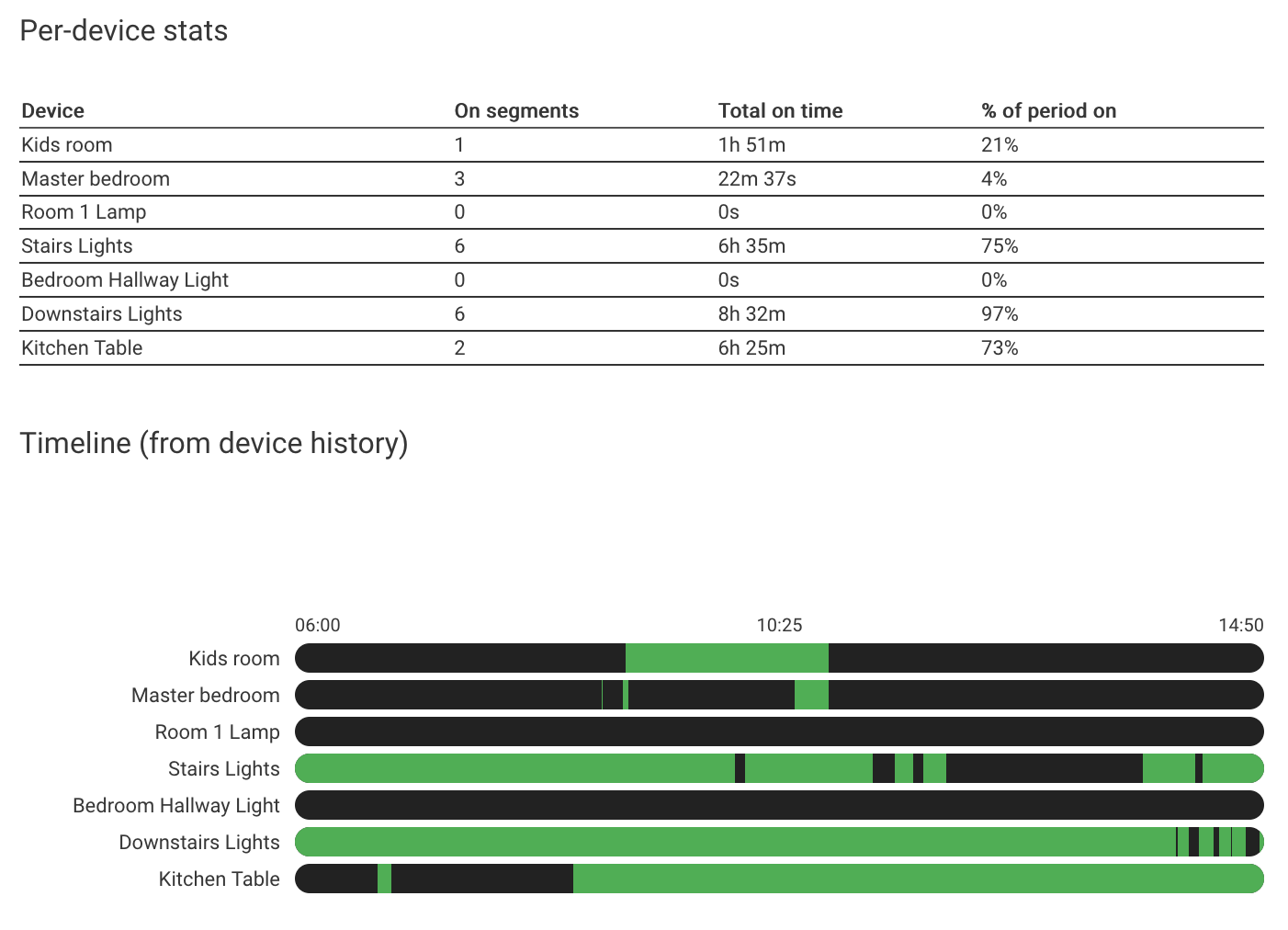
• Analyze lighting history for a date range
• Visualize overlaps and idle gaps
• Learn how your house actually behaves

[Example Analysis of a weekend Light use]

🏡 Fun (and realistic) use cases

Classic “we’re on vacation”
• Evening Simulation runs 6:00pm–11:30pm
• A few lights come on, overlap, turn off
• Looks like someone’s home watching TV

Two-phase daily realism
• Morning child: kitchen + hallway
• Evening child: lamps + living room
• No single pattern gives you away

Weekend weirdness
• Longer daytime activity
• Fewer lights, but for longer stretches
• Just like real humans (allegedly)


🧠 Philosophy: embrace imperfection

This app intentionally avoids:
• Exact schedules
• Repeating patterns
• “Everything off at once” moments

Instead, it aims for:
• Slight randomness
• Soft jitter
• Imperfect timing
• Believable chaos
• Very low resource usage. Only runs when your triggers are set. Tested to work well on old Hubitat hardware.

If your lights look a little… natural — it’s working.


🙏 Where this came from

This app didn’t appear out of nowhere. I went about this adventure as I long ago I used Home Sitter on Wink, then when I moved to HE I used Alexa guard's away lighting. But ultimately really wanted an all local and better experience, which I finally got time to do over this holiday season.

It started as a simpler, single-instance vacation lighting app, inspired by:
• Existing Hubitat vacation lighting solutions like Vacation Lighting Director (VLD)
• Rule-based randomizers
• Community ideas and discussions

This rewrite is about:
• Scaling beyond “one simulation”
• Making experimentation easy
• Making it easy to trouble shoot and tweak with Analyzer features


🛠️ Installation (aka: unleash the chaos responsibly)

Recommended: Install via Hubitat Package Manager (HPM) :star:

The easiest (and safest) way to install is using
Hubitat Package Manager.

With HPM you get:
• Automatic installation of Parent + Child apps
• Clean upgrades when new versions are released
• Less copy/paste, more happiness

How to install with HPM:
• Open HPM
• Choose Install
• Search for Vacation Lighting Simulator
• Follow the prompts

That’s it — HPM handles the rest.

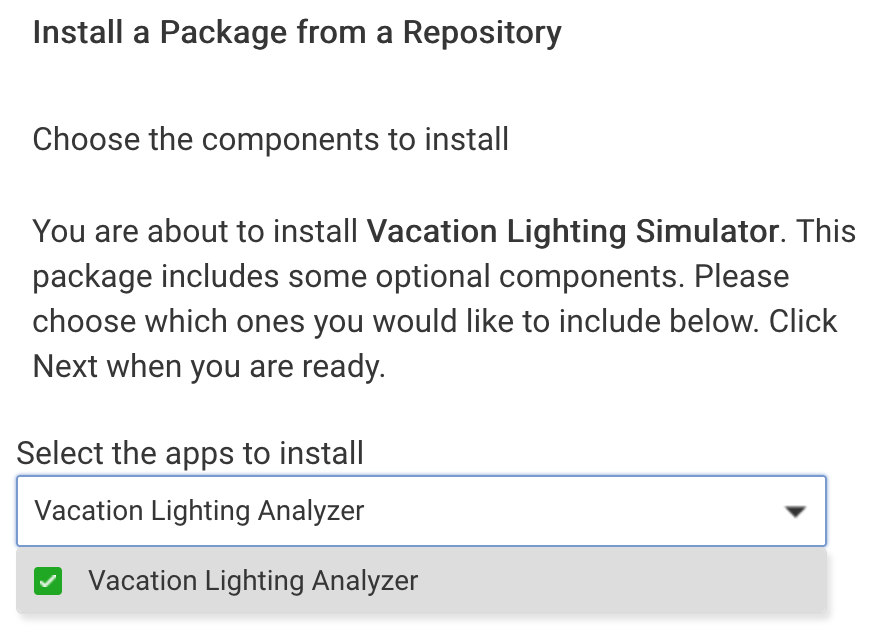
[Screenshot]
(:camera_flash: Selecting the optional + Analyzer child)

After installation

• Go to Apps → Add User App
• Select Vacation Lighting Manager
• Add one or more Simulator children
• Optionally add the Analyzer child

Each Simulator child can represent a different “behavior pattern”
(morning, evening, weekend, etc.).

Manual installation (for brave souls and tinkerers)

If you prefer manual installs, want to inspect the code, or are helping with development:

:point_right: Full instructions and source code live on GitHub:
Hubitat-Projects/Vacation Lighting Simulator at main · jedbro/Hubitat-Projects · GitHub

The repo includes:
• Parent app
• Simulator child app
• Analyzer child app
• Version history and notes


Upgrading from an older version?

This release introduces a new Parent / Child model.

Best approach:
• Install the new version via HPM
• Recreate your simulations as child apps
• Remove old standalone instances once you’re happy

If something feels off — feedback is welcome (and encouraged)!


Huge thanks to everyone who shared ideas, logs, and feedback along the way. In particular a huge shout-out to @ThunderboltsRock for testing out the early version and reporting bugs.

Would love your feedback!
9 Likes

[... Reserving Placeholder ...]

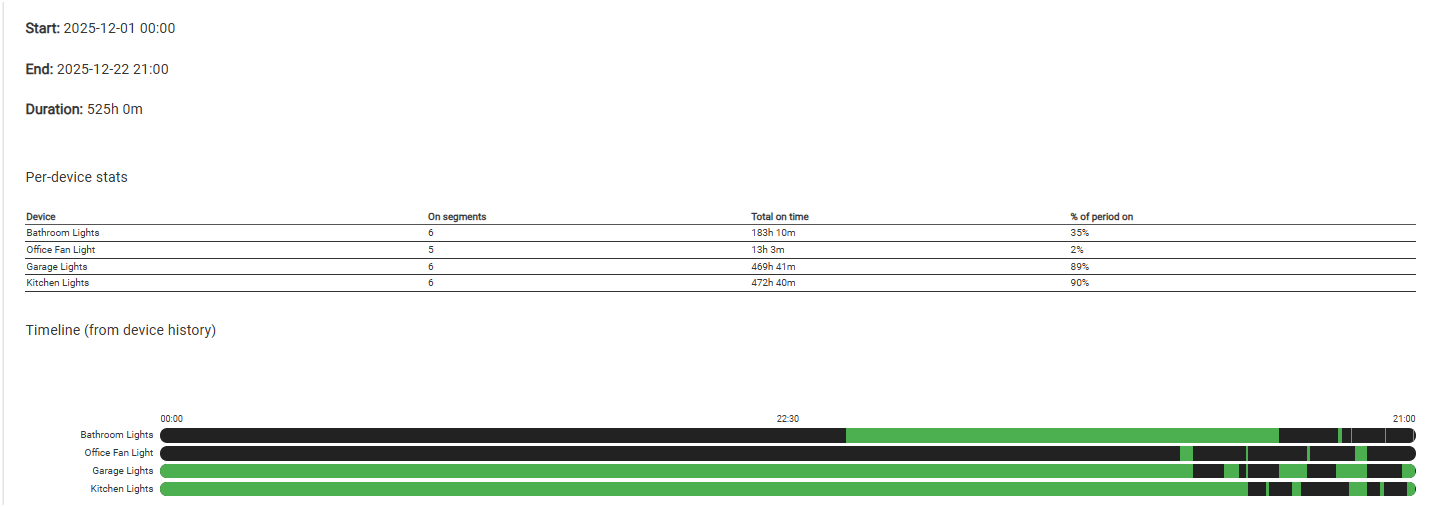
Very cool. I gave the analyzer a try. This isn't even close to being correct, but how does it know when any given light is on or off for any arbitrary time period?

Hey, thank you for trying it out!

Thank your for reporting, so for the second part, it specifically looks at the last 1,000 events from the device that Hubitat stores.

device.currentValue("switch")
device.eventsSince(time)

Do you know which part? The table should be correct based on what Habitat has stored (last 1,000 vents). But to your point your kitchen being on almost 24 hours would be odd. Can you try a smaller slice of time?

Edit: I wonder if the 1,000 events limit are causing an on/off to be dropped or not seen, so things seem on longer than true.

Also, the graph over the time period isn't really useful as everything is so compressed. It's really meant to look over a 48/24 hour or so time-line. Beyond that you can't really see any events.

Edit 2: I also might have found a bug for longer ranges, I'm working on now. But honestly this shouldn't be used longer than a week, and that is probably the upper bound. I might need to cap it at that.

I just picked December to date for the graph, no particular reason why.

There's no way the kitchen lights for example were on 90% of the time. They go on at sunset and generally remain on at some level until around midnight, give or take a few hours, unless we're not home. The garage lights are generally on longer as I'm in and out of the garage all day and usually leave the lights on.

Every one except for the office fan light would have at the very least one on segment per day, so at least 22 for December to date.

Does the hub really store that many events per device?

Update: The Kitchen Lights, for example, has 3 events going back as far as 11/28 but then there's a 14-day gap until the next event on 12/12.

Or readjust the starting point of the graph to the earliest event that exists. Might get a little messy with multiple devices though that have different ranges of events.

But yeah, I'm not sure there's a real need to see an entire month's worth of data. Most people's lighting patterns are probably discernable in a much shorter time period.

Super helpful, I also am realizing the 'level' might be throwing it off. I see some lights the "switch" doesn't change if the levels are set for on/off. This should work fine with the vacation mode as I specifically set on/off not level. But for general analysis it might not work... let me see.

You're probably right. The vast majority of my switches are Inovelli 2-in-1's. The events for the kitchen lights for example only include off() and setLevel(1), there's no on() events at all.

Oh wild. Just 1? I was about to push an update that is looking at level > 5, as I know some lights and some people's automation set level just above 0 for off. But I can adjust to >0 if not.

Edit: OK, I pushed an update (0.3.1) that will ask you to reselect the lights you want to track, I'm looking at on/off and level being set above >5 as on, below as off. What I can't fix is if the events of a device are not present. So think is probably better used for validating the visualizing the simulation runs to ensure you are happy.

Yes. Hue bulbs and downlights dim all the way down to level 1 without flickering. They emit just enough light to softly illuminate a room so you can walk around without walking into things. A good number of them come on at sunset at level 1.

I think that's rarely the case for normal dumb led bulbs though. The few that I have won't do anything until level is around 10-15.

1 Like

Thanks for this, I really like that I can add an AM schedule now.

1 Like

I presume this is different from Vacation Lighting Director

1 Like

Same but with some improvements and extras.

1 Like

It started out as a port for Hubitat with more optimizations, but I ultimately ended up re-writing most of it to better tailor to my needs. Some examples of my needs that Director didn't have;

  • Instead of all of the randomly selected lights turning on and off at the same time, this introduces a bit more randomness so that it looks more like someone walking around the house and turning on a light in one room, then another, vs a timer all on/off
  • I removed the presence functionality as that should be handled outside of this app
  • This app can be activated by mode and/or a switch. So for example I use it by mode for my "away-vacation" mode, but the Switch can override it, so I can flip the switch if we are just gone for a few hours without affecting my home mode.
  • It tells you the status and why it is triggered or not triggers
  • Optional Push notifications to whatever notification device you have setup that gives you a summary of happened at the end of the day.
  • Parent/Child so you can have different scheduled (e.g. I have an evening mode, and a morning mode that mimics our behavior Mon-Fri where we get up earlier.
  • It also instantly stops the cycle when you deactivate it (mode or switch), so you don't get weird light behaviors when you get home like you do with Director.
3 Likes

Happy 2026 everyone.
I found a few bugs while using this over the holidays, so have updated the app to 0.3.2.2 with the bug fixes. Specifically; Times where it could unscheduled even if in the trigger conditions. Ensuring the daily summary is sent even outside of being active, and fixing if you have both mode and switch configured to act as a real OR.

Appreciate the feedback!

Edit: Added one more bug fix with 0.3.2.2 to ensure lights are turned off on trigger change in all cases, daily summary is scheduled in a cleaner way, and a UX warning if your timezones are not configured in Hubitat.

2 Likes

I just by mistake added another child schedule. When I was about to remove it The message asked remove vacation lighting simulator, just want to be sure Only that child will be removed and not the whole app before I do.

1 Like

Yes, when you remove from within the child page, it will only remove the child:

To your point, the message is a big confusing, but I can't control the text, that is hubitat using the parent app name even though only the child is being removed.

Question because it happened this past week as I was having to stay at a hospital and did not know I would be there all night. Any way to start the program if it was set to run at 7pm and I think about it at 8pm?

Not super sure I understand the question. In general it will only actively simulation within the time-ranges you set, and the trigger (mode and/or switch) says if it's allowed to run or not.

So if for example it's set to run at 7, but you didn't turn on the mode or switch until 8pm, that should be fine as it will detect that it a) is active and b) it's within the allowed time frame. So you would be fine there.

I'm making an assumption on your question thought.... perhaps if what you'd like to do is force it to run immediately and not pay attention to the time-range, you could do a few different things;

  1. Not specify a time-range and instead have your mode or switch be what is changing based on time.

  2. You could create another child that is specific for this use case... so it doesn't have a time-range, and only look at the switch for activation/simulation. (e.g. since I have two vacation children today, one for morning and another for night, I'd create a 3rd here call "immediate" or "emergency" simulation),

#2 might be the cleanest if you already have specific modes/switchs + time-ranges that are working for you.

Really depends on your scenario as I'm reading a bit between the lines on which use-case you are talking about, but both are very solvable and supported.

That can work, thanks for those tips

1 Like