I added the fingerprint below and it now works
fingerprint profileId:'0104', endpointId:'01', inClusters:'0003,0004,0005,0006,0702,0B04,E000,E001,0000', outClusters:'0019,000A', model:'TS011F', manufacturer:'_TZ3210_ddigca5n', deviceJoinName: 'Tuya Zigbee Plug _TZ3210_ddigca5n'

1 Like
Does this driver apply to the new Shelly US Plug Gen 4 ( S4PL-00116US) as well?
I can't get it to pair in zigbee mode.
@christian.busch this Shelly new device fingerprint is not in this driver yet, but theoretically it should be working if you succeed to pair it successfuly to your hub. Is it a C-8? If yes, try using the Double Luck voodoo to pair.
An easy way to put Shelly Gen4 devices into Zigbee pairing mode is through their WiFi web page - does your device have the same feature as mine? (it is a switch module 1PM Gen4) :
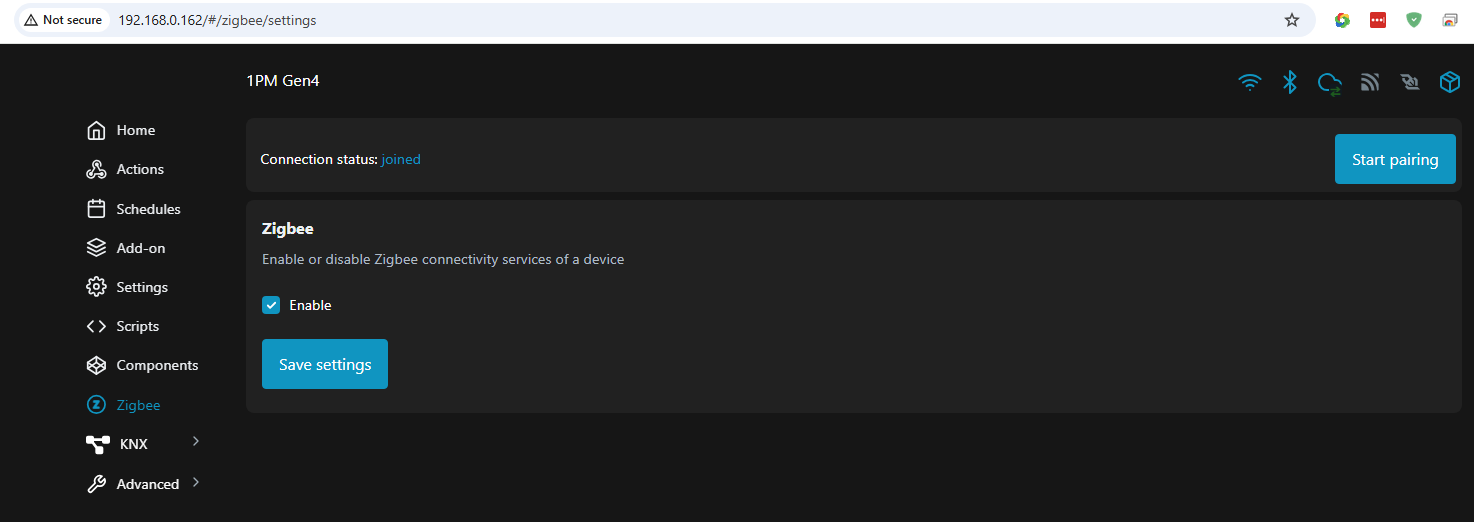
yes it has a web server, looks quite capable, like the last plug you'll ever need.
I connected to the plug wifi AP, disabled bluetooth and enabled zigbee. that allowed me to pair. It defaulted to "device".
Initializing Zigbee Device 98A316FFFE7AEA60, 7FB7
**S4PL-00116US** Finger print
dev:46122025-11-22 09:50:30.466
info
Zigbee parsed:[raw:catchall: 0000 0002 00 00 0040 00 BAFA 00 00 0000 00 00 150000, profileId:0000, clusterId:0002, clusterInt:2, sourceEndpoint:00, destinationEndpoint:00, options:0040, messageType:00, dni:BAFA, isClusterSpecific:false, isManufacturerSpecific:false, manufacturerId:0000, command:00, direction:00, data:[15, 00, 00]]
dev:46122025-11-22 09:50:29.866
info
Zigbee parsed:[raw:catchall: 0000 0013 00 00 0040 00 BAFA 00 00 0000 00 00 14FABA60EA7AFEFF16A3988E, profileId:0000, clusterId:0013, clusterInt:19, sourceEndpoint:00, destinationEndpoint:00, options:0040, messageType:00, dni:BAFA, isClusterSpecific:false, isManufacturerSpecific:false, manufacturerId:0000, command:00, direction:00, data:[14, FA, BA, 60, EA, 7A, FE, FF, 16, A3, 98, 8E]]
dev:46122025-11-22 09:50:22.995
info
Zigbee parsed:[raw:catchall: 0000 0002 00 00 0040 00 9C42 00 00 0000 00 00 110000, profileId:0000, clusterId:0002, clusterInt:2, sourceEndpoint:00, destinationEndpoint:00, options:0040, messageType:00, dni:9C42, isClusterSpecific:false, isManufacturerSpecific:false, manufacturerId:0000, command:00, direction:00, data:[11, 00, 00]]
dev:46122025-11-22 09:50:22.324
info
Zigbee parsed:[raw:catchall: 0000 0013 00 00 0040 00 9C42 00 00 0000 00 00 10429C60EA7AFEFF16A3988E, profileId:0000, clusterId:0013, clusterInt:19, sourceEndpoint:00, destinationEndpoint:00, options:0040, messageType:00, dni:9C42, isClusterSpecific:false, isManufacturerSpecific:false, manufacturerId:0000, command:00, direction:00, data:[10, 42, 9C, 60, EA, 7A, FE, FF, 16, A3, 98, 8E]]
dev:46122025-11-22 09:50:15.202
info
Zigbee parsed:[raw:catchall: 0000 0002 00 00 0040 00 DF49 00 00 0000 00 00 0D0000, profileId:0000, clusterId:0002, clusterInt:2, sourceEndpoint:00, destinationEndpoint:00, options:0040, messageType:00, dni:DF49, isClusterSpecific:false, isManufacturerSpecific:false, manufacturerId:0000, command:00, direction:00, data:[0D, 00, 00]]
dev:46122025-11-22 09:50:14.526
info
Zigbee parsed:[raw:catchall: 0000 0013 00 00 0040 00 DF49 00 00 0000 00 00 0C49DF60EA7AFEFF16A3988E, profileId:0000, clusterId:0013, clusterInt:19, sourceEndpoint:00, destinationEndpoint:00, options:0040, messageType:00, dni:DF49, isClusterSpecific:false, isManufacturerSpecific:false, manufacturerId:0000, command:00, direction:00, data:[0C, 49, DF, 60, EA, 7A, FE, FF, 16, A3, 98, 8E]]
dev:46122025-11-22 09:50:01.847
debug
getting info for unknown Zigbee device...
1 Like
Use the HE inbuilt ‘Device’ driver to get the device fingerprint - clicking the ‘Get Info’ button.
I suppose that Shelly US Plug Gen 4 ( S4PL-00116US ) may be working using also the HE stock drivers - try the Generic Zigbee Outlet driver too.
I just connect a Sercomm SZ-ESW02 (aka Telstra Smart Plug 2) paired fairly easy. I edited @kkossev tuya mtering plug driver to include the fingerprint for this plug, but I'm guessing the power reporting is off by a factor of 100x, it reported a kilowatt/minute consumption for a Tapo power strip with only a Google mini, zooz Siren and a Tuya USB repeater plugged into the strip, and the TAPO strip itself plugged into the Sercomm outlet. Used Kill A Watt to verify the power reporting is very inaccurate.
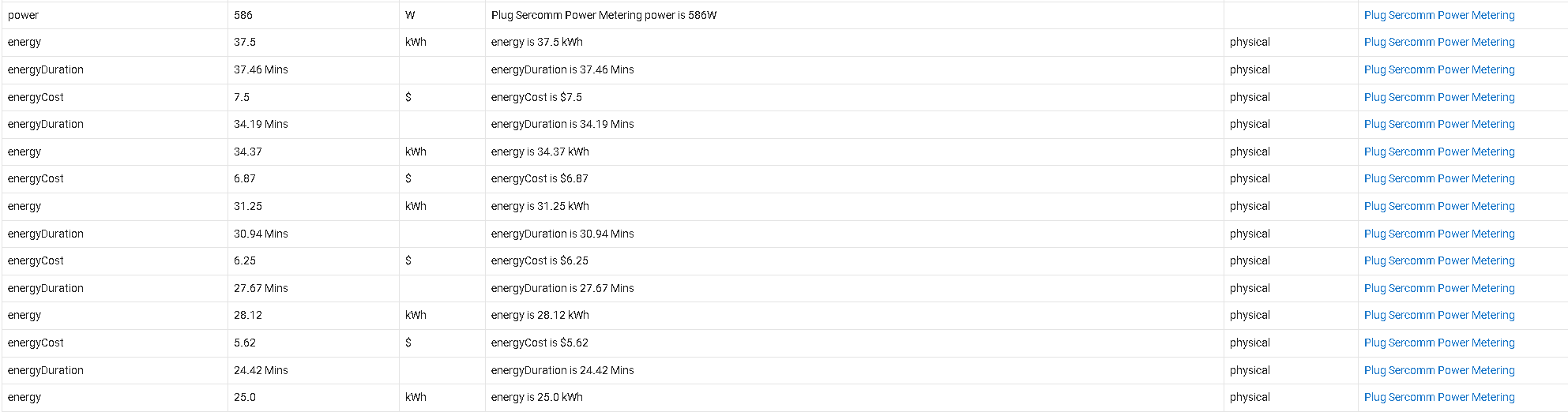
Besides the wonky power reporting the zigbee repeater performance is incredible (Centralite made the guts?), and for 15.99 for 5 plugs from ebay, I'm happy.
Krassimir, is there anyway to adjust the power reporting in the driver?
Also tried inbuilt Generic Zigbee Plug driver and got same exaggerated 570 watts
Sercomm Fingerprint
Device pairing info
Manufacturer: Sercomm Corp.
Endpoint 01 application: 19
Endpoint 01 endpointId: 01
Endpoint 01 idAsInt: 1
Endpoint 01 inClusters: 0000,0003,0004,0005,0006,0702,0B05
Endpoint 01 initialized: true
Endpoint 01 manufacturer: Sercomm Corp.
Endpoint 01 model: SZ-ESW02
Endpoint 01 outClusters: 0019
Endpoint 01 profileId: 0104
Endpoint 01 stage: 4
Endpoint 02 endpointId: 02
Endpoint 02 idAsInt: 2
Endpoint 02 inClusters: 0000,0003
Endpoint 02 initialized: true
Endpoint 02 outClusters: 0003,0006
Endpoint 02 profileId: 0104
Endpoint 02 stage: 4
ebay link, if you need a strong repeater(UL Listed)
PS: On Z2M when the identical device is paired the reporting seems very accurate:
"device": {
"applicationVersion": 20,
"dateCode": "20190307",
"friendlyName": "Plug Sercomm Super Repeater",
"hardwareVersion": 16,
"ieeeAddr": "0x000d6f0015b9d1b2",
"manufacturerID": 4401,
"manufacturerName": "Sercomm Corp.",
"model": "SZ-ESW02N-CZ3",
"networkAddress": 4055,
"powerSource": "Mains (single phase)",
"stackVersion": 98,
"type": "Router",
"zclVersion": 3
},
"energy": 0,
"last_seen": "2026-01-28T17:54:38-05:00",
"linkquality": 200,
"power": 18.54,
"state": "ON"
~bump
Hi @Rxich ,
I have registered a GitHub issue to add support for the Sercomm SZ-ESW02 in this driver. However, I cannot tell when I will be able to work on it, as I currently have 40 other tasks in the backlog.... At the moment, I am focused on implementing Matter Advanced support for buttons and locks.
There should be better power and energy reporting drivers in Hubitat that automatically select the correct multipliers or divisors for any Zigbee plug. Have you attempted to find one?
I suppose that bringing the power reporting to HE using the HADB works OK?
Also, have you tried the Home Assistant Matter Bridge add-on ? This should also work OK with HE.
Hi Krassimir, Thank you for responding. No worries at all, not critical. Yes I have tried the HE inbuilt driverand it produces the same 1000x power error. Chat GPT seems to think that Sercomm reports in Milliwatts, versus other plugs that report in watts. I had Chat create a driver but it didn't handle on/off correctly.
I thought I could just revise the divisor in your driver, but it's uber complex.
This is what chat said:
Sercomm Quirk
This is a very common Sercomm quirk:
- Instantaneous Demand (0702 / 0x0400) is reported in milli-watts, not watts → needs
/ 1000 - Voltage & current usually come from Electrical Measurement cluster
0x0B04, even when the device fingerprint lists0B05(Diagnostics). Sercomm plugs often under-advertise this cluster but still report it.
Below is an updated, corrected Hubitat Groovy driver with:
@mike.maxwell at some point would you consider correcting the power reporting for the Sercomm Zigbee Plugs((aka Telstra Smart Plug 2) in the Generic Zigbee Outlet driver? The driver functions perfect otherwise.
1 Like
Hi @kkossev,
Bought Zemismart Smart Energy Sensor SPM01.
I have the "Tuya Zigbee Metering Plug" driver installed.
The device was recognized as "Tuya Zigbee Valve" when I paired.
|Manufacturer|_TZE284_iwn0gpzz|
|Model|TS0601|
Can you add it to the driver?
Thanks.
Yes, I probably can, but I currently have too many pending requests to add other devices that are already on the list. So, it may take some time until I come to this one.
Thanks.
I'll wait.


