rxCtr counts the number of received Zigbee messages from this device. Zero indicates a pairing problem.
There is also a button 'Ping' - look at the rtt (round-trip-tim) value in the Current States. If you see 'timeout' there, it means that the device does not respond to commands.
I have noticed that the device web page Current States does not refresh automatically sometimes.. Press the refresh button in your browser (F5 in Chrome) several seconds after you have updated the preferences.
I meant pressing the F5 (or Ctrl-R) key on the PC browser, to refresh the HE device web page.
The Refresh command in the driver will not work for this Tuya device, there is no known way to request refreshing of the Tuya 'data points' values.
Probably I wasn't clear - do not click on Refresh, do not click on Configure - just click on the 'Save Preferences' button :
Hi Tom, thank you for repeating the preferences saving test.
... I see from the debug logs that the settings are received from the device, but they are not acknowledged, not reported back...
My Fingerbot is from the first manufacturer :
endpointId: 01
application: 81
manufacturer: _TZ3210_dse8ogfy
model: TS0001
tuyaVersion: 2.0.1
so probably there are some differences .. Give me some time to research.
Then click on the Save button within the editor, and after the code is successfully updated, click on the Save Preferences button from the device web page.
Observe the live logs - do you see Info logs with the preferences echoed back from the device as in my example?
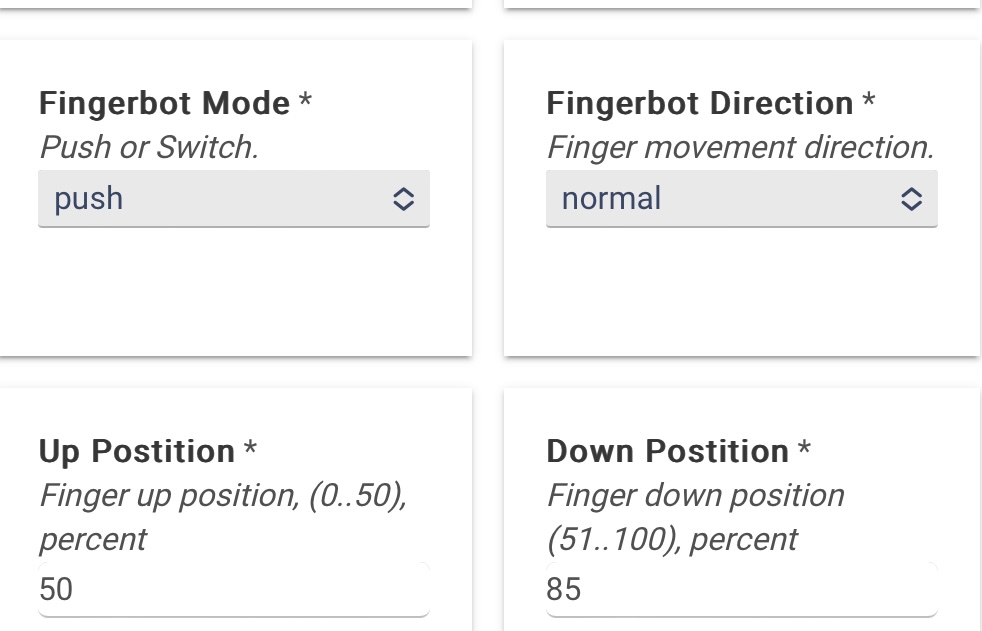
@Pradeep seems that you have the same new Fingerbot device, can you check again whether you can successfully change the preferences (direction, Up/Down positions, etc..) ?
I have 2 of this model. I tested in one of them and i am able to change the preferences like Mode, Direction, Up&Down Positions and Fingerbot touch button enable/disable.
I tested with different values for Up&Down positions and it's responding well.
@kkossev,
My 2 fingerbot's seem to be not responding to on/off commands for some reason, battery seems to be okay and bot's are online.
I did pair it again last night and it seemed to work, but then it stopped working shortly afterwards?
Please see an warning below probably initiated by an RM rule:
Yes, using on my C8 latest beta software.
There is no issue with connectivity, see below: dev:20632023-12-14 10:19:40.813 AMinfoFingerbot fan Round-trip time is 1810 ms (min=971 max=1994 average=1145)
Will do further tests tonight and/or move to C7 if required (only noticed it not working recently).
Edit: note that commands seem to be working in software, but not physically. Even the physical on/off button on the device did not work last night, although it worked for a brief period after I re-paired it.
The new one I just got is working great on my C-8 running beta. Thanks for the driver @kkossev !
Great way to quickly, cheaply, and easily 'smartify' my gate control.
How long it will last, who knows? But, I probably won't use it that much: I documented, with pictures, an incident with my last gate, where I tried too much automation.
Update: I almost gave up and thought that the fingerbot had a mechanical fault with the arm/finger as the batteries had a good voltage.
But then I manually pushed the arm up and down a few times and it started working again... had the device for about 7 months now!