[RELEASE] Tuya Temperature Humidity Illuminance LCD Display with a Clock (w/ healthStatus)

Hi @garyjmilne ,

I used OpenAI Codex 5.6 Sol (Extra High) for a deep review of the LCZ030 implementations and related GitHub discussions.

Unfortunately, there is no confirmed way to configure a smaller temperature/humidity delta or faster reporting period. Configure Reporting appears to fail or be ignored, with the approximately 1 °C temperature threshold controlled by the device firmware. The only possible workaround is periodic endpoint-2 polling, which still needs hardware verification and may reduce battery life.

Full research: LCZ030 research and driver audit

Cool, never heard of it before but seems very thorough. Well my suspicions were confirmed, now I have to find a decent LCD display that does not have those restrictions.

Tuya Temperature Humidity Illuminance LCD Display with a Clock' version 2.2.0 '2026/08/04 10:02 PM' (testing build, not yet in HPM)

It includes a batch of fixes and a few new device additions based on recent reports in this thread. This build is not pushed to HPM yet - please update the driver manually for now (paste from the dev branch, or copy/paste into the Drivers Code editor) before it's released more broadly.

New / fixed :

  • @XLR8ED - added 'Temperature Decimal Places' and 'Humidity Decimal Places' preferences, so either reading can show 37 instead of 37.4 (or the reverse) independently.
  • @calinatl's sensor (_TZ3000_utwgoauk, labeled "SNZB-02") now has the correct fingerprint - it was reporting a different model string than the driver expected, so it likely never matched at pairing, and moved to the Zigbee NON-Tuya group for proper periodic reporting configuration. This is a best-guess fix for the network dropouts reported; confirmation on whether it actually helps is welcome.
  • @Jost's illuminance/temperature/humidity sensor (_TZE204_rbbx5mfq) had a DP mismatch: the driver was reading the illuminance value as humidity, which is exactly why it looked wrong and spiked past 100% in bright light. New TS0601_Illum_TH group added with the correct DP mapping.
  • @mail.djain's 5-in-1 soil tester (_TZE284_hdml1aav) is now supported: new TS0601_Soil_5IN1 group exposing soil moisture, soil fertility, temperature, humidity, illuminance, plus water/fertility warning states. The writable calibration/reporting-interval DPs are not implemented yet.

Any feedback is welcome.

I cut & pasted the new driver code into this driver and saved it. What specifically is the next step to update the device to the new driver?

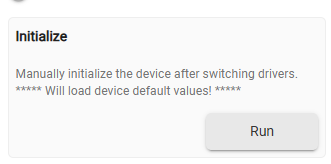
Open the device HE page and click on the Initialize() run button.

OK - did as directed.
The device remained online for 13 hours 31 minutes, then went offline...

This is a very weird device, a kind of Frankenstein combining all the Tuya and SONOFF oddities... :frowning:

OK, let's try once more. Please follow these steps:

  1. Update the driver again. The development version stays 2.2.0, but the timeStamp is now 2026/08/04 10:02 PM.
  2. Remove the device using the red "Remove Device" button. Note that this also removes it from any rules and dashboards where it is used.
  3. Pair the device to your hub again. This driver should be selected automatically at the end of the pairing process.
  4. Open the device web page and check in the logs that the driver version and timeStamp are the ones above.
  5. Verify that the device works as expected: the temperature and the humidity attributes should update when you change them rapidly.
  6. Make sure debug logging is enabled, then leave the device alone for 12 hours.
  7. Please do not click on any of the commands in the meantime. We are interested only in the Zigbee messages that the device sends on its own.

If it stops working, send a screenshot of the last debug messages received from the device.

Thank you for all your help with this. I got to step 3. It did not select any driver (I assume what we have traditionally called driver is now under the "Device Info" tab, in the "Type" field) - it just calls it "Device". Here is the data from the log:

**dev:674**2026-08-05 5:06:04.599 pm

info

Zigbee parsed:[raw:1E910104020A0000294E0A, dni:1E91, endpoint:01, cluster:0402, size:0A, attrId:0000, encoding:29, command:0A, value:0A4E, clusterInt:1026, attrInt:0]

**dev:674**2026-08-05 5:05:24.726 pm

info

Zigbee parsed:[raw:1E91010001082000201E, dni:1E91, endpoint:01, cluster:0001, size:08, attrId:0020, encoding:20, command:0A, value:1E, clusterInt:1, attrInt:32]

**dev:674**2026-08-05 5:05:24.560 pm

info

Zigbee parsed:[raw:1E9101000108210020C8, dni:1E91, endpoint:01, cluster:0001, size:08, attrId:0021, encoding:20, command:0A, value:C8, clusterInt:1, attrInt:33]

**dev:674**2026-08-05 5:04:04.511 pm

info

Zigbee parsed:[raw:1E910104020A0000291B0A, dni:1E91, endpoint:01, cluster:0402, size:0A, attrId:0000, encoding:29, command:0A, value:0A1B, clusterInt:1026, attrInt:0]

**dev:674**2026-08-05 5:01:46.288 pm

info

Zigbee parsed:[raw:1E910104050A000021AB11, dni:1E91, endpoint:01, cluster:0405, size:0A, attrId:0000, encoding:21, command:0A, value:11AB, clusterInt:1029, attrInt:0]

**dev:674**2026-08-05 5:01:46.158 pm

info

Zigbee parsed:[raw:1E910104020A000029E209, dni:1E91, endpoint:01, cluster:0402, size:0A, attrId:0000, encoding:29, command:0A, value:09E2, clusterInt:1026, attrInt:0]

**dev:674**2026-08-05 5:01:46.082 pm

info

Zigbee parsed:[raw:1E91010001082000201E, dni:1E91, endpoint:01, cluster:0001, size:08, attrId:0020, encoding:20, command:0A, value:1E, clusterInt:1, attrInt:32]

**dev:674**2026-08-05 5:01:45.958 pm

info

Zigbee parsed:[raw:1E9101000108210020C8, dni:1E91, endpoint:01, cluster:0001, size:08, attrId:0021, encoding:20, command:0A, value:C8, clusterInt:1, attrInt:33]

**dev:674**2026-08-05 5:01:44.875 pm

info

Zigbee parsed:[raw:1E910104050A000021AB11, dni:1E91, endpoint:01, cluster:0405, size:0A, attrId:0000, encoding:21, command:0A, value:11AB, clusterInt:1029, attrInt:0]

**dev:674**2026-08-05 5:01:44.698 pm

info

Zigbee parsed:[raw:1E910104020A000029E209, dni:1E91, endpoint:01, cluster:0402, size:0A, attrId:0000, encoding:29, command:0A, value:09E2, clusterInt:1026, attrInt:0]

**dev:674**2026-08-05 5:01:43.529 pm

info

Zigbee parsed:[raw:1E9101000108210020C8, dni:1E91, endpoint:01, cluster:0001, size:08, attrId:0021, encoding:20, command:0A, value:C8, clusterInt:1, attrInt:33]

**dev:674**2026-08-05 5:01:36.652 pm

info

Zigbee parsed:[raw:1E91010001082000201E, dni:1E91, endpoint:01, cluster:0001, size:08, attrId:0020, encoding:20, command:0A, value:1E, clusterInt:1, attrInt:32]

**dev:674**2026-08-05 5:01:35.766 pm

info

Zigbee parsed:[raw:catchall: 0000 0013 00 00 0040 00 1E91 00 00 0000 00 00 00911E2D225BE8ED38C1A480, profileId:0000, clusterId:0013, clusterInt:19, sourceEndpoint:00, destinationEndpoint:00, options:0040, messageType:00, dni:1E91, isClusterSpecific:false, isManufacturerSpecific:false, manufacturerId:0000, command:00, direction:00, data:[00, 91, 1E, 2D, 22, 5B, E8, ED, 38, C1, A4, 80]]

**dev:674**2026-08-05 4:59:37.537 pm

info

fingerprint profileId:"0104", endpointId:"01", inClusters:"0000,0003,0001,0020,0402,0405", outClusters:"0019", model:"SNZB-02", manufacturer:"_TZ3000_utwgoauk", controllerType: "ZGB"

**dev:674**2026-08-05 4:59:37.271 pm

trace

ZCL version:03

**dev:674**2026-08-05 4:59:37.269 pm

trace

Software Build Id:0122052017

**dev:674**2026-08-05 4:59:37.267 pm

trace

Model:SNZB-02

**dev:674**2026-08-05 4:59:37.265 pm

trace

Manufacturer:_TZ3000_utwgoauk

**dev:674**2026-08-05 4:59:37.028 pm

debug

getting info for unknown Zigbee device...

**dev:674**2026-08-05 4:59:31.673 pm

info

Zigbee parsed:[raw:catchall: 0000 8005 00 00 0040 00 1E91 00 00 0000 00 00 C200911E0101, profileId:0000, clusterId:8005, clusterInt:32773, sourceEndpoint:00, destinationEndpoint:00, options:0040, messageType:00, dni:1E91, isClusterSpecific:false, isManufacturerSpecific:false, manufacturerId:0000, command:00, direction:00, data:[C2, 00, 91, 1E, 01, 01]]

**dev:674**2026-08-05 4:59:27.011 pm

debug

getting device info in 10 seconds...
Please try again : VERSION = '2.2.0' TIME_STAMP = '2026/08/06 12:22 AM'

  • added a second _TZ3000_utwgoauk ("SNZB-02" clone) fingerprint with the inClusters in the order actually announced by calinatl's unit - fingerprint matching is order-sensitive (community report #704)

Done.
I do not know how to do item 4 - check in the log that the driver version and timeStamp are correct. That data does not seem to be in the log. However, on the Commands tab, under "State Variables" it does say: 2.2.0 2026/08/06 12:22 AM

The device paired to the Temp/Humid/Illuminace driver, and has the proper attributes.

Will move it around to areas with various temp/humidity and see if it stays connected overnight and report back.

THANK YOU

Happy to report it remains connected 17 hours later!!!
THANK YOU!

Device has remained connected for the last 40 + hours, checking in and updating approx every hour!!! This is terrific! THANK YOU.

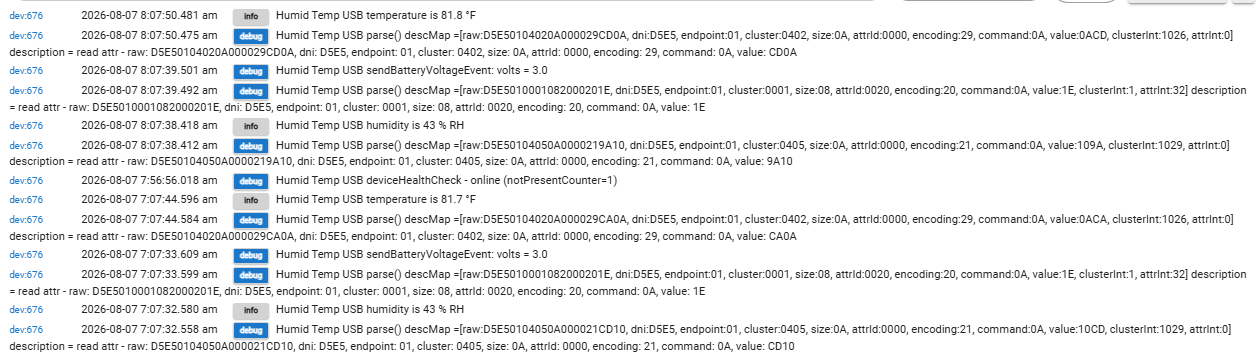
I named the device "Humid Temp USB." With debug logging turned on, the logs show the below - is this just info or does this mean some sort of error?
Not that it matters much, but this device is on USB power rather than battery (it has the option for both).

Well d---. The device disconnected this am...
From the log:

image

From Events( and I can assure you I was not awake at 4:56 am to "set" the device to anything. It set itself to offline...

image

Any suggestions on next step?

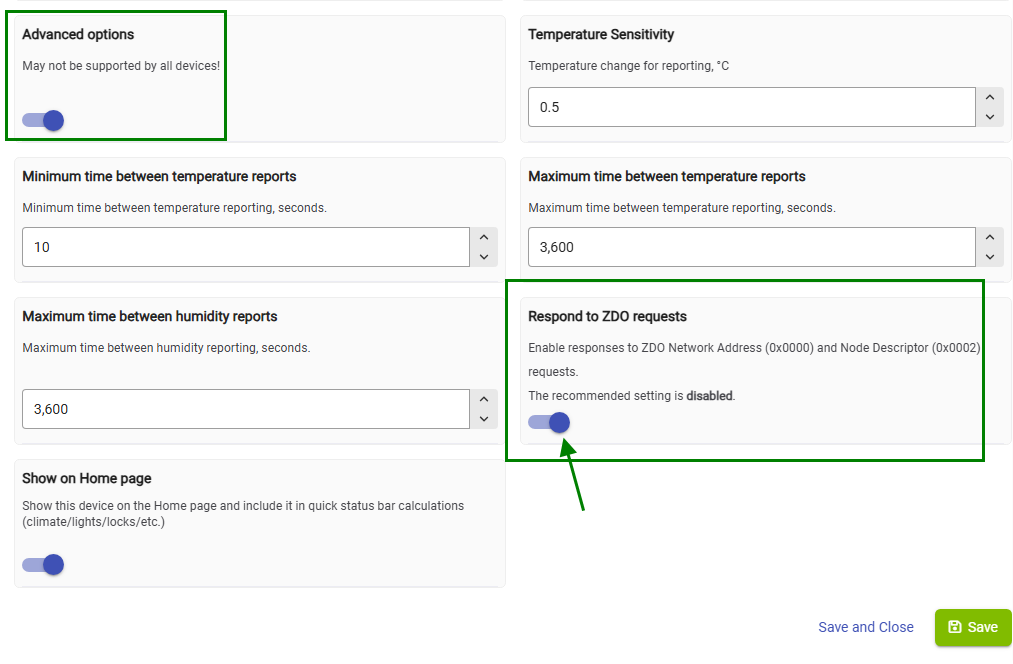
One last try : enable the Advanced options, refresh the page, then enable the 'Respond to ZDO request' toggle :

After saving the preferences, pair the device again to your hub (without deleting it).
Make sure it is working after the repairing (new T/H readings are reported automatically).

If this doesn't keep it online, I don't have more ideas...

@kkossev - turned out to be a user problem. Sorry.

When this sensor stayed connected for over 72 hours, yesterday, I moved it to it's permanent location. Wanting to reduce variables, I just have it plugged in and did not insert batteries (it has both, but I don't want to change batteries, and if there is no power, my dehumidifier can't operate, so this device does not need battery backup).
In placing and plugging in the device, I accidentally moved something else, which fell and knocked the usb power cord from the plug on the wall. So, in following your directions to repair the device, I discovered the problem was this device had no power.

The interesting thing is the power probably got disconnected yesterday afternoon. A few hours after I moved it, I heard a noise, but had not yet investigated. When I look at the events, the last temp/humidity report coincides with just before I heard the noise. It then took over 12 hours for the device to report offline...

The good news is that as soon as I plugged it back in, it reconnected to the zigbee network. I hope this is the behavior it follows after a power outage. If so, I'll never need to change batteries on this thing.

Sorry....

kkossev thanks for adding 'Temperature Decimal Places' and 'Humidity Decimal Places' preferences.

Appreciate it