The thermostat controller says it's connected but it's not showing the correct current temperature and it's not controlling the thermostat. I'll keep digging.
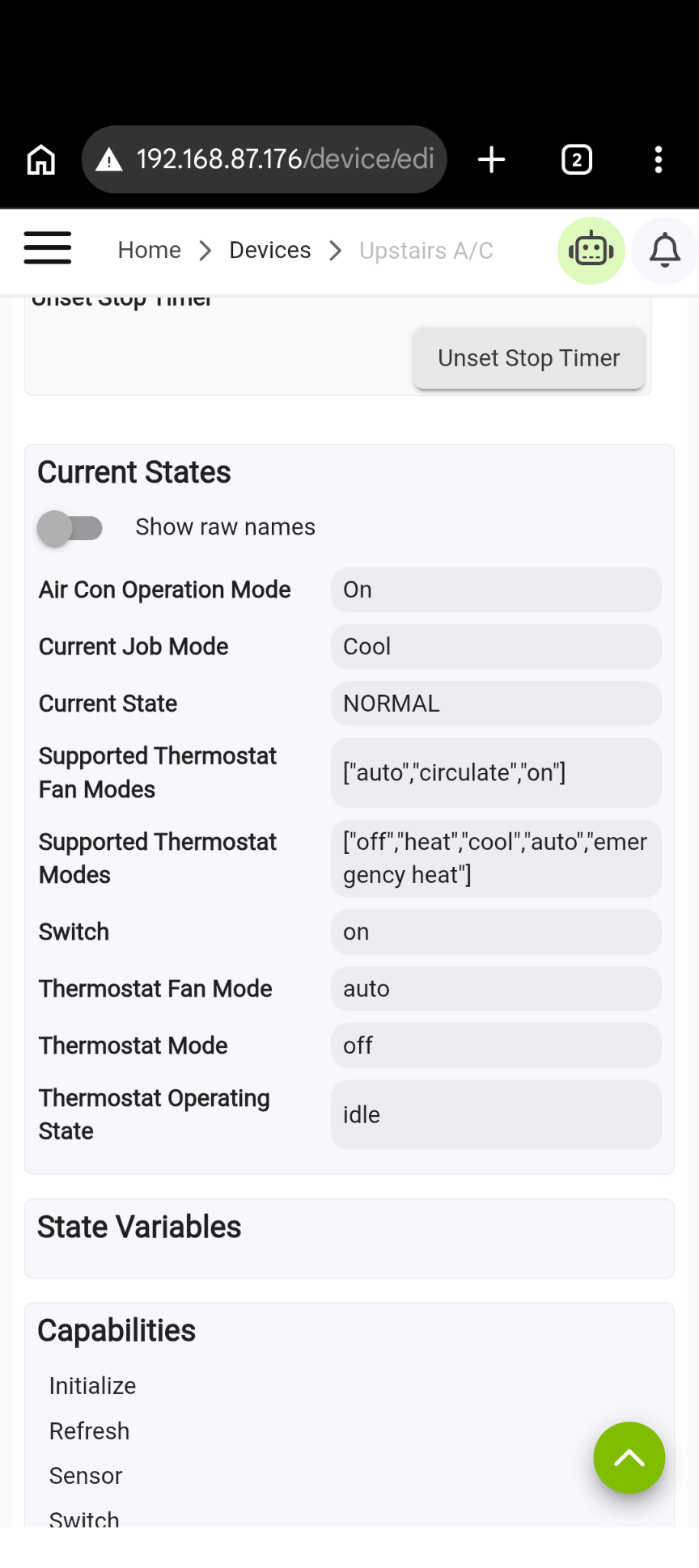
I hate to bother you on all this, but I think I see the issue. When I started looking at all this, the air conditioner device was showing all of the attributes such as temperature and set points was shown in a chart with all the current values.
Somewhere along the way of making the changes, most of these have disappeared, including the current temperature and she the setpoints.
The thermostat controller uses these and they're blank in the controller screens. They're also showing as "null" in the Rules Machine rules I've made.
So it looks like Hubitat can set the values but not read them.
I've attached a screenshot of the device current values display.
Thanks!
Before I go down the rabbit hole, has anyone tried to get the fridge to show current temp (not just target temp)?
We just had our compressor replaced and the LG tech told me the App used to show current temp, but they yanked it due to an increase in service calls.... I'd think the data is still there to be read from the API, just not exposed in the App.
I don't see it in their official Thinq API driver, so I doubt it's still being exposed. You could enable debug logging, hit Refresh and see if it's still in the API response.
The app (and API) used to show all top burners individually on our circa 2018 dual fuel, now it's only a single indicator on/off for the whole cooktop. They really dumbed it down.
it looked promising at first when I saw "InUnits", but it looks like it's still just the target values, nothing else... Le Sigh
temperature:
[[locationName:FRIDGE, targetTemperature:33, unit:F],
[locationName:FREEZER, targetTemperature:-2, unit:F]],
temperatureInUnits:
[[locationName:FRIDGE, targetTemperatureC:1, targetTemperatureF:33, unit:F],
[locationName:FREEZER, targetTemperatureF:-2, unit:F]]
Hello,
I modified the code to add an air purifier and a styler.
I have attached the modified app code along with the drivers for the air purifier and the styler.
The air purifier has been tested, but I haven’t been able to test the styler yet.
Hey, thanks for your contribution. Could you please create a pull request with your changes?
https://github.com/jonozzz/hubitat-thinqconnect/pulls
I've created a pull request.