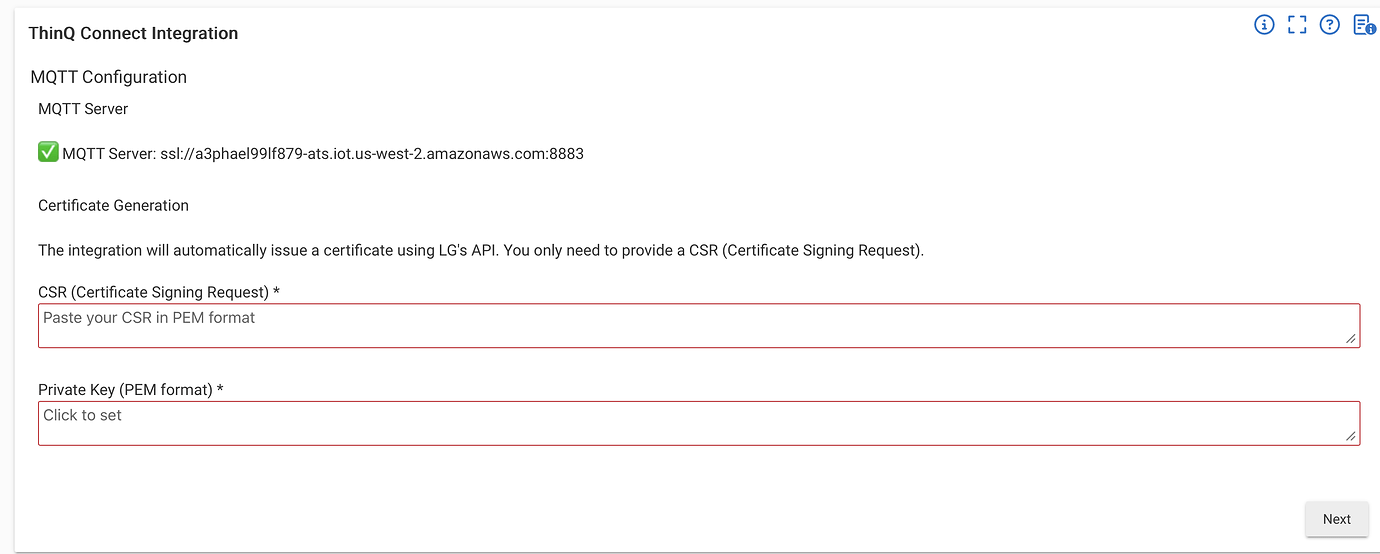
Appreciate everyone jumping in to help @wiegout before I got to it. And yeah, the CSR/key generation step isn’t very intuitive, but it’s required to get MQTT working with the LG cloud.
Possible bug in device Event listing: I have a supported microwave, oven, and dishwasher configured in the ThingQ Integration. When I look at the events listed for both the oven and dishwasher, I see "Microwave" listed in most cases under the "Produced By" column. The events listed in both appliances are produced by those appliances and not by the microwave.
Yeah, this is a quirk that dates back to the original app/drivers. It's not really a bug—it's a workaround for the fact that Hubitat apps can't subscribe to MQTT directly; only device drivers can. So the app has to pick one device to act as the "master" receiver for all account-wide push updates, and it looks like your Microwave drew the short straw. I agree it's not elegant, but as far as I know there's no way around it with Hubitat's current architecture.
Does that change now with Hubitat’s new MQTT support, I wonder…?
2 Likes
Thanks for the explanation. It's not a big deal, so we'll just live with it.  Nice work on this integration, much appreciated.
I'm not sure of any new mqtt support -- do you have a link?
This is the official mqtt interface documentation: MQTT Interface | Hubitat Documentation
Got it installed including the MQTT stuff. I had seen the README and then I couldn't find it later for nothing. So the link helped a lot.
I was able to do all the steps on a Mac. One thing missing that I figured out was that I needed to download the csrconfig.txt from the GitHub bundle. Then I was able to run the two commands to generate the files.
(For those coming after me that are MQTT deniers like me)
-
Download the csrconfig.txt to some place like ~/Downloads
-
cd ~/Downloads
-
Generate the private key: $ openssl genpkey -outform PEM -algorithm RSA -pkeyopt rsa_keygen_bits:2048 -out priv.key
-
Generate the signing request: $ openssl req -new -nodes -key priv.key -config csrconfig.txt -out cert.csr
-
Now you'll be able to open those two files and copy/paste them into the step I showed earlier:
-
Profit.
Thanks everyone for the assistance. Looking forward to finding innovative ways annoy my wife with the new integration.
1 Like
I’m not sure if the hub docs have been updated yet, but there were some updates to MQTT features in the most recent platform update:
Also not sure if any of it’s relevant to this integration  .
.
1 Like
I’ve got a notification via Alexa asking her to close the dishwasher if it was left open for too long… she LOVES that… 
2 Likes
Ha, that's funny because I have the exact opposite notification to remind us to OPEN the dishwasher door. Never had a stinky issue with it.
1 Like
I have a couple of LG mini split heat pumps that I'm able to connect to using this driver but "Set Air Con Job Mode" setting has the COOL option but doesn't have a HEAT option.
Any thoughts on how to add this?
Thanks!
I just added it in:
But I'm not sure if that'll work. I couldn't find any references to those enum values. Let me know if it works. You can also enable debug logging and see what the API returns when you refresh the device while it's in HEAT mode.
1 Like
That worked! Thanks so much!
There's also a "Seasonal Mode" with two options: "Summer" and "Winter." Would it be possible to expose that?
Also, do you have a way for me to send you a small monetary donation for providing this driver?
Thanks again!
1 Like
I don’t see any “Seasonal Mode” exposed through the API. It may just be a client-side feature implemented within the LG app itself. If you know what behavior it performs, you could likely recreate it in Hubitat using a few simple automation rules.
This is an open-source hobby project that I maintain for fun. I appreciate the support, but there’s no need for a donation! Thank you.
Thanks for looking!
The seasonal mode is actually part of the scheduling in their smart thermostat. The scheduling has four schedule modes (Sleep, Awake, Home, and Away) and you can set different operating modes (heat, cool, auto, etc ) thermostat set points for each of those schedule modes for the two seasonal modes (Summer and Winter) so you can easily switch back and forth as needed.
The thermostat model I have doesn't allow you to set separate heating and cooling set points when you're in Auto mode - you set just a target temperature and it's supposed to turn on the hearing and cooling as needed, but the dead band around that set point is too large to keep things comfortable - it'll go 6 degrees or more above or below that set point before the unit kicks in. I was hoping to use Hubitat to switch between seasonal modes on those spring and fall days when you need heat in the morning and cooling in the afternoon and still maintain the seasonal mode functionality. Definitely doable with Hubitat but a bit more work to set up.
Thanks again!
jonozz, is it possible to have this show in Hubitat as a thermostat instead of an air conditioner?
The Hubitat thermostat controller and thermostat scheduler should handle most of the functionality I'll looking for but I can't get them to connect to my devices - they don't show up for selection in the thermostat controller. I've tried changing the device type for my ThinQ thermostats to Virtual thermostat but the thermostat controller crashes when I try to connect them.
I've also tried to create a virtual thermostat first but then I can't connect it to the actual thermostat.
Thanks!
Give it a try now, let me know if it works.
My two ThinQ thermostats are now showing up when I try to set up a Thermostat Controller - thanks so much! But...
When I select one or both of them, I get the this error:
Error: Cannot invoke method capitalize() on null object
A virtual thermostat does get created for the thermostat; I'll see if it controls the thermostat.
Here are the messges in the log - I assume app 586 is the Thermostat Controller app.
app:5862026-05-11 02:57:31.201 PM
error
java.lang.NullPointerException: Cannot invoke method capitalize() on null object on line 267 (method mainPage)
dev:37402026-05-11 02:57:30.848 PM
info
setSupportedThermostatFanModes(["auto","on"]) was called
dev:37402026-05-11 02:57:30.579 PM
info
setSupportedThermostatModes(["heat","cool","auto"]) was called
dev:37402026-05-11 02:57:30.453 PM
warn
installed...
Try again, but make sure you hit Initialize first:

Thanks!
I was able to create controllers for each thermostat now. I'll do some testing and report back.
Thanks again!