[RELEASE] Tasmota Sync - Native and Real-time Synchronization between Hubitat and Tasmota 11 or later

Blockquote If you go to the Tasmota console and do a POWER ON for example that should cause rule3 to fire

that generated the following-
10:38:55.755 RSL: RESULT = {"POWER1":"ON"} 10:38:55.757 RSL: POWER1 = ON 10:38:55.797 RUL: POWER1#STATE performs "backlog0 Var13 1 ; RuleTimer1 1" 10:38:55.816 RSL: RESULT = {"Var13":"1"} 10:38:55.841 RSL: RESULT = {"T1":1,"T2":0,"T3":0,"T4":0,"T5":0,"T6":0,"T7":0,"T8":0} 10:38:56.863 RUL: RULES#TIMER=1 performs "var15 '1','1'" 10:38:56.868 RSL: RESULT = {"Var15":"'1','1'"} 10:38:56.897 RUL: VAR15#STATE$!%VAR16% performs "backlog ; var16 '1','1' ; webquery http://192.168.1.185:39501/ POST {'TSync':'True','SWITCH1':'1','SWITCH2':'1'}" 10:38:56.928 RSL: RESULT = {"Var16":"'1','1'"} 10:38:57.382 RSL: RESULT = {"WebQuery":"Done"}

Habitat findings-
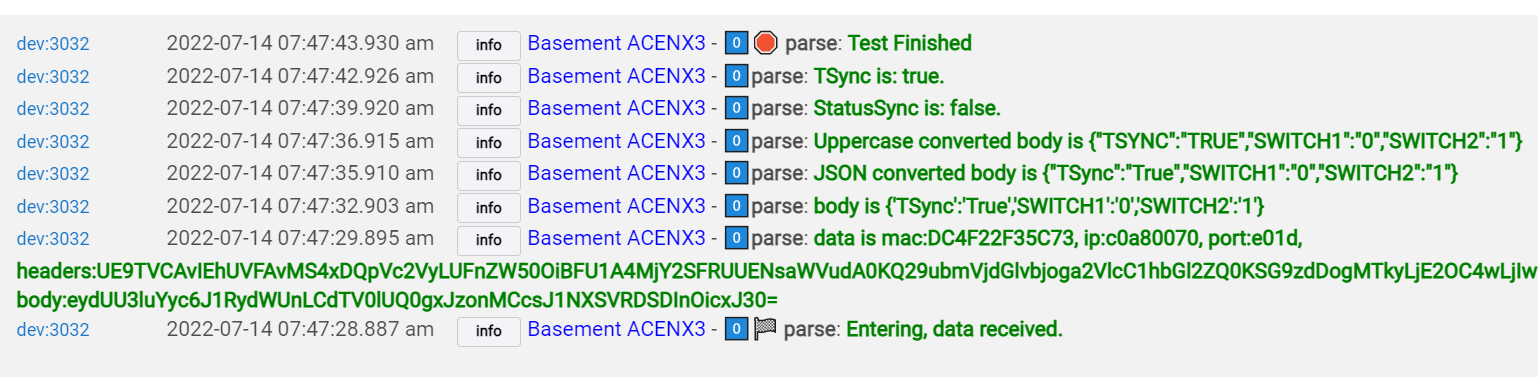
From within this virtual device, I do not see anything in the logs, nor the actual device logs. But from within the "Parent" device logs, I see this:

Hopefully that helps something. No worries if you can't get to it for a few days, I appreciate the quick response and help!

Thanks for the info. I know roughly what is going wrong but don’t know why. I’ll be home in a few days and be better positioned to debug. Thanks for your patience. One last thing you could do to help is turn the log level up to three and rerun the test and send me the output.

Thanks.

No problem!!

From Tasmota -

16:24:03.809 RSL: RESULT = {"POWER1":"OFF"}
16:24:03.811 RSL: POWER1 = OFF
16:24:03.858 RUL: POWER1#STATE performs "backlog0 Var13 0 ; RuleTimer1 1"
16:24:03.877 RSL: RESULT = {"Var13":"0"}
16:24:03.900 RSL: RESULT = {"T1":1,"T2":0,"T3":0,"T4":0,"T5":0,"T6":0,"T7":0,"T8":0}
16:24:05.425 RUL: RULES#TIMER=1 performs "var15 '0','1'"
16:24:05.431 RSL: RESULT = {"Var15":"'0','1'"}
16:24:05.483 RUL: VAR15#STATE$!%VAR16% performs "backlog ; var16 '0','1' ; webquery http://192.168.1.185:39501/ POST {'TSync':'True','SWITCH1':'0','SWITCH2':'1'}"
16:24:05.515 RSL: RESULT = {"Var16":"'0','1'"}
16:24:05.615 RSL: RESULT = {"WebQuery":"Done"}

From Habitat (wow!):

dev:1682022-07-10 04:24:01.048 pm infoKitchen Light Sync - *️⃣1️⃣🐶 🛑 ..watchdog: Finished.
dev:1682022-07-10 04:24:01.045 pm debugKitchen Light Sync - *️⃣*️⃣2️⃣🐶 ....watchdog: All normal. Not in a transaction.
dev:1682022-07-10 04:23:56.247 pm infoKitchen Light Sync - *️⃣1️⃣💨 ..hubitatResponse: Exiting
dev:1682022-07-10 04:23:56.243 pm infoKitchen Light Sync - *️⃣1️⃣..hubitatResponse: Closing Transaction
dev:1682022-07-10 04:23:56.239 pm infoKitchen Light Sync - *️⃣1️⃣..updateStatus: Complete:Success
dev:1682022-07-10 04:23:56.235 pm infoKitchen Light Sync - 0️⃣hubitatResponse: Setting device handler values to match device.
dev:1682022-07-10 04:23:56.231 pm debugKitchen Light Sync - *️⃣*️⃣2️⃣....hubitatResponse: RSSI: 100
dev:1682022-07-10 04:23:56.226 pm debugKitchen Light Sync - *️⃣*️⃣2️⃣....hubitatResponse: Flags are Action:STATE  ActionValue:None
dev:1682022-07-10 04:23:56.221 pm debugKitchen Light Sync - *️⃣*️⃣2️⃣....hubitatResponse: Raw data is: {"TIME":"2022-07-10T16:23:53","UPTIME":"0T02:53:58","UPTIMESEC":10438,"HEAP":23,"SLEEPMODE":"DYNAMIC","SLEEP":50,"LOADAVG":19,"MQTTCOUNT":0,"POWER1":"ON","POWER2":"ON","WIFI":{"AP":1,"SSID":"CANDY CASTLE","BSSID":"3E:94:ED:BC:05:73","CHANNEL":8,"MODE":"11N","RSSI":100,"SIGNAL":-48,"LINKCOUNT":1,"DOWNTIME":"0T00:00:05"}}.
dev:1682022-07-10 04:23:56.218 pm infoKitchen Light Sync - *️⃣1️⃣🏁 ..hubitatResponse: Entering, data received
dev:1682022-07-10 04:23:56.215 pm infoKitchen Light Sync - *️⃣1️⃣💨 ..parse: Exit to hubitatResponse()
dev:1682022-07-10 04:23:56.212 pm debugKitchen Light Sync - *️⃣*️⃣2️⃣....parse: TSync is: false.
dev:1682022-07-10 04:23:56.209 pm debugKitchen Light Sync - *️⃣*️⃣2️⃣....parse: StatusSync is: false.
dev:1682022-07-10 04:23:56.203 pm debugKitchen Light Sync - *️⃣*️⃣2️⃣....parse: body is {"Time":"2022-07-10T16:23:53","Uptime":"0T02:53:58","UptimeSec":10438,"Heap":23,"SleepMode":"Dynamic","Sleep":50,"LoadAvg":19,"MqttCount":0,"POWER1":"ON","POWER2":"ON","Wifi":{"AP":1,"SSId":"Candy Castle","BSSId":"3E:94:ED:BC:05:73","Channel":8,"Mode":"11n","RSSI":100,"Signal":-48,"LinkCount":1,"Downtime":"0T00:00:05"}}
dev:1682022-07-10 04:23:56.167 pm debugKitchen Light Sync - *️⃣*️⃣*️⃣3️⃣......parse: data is mac:8CAAB5E49F85, ip:c0a801ba, port:50, headers:SFRUUC8xLjEgMjAwIE9LDQpDb250ZW50LVR5cGU6IGFwcGxpY2F0aW9uL2pzb24NClNlcnZlcjogVGFzbW90YS8xMi4wLjIgKEVTUDgyNjZFWCkNCkNhY2hlLUNvbnRyb2w6IG5vLWNhY2hlLCBuby1zdG9yZSwgbXVzdC1yZXZhbGlkYXRlDQpQcmFnbWE6IG5vLWNhY2hlDQpFeHBpcmVzOiAtMQ0KQWNjZXB0LVJhbmdlczogbm9uZQ0KVHJhbnNmZXItRW5jb2Rpbmc6IGNodW5rZWQNCkNvbm5lY3Rpb246IGNsb3NlDQo=, body:eyJUaW1lIjoiMjAyMi0wNy0xMFQxNjoyMzo1MyIsIlVwdGltZSI6IjBUMDI6NTM6NTgiLCJVcHRpbWVTZWMiOjEwNDM4LCJIZWFwIjoyMywiU2xlZXBNb2RlIjoiRHluYW1pYyIsIlNsZWVwIjo1MCwiTG9hZEF2ZyI6MTksIk1xdHRDb3VudCI6MCwiUE9XRVIxIjoiT04iLCJQT1dFUjIiOiJPTiIsIldpZmkiOnsiQVAiOjEsIlNTSWQiOiJDYW5keSBDYXN0bGUiLCJCU1NJZCI6IjNFOjk0OkVEOkJDOjA1OjczIiwiQ2hhbm5lbCI6OCwiTW9kZSI6IjExbiIsIlJTU0kiOjEwMCwiU2lnbmFsIjotNDgsIkxpbmtDb3VudCI6MSwiRG93bnRpbWUiOiIwVDAwOjAwOjA1In19
dev:1682022-07-10 04:23:56.163 pm infoKitchen Light Sync - *️⃣1️⃣🏁 ..parse: Entering, data received.
dev:1682022-07-10 04:23:56.070 pm infoKitchen Light Sync - *️⃣1️⃣💨 ..callTasmota: Exiting
dev:1682022-07-10 04:23:56.065 pm infoKitchen Light Sync - *️⃣1️⃣..updateStatus: Sent:STATE 
dev:1682022-07-10 04:23:56.060 pm debugKitchen Light Sync - *️⃣*️⃣*️⃣3️⃣📞 ......callTasmota: hubaction: GET /cm?user=null&password=null&cmnd=STATE%20None HTTP/1.1
Accept: */*
User-Agent: Linux UPnP/1.0 Hubitat
HOST: 192.168.1.186:80

dev:1682022-07-10 04:23:56.055 pm debugKitchen Light Sync - *️⃣*️⃣*️⃣3️⃣📞 ......callTasmota: Path: /cm?user=null&password=null&cmnd=STATE%20None
dev:1682022-07-10 04:23:56.052 pm debugKitchen Light Sync - *️⃣*️⃣*️⃣3️⃣......cleanURL: Returning fixed path: /cm?user=null&password=null&cmnd=STATE%20None
dev:1682022-07-10 04:23:56.048 pm debugKitchen Light Sync - *️⃣*️⃣*️⃣3️⃣......cleanURL: Fixing path: /cm?user=null&password=null&cmnd=STATE None
dev:1682022-07-10 04:23:56.019 pm debugKitchen Light Sync - *️⃣*️⃣*️⃣3️⃣📞 ......callTasmota: Starting Watchdog
dev:1682022-07-10 04:23:56.016 pm debugKitchen Light Sync - *️⃣*️⃣2️⃣📞 ....callTasmota: Opening Transaction
dev:1682022-07-10 04:23:56.012 pm infoKitchen Light Sync - 0️⃣📞 callTasmota: Sending command: STATE 
dev:1682022-07-10 04:23:55.488 pm debugKitchen Light Sync - *️⃣*️⃣*️⃣3️⃣......remainingTime: Remaining time 0
dev:1682022-07-10 04:23:55.485 pm infoKitchen Light Sync - 0️⃣⚡ Action: Refresh started....
dev:1682022-07-10 04:23:55.460 pm infoKitchen Light Sync - 0️⃣Initialize: Configured as simple switch. No power monitoring information.
dev:1682022-07-10 04:23:55.449 pm infoKitchen Light Sync - 0️⃣Initialize: pollFrequency value: 0 seconds.
dev:1682022-07-10 04:23:55.446 pm debugKitchen Light Sync - *️⃣*️⃣2️⃣⚡ ....Action: DNI: C0A801BA is correct. Not updated. 
dev:1682022-07-10 04:23:55.441 pm debugKitchen Light Sync - *️⃣*️⃣*️⃣3️⃣......updateDeviceNetworkID: Settings are:192.168.1.186
dev:1682022-07-10 04:23:55.432 pm infoKitchen Light Sync - 0️⃣Initialize: Device initialized
dev:1682022-07-10 04:23:55.428 pm infoKitchen Light Sync - 0️⃣Update: Settings: [destIP:192.168.1.186, HubIP:192.168.1.185, relayType:0, timeout:5000, debounce:7000, switchBehaviour:2, logging_level:3, loggingEnhancements:3, pollFrequency:0, destPort:80]

Thanks again!

Hi there, I'm back home. I have created this combination however I can't test it thoroughly because I don't have that combination. I test part on my iFan and part on a Dimmer but that is not quite the same. You can find it here but it is not in HPM yet until you give me the 2 thumbs up.
https://github.com/GaryMilne/Hubitat-Tasmota/blob/main/Fan_with_Dimmer.txt

H, I'm home and ready to work on this. From that last post it seems that Hubitat is sending the right formatting ( webquery http://192.168.1.185:39501/ POST {'TSync':'True','SWITCH1':'0','SWITCH2':'1'} ) but that the driver is not processing correctly.
In the Hubitat logs you sent there is something not right. Could I ask you to do this.

  1. Set the log level at 3 for the device.
  2. Clear the log for that device.
  3. Go to Tasmota console and type "POWER TOGGLE" and enter.
  4. Wait 15 seconds and then send me whatever is in the log for that device.

It should start with something like this (parse: Entering, data received)


In the one you sent me most of the output is the result of saving the configuration which invokes the STATE command.
Thanks.

P.S. What is your hub software version.

1 Like

hub version 2.3.2.135

dev:1682022-07-13 07:52:47.290 pm infoKitchen Light Sync - *️⃣1️⃣🐶 🛑 ..watchdog: Finished.
dev:1682022-07-13 07:52:47.287 pm debugKitchen Light Sync - *️⃣*️⃣2️⃣🐶 ....watchdog: All normal. Not in a transaction.
dev:1682022-07-13 07:52:42.803 pm infoKitchen Light Sync - *️⃣1️⃣💨 ..hubitatResponse: Exiting
dev:1682022-07-13 07:52:42.799 pm infoKitchen Light Sync - *️⃣1️⃣..hubitatResponse: Closing Transaction
dev:1682022-07-13 07:52:42.795 pm infoKitchen Light Sync - *️⃣1️⃣..updateStatus: Complete:Success
dev:1682022-07-13 07:52:42.790 pm infoKitchen Light Sync - 0️⃣hubitatResponse: Setting device handler values to match device.
dev:1682022-07-13 07:52:42.786 pm debugKitchen Light Sync - *️⃣*️⃣2️⃣....hubitatResponse: RSSI: 100
dev:1682022-07-13 07:52:42.781 pm debugKitchen Light Sync - *️⃣*️⃣2️⃣....hubitatResponse: Flags are Action:STATE  ActionValue:None
dev:1682022-07-13 07:52:42.775 pm debugKitchen Light Sync - *️⃣*️⃣2️⃣....hubitatResponse: Raw data is: {"TIME":"2022-07-13T19:52:37","UPTIME":"3T06:22:42","UPTIMESEC":282162,"HEAP":23,"SLEEPMODE":"DYNAMIC","SLEEP":50,"LOADAVG":19,"MQTTCOUNT":0,"POWER1":"ON","POWER2":"OFF","WIFI":{"AP":1,"SSID":"CANDY CASTLE","BSSID":"3E:94:ED:BC:05:73","CHANNEL":8,"MODE":"11N","RSSI":100,"SIGNAL":-47,"LINKCOUNT":1,"DOWNTIME":"0T00:00:05"}}.
dev:1682022-07-13 07:52:42.771 pm infoKitchen Light Sync - *️⃣1️⃣🏁 ..hubitatResponse: Entering, data received
dev:1682022-07-13 07:52:42.766 pm infoKitchen Light Sync - *️⃣1️⃣💨 ..parse: Exit to hubitatResponse()
dev:1682022-07-13 07:52:42.762 pm debugKitchen Light Sync - *️⃣*️⃣2️⃣....parse: TSync is: false.
dev:1682022-07-13 07:52:42.758 pm debugKitchen Light Sync - *️⃣*️⃣2️⃣....parse: StatusSync is: false.
dev:1682022-07-13 07:52:42.751 pm debugKitchen Light Sync - *️⃣*️⃣2️⃣....parse: body is {"Time":"2022-07-13T19:52:37","Uptime":"3T06:22:42","UptimeSec":282162,"Heap":23,"SleepMode":"Dynamic","Sleep":50,"LoadAvg":19,"MqttCount":0,"POWER1":"ON","POWER2":"OFF","Wifi":{"AP":1,"SSId":"Candy Castle","BSSId":"3E:94:ED:BC:05:73","Channel":8,"Mode":"11n","RSSI":100,"Signal":-47,"LinkCount":1,"Downtime":"0T00:00:05"}}
dev:1682022-07-13 07:52:42.720 pm debugKitchen Light Sync - *️⃣*️⃣*️⃣3️⃣......parse: data is mac:8CAAB5E49F85, ip:c0a801ba, port:50, headers:SFRUUC8xLjEgMjAwIE9LDQpDb250ZW50LVR5cGU6IGFwcGxpY2F0aW9uL2pzb24NClNlcnZlcjogVGFzbW90YS8xMi4wLjIgKEVTUDgyNjZFWCkNCkNhY2hlLUNvbnRyb2w6IG5vLWNhY2hlLCBuby1zdG9yZSwgbXVzdC1yZXZhbGlkYXRlDQpQcmFnbWE6IG5vLWNhY2hlDQpFeHBpcmVzOiAtMQ0KQWNjZXB0LVJhbmdlczogbm9uZQ0KVHJhbnNmZXItRW5jb2Rpbmc6IGNodW5rZWQNCkNvbm5lY3Rpb246IGNsb3NlDQo=, body:eyJUaW1lIjoiMjAyMi0wNy0xM1QxOTo1MjozNyIsIlVwdGltZSI6IjNUMDY6MjI6NDIiLCJVcHRpbWVTZWMiOjI4MjE2MiwiSGVhcCI6MjMsIlNsZWVwTW9kZSI6IkR5bmFtaWMiLCJTbGVlcCI6NTAsIkxvYWRBdmciOjE5LCJNcXR0Q291bnQiOjAsIlBPV0VSMSI6Ik9OIiwiUE9XRVIyIjoiT0ZGIiwiV2lmaSI6eyJBUCI6MSwiU1NJZCI6IkNhbmR5IENhc3RsZSIsIkJTU0lkIjoiM0U6OTQ6RUQ6QkM6MDU6NzMiLCJDaGFubmVsIjo4LCJNb2RlIjoiMTFuIiwiUlNTSSI6MTAwLCJTaWduYWwiOi00NywiTGlua0NvdW50IjoxLCJEb3dudGltZSI6IjBUMDA6MDA6MDUifX0=
dev:1682022-07-13 07:52:42.715 pm infoKitchen Light Sync - *️⃣1️⃣🏁 ..parse: Entering, data received.
dev:1682022-07-13 07:52:42.387 pm infoKitchen Light Sync - *️⃣1️⃣💨 ..callTasmota: Exiting
dev:1682022-07-13 07:52:42.372 pm infoKitchen Light Sync - *️⃣1️⃣..updateStatus: Sent:STATE 
dev:1682022-07-13 07:52:42.345 pm debugKitchen Light Sync - *️⃣*️⃣*️⃣3️⃣📞 ......callTasmota: hubaction: GET /cm?user=null&password=null&cmnd=STATE%20None HTTP/1.1
Accept: */*
User-Agent: Linux UPnP/1.0 Hubitat
HOST: 192.168.1.186:80

dev:1682022-07-13 07:52:42.310 pm debugKitchen Light Sync - *️⃣*️⃣*️⃣3️⃣📞 ......callTasmota: Path: /cm?user=null&password=null&cmnd=STATE%20None
dev:1682022-07-13 07:52:42.305 pm debugKitchen Light Sync - *️⃣*️⃣*️⃣3️⃣......cleanURL: Returning fixed path: /cm?user=null&password=null&cmnd=STATE%20None
dev:1682022-07-13 07:52:42.300 pm debugKitchen Light Sync - *️⃣*️⃣*️⃣3️⃣......cleanURL: Fixing path: /cm?user=null&password=null&cmnd=STATE None
dev:1682022-07-13 07:52:42.261 pm debugKitchen Light Sync - *️⃣*️⃣*️⃣3️⃣📞 ......callTasmota: Starting Watchdog
dev:1682022-07-13 07:52:42.257 pm debugKitchen Light Sync - *️⃣*️⃣2️⃣📞 ....callTasmota: Opening Transaction
dev:1682022-07-13 07:52:42.250 pm infoKitchen Light Sync - 0️⃣📞 callTasmota: Sending command: STATE 
dev:1682022-07-13 07:52:41.706 pm debugKitchen Light Sync - *️⃣*️⃣*️⃣3️⃣......remainingTime: Remaining time 0
dev:1682022-07-13 07:52:41.699 pm infoKitchen Light Sync - 0️⃣⚡ Action: Refresh started....
dev:1682022-07-13 07:52:41.660 pm infoKitchen Light Sync - 0️⃣Initialize: Configured as simple switch. No power monitoring information.
dev:1682022-07-13 07:52:41.645 pm infoKitchen Light Sync - 0️⃣Initialize: pollFrequency value: 0 seconds.
dev:1682022-07-13 07:52:41.641 pm debugKitchen Light Sync - *️⃣*️⃣2️⃣⚡ ....Action: DNI: C0A801BA is correct. Not updated. 
dev:1682022-07-13 07:52:41.630 pm debugKitchen Light Sync - *️⃣*️⃣*️⃣3️⃣......updateDeviceNetworkID: Settings are:192.168.1.186
dev:1682022-07-13 07:52:41.602 pm infoKitchen Light Sync - 0️⃣Initialize: Device initialized
dev:1682022-07-13 07:52:41.596 pm infoKitchen Light Sync - 0️⃣Update: Settings: [destIP:192.168.1.186, HubIP:192.168.1.185, relayType:0, timeout:5000, debounce:7000, switchBehaviour:2, logging_level:3, loggingEnhancements:3, pollFrequency:0, destPort:80]

Hub version is good. However the trace you sent is the result after saving preferences or initializing the device. Perhaps you skipped step 2 and step 3 does not generate anything?

  1. Set the log level at 3 for the device.
  2. Clear the log for that device.
  3. Go to Tasmota console and type "POWER TOGGLE" and enter.
  4. Wait 15 seconds and then send me whatever is in the log for that device.

Maybe nothing is tracing, but when I clear (from the Current logs, seem to be all I can clear, unless im missing something), what I get in the logs after the POWER TOGGLE, is:

dev:1092022-07-13 10:17:00.313 pm errorgroovy.json.JsonException: expecting '}' or ',' but got current char ''' with an int value of 39

The current character read is ''' with an int value of 39
expecting '}' or ',' but got current char ''' with an int value of 39
line number 1
index number 1
{'TSync':'True','SWITCH1':'0','SWITCH2':'1'}
.^ on line 855 (method parse)

I have log level at 3, but this is still all I get.. hope this helps! let me know anything else I need to do if that's not what you're looking for :slight_smile:

I think the error happens so quickly that the prior messages that were sent to the log do not have time to display. Line numbers generated by the error are wrong but I know the approximate location.

I upgraded one of my dual plugs to Tasmota 12.0.2 and upgraded my Hub to 2.3.2.138 (Current) and everything is working as I would expect.

I have created a test driver which you can find here.

Basically it simulates the critical area into a test function. To use it do the following.

  1. Create a new virtual device
  2. Assign the above as the driver
  3. Assign the Hub IP and any random IP on your network (does not need a device)
  4. Save the configuration.
  5. Clear the log for the device.
  6. Click on the "Test" button.
    Go to the Log for this device and it should SLOWLY spit out the following.

With this we are working with exactly the same data. If it works that I'm going to have you substitute your data from one of your devices on line 113 and repeat the process.

Line 112 specifies the delay between commands in milliseconds if you need to increase it.

Let me know how it goes.

Ok, ran through that and got the exact same output!

Which data on 113 do I need to put in there? change all of them (mac, ip, port, and headers)? Or can I just use the Mac and IP which I can easily get. Unsure how to get the port and headers. Thanks!!

Isn't coding fun!? :smiley:

It is fun, but frustrating at times.
Thinking about it I don't think you have that data as it's the first thing the parse() function spits out, but it's not doing that in our case.
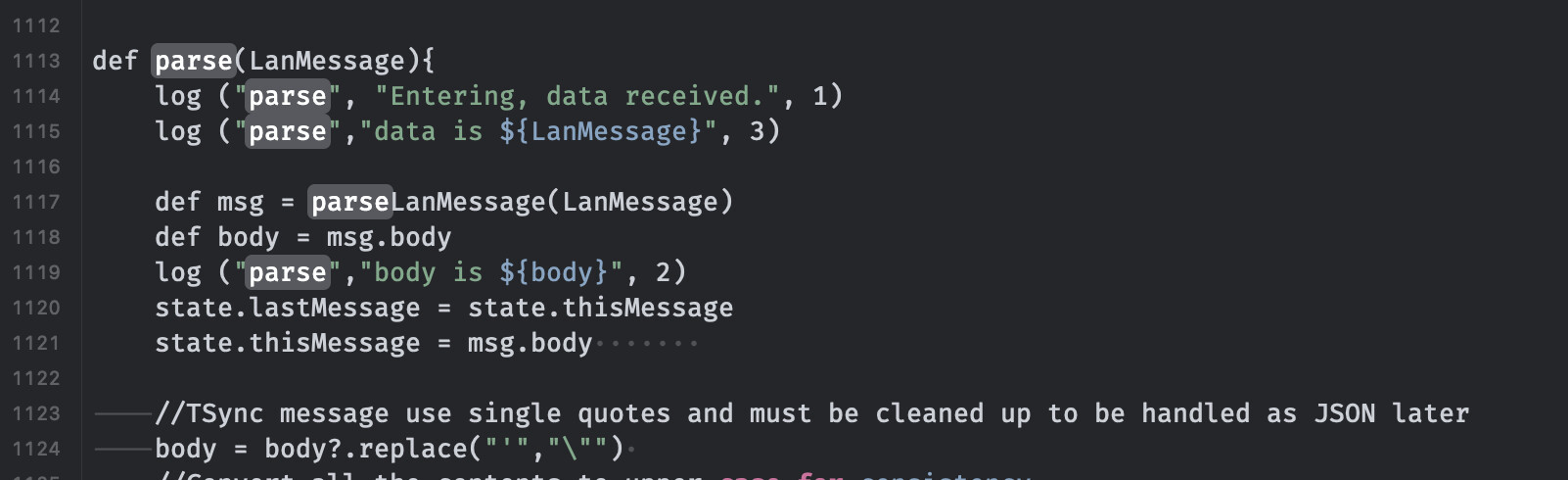
Instead, locate the parse() function (around line 1000) and insert a number of the pauseExecution(duration) statements like those in the test() function. Save, set log level to 3 and then retry normal operation.

Hopefully that will give it time to spit out the data so we can look and see what is wrong. Something is misformatted in the data causing the JSON calls to blow up.

I found this at line 1112, is this what you meant?

A little confused, do you mean to change the duration here and test?

With the virtual device, or my real device im trying to get working?

i work with code also, so yes, very fun and frustrating!

I PM'd you some replacement code for the parse() function. Once you paste that in I'd like you to try making a change on Tasmota (power toggle for example) and see what the log output reveals.

Should blow up as it has before but hopefully we will get some output before that like we did from the test function.

Let me know how this works for you when you get a chance.

1 Like

I’m trying this out and getting the same error as @GraphicHealer.

I found that it was being generated by Markus’ driver (I still had it installed). I also found that when Markus’ driver was installed for the same switch, the status wouldn’t properly show on the app. Everything fixed itself once I removed the device on then same IP using that driver.

Would it be possible to have an option to disable info logging? (or is it there and I don’t see it…)

Also, in some instances, I use the switches to monitor power and would rather they not be able to turn off. Is anyone aware of a command or rule that would enable this? I checked the command list and didn’t recognize anything that would do that. I suspect that a rule could be built that would perform this action, but I’m not sure if it would interfere with the rules that provide status to Hubitat…?

I'm not sure I understand. GraphicHealer made the request for a Fan\Dimmer combination. I posted that combo here for him to test (I don't have that combo) but have not heard back.

Now another user reported the "error on line 855" problem which we are still actively trying to figure out. Is that the error you are referring to?

Yes, if you do add a new device with a duplicate address then everything still gets routed to the old address handler so the new device does not receive any input.

Glad you were able to figure it out.

It's not there but you are the second person to make that inquiry so I'll take a look at it and see.

If I understand correctly then I would use a rule for this. My driver only uses rule3 so you can still use rule1 or rule2.
Example: If turned off, power 1 will be turned on after a 10 second delay
rule1 on Power1#state=0 do Backlog Delay 10; Power1 1 endon
rule1 enable

1 Like

You’re right! I meant to point to this:

But it’s all good now. :smiley:

Awesome! I’ll give that a try.

In case anyone looks at this thread the line 855 error was generated by a T4HE device on the same IP address. Once this device was removed (or address renamed) then the Tasmota Sync driver worked as expected.

3 Likes