I adjusted your forum privilege level so you should be able to add links or edit your posts.
Thanks for bringing this integration to Hubitat!
I adjusted your forum privilege level so you should be able to add links or edit your posts.
Thanks for bringing this integration to Hubitat!
I don't know what Pronto Hex is, but are you saying that you can configure an X series remote from HA instead of using the phone app? I have an X2 and one of the things I miss that that Harmony remotes offered was the ability to set things up from a PC.
I'll definitely take a look at your HA integration when I get back to our winter home in about a month.
It’s an old IR format that is still used for storing IR codes for some remotes. URC remotes can import them too.
I’ll probably not have time to look at this this week, but I’ll add it to my projects list.
The Home Assistant integration includes 2 "cards" (dashboard modules), 1 for control and 1 for configuration. The configuration card ("Sofabaton Control Panel") has a full featured editors, letting users change any aspect of their Devices and Activities on the hub.
One of the things the Device editor lets you change is the "payload" of a device's command. The payload is what the hub ends up emitting when you trigger a command via the remote or app. For infrared payloads, Sofabaton has their own format. The editor knows how to convert different IR formats into Sofabaton compatible payloads.
That's useful because Devices installed from the Sofabaton cloud will have the Power toggle command, but may lack discrete ON and OFF commands, even though they exist for the device. Inputs are also frequently incomplete.
Users can go to online databases, like Global Cache (these guys basically have IR codes for everything), and retrieve missing codes, in the Pronto Hex format, from there. You can just paste these into the editor and save them to the hub.
What i posted here is the engine that contains the functionality of the Home Assistant integration, packaged in a way so that implementations can be made for other automation platforms.
I’m lucky that I still have a working URC account and access to their Complete Control software. Their database is about the most detailed I’m aware of, so I program my old MX-980 with the extended device codes, and then use the 980 to program my X2 via the learning function.
For most folk, your system is the better workaround. 
I have now published sofabaton-x-server to PyPi. The REST+WS API remains stable versus the development version i posted here previously.
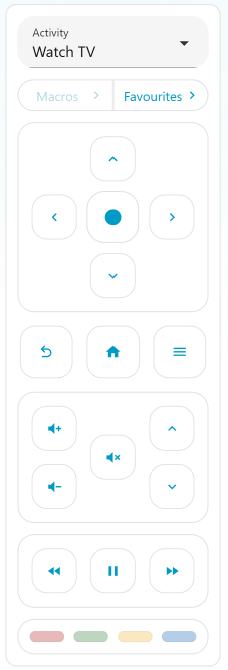
What's new is that I ported the Virtual Remote card to the server and it's included here. There is also the beginnings of a management UI in the package.
The idea here is that an integration for Hubitat does not have to necessarily contain more than the bare minimum, which is (1) sending commands to the hub and (2) receiving events/state from the hub so that automation actions can be triggered. All other functions could be relegated to the on-board management app.
No need anymore to checkout the repo, to try this out:
Make sure the Sofabaton app is closed and that no other clients/integrations are connected to the hub.
With Python 3.11+ available, do:
python -m pip install "sofabaton-x-server>=0.2,<0.3"
sofabaton-x-server
http://<ip_of_the_device_you_installed_on>:8480/ui/ in your webbrowser.Notes:
Status:
Let me know how it goes.
Hey @dJOS and @m3tac0de , thanks for the driver and the underlying work behind it.
SB Integration: (Stalled)
I started building a fuller integration (sitting in GH currently), X1S on your platform, and X2 over MQTT via Hubitat's built-in broker for full local read/write. Ran into a roadblock there, interfaces.mqtt connects and subscribes but doesn't seem to be delivering incoming messages. Already sent HE support a writeup.
TCP Inbound Messages to HE:
Also read through the inbound TCP discussion earlier in this thread and the possible feature request @Sebastien. I have ran into this same issue on other integrations, so its not a new roadblock but I think the TCP inbound messages MAY expose security concerns.
If we shift to that route, we COULD see if there is a TCP inbound port section we could use but that's a big IF
MATTER for Sofabaton:
Might all be moot soon because Sofabaton finalized Matter certification recently. This roll out is planned to go live sometime in October. Not sure how that changes things, but wanted to flag it either way.
This, of course, would be dependable on what is exposed in the MATTER support.
For me its a matter, no pun intended, for scene control based on remote input rather than commands from HE itself except for the one lone command of "Off". The command would be for a "All away, or Bedtime Rule".
A small update on sofabaton-x-server: I’ve spent some time on the browser UI since my last post. You can now edit devices and activities, change button assignments, work with IR codes and manage backups through the control panel. There’s also a web remote.
You can use it just for configuration and backups, even if you already have everything you need working in Hubitat. It doesn’t require Home Assistant, and you can run it on your computer only when you want to make changes or save a backup. There’s no need for an always-on Pi or NAS for that.
If you do want to connect it to Hubitat, you can send HTTP commands using the device and command IDs shown in the panel, or subscribe to the WebSocket for activity updates and configured remote-button events. For those uses, you’d leave the server running. The configuration UI can sit alongside that, so an integration doesn’t have to recreate all those editors.
If you already installed it using the pip command above, stop the server and run:
python -m pip install --upgrade "sofabaton-x-server>=0.2.1,<0.3"
Then start it again as before and reload the page at http://<server>:8480/ui/. Use the same Python environment and keep your existing data directory.
Edit: Full release notes are here.
I’ve released sofabaton-x-server 0.2.2 on PyPI. A few additions since my last post:
One detail for anyone embedding controls in a dashboard: browser pages calling the API from a different origin now need that origin added under Server settings → Access. Embedding the web remote in an iframe needs no change.
To upgrade, stop the server and run this in the same Python environment:
python -m pip install --upgrade "sofabaton-x-server>=0.2.2,<0.3"
Then restart with your existing data directory and reload any open control-panel or remote pages.
Full changelog · Getting started
As before, you can use it just for configuration and backups without Home Assistant or a Hubitat integration. Feedback from anyone trying it with Hubitat is welcome.
Heads-up: Sofabaton Integration v1.0.0
Hi all, and a big thank you to @dJOS and @m3tac0de for this driver. It's been the foundation for a lot of us.
I've built a Sofabaton Integration app that builds onto this driver (with his blessing and full credit to both) and adds new options:
This driver keeps working as is. The integration is just another option.
Tip for X1S owners trying the integration: a hub can only be set up in one place at a time, since both use the hub's IP as its device ID.
X1S owners, I'd love your help testing. I don't own one, so real-hardware feedback would be great.
The integration is getting its own release thread shortly, with install steps, setup guides for X2 and X1S, and a place for questions and feedback. IF your interested, keep an eye out...
Nice work mate, I look forward to testing it out.
Here's the link to the 2-way integration by @JdThomas24 and I've added the link to the 1st post as well.