Is there a reason why this wouldn't work with Centralite and other motion sensors that do temp? Is it very specific to the Samsung sensors, or is "SmartThings" just a reference to the platform?
Edited for a little more clarity:
It will utilize timing for motion and create a table for common motion events.
Watching how often the device checks in
Learning its normal behavior (average interval)
Setting a timeout to 3× that average
Continuously adjusts based on events.
It is definitely in testing phase and if it’s not working as expected, will be removed all together.
Using it for daughters presence since Apple home doesn’t work often for her.
@danabw
Try it out. Not sure if it would work. This was based on the ST and Aeotec units.
SmartThings Motion Sensor Enhanced v1.7.5 — Now Available!
Bug Fix — Devices Stopping Reporting
The presence detection feature introduced in earlier versions was causing devices to intermittently stop reporting. The root cause was aggressive runIn() scheduling — every single parse event (motion, battery, temperature) was cancelling and rescheduling the presence timeout timer. On active motion sensors this could fire dozens of times per hour, interfering with the device's normal reporting cycle.
Switching to the generic Zigbee motion driver resolved the issue, confirming the presence logic was the culprit.
lastCheckin attribute — redundant with Hubitat's built-in Last Activity
zigbeeHealth and missedCheckins — were driven by presence, no longer have a data source
presenceLogging and enablePresence preferences
Improvements
Battery voltage curve tightened to 5% increments — 20 clean steps from 100% down to 1%, weighted correctly for CR2450/CR2477 cells (holds well from 3.05V→2.70V, drops steeply below)
Temperature events fully suppressed when Enable Temperature Reporting is off — no log entries, no state updates, nothing
LQI, RSSI, and Route Health monitoring retained — these are useful signal quality indicators and are unaffected
Do I Need to Reconfigure? If you had presence-related automations using the presence attribute from this driver you will need to update those. All other automations (motion, battery, temperature) are unaffected. A Save Preferences on each device after updating is recommended to clear stale state.
Small but solid cleanup release — no functional changes to motion or battery behavior, just tighter housekeeping.
What changed in v1.7.7:
configure() no longer fires on every Save Previously, saving preferences always sent Zigbee configuration commands to the device even if nothing relevant changed. This could interrupt the device's reporting cycle. Now configure() only fires when enableTemp or batteryReportMinutes actually change — or on first save after updating the driver.
Temperature toggle now behaves cleanly in both directions
Toggling off immediately clears the temperature attribute so dashboards and apps see it go blank rather than showing a stale reading indefinitely
Toggling on immediately refreshes the device so the attribute populates right away — no waiting up to 30 minutes for the next natural report
batteryVoltage only fires on change Previously batteryVoltage fired on every battery report regardless of whether the value changed, while battery % only fired on change. Now both behave consistently.
Removed presenceTimeoutCheck() stub This was a compatibility shim added in v1.7.6 to absorb stale scheduled calls from v1.7.4. Enough time has passed that all devices will have saved preferences and cleared the old timer — safe to remove now.
Small but important update — fixes a battery reporting accuracy issue that was affecting Battery Monitor 2.0 App health ratings on these devices.
What changed in v1.7.8:
Battery voltage curve corrected for CR2 chemistry The previous curve was tuned for CR2450/CR2477 coin cells and not the CR2 batteries these sensors actually use. The new curve reflects CR2's real discharge profile: 3.0V fresh, a flat plateau around 2.8V for most of its life, and a steeper drop below 2.5V toward the 2.0V cutoff. Battery percentage readings will now be more accurate across the full discharge cycle.
Default battery reporting interval changed to 240 minutes The previous default of 60 minutes was causing Battery Monitor to see large per-sample drops and reject them as outliers, leaving health ratings stuck at Pending indefinitely. 240 minutes gives the voltage enough time to move meaningfully between reports so drain rate calculations work correctly.
Note: Existing installs are unaffected by default interval change. If you are running 60 minute reporting, from previous install of driver, and seeing Pending health in the Battery Monitor 2.0 app, change your interval to 240 minutes and reset drain history for the affected devices.

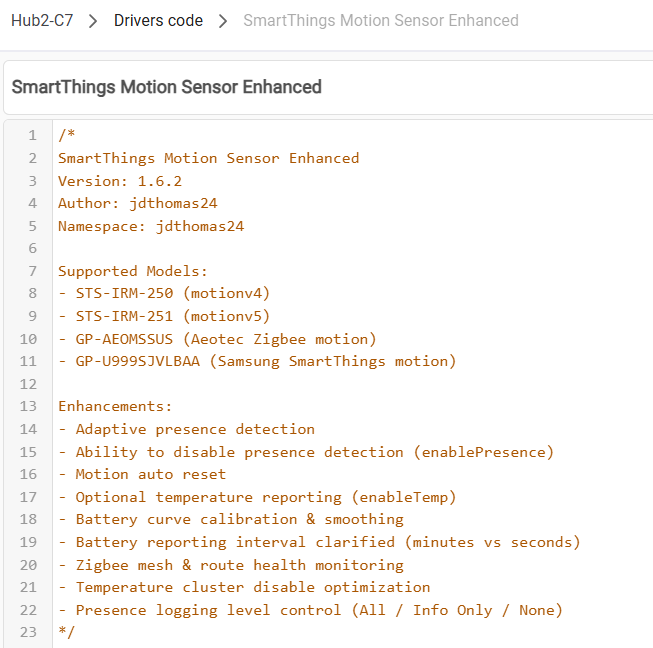


 Presence detection —
  Battery voltage curve tightened to 5% increments — 20 clean steps from 100% down to 1%, weighted correctly for CR2450/CR2477 cells (holds well from 3.05V→2.70V, drops steeply below)
 Temperature events fully suppressed when Enable Temperature Reporting is off — no log entries, no state updates, nothing
 LQI, RSSI, and Route Health monitoring retained — these are useful signal quality indicators and are unaffected
 Pending indefinitely. 240 minutes gives the voltage enough time to move meaningfully between reports so drain rate calculations work correctly.