Shelly Wave Shutter Z-Wave 800 Driver for Hubitat (Works with ZWaveJS)
Description
This is a custom driver for Shelly Wave Shutter that is intended to be used instead of the Hubitat in-built drivers. As of the time of writing, the in-built driver suffers from multiple issues encountered on S2-included devices from EU distribution.
This custom driver fixes the following issues:
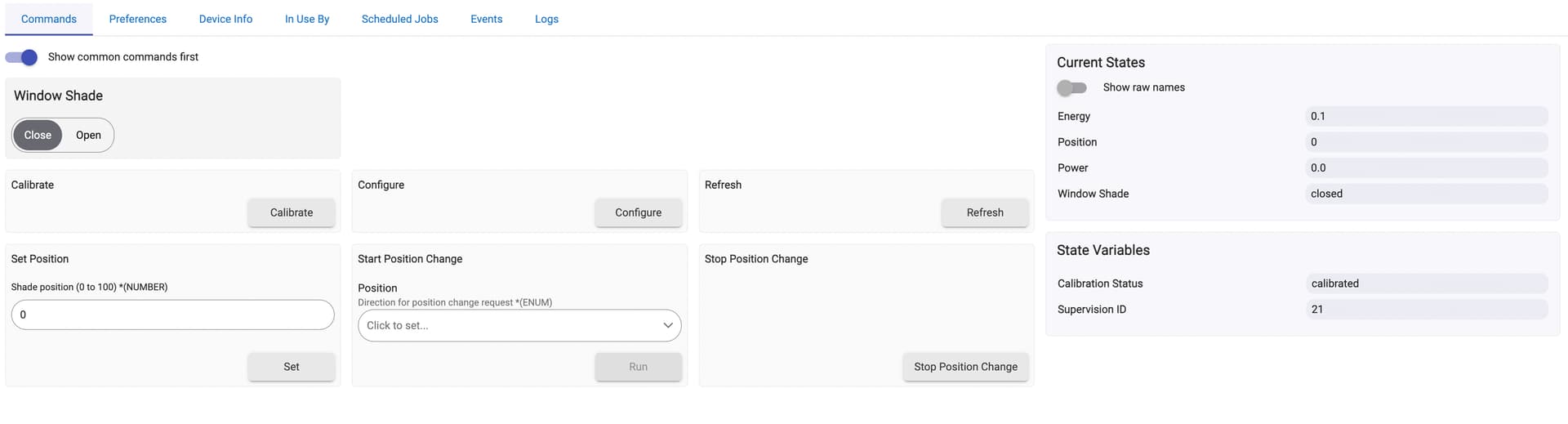
shows properly "opening", "closing", "partially open", "open", and "closed" states,
calibration button works correctly,
all parameters defined in the manual are configurable, and the configuration is properly saved on the device.
Additionally:
the driver properly leverages S2 supervision and infers "closing" and "opening" states from acknowledged commands, thus reducing radio traffic,
upon hitting the "refresh" action shows the current calibration status,
lifetime energy consumption is shown.
Notes
The driver has been tested on Shelly Wave Shutter from EU distribution module with firmware version 12.23 and securely paired with Hubitat.
v0.1.1 - 19.06.2025: Minor fix when reading enumerated configuration params.
v0.1.2 - 25.06.2025: Minor safeguard against logging level set by different custom driver.
v0.2.0 - 20.09.2026: Support for Z-Wave JS, for the breaking configuration changes introduced in firmware 14.x, and for new parameters.
Installation
It is recommended to install through Hubitat Package Manager by searching for Shelly Wave Shutter. Alternatively, you can download the code and install it manually.
I'm using this drive to control my Shelly Wave Shutters. I love how it gives me access to the Status and all the parameters. So thank you @bogus.wojcik Incredible work!
I'm having a small issue where the status is always inverted (it shoes opened when it's closed and vice-versa). I know I could revert the buttons, but the buttons work fine - the button on the left opens it and the button on the right closes it. But the "online" behaviour is switched on Hubitat (the buttons and the status).
The thing is that if the installer (or you if you installed this by yourself) plugged buttons' wires incorrectly and engine's wires incorrectly, then physically the up button will result in shades opening and down button will result in shades closing, while the device is thinking otherwise. Setting both settings to reverse should make both the buttons and the "online" status to show the same.
Just intall the driver and movements are ok, directions are ok, BUT no information on shutter position!!! what can I try?
When I pressed calibration the shutter just moved a few cm on opening direction and close again! is this corrrect? What should be the driver calibration routine?
Based on the official instruction you should first open the blinds manually and only after that start calibration. If calibration is being executed properly, the blinds will close, then open, and then close again and stop in the middle.
Only after the calibration is successful the module and the driver will show the position of the blinds.
Furthermore, the module sends updates after finished movement. When you press close you will not get gradual updates like 0%, 10%, 23%, .... You will get just 0 and then 100%. But if you move the blinds manually or set a particular level, it should show it correctly, providing the module is calibrated.
Uau quick answer, this is really a great comunity.
Can I presume you mention calibration made by the software buttom? Or do i need to perform the hardware S buttom calibration routine?
Hi @bogus.wojcik any idea why the Shelly using your driver does not show up in the list of devices available in my apps, even though I click the "Update" and "Refresh device lists"?
Right, so it appears the drivers, both the system driver and this driver only expose the Shelly as a WindowShade, contrary to the Qubino Shutter drivers which exposed them as Switches and Dimmers. I'm currently trying the Mirror app, creating 2 x Custom Mirrors as the (hopefully) quickest workaround this, without having to modify my existing shades automations and migrate them all to Rules Machine. I have Philips Pronto control panel integrations that would be a pain to change.
FYI, I modified the driver to expose also Dimmer functions like the Qubinos did. It now works well with the Scenes I have which rely on Dimmer behaviour.
There is a new version of this driver that now supports both firmware 14 and ZWaveJS.
@faviao and @gan : Shelly did something very unexpected, they changed the parameter numbering for some of the key parameters when the firmware jumped from 12 to 14. The worst thing it's not clearly documented. The docs for Shutter have still the old layout of params from 12, and it's not clear that by installing 14 on it you make it LR. Long story short it's now fixed.
After updating, open the device page, check your preferences and hit Save Preferences once, so the values are written with the correct numbers.
Also, I made this driver to work on ZWaveJS as well, going around of ZWaveJS flattening of supervision.