My integration was written for TVs that have Roku built-in and then later adapted to support the media players. Of the Roku media players I have used (ultra, stick, mini), they all report that the TV is on, even when you power the Tav off. So, detecting if the TV is on or off will have to be done with another device, if at all.
Additionally, not all Roku media players support HDMI-CEC, but those that do, than turn the TV on/off without the remote, using the HDMI-CEC protocol. Different brands will calls this different names. I have seen BraviaLink, toslink, and other names that are all the CEC protocol. Make sure you have that turned on, and set to turn on/off when the devices do. Then the Roku will be able to command the TV on/off using the HDMI cable. It will also send a command to the TV to switch inputs to the Roku input when you wake up the Roku (send power on).
For this to work, the settings page needs to be set to use discreet power on and power off instead of toggle behavior.
Roku has 3 power command: PowerOn, PowerOff, and Power. Power is a toggle. I allow you to define in the power or PoweroOn command is used to turn on the device, and if the power or PowerOff command is used to turn off the device. Make sure they are set to not use the Power command.
This may be because the TV is powering off by idle detection, and then it turns off the Roku’s power. Or this could be new behavior — this would be the first case of the Roku reporting that the TV is off that I have seen. I wonder — if you get the HDMI-CEC working, would the TV fully power off and report Off immediately.
OK, I verified that CEC is on for both the TV and Roku. On my TV, it is called Simplink. On the Roku, it is called "One Touch Play." I have a Vizio soundbar connected to the TV via Optical. It seems the Roku had no problem controlling the TV volume and mute command, so I assume the Roku is telling the TV what to do with volume, and the TV adjusts the soundbar accordingly. As far as I know, CEC is only supported via HDMI, not via optical cable interfaces so the soundbar is likely irrelevant.
Also, if I switch the input to another device connected via HDMI (in my case, an Xfinity device), if I press any button on the Roku remote it switches back to the Roku HDMI input. Hence, I think CEC is functioning correctly.
As far as reporting on or off status, despite CEC being set on both the TV and the Roku, the switch status does not update when using the Roku device to turn the TV off. I've noticed that other status attributes update immediately, such as what app is currently streaming, whether you hit pause or play, etc. It seems whatever works to update the device also works the other way around, from the device page to the Roku.
Neither the on / off buttons, nor key press PowerOn or PowerOff function. I set the preferences to use PowerOn and PowerOff versus the toggle as you suggested.
I suppose this means that for Roku Sticks, none of the power commands will work. If I understood you correctly, it sounds like you agree. In which case what I wanted to do isn't possible.
Just for giggles, I received another 4k stick today that I'm going to hook up to an older Vizio TV. I'll fool around with that to see if it exhibits the same behavior.
The issue is t necessarily the Roku — though older Roku sticks do not support CEC, if that one does it means that the TV is not supporting power controls over CEC.
Optical cable is just a remote speaker connection, it behaves to the TV like if you plugged in headphones. The Roku controls the TVs volume and thus the sound bar’s volume.
In the case on my Vizio guest bedroom TV connected to a Roku Premier, the Roku can power on or off the TV but the Roku never knows the power state of the TV, so it always reports as on.
In my RV with a Roku Mini connected to a Toshiba TV, everything is the same as it is for my guest room Roku, except I must use the TV remote to turn on the tv. after that, the Roku can turn it off. Technically, am using the Roku remote in both instances, but to turn it is need line of sight to the Tav’s IR sensor, but turning off works via CEC. Every TV implements the CEC standard differently. Everyone’s mileage will vary based on TV being used.
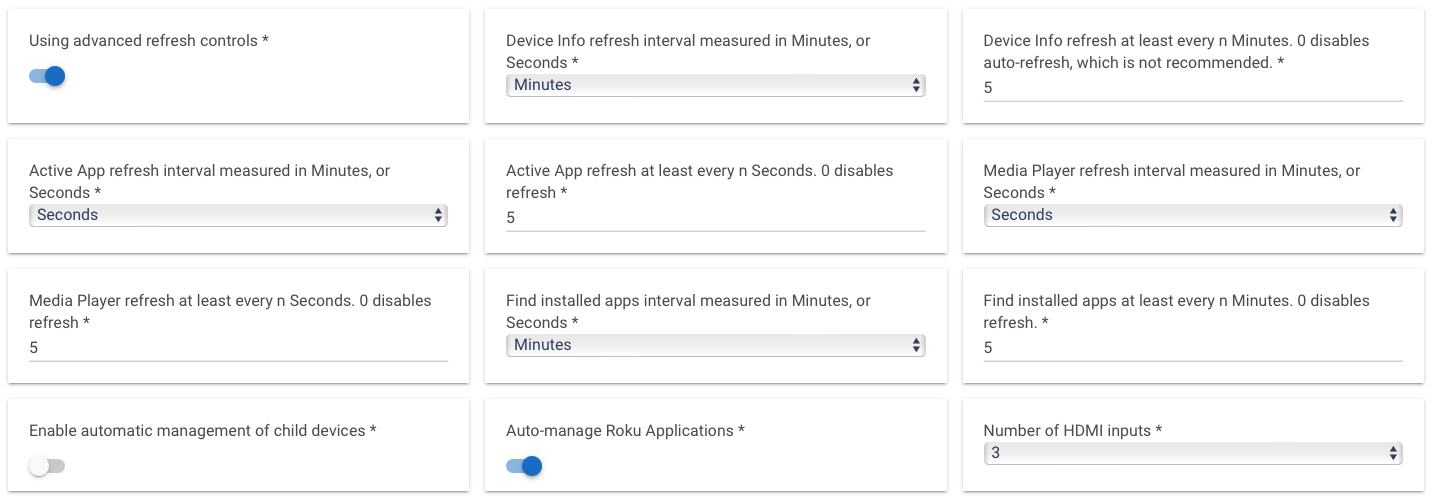
Hi Armand, Thanks so much for creating this great package. Loving the integration and capabilities but am stuck on the Query Active App refresh time. Is there a way I can set this to automatically run ever x seconds. I am trying to use the app buttons on my roku remote to trigger Rule Machine but it seems like I need to run the query manually each time. Thanks!
set Active App Refresh interval measurement to “Seconds”
set Active App refresh every n seconds to your number of seconds.
I highly recommend setting media player to the same or faster interval as app refresh. The reason being is that once media is playing, app refresh is ignored in favor of media player status updates, and only when media player stop does app refresh resume. Setting media player to same or faster interval ensure the same experience.
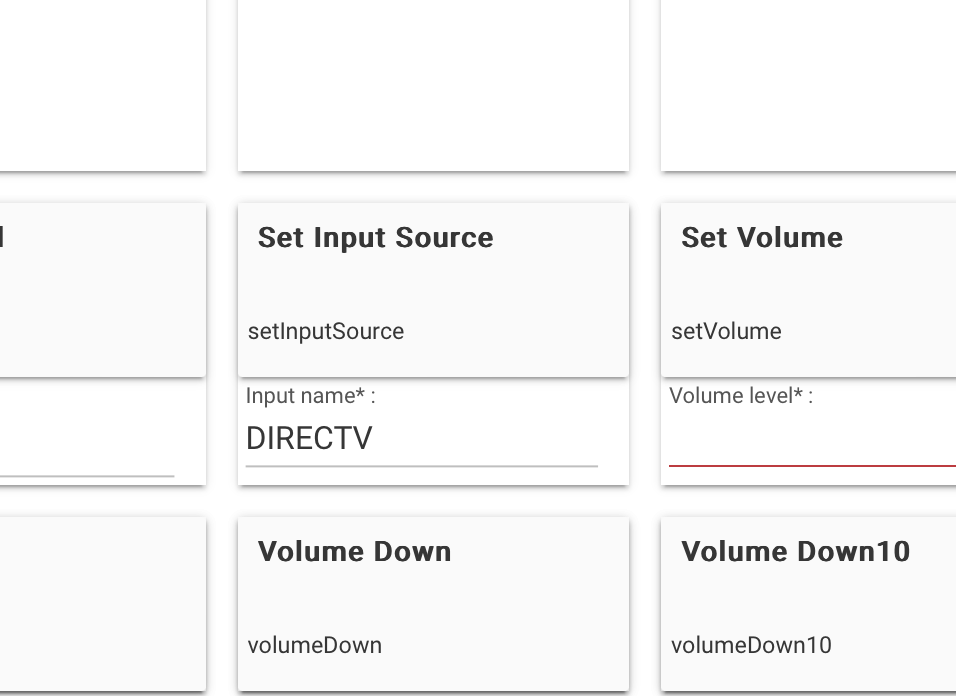
I must be doing something stupid but I can't find my Roku TV device in a rule when I select custom action and then actuator. I wanted to "Set Input Source" and specify the name of an app in a string. Thanks for any help.
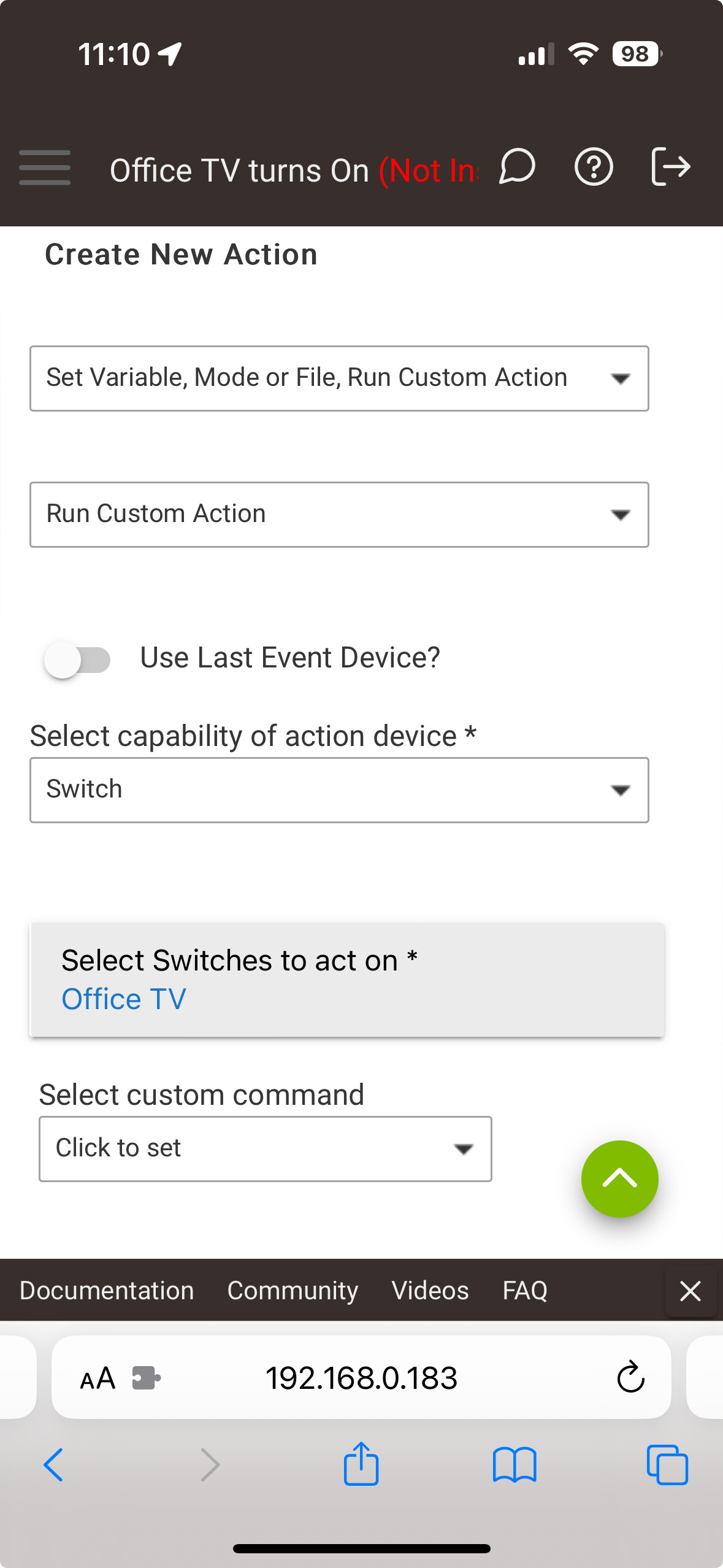
I am in a beta version so my experience may be a bit different than yours. In my system, actuator is not an option. I select switch, then it see my Roku devices that I have setup. The device must be setup first and visible in the devices list.
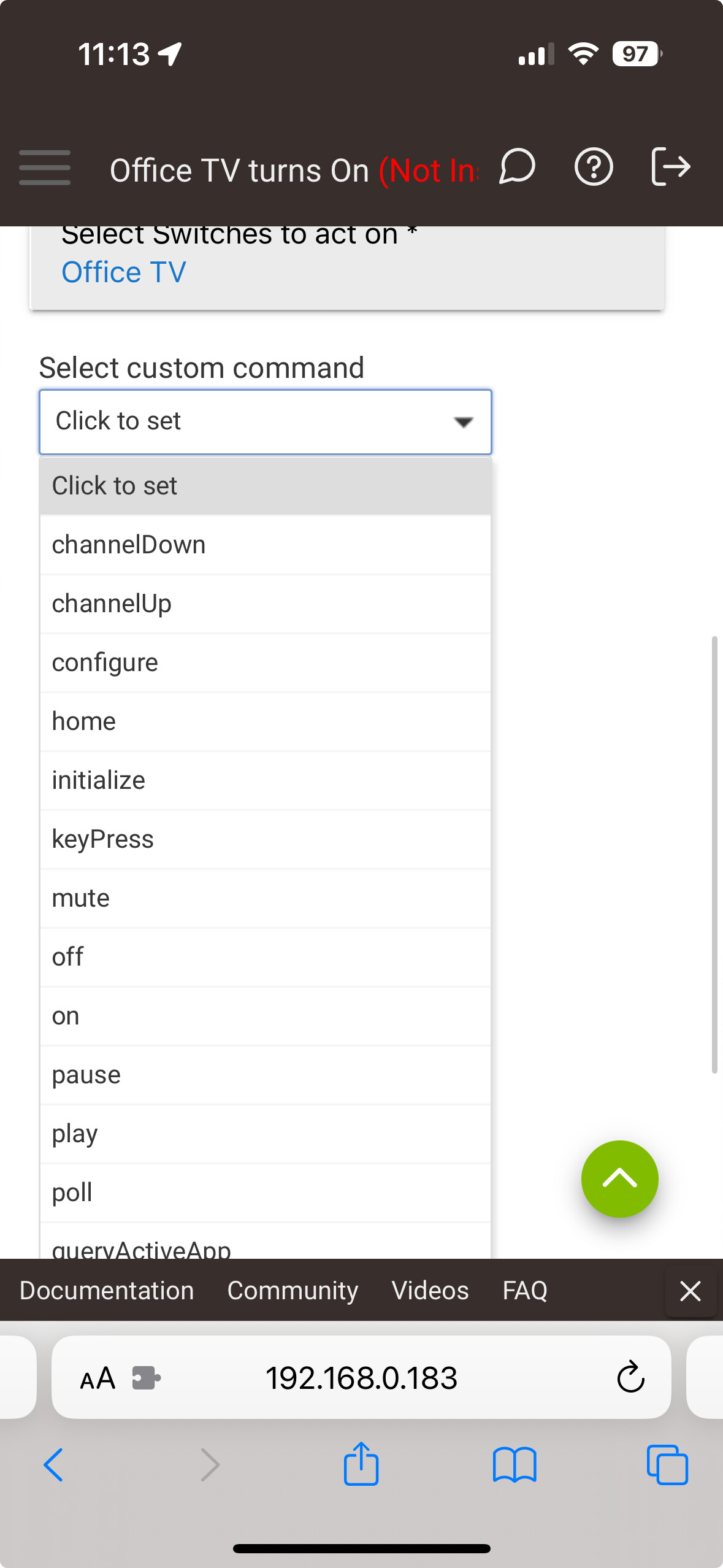
No, that is t how this works. What rules app are you using? When you select the switch, if then enable on/off but you can also issue custom commands, which are any of the commands available. I would need to know while rules app your using to help guide you.
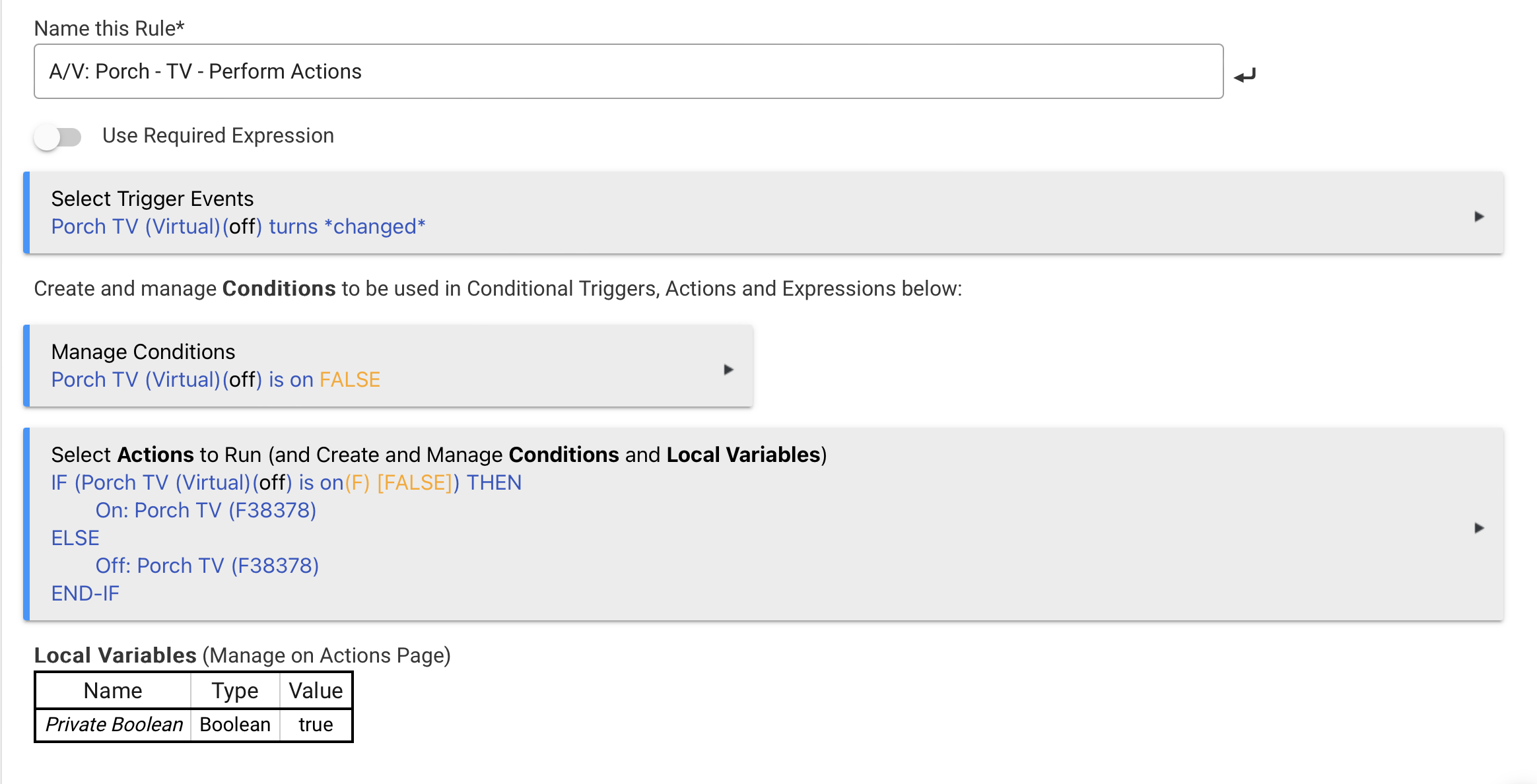
I am trying to do some very basic things. Turn on the TV - which you see in the rule. And then after the TV is turned on to set the input source for the TV. Normally I would expect to use Run Custom Action, then Actuator, then select this button and specify a string to pass to it. But maybe I have this all wrong? Thanks for the help.
When you select the device type in the action, that is just a filter. But when enumerating the available actions, they are all listed for the selected device.
I just noticed, this is a legacy rule you are using. Please switch to the modern rule machine. The legacy rules are just there for backwards support. There may be a bug in it that is preventing the full functionality.
It is the latest rule machine. But I found it. I didn't realize you have to select custom action, then switch, then custom command. When I have used custom commands such as this in the past I have selected Run Custom Command, then actuator, then custom command. To be honest I don't really understand the difference between the two?
Glad it worked. I am not up to date on the current release of HE. I am on the beta stream, and I have been mostly hands off for a couple months now, and I have very few rules left in my system. I have migrated most rules over to the other apps, like room lighting, basic rules, simple lighting, etc.
Hey this app is awesome! I really wish Hunitat would install some of these automatically because I had no idea it even existed. My harmony hubs are all acting up again and Im going to just abandon them this time. I Started searching for replacements and found this thread (via google) by accident. This fixes a huge issue for me so now the system can know if tvs are on or not without relying on ancient harmonys.
So if Hubitat is paying attention consider making some of this stuff part of the system. Not every user is on your forum constantly.
If Hubitat wants to make any of my code standard, I am okay with that. The problem is that my code is a slave to the data provided by Roku. I have done a lot to try and performance tune about of the overhead involved in the query and parsing of the Roku data, but it is still rather processor intensive simply because of the payload of the xml content provided by Roku, and xml is a costly format to parse. I’m the Roku ECP protocol is a public API, so I am sure the devs have reason for not integrating this stuff already.
I wrote this because I was in the same boat as you — relying on Logitech, and not loving the experience.
If you have any requests for changes let me know. I am a full time developer with about of high priority projects that demand a lot of my attention, but I still try to squeeze time in to manage ty home automation projects. I try to fix bugs immediately and I try to implement feature enhancements or Baguio changes to align with my project’s goals within a week or two. Some things do fall off the radar at times, though, this is just a side project for me.
I just started playing with it but my first question would be how often can I refresh without killing the hubs cpu? I’ve got 5 Rokus I’d like to monitor. Looks like everything I want to do can be done by looking at just the application that’s runnning. On 2 Rokus I’ll look at transport status for pauses. Every 5 seconds be ok maybe?
That’s a tough one to answer. It depends how you use it. I recommend you turn on advanced refresh. I have mine set ton5 minute device refresh, 5 second active app refresh, 2 second media player refresh and 30 minutes for installed apps refresh.
I don’t trigger events based on if the atV turns on or off, so every 5 minutes is enough for me. You can safely go down to every 5 seconds just fine. The thing is, if advanced refresh is enabled, then the device refresh is just for detecting when the tv turns on. Once the TV is on, the much more efficient active app and media player refreshes are sufficient.