This new released fixed my problem.
Thank you!
Curious if you get a new offline/online events. I am on latest and have a few per day.
Often had these even on the old driver
The cloud MQTT queue occasionally disconnects the driver device. A watchdog ping command periodically checks the connection and rebuilds it when it's down. The driver currently declares an offline event during the rebuild. While we can't resolve the MQTT disconnection issue, I am testing a fix to delay declaring 'offline' for at least 15 seconds. This should prevent the ping-pong effect.
That would work. When I see offline now it almost always reconnects within 1 sec.
Released 1.1.10 to prevent healthStatus ping pong. Also, has some refinements to prevent fast polling if the API changes resulting in an error condition.
Just chiming in here that I'm able to connect and read status on an S8 MaxV Ultra. I need to do some playing around with commands still. Thanks for the awesome work on this driver!
Now that I've mapped a second map, I don't see the rooms from the second one in the state variables of the device.
I haven't actually attempted this, but did you hit 'refresh' on the driver after you did the second map? It should do that periodically too...if that doesn't work, it will be a couple of days before I can help.
I did a forced reauthorization of the user by saving the preferences with that option on. Then I followed that with a refresh.
I will do another check/refresh now after turning debugging on and report back if anything seems notable.
I'm in no rush on any fix for it. I did attempt to read the code to see if I could understand the API in hopes maybe I could explore through the usiot site (only to realize they don't publish their API commands and that I wasn't sure how to make a proper call to it in the browser's address bar).
Thanks for taking a look at it.
Recently my Roborock S7 MaxV became unstable. (last 1 month probably) it is losing communication and when I try to login on the app , it complains about data collection error.
I reconnect to wifi and it then continues working.
So I wrote the situation to Roborock support. Here's their answer:
Could you tell us if you are using Home Assistant to control the vacuum cleaner?
If yes, it is Roborock APP server detecting that Home Assistant has tried to visit it for too many times in a short period and ban it temporarily to protect server. You can wait for 24 hours and all will work again. But we suggest you disable Home Assistant to avoid it happens again in the future.
I am not using HomeAssistant but I assume this integration is similar to HomeAssistant.
So I think this driver is the reason of my issues.
But it was working fine before. So I guess they changed something on their Cloud or their software and that requires less frequent access.
Now I checked the installed driver version. It is 1.1.6 and there is a 1.1.10 release.
Does this new release resolve such issue with Roborock cloud ?
Yes, the 1.1.10 changes should solve for this issue. They changed the API and it caused a lot of noise that was then blocked. The newer code, fixes the API, and if something 'bad' happens again does not hammer the server like 1.1.6 could/would do.
thanks
Still loving this driver, and I use it with a companion app I wrote to do scheduling and smart home status checks before starting cleans, as well as empty the bin based on Sq. ft cleaned.
Would you have any time to add maps to this driver? I see there are map options available with the API
get_map_v1
get_multi_map
I add images to drivers using a String attribute and a sendEvent command using

So it seems doable. I'm just not clear if it sends the map or if you have to request it, I was thinking of poking with your code, but if you have the time that would be great!
I'm jealous of the HA integration that pulls in the maps 
Apologies, but not at this time. I specifically mentioned that unless someone else wanted to take on the image work, I wasn’t interested in doing it, especially since you can use HA for that.
Update:
If you want to give it a go, you can see at line 651, I block on messages other than 102. The images are different type and I think have different encryption, but I didn't take it much beyond just blocking from processing since I didn't want the load on the hub.
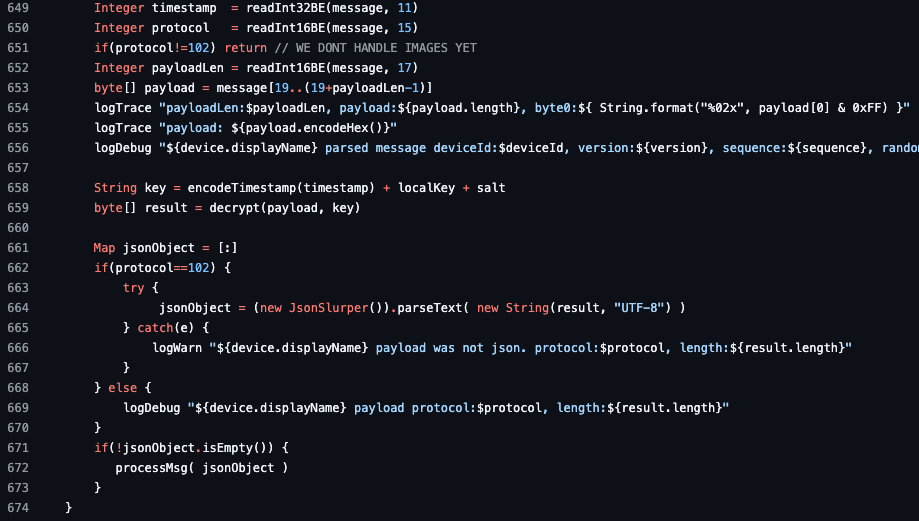
@Bloodtick_Jones
a small bug for some of the models - the switch is always on.
the issue is in line 553.
result.switch=(result?.in_cleaning?.toInteger()!=0 || result?.is_locating?.toInteger()!=0 || result?.is_exploring?.toInteger()!=0) ? "on" : "off"
some of the models do not have "is_exploring", so the last check is Null.
change this line as following solved the problem.
result.switch=(result?.in_cleaning?.toInteger()==1 || result?.is_locating?.toInteger()==1 || result?.is_exploring?.toInteger()==1) ? "on" : "off"
Went with:
result.switch=((result?.in_cleaning ?: 0).toInteger() != 0 || (result?.is_locating ?: 0).toInteger() != 0 || (result?.is_exploring ?: 0).toInteger() != 0) ? "on" : "off"
Since in_cleaning can be greater than 1 sometimes.
Thanks for the help. GitHub and HPM updated.
I have a Q Revo Max V and found the command for the fan power:
Set_Custom_Mode [xxx]
where xxx is
quiet=101
balanced=102
turbo=103
max=104
auto=106
max+=108
Remember to include the brackets! IE [104]
First off, MANY thanks Bloodtick for creating this driver. I just bought my 2nd roborock 3 days ago - and a buddy told me about the driver ... I WAS using Home Assistant but now am switching over to your driver.
I cannot for the life of me get a Rule machine rule to execute for the vacs though. No PROBLEM doing anything on WebCoRe - my testing just uses a virtual switch then I attempt to have RM do a appRoomClean for room 22 I am trying the following

Here is the very short rule I am trying to make work - room clean for room 22 if switch turns on
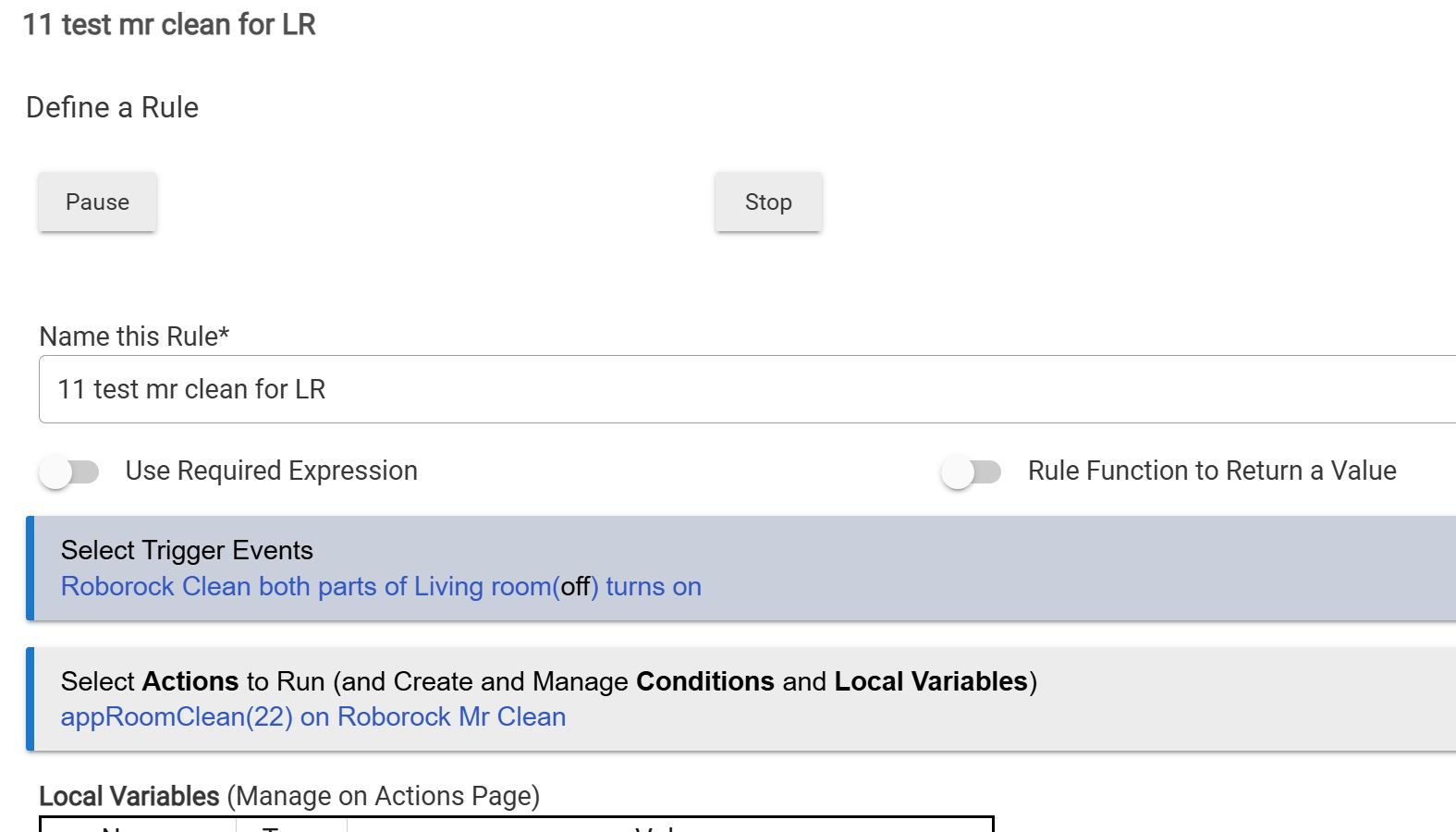
I have no problems inside the driver by inputting room # in the App Room Clean portion of commands - it works right away. I am trying to do this programmatically in RM ... and also, ZERO problem doing this in Webcore.
Feeling stupid ...
