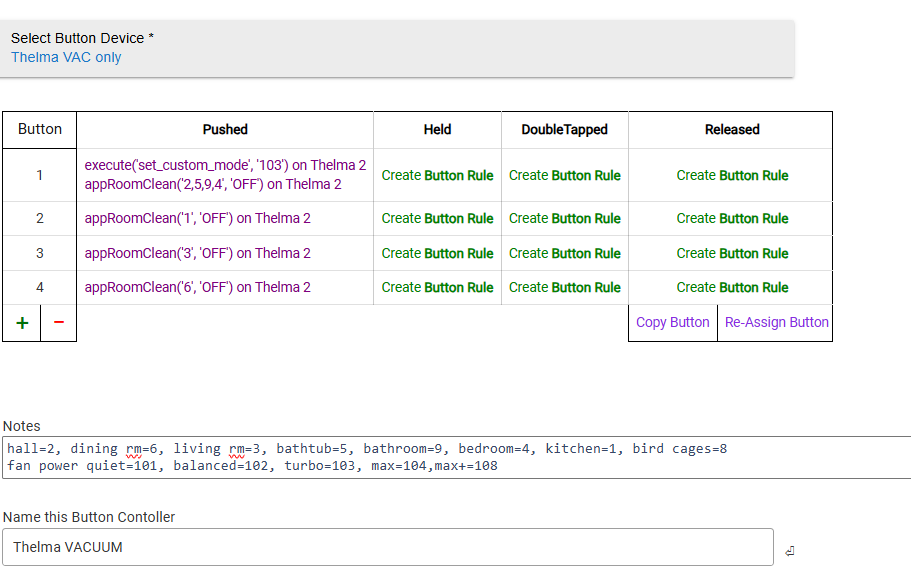
The select device is harsh in its design. I wouldn’t use it for except to set up each device to its own driver.
It shouldn’t change on its own unless you remove it from your account as it locks to the device UUID.
The select device is harsh in its design. I wouldn’t use it for except to set up each device to its own driver.
It shouldn’t change on its own unless you remove it from your account as it locks to the device UUID.
That's good to know. I wasn't suggesting selecting the device often, only checking to make sure it didn't .. for whatever reason .. get messed up. If it never changes, it would never issue the Select Device.
But your explanation about the UUID precludes the need to do even that.
About to take the plunge on a new Roborock since my Neatos have finally died. 
Surprised there’s zero mention of the Saros line on this thread. Any opinions on best model for a pure vacuum (not combo mop)?
I recognize that “best” is highly subjective but I’d appreciate opinions.
Never heard of them but your post made me curious and wow those are expensive. That’s likely why no one has mentioned them. While my Q8 has a mop feature, I have never used it.
TONS of vacuum reviews on youtube - stick with roborock so you can use the Hubitat integration they make great units. IF you change your mind about mopping, get one with the dual rotating heads. I just bought a 2nd Roborock a Qrevo Pro I got at Target for 625 - it does a GREAT job of vac and mop.
Hi there! I’m a happy user of a Roborock E5 cheap but effective model, it doesn’t work with Roborock app only Xiaomi home…any options of getting work in hubitat? Thanks in advance
Unfortunately this solution does not support Xiaomi. There might be some older solutions if you search.
Older solutions means “virtual button” ?
Didn't they just come out last month? I wouldn't expect much in this thread about them yet. I have been following the release of them in the Roborock subreddit though. Nothing I can afford, and others who will eventually buy them are probably waiting for their current robot age more before a new robot purchase.
That, and their cost, certainly explains the silence. I didn't realize they were so new. I'm even newer to Roborock and just started doing a bunch of research over the last few days. I'm a Neato refugee, so be kind 
Today, we just took the plunge and bought two Roborocks, one vacuum-only (Q5 Max+ for carpeted upstairs and a Qrevo MaxV for mixed floor downstairs). Psyched to get it set up and put Neato in my rearview mirror (and my garbage).
Maybe I will be out of the Roborock driver biz soon?
Ah, interesting! I have the S8 Max Ultra - will be interesting to see how this goes.
I typically just have it run on its in-built schedule, so not sure if I will use the matter functionality. We will see! I do suspect that it won’t have all the features though…
Please not until my Q8 supports this (seems unlikely) or dies and I purchase one that does support Apple Home/Matter. Love your driver as it’s used a few times each week because of odd schedule I cannot implement within the Roborock app.
Hopefully Home Assistant will support these via their HomeKit Device integration. I already have that up and running for local control of my Ecobee and FP2.
Trying to start the my S7 with Rule Machine but with only certain rooms AND mopWater turned off in case with forgot to remove the mop. If Only send room codes, all works but since default is to use the mop if installed, it will start the mopping function. When I try to add the second parameter, it just does not work. I tried everything i could think of like string OFF, string and integer 200 (code to turn off), string MOPWATER=200, etc. it just does not start when adding the second parameter.
Here is a snippet of the code, it does trigger the notify if I place it before the appRoomClean command so it does trigger, did not see anything in the logs.

Next option if no one can help or find what I'm doing wrong is to add logging in the code to see what exactly the appCleanRoom receives when I use via the commands (just thought of this option and will do it tomorrow when back home)...
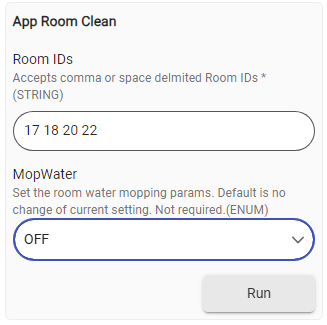
The second parameter is an enum, so you should use "Default, Off, "Low",...
So it this case, would expect the command to be:
appRoomClean('17 18 20 22', 'off')
It shouldn't be case sensitive.
The code block is here:
def appRoomClean(String rooms, String mopWater=mopWaterModeCodes[0]) {
    rooms = rooms.replaceAll(" +", ',')
    if(mopWater?.toUpperCase()!=mopWaterModeCodes[0].toUpperCase()) {
        Integer mopWaterCode = ( mopWaterModeCodes.find { it.value.toUpperCase() == mopWater?.toUpperCase() }?.key )
        execute("set_water_box_custom_mode","[$mopWaterCode]")
        execute("get_water_box_custom_mode")
    }
    execute("app_segment_clean","[$rooms]")
}

@Field static final Map mopWaterModeCodes  = [
    0: "Default",
	200: "Off",
	201: "Low",
    202: "Medium",
	203: "High",
    204: "Auto",
    207: "Custom",
]
You could attempt using the 'execute' command if that doesn't work. I don't mop, so this was done by inspection, and not tested.
Another option is to create a shortcut in the app and then use appscene to run it.
This is what I have so far for my Soros 10R.
Seems like most of the commands are common to many of their "later" vacs.
Kind of trial and error.
Just to add...
I think the format is
appRoomClean ('x,x,x,x,...','yyyy')
where x is the room number that is assigned to your rooms by the Roborock app.
NOTE.... the rooms MUST BE NAMED in the app before this will work.
and yyy is the mop water box custom modes NOT the mop modes. Those are two different parameters.
The set mop water box custom modes are
off
low
medium
hi
custom.
What custom is I haven't figured out yet but it might be the default for the room if not specified with water box custom modes.
The mop modes are
300=standard
301=deep
302=custom
303=deep+
304=fast
306=smart
What the difference is I haven't figured out YET. From what I gather is the water box modes is how much water is dispensed and the mop modes is the pattern the bot takes when mopping. IE quick pass, standard with no overlapping paths, deep and deep+ overlap passes more, and smart is anyones guess!
This is what I have observed and tried so far but I am trying to get more info from Roborock and they are kind of stingy with the details.
This is what I have squeezed out of Roborock so far:
Regarding the mopping API commands:
Something to start with!
I'm sure I tried that, but will try it again today, thanks!
EDIT:
ok, after some more investigating, I found the bug, for some reason although RM was showing that it was sending 2 parameters, it was actually sending 3 as you can see below...
Had to delete that line completely and redo it and now it works with the OFF parameter (and no null after the first!
Seems to be some additional settings you can use, but that should work ^^. Here is the api that you could attempt to test with the execute command.
Download the Hubitat app