My driver is on V1.5.0
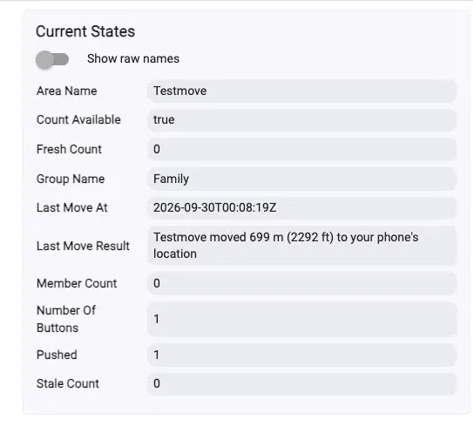
Suggest that the Last Move Result only contain the the age, not the instruction to update the position. The log should still have the instruction.
My driver is on V1.5.0
Suggest that the Last Move Result only contain the the age, not the instruction to update the position. The log should still have the instruction.
Good, 1.5.0 rules out the driver, so I think it's the other thing: both attributes had no value at all until the first move, and I suspect that's why Rule Machine wasn't offering them. 1.5.1 gives them a starting value, and your existing devices should pick it up on the next poll.
Agreed on the wording, the attribute is meant to be usable as-is in a notification. I'd keep the outcome though, so it reads "Not moved, your last position was 4 minutes old", Not just the age.
Hubitat Integration 1.5.1 is out through HPM. Update the app and all three drivers, a hub running the new app with an older area driver won't have the new attributes at all.
@JimB lastMoveResult and lastMoveAt now start with a value ("No move yet" and "never") instead of being empty until the first move. I think is why Rule Machine wasn't showing them. Your existing devices should pick them up on the next poll, no need to recreate anything.
Also in this release: area devices for groups you've deselected now report their count as unavailable instead of holding a frozen number forever. They are not deleted, so nothing on a dashboard or in a rule breaks.
The position age limit is next. It needs a change on the PositionGuard side first.
Thinking about how to automate a response to a stale position.
Idea #1
It appears that the PositionGuard app on the phone updates its position every 10-20 minutes. If I can parse the stale minutes from the Last Move Result, then I could set a wait for (Position Update Frequency - Stale Minutes) and then push the button from the rule. Would be even easier with a Stale Minutes attribute.
Idea #2
If there were an action in the driver that would tell the phone to update its position then after waiting for a response, the rule could push the button.
The additional benefit of this idea is that after the the Area is uodated, the rule could perform the action to tell the phone(s) to update position. This would lead to a nearly immediate update of the number of the memberCount. Won't need to wait until the phones update their position.
Thanks @JimB, great thinking. Keep it coming.
The 10-20 minutes is the Android app's heartbeat, it reports on a timer when you're not moving, plus whenever you do move. It's not a fixed refresh you can count on, and iPhones behave differently again, so I'd be careful building a rule around the interval.
For idea #1 you don't need to parse anything: your own Member device already has positionAgeSeconds and positionFresh (added in 1.4.0). Trigger on those instead. It's a number, and it updates every poll rather than only after a failed press.
Idea #2 is the more interesting option, and I'd split it in two. Getting your own phone to report a fresh position before a move is the useful half, that's what makes the button work every time rather than most of the time. Doing the same across a whole group to refresh the member count is a different thing, since that's other people's battery, and I don't think it's what you actually need here.
It's a bigger change than it sounds: the hub would be asking a phone to do something rather than asking PositionGuard a question, and phones push back on being woken too often, iOS in particular will quietly stop answering an app that asks a lot. Worth doing properly rather than quickly. It's on the list. Great idea and use case.
Hubitat Integration 1.6.0 is out through HPM.
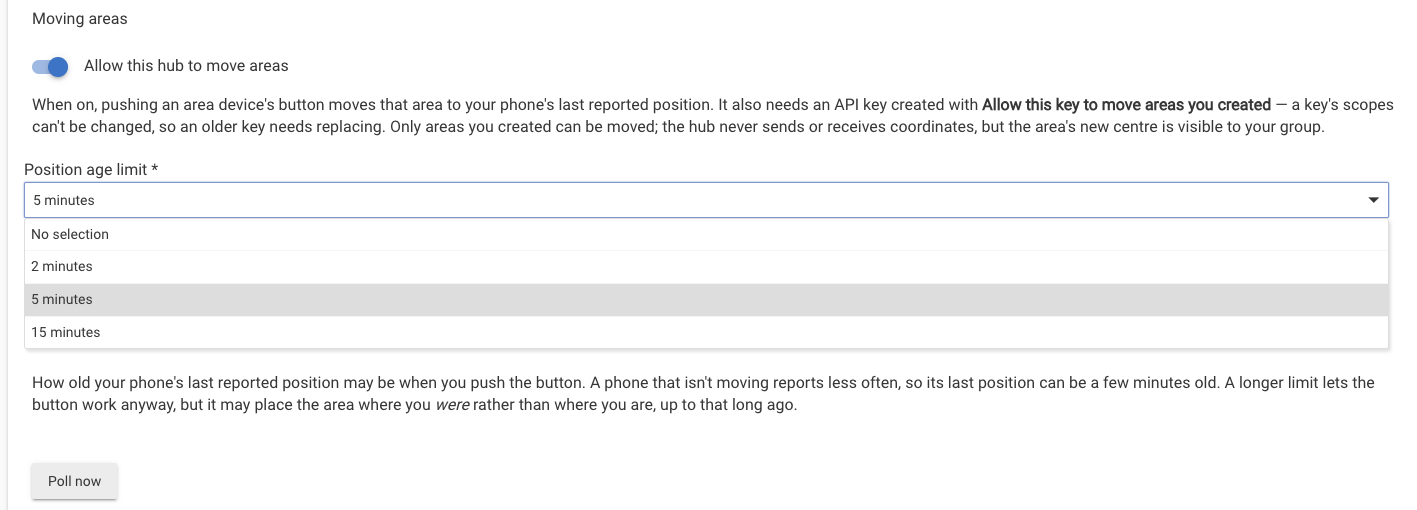
@JimB the position age limit is now a setting. In the PositionGuard app on your hub (Apps → PositionGuard), under Moving areas, Position age limit can be 2, 5 or 15 minutes. It defaults to 2, the same limit as before, so nothing changes until you pick a longer one.
A longer limit lets the button work when your phone hasn't reported for a few minutes. The area still goes to where your phone last reported, so with a longer limit that can be where you were rather than where you are.
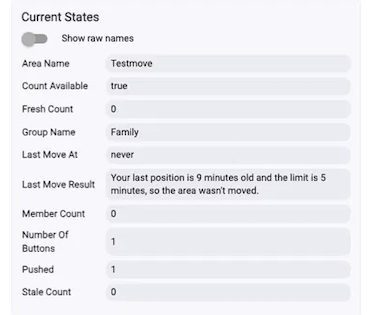
When a move is refused for age, lastMoveResult now gives both numbers, for example "Your last position is 9 minutes old and the limit is 5 minutes, so the area wasn't moved." If you see that at 5 minutes, the first number tells you whether 15 will cover it.
I am following Option #1 and created a rule that checks the position age before pushing the button. If the rule sees that the age is less than 2 minutes it will push the button. Otherwise, it will wait for 16 minutes minus the age in minutes, then push the button. The rule puts a status message in a hub variable that I display on my dashboard so I know when the area will be moved.
Nice to see it running on positionAgeSeconds.
One thing to watch: the push after the wait isn't checked again, and if the phone hasn't reported by then it's refused at 2 minutes. Setting Position age limit to 15 minutes covers that, and lastMoveResult always tells you what actually happened.
quick question, is this available on the android app store for Canada? I don't think I see it when looking
Thanks for letting me know! I thought Canada was already turned on, so let me check. If it isn't, I'll add it today, and it can then take a few hours for the app to show up on Google Play in Canada.
awesome, thanks!
@freddy.mossman It wasn't turned on for Canada, sorry about that. It is now, so you should find PositionGuard on Google Play. If not already, should show up shorttly. The Android app is still in beta, so it's listed as early access.
thanks for the speedy response! it showed up this morning and I've got it installed
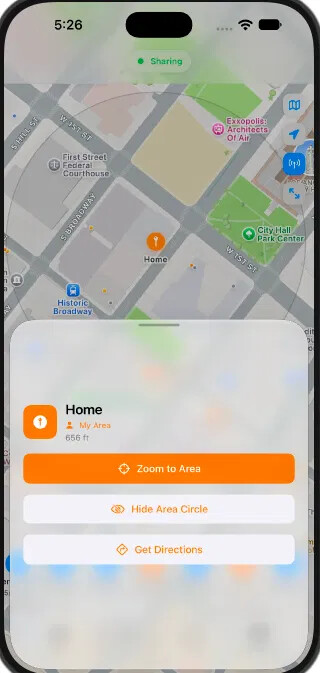
iOS 2.1.6 is out, with something I was asked for: you can now show an area's circle on the map. That makes it easier to see whether a member is inside an area when you're checking a rule.
Thanks for the feedback.
A quick update since iOS 2.1.6: