I am having to change a few things. HE dashboard strips away the HTML in the background.
Go ahead and update all 4 pieces. Test
We will circle back tomorrow.
When I copy and past the Bridge driver, I get this error when I attempt to save it:
unexpected token: } @ line 652, column 1.
1 Like
Released to HPM. If you have the BETA a version you must uninstall all the drivers and app BEFORE installing via HPM. All updates will now run through HPM.
See OP notes for uninstalling.
Understood... thanks for getting it under HPM
I removed all 4 drivers and then installed via HPM. No devices created and when I click on Pentair on app page, app page says "Bridge device not yet created — click Done to initialize.". I've waited a few minutes but no change. How long before devices created?
Under Driver code, only Pump created.

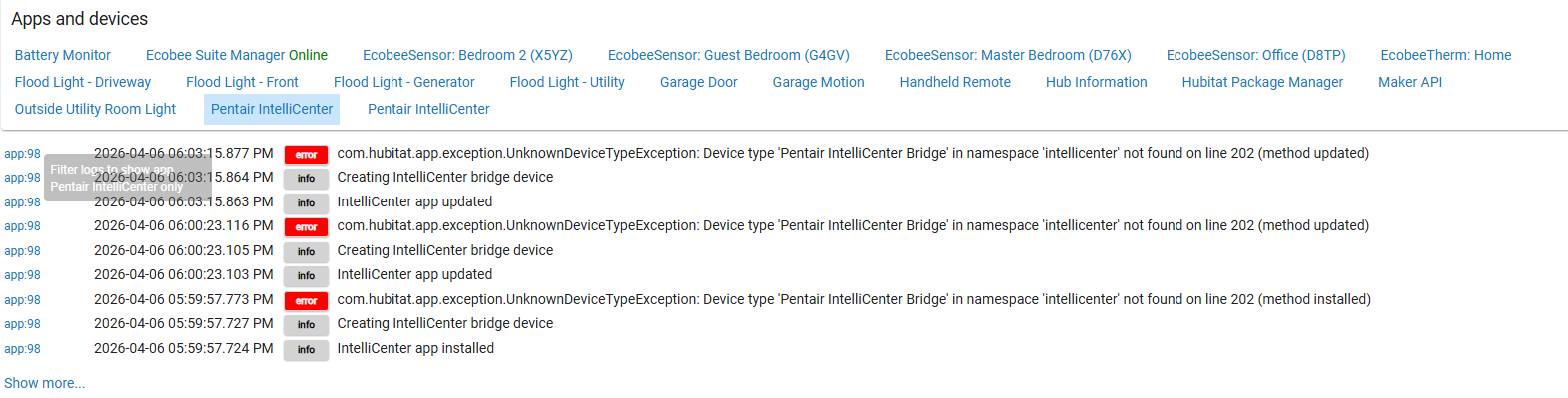
Go to HPM. Click on repair and choose the app. I had an issue earlier with the link for one of the drivers. When you repair it should pull in all of the drivers.
Ok will do.
1 Like
That fixed my issue. Thanks!
1 Like
v1.5.9 Patch Release Notes
Bug Fixes
- Fixed a critical bug where tapping the Pool or Spa switch tile on the dashboard would throw a
MissingMethodException— the pump now starts correctly when the switch is tapped- Fixed the Heat Lock warning message which incorrectly referenced the wrong command name
- Fixed stale version strings in the Body driver log output that were still showing v1.5.4
- Fixed the Bridge driver poll watchdog firing immediately on first boot, which could cause a double-poll race condition on fresh installs
- Fixed IC2 firmware compatibility — the
WriteParamListchanges field is now properly handled whether the controller sends a single object or a list- Fixed the Bridge driver writing the
endpointBasesetting on every state push — it now only writes when the value has actually changed- Fixed the Parent App
componentRefreshrouting — all device types (body, pump, circuit, sensor, chem) now get the correct query type when the refresh button is tapped- Fixed the air temperature sensor not updating automatically — sensors are now included in the scheduled poll cycle
- Fixed the refresh button not working on sensor, pump, circuit, and chem devices — each device type now sends the correct query to the controller
New Features
- Added poll chain watchdog — if the scheduled poll chain dies for any reason the integration will self-heal and restart automatically without requiring a hub reboot
- Added Community and PayPal donation links to the Preferences page of all device drivers and to the main app page
As always, no devices, settings, or data are affected by this update.
To update: Open Hubitat Package Manager and use Update. If you previously had a failed or partial install, use Repair instead to ensure all files are pulled correctly.
If you see duplicate drivers (e.g. two copies of the Body Driver or Pump Driver in Drivers Code), go to Drivers Code in Hubitat and delete the duplicate that has no devices associated with it before running Update or Repair. To check which driver has devices, click on the driver name and look for an In Use By count at the top.
Pentair IntelliCenter Controller v1.6.2 — Important Update Notice
This release adds unique package IDs to the HPM manifest, which are required for reliable installation and updates going forward.
If you are updating from a previous version: You will need to unmatch and re-Match this package in Hubitat Package Manager before updating.
- Open HPM and go to HPM settings. Unmatch package
- Find the Pentair IntelliCenter entries and click Un-Match
- Run Match Up from main page to re-link the package
- Then run Update as normal
If you skip this step HPM may duplicate your drivers. Fresh installs are not affected.
If Un-Match and re-Match fails: You will need to fully uninstall the package from HPM and reinstall fresh. Before doing so you must remove all devices from the drivers first — if any devices are still assigned to the Bridge, Body, or Pump drivers HPM will not be able to delete them. Go to your Hubitat devices list, delete or reassign any devices using the IntelliCenter drivers, then uninstall the package from HPM and perform a clean reinstall.
What's new in v1.6.2:
- Added unique package IDs for HPM compatibility
- Resolves install issues where Bridge and Body drivers were skipped during fresh HPM installs
Can this connect to simpler devices like my Pentair Intelliflow Pump?
This is built for an Intellicenter controller. The controller will expose circuits, features, and bodies.
The controller is accessible from the Pentair app via the network bridge.
Hubitat connects locally to that bridge for control.
If you don’t have any of that, then unfortunately

