@jacobgraf I didn't want to clutter up your [RELEASE] thread with this long post, so I'll just tag you and the original thread: [RELEASE] NTFY Notifier Driver - Push Notifications via ntfy.sh or Self-Hosted.
I have been using Gotify for a while but really wanted something that could auto-expire messages. I was testing Pushover, which can do auto-expiration, but then realized that NTFY has update, clear, and delete functionality which is even better for my use case. It's also a big plus that NTFY can be self-hosted. However to use those functions you need to send a sequence-id as part of the message, which isn't an option in your current driver, so I forked the driver and made a few changes.
TLDR: I added support for sequence-id to enable updating, clearing, and deleting messages. I added the ability to override device settings so a single NTFY device can be re-used for multiple rules, and I made a companion driver for clearing and deleting messages.
I still need to test for a while, but if you're open to a PR, I can submit one. Otherwise I'll just keep my fork separate. I used Visual Studio and CoPilot to do most of the work. While I can just about get by in Groovy, it was much faster using the AI assistance. While the coding was AI-assisted, this rambling post is entirely the fault of my meat-brain.
Details:
-
I added a "sequence-id" field to the driver.
- When you send a second message to a topic with the same sequence-id, it replaces the previous message. This can be really useful for status messages where only the most recent one matters.
- One of my use cases is location tracking. I get region enter/exit notifications from Owntracks in Hubitat plus destination/ETA notifications from my wife's car navigation and geofence updates from the car (being sent from NodeRED) all of which add up to "where is my wife?"
- I created a NTFY device with topic={wife's_name}location, title="Owntracks", and sequence-id = "{wife's_name}location". I have Owntracks sending each update to that device.
- In NodeRED I sent the navigation/geofence messages to the same topic and sequence-id, but with different titles.
- I only see the latest notification as each overwrites the previous one. The different titles tell me which data source pushed the message.
- This could also be used to keep a persistent status notification, for example, use a rule to send the HSM status to topic=hsm sequence-id=hsm_status each time it changes. The notification in the hsm topic will always show the current HSM status. The old ones won't clutter up the history.
- You could also set up a workflow where the old messages are retained, but they are cleared (marked as read) when the next message is sent so they are all in the history but only one is showing as unread.
-
I added the ability for the driver to process a JSON-formatted incoming notification message with the following overrides: topic, title, priority, tag, click action (open_url or http_request), actionurl, attachmenturl, attachmentfilename, iconurl, sequenceid, message
- All of those are obviously fields from the device settings except 'message', which is used for the message body text.
- This allows me to have a single NTFY driver device receive messages from multiple Rule Machine rules by setting the options in the JSON-formatted message.
- If an incoming message has valid override tags, they are used in place of the configured settings. If the message doesn't have valid tags, it is just treated as regular message text.
- So if I have a device set up with the topic "hubitat" the title "Hubitat", and priority 3 but I have a rule send a notification message like:
{"title":"HSM Alert","message":"HSM Failed to arm","priority":"5"}
I'll get this notification in the hubitat topic (notice the title and priority ^^^):
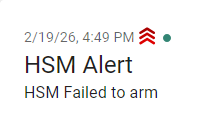
Finally, I added a companion driver that is used to clear or delete messages. It is set up with the Hubitat "notification" capability, so you can send it a message using the "Notify" action in rules. The only device preferences are protocol, host, and optionally username and password. You only need to create one device using this driver (per NTFY server) as the incoming message dictates its actions.
This driver expects an incoming notification message in JSON format with command, topic, and sequenceid fields. So if I sent an initial message to topic "hubitat" with sequenceid "abc123", I could then send a message to my clear/delete device like:
{"command":"clear","topic":"hubitat","sequenceid":"abc123"}
That would clear the notification, which leaves it on the list but makes it look like it was read. It clears from the phone app's notification pull-down and is removed from the new message count.
or I could send:
{"command":"delete","topic":"hubitat","sequenceid":"abc123"}
That would completely delete the message.
Putting that all together, with this hypothetical rule:
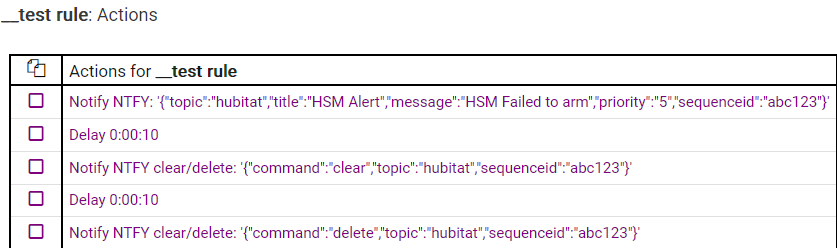
First I have this (notice the green "new message" dot)
Then 10 seconds later I have this (message is marked as read):
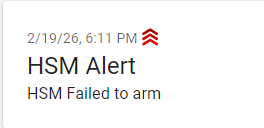
then 10 second later I have this: