[RELEASE] Mold Guardian - Smarter Logic. Drier Air. Safer Home

The Problem

We all have humidity sensors. We all have "dumb" dehumidifiers. But tying them together usually results in one of two things:

  1. Alert Fatigue: You take a shower, humidity spikes to 85%, your phone screams at you, you ignore it.
  2. The "Dumb" Dehumidifier Issue: You put a smart plug on your dehumidifier to save energy. But when the tank fills up, the dehumidifier goes into "Standby," the plug stays ON, and you have no idea that it has stopped working while humidity climbs.

:house: Use Case: The "Retrofit" Scenario

The Environment: A residence constructed in the 1970s located in the Southern United States. The architecture predates modern mechanical ventilation standards, resulting in bathrooms with no exhaust fans and high ambient humidity levels inherent to the region.

The Challenge: To mitigate moisture accumulation and prevent mold growth, portable dehumidifiers were deployed across multiple zones. However, these units lack internal pumps, requiring manual tank evacuation.

  • The Failure Point: Without active monitoring, the tanks would frequently reach capacity and cease operation (Standby Mode) unnoticed. This resulted in critical equipment downtime lasting several days, allowing humidity to rebound to unsafe levels and creating a fertile environment for mold.

The Solution: Mold Guardian was developed to bridge the gap between "dumb" appliances and smart home safety.

  1. Tank Monitoring: By analyzing power draw versus humidity trends, the system detects when a unit has stalled (Tank Full) and alerts the homeowner immediately, eliminating downtime.
  2. Risk Analysis: Instead of relying on guesswork, the app calculates cumulative mold potential, ensuring that even if a tank is forgotten, a secondary "High Risk" alert will trigger before conditions become biological hazards.

The Solution: Mold Guardian

Mold Guardian is not just a simple automation; it is a full-featured Environmental Analysis Engine designed to replace simple threshold triggers. It uses ASHRAE Standard 62.1 logic, Dew Point calculations, and a new Predictive Mold Index to tell you when you are actually at risk, while ignoring false positives like showers.

It turns a $20 smart plug and a simple humidity sensor into a commercial-grade air quality monitor.


:star2: Key Features

1. :mushroom: Predictive Mold Index (New in v20.0)

Most apps alert you if humidity hits a number (e.g., >65%). But mold doesn't grow instantly; it needs Time + Moisture. Mold Guardian implements a Cumulative Risk "Bucket" Algorithm:

  • The Bucket: Every minute your room is above 60% RH, points are added to a "Risk Score." The higher the humidity, the faster the points accrue.
  • The Drain: Every minute the room is below 60%, the score drains (drying kills spores faster than they grow).
  • The Alert: You only get alerted if the score hits Critical (1000+). This catches slow leaks or persistent dampness that "snapshot" alerts miss, while ignoring temporary spikes from cooking or cleaning.

2. :electric_plug: "Stall" Detection for Dumb Dehumidifiers

How do you know if your dehumidifier tank is full without a sensor inside the tank? Math. The app monitors the Smart Plug's power state and the Room's Humidity trend.

  • The Logic: If the plug is ON for 90 minutes (configurable), but the humidity has not dropped by at least 0.2%...
  • The Conclusion: The unit is running but doing nothing.
  • The Alert: It sends a specific alert: "Basement Dehumidifier Stalled: Tank Full or Coils Frozen."
  • Auto-Reset: Once you empty the tank and the humidity drops, the app automatically clears the alert.

3. :snowflake: Winter Mode (Condensation Protection)

60% humidity is safe for mold in July, but it will rot your window sills in January.

  • Dynamic Targets: When the outdoor temperature drops (e.g., below 40°F), the app automatically lowers your safety target (e.g., to 45%).
  • Safety Hysteresis: Includes a 5°F buffer to prevent the mode from flickering on/off on days with fluctuating weather.
  • Stale Sensor Protection: If your outdoor sensor dies, the app forces Winter Mode OFF after 24 hours to prevent getting stuck in a strict state.

4. :shower: Smart Shower Detection

Stop getting alerts when you bathe.

  • If the associated Motion Sensor is active (or was active recently), the app pauses alerts for this zone.
  • It queues a check for 60 minutes later.
  • If the humidity has returned to normal by then? No alert sent.
  • If humidity is still high after an hour? Alert sent (because your fan might be broken).

5. :bar_chart: The Dashboard Tile

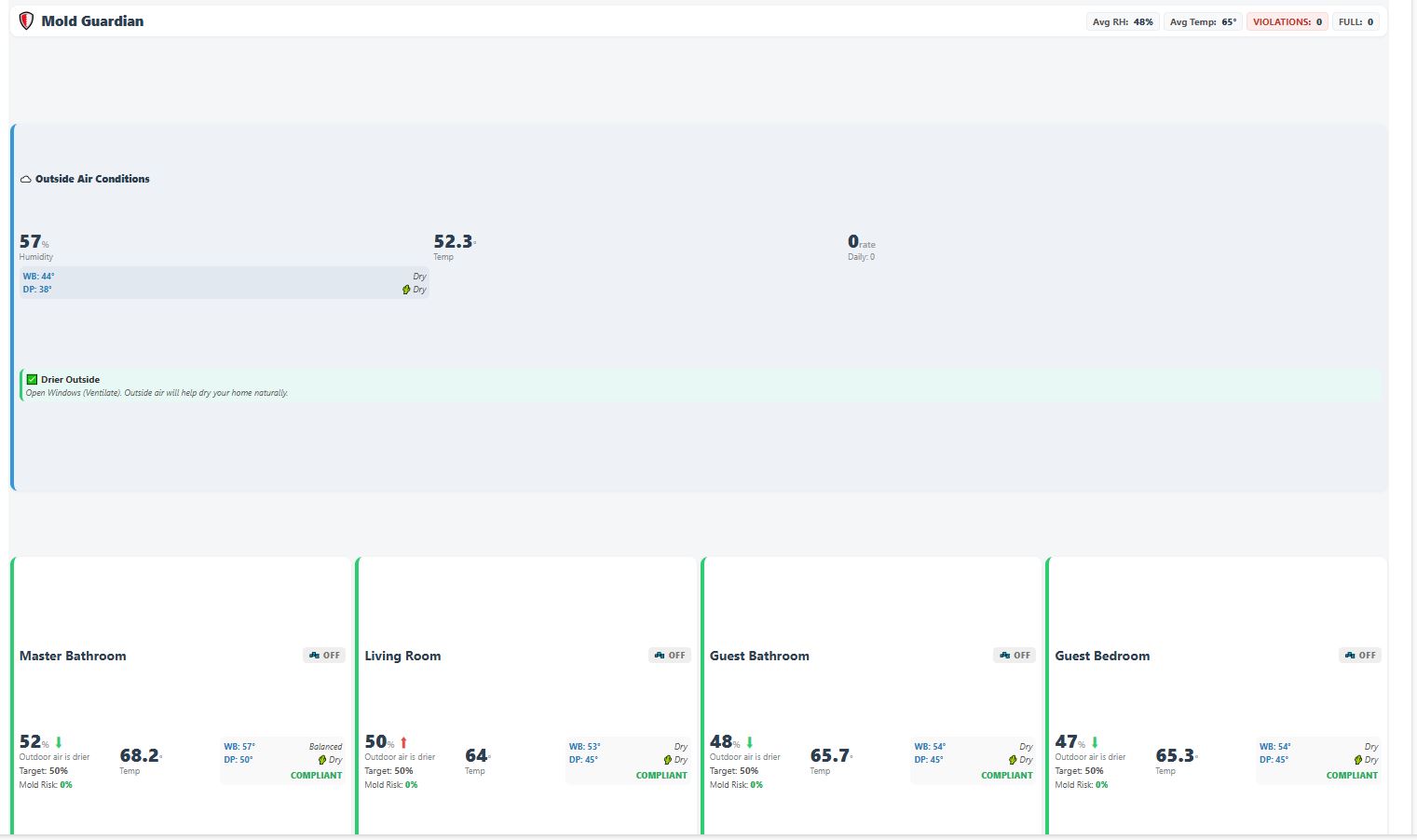
The app generates a beautiful, rich-text HTML tile for your Hubitat Dashboard that displays:

  • Zone Name & Status Badge (Running, Off, Tank Full, Offline).
  • Current RH% & Temp with Trend Arrows (:arrow_up:/:arrow_down:).
  • Derived Science: Displays Dew Point and Wet Bulb temperature.
  • Mold Risk Score: A color-coded percentage (0-100%) showing cumulative risk.
  • Advice: Tells you to "Monitor," "Ventilate," or "Empty Tank."

:gear: How It Works (The Logic)

The "Bucket" Theory (Mold Index)

The app runs a calculation loop (Instant, 1m, 5m, or 15m intervals).

GroovyDelta = CurrentRH - 60 If (Delta > 0) Score += Delta // Filling the bucket If (Delta < 0) Score += (Delta * 2) // Draining the bucket (2x speed)

  • Scenario A (Shower): Humidity spikes to 90% for 20 mins. Score rises to 300. Fan runs, humidity drops to 40%. Score drains to 0 in 15 mins. Result: Safe (Green).
  • Scenario B (Basement Leak): Humidity sits at 68% for 48 hours. Score creeps up +8 points every cycle. Eventually, it crosses 1000. Result: Critical Mold Alert (Red).

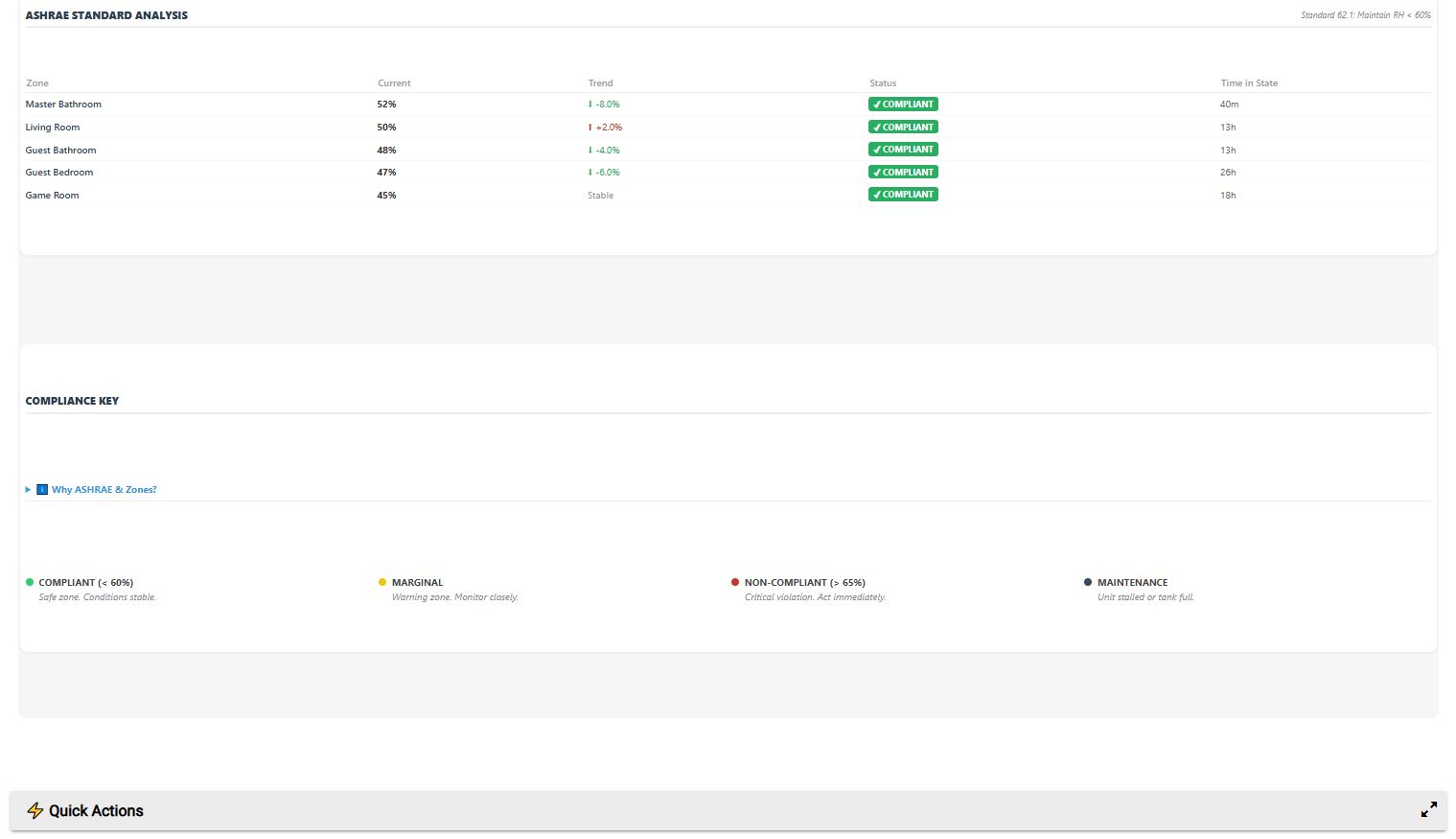
The ASHRAE Compliance Check

On top of the prediction index, the app performs a strict standard check:

  • Safe (Green): <= Target Limit
  • Marginal (Yellow): < Target + 5%
  • Violation (Red): >= Target + 5%

Hardware Safety & Data Integrity

  • Filter Tracking: Tracks actual runtime hours. Caps sessions at 24h to prevent data corruption if a plug falls offline while ON.
  • Reboot Safety: If your Hub reboots while a "Post-Shower Check" is pending, the app restores the queue immediately upon boot.
  • Tank Loop Fix: Resetting a "Tank Full" alert automatically restarts the runtime timer, preventing an immediate false alarm 15 minutes later.

:calling: Configuration Guide

1. Main Settings

  • Update Frequency: Choose between "Real-Time (Instant)" for max responsiveness or "15 Minute Polling" to save Hub resources.
  • Notification Style: Standard, Minimal, or Urgent (adds emojis/caps).

2. Zone Setup (Supports up to 8 Zones)

For each room (e.g., Basement, Bathroom, Attic), you map:

  • Humidity Sensor: (Required)
  • Dehumidifier Plug: (Required for Stall/Tank logic)
  • Motion Sensor: (Optional, for Shower Detection)

3. Advanced Tuning

  • Winter Mode: Toggle ON/OFF. Set Trigger Temp (e.g., 40°F) and Target RH (e.g., 45%).
  • Stall Timer: How long should the unit run without results before alerting? (Default: 90 mins).
  • Filter Interval: Hours of runtime before "Clean Filter" badge appears (Default: 500 hrs).

:inbox_tray: Installation

  1. Go to Apps Code in Hubitat.
  2. Select New App.
  3. Paste the code provided below.
  4. Click Save and OAuth (not strictly required but good practice).
  5. Go to Apps, click Add User App, and select Mold Guardian.
2 Likes


[GUIDE] Which Hub is Best for Logic-Heavy Apps? (Mold Guardian Edition)

When running complex custom applications like Mold Guardian—which performs continuous math, polling, and cumulative logic—the hardware you choose matters significantly.

While Mold Guardian is optimized to run efficiently on all modern Hubitat hubs, the user experience (speed, responsiveness, and overhead) varies depending on the processor and RAM available.

Here is the breakdown of how each model handles the workload.


:rocket: The Performance King: Hubitat C-8 Pro

Status: Best Choice for Heavy Calculation & Zero Lag.

If you plan to run Mold Guardian in "Real-Time Mode" with multiple sensors, the C-8 Pro is the only logical choice to guarantee zero system slowdowns.

  • Processor: 2.0 GHz Quad-Core (High Performance)
  • RAM: 2 GB (Double the standard)
  • Why it wins for Mold Guardian:
    • Math without Lag: Mold Guardian calculates Dew Point and Wet Bulb physics every time a sensor reports. The C-8 Pro chews through this math instantly without delaying your lights or motion sensors.
    • Memory Headroom: With 2GB of RAM, you can run the "Cumulative Mold Index" (which stores long-term variables) without fear of hitting memory warnings, even if you have 50 other apps running.
    • Polling Power: It can handle 1-minute polling intervals on 8+ zones without breaking a sweat.

:balance_scale: The Balanced Standard: Hubitat C-8

Status: Excellent for Most Users (Standard Polling).

The standard C-8 is the current baseline. It shares the same radio benefits (external antennas) as the Pro but has standard processing specs.

  • Processor: 1.4 GHz Quad-Core
  • RAM: 1 GB
  • Performance Verdict:
    • Ideal for: Running Mold Guardian in "15 Minute Polling" or "5 Minute Polling" modes.
    • The Trade-off: If you switch to "Real-Time (Instant)" updates and have 10+ active zones updating constantly, you might see a slight delay (milliseconds) in other automations during a humidity spike event.
    • Efficiency: Extremely efficient. The external antennas ensure it catches sensor reports from basements/attics that the C-7 misses, preventing the app from hanging on "Waiting for Data..." states.

:racehorse: The Old Workhorse: Hubitat C-7

Status: Compatible, but requires "Polite" Settings.

The C-7 is fully supported, but it lacks the raw horsepower of the newer generation.

  • Processor: Standard Quad-Core (Older Architecture)
  • RAM: 1 GB
  • Performance Verdict:
    • Recommendation: Use the "15 Minute Polling" setting in Mold Guardian.
    • Why: Calculating floating-point math (Dew/Wet Bulb) for 8 zones simultaneously every minute can tax the C-7 CPU, potentially causing "hub slowdowns."
    • Radio Limit: The internal antennas are weaker. If your dehumidifier plug is behind a metal washing machine in the basement, the C-7 might struggle to see the "Power Meter" reports, leading to missed "Stall" alerts.

:older_woman: The Legacy Hub: Hubitat C-5

Status: Not Recommended for New Setups.

  • Performance Verdict: It can run the code, but the database write speed is significantly slower.
  • Risk: Mold Guardian writes to the database frequently to track the "Cumulative Risk Score." On a C-5, this can wear down the flash storage faster or cause database corruption over time if you use "Real-Time" updates.

:bar_chart: Summary: App Settings by Hub Model

Feature C-8 Pro C-8 C-7
Recommended Update Mode Real-Time / 1 Min 5 Min / 15 Min 15 Minute Polling
Max Zones Recommended Unlimited (8+) 8 Zones 4-6 Zones
Calculation Speed Instant Fast Good
Risk of "Hub Slowdown" Near Zero Low Moderate (if polling fast)

My Recommendation

If you are buying a hub specifically to protect your home with Mold Guardian:

  • Get the C-8 Pro. The extra $30-$40 is worth it for the RAM alone. It ensures that no matter how much math the app does to predict mold, your smart lights will always turn on instantly.

:question: Frequently Asked Questions (FAQ)

General Questions

Q: What do I need to use this app? A: At a minimum, you need:

  1. A Hubitat Elevation Hub.
  2. A Humidity Sensor (Zigbee or Z-Wave) in the room you want to monitor.
  3. (Optional) A Smart Plug connected to your dehumidifier (required for "Stall/Tank Full" detection).
  4. (Optional) An Outdoor Temperature Sensor (required for Winter Mode condensation protection).

Q: Does this work with digital dehumidifiers? A: Yes, but with a caveat.

  • The Issue: Digital units often have a "soft" power switch. If the smart plug turns OFF and then ON again, the dehumidifier might stay in "Standby" instead of running.
  • The Fix: You must ensure your dehumidifier supports "Auto-Restart" after power loss. Most modern units do, but test it first: Unplug it while running, then plug it back in. If it turns back on automatically, it works with this app.

Q: Can I use this just for monitoring without a dehumidifier? A: Absolutely. You can simply add a Humidity Sensor to a zone. The app will still track Mold Risk, ASHRAE Compliance, and send you alerts if humidity gets too high. You just won't get "Stall" or "Tank Full" alerts since there is no plug to monitor.


Logic & Features

Q: How does the "Mold Prediction" work? A: It uses a cumulative "Bucket Theory" algorithm:

  • Every time the app checks (e.g., every 15 mins), if humidity is >60%, points are added to a "Risk Score."
  • Higher humidity = More points (exponentially).
  • If humidity is <60%, points are subtracted (drying kills spores faster than they grow).
  • Alert: If the score exceeds 1000, it means the room has been damp for long enough (~24-48 hours) to risk mold growth. This filters out short spikes from showers or cooking.

Q: What is "Stall Detection" (Tank Full)? A: Since "dumb" dehumidifiers can't tell Hubitat their tank is full, we use logic:

  • If the Smart Plug is ON (drawing power) for 90 minutes...
  • ...AND the humidity has not dropped by at least 0.2%...
  • ...The app assumes the unit is either Full (compressor off) or Frozen.
  • It sends you a "Stall Alert" and marks the unit as Maintenance Required.

Q: Why do I need "Winter Mode"? A: 60% humidity is safe in summer, but in winter (e.g., 20°F outside), 60% inside will cause water to drip down your windows, rotting the wood.

  • Winter Mode automatically lowers your target (e.g., to 45%) when the outdoor temperature drops below your set trigger (e.g., 40°F).
  • It prevents you from accidentally growing mold caused by your humidifier or lack of ventilation in winter.

Troubleshooting

Q: I keep getting "Stall" alerts, but the tank isn't full. A: This usually happens if your dehumidifier is undersized or the room is very leaky.

  • Fix: Go to Settings -> Advanced -> Stall Time. Increase it from 90 minutes to 120 or 180 minutes. This gives the unit more time to make a dent in the humidity before the app complains.

Q: I didn't get an alert when I took a shower! A: That is a feature, not a bug.

  • The app has a Shower Delay (Default: 60 mins). If it sees humidity spike and motion in the bathroom, it pauses alerts for 1 hour to let the fan work.
  • If humidity is still high after 1 hour, then it will alert you.
  • Want instant alerts? Disable the "Motion Sensor" in the Zone settings or switch the "Update Frequency" to "Real-Time."

Q: My "Filter Runtime" is huge/wrong! A: This happens if a smart plug falls off the network while it is ON, so the app never sees the "OFF" event.

  • Fix: Open the app and click the "Reset Filter" button in the Quick Actions menu.
  • Prevention: v20.0 includes a safety cap that ignores run sessions longer than 24 hours to prevent this data corruption.

Q: The Dashboard tile says "Offline" but the device works. A: The app has a Watchdog. If a sensor hasn't reported a new value in 12 hours, it marks it as Offline to prevent logic errors.

  • Fix: Check your sensor's battery. Some sensors (like Aqara/Sonoff) fall off the mesh easily. You may need to add a Zigbee repeater.
1 Like

I hope you find Mold Guardian useful. Developing this application has been a journey involving extensive testing and logic design with the help of Gemini Pro. I welcome all feedback, whether it be bug reports or new feature ideas based on your specific setup.

Thanks,

1 Like