[RELEASE] MCP Server to play with Hubitat and AI

Forum Post for Hubitat Community

Title: Free & Easy Way to Control Hubitat with Claude/ChatGPT using MCP


Hey everyone,

I've been experimenting with MCP (Model Context Protocol), the open standard that lets AI assistants connect to external tools and APIs, and wanted to share an easy, free way to get it working with Hubitat.

Once set up, you can control your smart home with natural language:

  • "Turn on the living room lights"
  • "Set the thermostat to 72 degrees"
  • "Lock all the doors and set the house to Away mode"
  • "What devices are currently on?"
  • "Dim the bedroom lights to 30%"

The AI figures out which Maker API endpoints to call based on what you ask. It's pretty slick.

The Setup

I put together a guide and an OpenAPI spec that covers the full Maker API:

GitHub: GitHub - craigde/hubitat-mcp-server: Workato MCP Server for Hubitat Maker API

The key is using Workato's free Developer Sandbox to host the MCP server. This means:

  • No server to run or maintain
  • No tunneling or exposing your local network
  • No cost (100k free events in the sandbox)
  • Works with Claude, ChatGPT, Cursor, and other MCP clients

Requirements

  • Maker API with cloud access enabled (Workato needs to reach your hub via the cloud endpoint)
  • Free Workato account (workato.com/sandbox)
  • Claude and/or ChatGPT account

The README has full step-by-step instructions for setting everything up: creating the Workato project, HTTP connection, API proxy, MCP server, and connecting it to your AI assistant of choice.

Why This Approach?

I wanted something I could set up quickly without running infrastructure. Workato handles all the MCP protocol details and gives you a secure hosted endpoint. The free tier is generous enough for personal/experimental use.


If anyone gives this a try, let me know how it goes. Happy to help troubleshoot. And if you find issues with the setup or want to improve the docs, PRs are welcome.

4 Likes


2 Likes

Natural language input: is that by voice or typing into an interface somewhere? Sorry to be dense.

Not dense at all, it's a fair question.

MCP (Model Context Protocol) is an open standard that lets AI assistants like Claude and ChatGPT connect to external systems and take actions on your behalf. Think of it as giving the AI "hands" to interact with tools beyond just chatting.

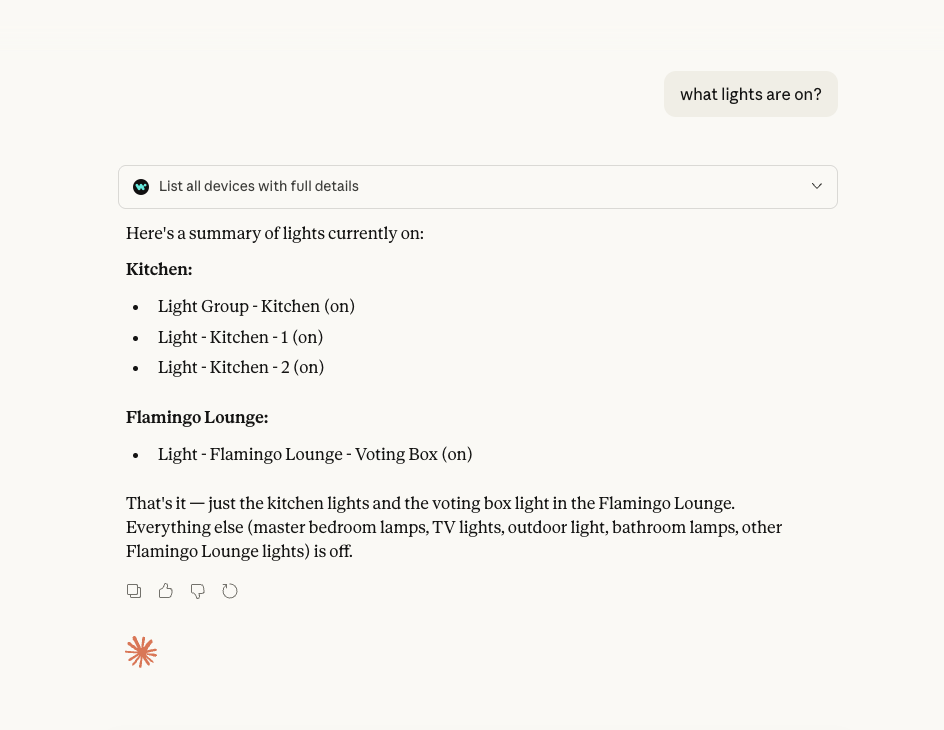
Without MCP, if you ask Claude "what lights are on?" it can only guess or say it doesn't know. With MCP connected to your Hubitat, it can actually call the Maker API, get the real device states, and give you an accurate answer. Same for commands: "turn off the kitchen lights" triggers a real API call to your hub.

How input works:

Right now it's text-based through whatever interface you normally use to chat with Claude or ChatGPT. So you'd type "what lights are on?" in Claude's web interface or the app, and it responds with actual data from your hub (like in my screenshot).

Voice could work if you're using a voice-enabled interface to the AI. Claude's mobile app has voice input, for example. You could also build something with the Claude or OpenAI APIs that takes voice input, converts to text, sends to the AI with MCP tools available, and speaks the response back.

Why this is useful:

The AI understands context and intent, so you don't need to know the exact commands or device names. You can ask things like:

  • "Is the garage door closed?"
  • "Set the house to away mode and make sure all the doors are locked"
  • "What's the temperature in the basement?"
  • "Turn on the porch light at sunset" (though for scheduled stuff, Rule Machine is still better)

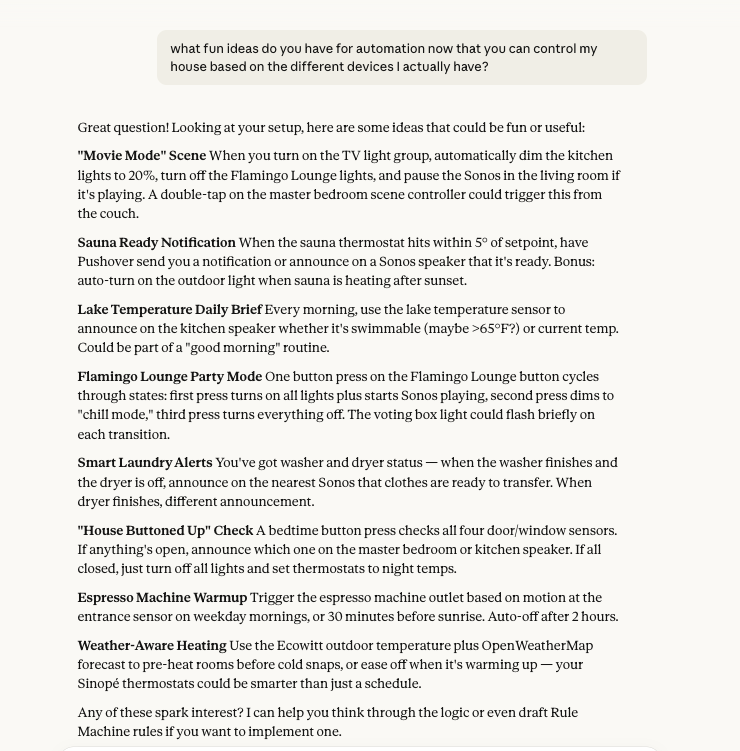
It's also good for querying status across multiple devices at once, or asking the AI to help you think through automation ideas based on what devices you actually have (like in my other screenshot).

It's not a replacement for dashboards or Rule Machine, but it's a nice additional way to interact with your setup, especially for ad-hoc queries and commands.
1 Like

This is awesome, plan to set this up when I get a chance sometime over the next week or so.

This is neat! I have been tinkering with OpenClaw this weekend and it was able to generate an integration plugin for the maker API on the first try! Some of this stuff is amazing…

Yea I've used it in a bunch of different tools now - openclaw is next to play with.

I had a bad time getting OpenClaw set up. The documentation is incomplete to be generous, and the web portal is really very clearly optimized for someone with a 486" widescreen monitor. I gave up on several separate messaging channels before finally just going with slack so I could get it up and running.

But here's the best part and why I mention it. After I got it running by following the docs, I asked it to audit it's own config and slack bot install and it found a list of a dozen places that weren't in the docs that needed to be changed :laughing:

It then was able to correct or direct me to fix the rest of the install, and guided me through getting BlueBubble setup, and a bunch of other stuff too. I've been impressed with it in general.

2 Likes

Any thoughts on ways to make this local only?

A few :slight_smile:

Openclaw - I have this running on a standalone Pi and it can happily hit the maker API directly without needing MCP
Claude Code - You could easily ask for a local MCP server to be created for whatever local platfrom you have running
hubitat community - Check out MCP Server for Hubitat? - #12 by mvdmunnik

Small tip on your Openclaw troubles. I have one running in a dedicated vLan using Proxmox, but this will basically work in most container sceanrios.

Get a 20$ a month subscription for Claude and have ClaudeCode do the heavy lifting. It just needs access to your host (Docker or in my case Proxmox) and some setting information. When you instruct it to PLAN first and give you instructions on what the prep for the install and allow it to ask you some questions about your network and stuff, and you will be done in about 1 hour or so. :slight_smile: Just a small tip.

PS; make sure to disable clawhub skills and just create your own. Also make sure you point it to OpenAI or a local LLM (32B Qwen models work pretty good locally). Using Claude subscriptions is no longer allowed (TOS issues). API use is allowed.
PPS; have fun with it... it rocks, but is a bit scary too

1 Like

I am trying to connect openclaw to Hubitat.
Initially I was thinking of connecting to Homeassistant and then connect Homeassistant to Hubitat.
But if MCP server is an alternative I prefer not to use Homeassistant.
However, I really don't want to use some cloud MCP. is there an option to install MCP locally ? (on my openclaw server for example ?)

**Yes, you can integrate OpenClaw with Hubitat completely locally - no cloud, no Home Assistant needed! I asked my open claw to describe this for you and here is what it said.

** How It Works OpenClaw uses a local skill that talks directly to your Hubitat hub via the built-in Maker API . Everything stays on your local network.

copy

OpenClaw (on your server) ➜ HTTP calls ➜ Hubitat Hub (Maker API)

Setup Steps 1. Enable Maker API in Hubitat • Go to AppsAdd Built-In AppMaker API • Select which devices you want OpenClaw to control • Note down: App ID and Access Token 2. Create OpenClaw Skill

Bash

# skills/hubitat/scripts/hubitat.sh
#!/usr/bin/env bash

HUB_IP="192.168.4.239"           # Your Hubitat hub's IP
APP_ID="224"                     # From Maker API (step 1)
ACCESS_TOKEN="your-token-here"   # From Maker API (step 1)
BASE_URL="http://${HUB_IP}/apps/api/${APP_ID}"

# Simple API wrapper
api() {
  curl -sf "${BASE_URL}/$1?access_token=${ACCESS_TOKEN}"
}
  1. Create Commands

Bash

# List all devices
api "devices"

# Control a device (device ID 174 = front door lock)
api "devices/174/on"     # Lock door
api "devices/174/off"    # Unlock door

# Dim lights (device ID 185)
api "devices/185/setLevel/50"   # Set to 50% brightness

What You Can Control • Lights : on/off, dimming, color changes • Locks : lock/unlock • Thermostats : temperature, mode changes • Sensors : read temperature, motion, contact states • Hub Modes : Day/Evening/Night/Away • HSM (Security) : arm/disarm states • Any device with Hubitat drivers Example Commands We Use

Bash

# Turn off living room lights
./hubitat.sh command 207 off

# Check front door lock status  
./hubitat.sh device 174

# Set thermostat to 72°F
./hubitat.sh command 210 setHeatingSetpoint 72

# Change to evening mode (affects multiple devices)
./hubitat.sh mode 2

Why This Approach :white_check_mark: 100% local - no internet required :white_check_mark: No additional software - uses Hubitat's built-in API :white_check_mark: Sub-second responses - direct HTTP calls :white_check_mark: Secure - uses Hubitat's token authentication :white_check_mark: Simple - just bash scripts + curl commands :white_check_mark: Reliable - no cloud dependencies to fail Real Usage On our houseboat, I can say "Turn off all the lights" to OpenClaw via Telegram, and it instantly calls:

Bash

curl "http://192.168.4.239/apps/api/224/devices/207/off?access_token=xxx"

The lights turn off immediately. Same network, same speed as using the Hubitat app. This is exactly what you want - OpenClaw on your local server, talking directly to your local Hubitat hub . No cloud services involved.

1 Like

I then asked it to describe a prompt you could give to your open claw to build the same capability and here is what it had to say

"Create a Hubitat smart home integration skill for OpenClaw. I want to control my Hubitat devices locally via the Maker API. Please:
1. Create a skill called 'hubitat' with a bash script that can:
• List all devices
• Get device details and status
• Send commands (on/off, setLevel, setColor, lock/unlock, etc.)
• Control hub modes (Day/Evening/Night/Away)
• Control HSM (Home Security Manager) states
**2. Use these API endpoints:
** • Base URL: http://HUB_IP/apps/api/APP_ID
• Authentication: ?access_token=ACCESS_TOKEN
• Device list: /devices
• Device details: /devices/DEVICE_ID
• Send command: /devices/DEVICE_ID/COMMAND/VALUE
• Hub modes: /modes and /modes/MODE_ID
3. Make the script configurable with environment variables:
HUBITAT_HUB_IP (default: [your hubitat ip](https://your hubitat ip/))
HUBITAT_APP_ID (default: your maker app id)
HUBITAT_ACCESS_TOKEN
4. Include error handling and JSON parsing where needed.
5. Create a SKILL.md that explains:
• How to enable Maker API in Hubitat
• How to configure the script
• Common usage examples
• Device control patterns My Hubitat hub IP is [YOUR_IP] and I'll get the App ID and access token from the Maker API app."

─── Optional additions to the prompt:
"Also show me how to get my access token and app ID from Hubitat"
"Include examples for controlling lights, locks, and thermostats"
"Make it work with device groups/scenes if possible"

3 Likes

OK. so that seems to be a good approach. Also no need for MCP.
Do you still prefer MCP ?

MCP is nice if you are playing with a bunch of tools and agents. its overkill for OpenClaw on a local network.

I spent the afternoon implementing my integration of Hubitat and OpenClaw via Maker API. I previously implemented TTS and Speech to Text so the end result is a Tony Stark like Jarvis assistant for my smart home. This stuff is remarkably cool and with Codex it was child’s play to implement. I literally now can talk casually into my Mac laptop and it sends the transcribed Text to OpenClaw on my local DGX box which reasons via the OpenAI GPT5.4 LLM and returns info or controls devices as requested and then it speaks the results to me on my office Sonos speaker. Magic.

I’ll post a few “how to’s” later when I have more time.

4 Likes

What I would like really like to be able to do with an integration like this is troubleshoot problems with AI. If something doesn't work, use AI to analyse logs etc and find the issue.

Is this possible using either of these methods?

To do this you need to install two AI agents and point them at each other. One will diagnose and repair the other, and vice versa. There is a helpful YouTube video by Alex Finn on doing this with OpenClaw and Hermes here:

