[RELEASE] Levoit Air Purifiers, Humidifiers, and Fans

Community-maintained fork of @NiklasGustafsson's original Levoit/VeSync driver pack. The fork has taken over active maintenance after the original repo went idle in 2022.

Available through HPM (search Levoit or VeSync) or via the manifest URL:

https://raw.githubusercontent.com/level99/Hubitat-VeSync/main/levoitManifest.json

GitHub: GitHub - level99/Hubitat-VeSync: Hubitat drivers for Levoit smart home devices (air purifiers, humidifiers, and fans) via the VeSync cloud API. Community fork. Β· GitHub

Supported devices

Air purifiers:

Model Model code(s) Notes
Core 200S, 300S, 400S, 600S (varies by SKU) From upstream v1.x + Child lock, display read-back, auto-off timer, filter reset, PM2.5 + AQ attributes.
Vital 200S LAP-V201S (all regional variants) v2.0
Vital 100S LAP-V102S v2.1
Sprout Air Purifier LAP-B851S family + LAP-BAY-MAX01S v2.3 preview. Full air-quality suite (PM2.5/PM1/PM10/VOC/CO2).
EverestAir LAP-EL551S (all 4 regional variants) v2.3 preview. Turbo mode + vent-angle support.
PlasmaPro 400S-P black LAP-C401S-KUSR v2.3 (routes to Core 400S driver)

Humidifiers:

Model Model code(s) Notes
Superior 6000S LEH-S601S v2.0
Classic 300S LUH-A601S v2.1
OasisMist 450S LUH-O451S / -O601S v2.1. EU variant (LUH-O451S-WEU) includes RGB color nightlight.
LV600S LUH-A602S (all 6 regional variants) v2.2 preview. The original LV600S β€” see naming traps below.
Dual 200S LUH-D301S (all 5 regional variants) v2.2 preview
Classic 200S Classic200S v2.3 preview
LV600S Hub Connect LUH-A603S-WUS v2.3 preview. Newer "Hub Connect" variant β€” see naming traps below.
OasisMist 1000S LUH-M101S (US + EU) v2.3 preview
Sprout Humidifier LEH-B381S v2.3 preview. Color-temperature nightlight on EU variant.

Fans:

Model Model code(s) Notes
Tower Fan LTF-F422S v2.1 preview
Pedestal Fan LPF-R432S v2.1. Includes setChildLock and setSmartCleaningReminder

Fall-through: Generic Levoit Diagnostic Driver β€” v2.0 β€” picks up any unrecognized LAP- / LEH- / LUH- / LV- / LTF- / LPF- device with best-effort Switch + AQ/Humidity capabilities and a captureDiagnostics command for filing new-device-support requests.

Levoit's product naming has some confusing overlaps. If you're unsure which driver applies, check your model code:

  • "LV600S" β€” two different products. LUH-A602S is the original LV600S (use the LV600S driver). LUH-A603S is the newer "LV600S Hub Connect" β€” different hardware, different cloud-API conventions (use the LV600S Hub Connect driver). Both are sold under the same "LV600S" brand name; only the model code distinguishes them.
  • Classic 200S vs Classic 300S. Two different humidifier products despite similar branding. Classic200S device type uses the Classic 200S driver; LUH-A601S uses the Classic 300S driver.

Headline features

  • Per-device offline detection β€” every Levoit child device exposes an online attribute (true/false). When a device stops responding, the parent marks it offline and emits the event for Rule Machine / Notifier to react.
  • captureDiagnostics() button on every device page β€” one-click bug-report data capture. Generates a markdown block with driver / device / hub-firmware metadata, recent error history, attribute snapshot, plus a pre-filled
    GitHub issue link.
  • EU region support β€” VeSync API region parent preference (US/EU) routes API calls through smartapi.vesync.eu for EU users.

Preview drivers

Several drivers ship as preview β€” built without maintainer hardware, validated against canonical pyvesync fixtures, the Home Assistant vesync integration, SmartThings/Homebridge community drivers, plus an automated CI gate (PyvesyncCoverageSpec).

Reporting Issues

Click captureDiagnostics() on the device page and use the pre-filled GitHub issue link in the diagnostics attribute. The capture includes the last 10 errors automatically (driver name, version, model code, hub firmware, recent error history, attribute snapshot all pre-populate the issue form).

For issues that don't trigger any error log β€” silent failures, Rule Machine actions that don't appear to work β€” also enable Debug Output in the device's preferences for a few minutes and include those logs in the issue.

Install + setup

  1. HPM: Apps β†’ Hubitat Package Manager β†’ Install β†’ search Levoit. Pick "Levoit Air Purifiers, Humidifiers, and Fans" β€” that's this community fork (active maintenance, full device list). (The original "Levoit Air Purifiers" by NiklasGustafsson may also appear in results; it's been idle since 2022) Alternatively, you may paste the manifest URL above to skip the disambiguation.
  2. First-time: Devices β†’ Add Device β†’ Virtual; for Type, scroll to User Devices and select VeSync Integration. Give the device a name e.g. Levoit. Save. Then on the device's detail page, enter your VeSync mobile-app email + password. Set Refresh Interval (60-120s recommended for most installs). Click Save Preferences.
  3. Within ~5s the parent driver logs in, discovers your devices, and creates one Hubitat child per device (named to match your VeSync app labels).
  4. To re-scan after adding a new device in the VeSync app: open the parent device β†’ Resync Equipment.

Migrating from Niklas's v1.x

Existing Core 200S / 300S / 400S / 600S devices keep working with no re-pairing β€” install via HPM and Hubitat matches drivers by (namespace, name).

Vital 200S and Superior 6000S users who previously hit "device discovered but no data" need to re-pick the device Type once after install.

Full migration guide: docs/migration-from-niklas-upstream.md.

Repo, issues, roadmap

Acknowledgements

  • @NiklasGustafsson β€” original VeSyncIntegration framework + Core 200S/300S/400S/600S drivers. The framework is preserved in the fork.
  • pyvesync β€” canonical VeSync API payload reference.

The original community thread for v1.x: Levoit Air Purifiers Drivers.

2 Likes

v2.2 is live in HPM. Update via Hubitat Package Manager β†’ existing v2.1 installs upgrade in place; no re-pairing needed.

New device support

  • LV600S Humidifier (LUH-A602S, all 6 regional variants) β€” preview
  • Dual 200S Humidifier (LUH-D301S, all 5 regional variants) β€” preview
  • EU region support for users on smartapi.vesync.eu β€” new parent preference, preview
  • RGB color nightlight on the EU OasisMist 450S 4.5L (LUH-O451S-WEU) β€” preview
  • 6 additional regional model codes now route to their proper drivers instead of falling through to Generic (Vital 200S, Core 200S, Core 300S, OasisMist 450S regional SKUs)

Two reboot-survival bug fixes

  • Polling no longer permanently stops after a hub reboot. If you've been opening Save Preferences on the parent after every reboot to wake polling back up β€” that won't be needed anymore. Existing pre-v2.2 installs that are currently
    stuck need ONE device command (or one Save Preferences) to activate the fix; after that, future reboots auto-recover.
  • Debug logging no longer stays stuck on indefinitely after a reboot. The 30-min auto-disable now persists across reboots.

Preview status β€” community reports welcome

If you own any of these devices and can share what works (or doesn't) on this thread, your report drives validation: LV600S, Dual 200S, EU region, RGB nightlight on EU OasisMist 450S 4.5L.

Full details

Release notes Β· CHANGELOG Β· ROADMAP for
v2.3

1 Like

v2.2.1 patch is live in HPM. Update via Hubitat Package Manager β†’ Update.

What's fixed

  • Resync Equipment crash on missing optional drivers. If a recent Levoit purchase didn't appear after clicking Resync, this is the bug. Now skips past missing drivers instead of halting discovery, and the parent device's INFO log names exactly which driver needs to be installed.
  • Log spam reduced (~240 INFO lines/hour from MissingPropertyException + steady-state heartbeat events).

Adding optional drivers later

Check the parent device's log for "Driver 'X' is not installed" β€” that names the driver you need. Then HPM β†’ Modify (not Install β€” Install may hang on already-installed packages) β†’ select the package β†’ check the missing driver β†’ Next β†’ install β†’ Resync Equipment.

Release notes Β· CHANGELOG Β· ROADMAP for v2.3

I am getting "No status returned from getPurifierStatus" every hour in the logs 200s working fine however the fan speeds are wrong in the device and different in a rule in rule machine.

v2.3 is live β€” 6 new drivers, Core line back-fill, polling self-heal

Released: Release v2.3 - 6 new drivers + Core back-fill + production fixes + tooling Β· level99/Hubitat-VeSync Β· GitHub

To update: HPM β†’ Update β†’ "Levoit Air Purifiers, Humidifiers, and Fans". Existing devices upgrade in place; no re-pairing. Optional new drivers below show up under HPM β†’ Modify.

Bug fixes

If you've been seeing ERROR: No status returned from getPurifierStatus in your logs (sometimes hourly, sometimes more often), v2.3 should fix it. The driver now auto-recovers on its own; no manual Resync needed.

Two related polish items shipped alongside:

  • Cleaner WARN logs for misconfigured Rule Machine actions that pass empty parameters to driver commands (instead of obscure NullPointerExceptions).
  • Migration hint when a device previously stuck on the Generic diagnostic driver gains proper driver support β€” the parent now logs the upgrade steps during Resync.

New drivers (preview β€” community feedback welcome if you own one)

  • Levoit EverestAir Air Purifier (LAP-EL551S, all 4 regional variants) β€” first driver in the pack with Turbo mode + vent-angle support
  • Levoit OasisMist 1000S Humidifier (LUH-M101S, US + EU)
  • Levoit Sprout Air Purifier (LAP-B851S family + LAP-BAY-MAX01S) β€” full air-quality suite (PM2.5/PM1/PM10/VOC/CO2)
  • Levoit Sprout Humidifier (LEH-B381S) β€” drying mode + color-temperature nightlight on EU
  • Levoit Classic 200S Humidifier (Classic200S)
  • Levoit LV600S Hub Connect Humidifier (LUH-A603S-WUS) β€” distinct from the existing LV600S A602S driver

Core line back-fill (Core 200S / 300S / 400S / 600S)

Long-standing gaps closed:

  • Child lock (called "Display Lock" in the Levoit app; exposed as childLock here for cross-driver consistency)
  • Display read-back attribute
  • Auto-off timer (setTimer / cancelTimer / timerRemain)
  • Filter-life reset (resetFilter)
  • PM2.5 + airQualityIndex attributes (300S/400S/600S)
  • AirQuality capability for Hubitat dashboard tiles (300S/400S/600S)

Other devices

  • PlasmaPro 400S-P black (LAP-C401S-KUSR) β€” automatic via existing Core 400S driver
  • UK Pedestal Fan (LPF-R432S-AUK) β€” automatic via existing Pedestal Fan driver

If you own one of the new preview devices

If anything behaves differently from your Levoit mobile app, please open a GitHub issue or reply on this thread. Useful diagnostic info to include: your device's model code (printed on the device or visible in the Levoit mobile app), a few minutes of debug logs (enable Debug Output in the device's Preferences, refresh, copy relevant lines, and any commands that don't behave as expected vs the mobile app.

The 6 new drivers were built without hardware, validated against pyvesync canonical fixtures + Home Assistant's integration + community TypeScript ports + a new automated CI gate, but real-device feedback is the gold standard.

Release notes Β· CHANGELOG Β· ROADMAP for v2.4

Hi @eric22 β€” that error should be fixed in v2.3. The fan-speed mismatch is connected to the same issue: when the device falls out of sync with Hubitat, attributes stop updating, so Rule Machine ends up reading stale values.

To fix it right now: open the VeSync Integration parent app and click Resync Equipment. That refreshes the device cache; your fan speed should sync back up on the next poll cycle.

To stop it from happening again: update to v2.3 via HPM β†’ Update β†’ "Levoit Air Purifiers, Humidifiers, and Fans". v2.3 detects this state and auto-recovers β€” no manual click needed.

Quick question: what version are you running? HPM shows it under your installed packages. If <= v2.2.1, the update solves it. If you're already on v2.3 and the issue persists even after a manual Resync β€” please reply with version + polling interval + a few minutes of debug logs from the parent (enable Debug Output in the parent's preferences, wait for the next ERROR cycle, then paste the relevant lines).

1 Like

It started after going to 2.3 but the resync fixed it. Thank you!

v2.4 is live β€” per-device offline detection, captureDiagnostics, Pedestal Fan write-path

Released: Release v2.4

To update: HPM β†’ Update β†’ "Levoit Air Purifiers, Humidifiers, and Fans". Existing devices upgrade in place; no re-pairing.

Bug fixes

  • ERROR: No status returned from getPurifierStatus after a VeSync firmware update or device re-pair β€” closes the v2.3 self-heal regression. Polling now recovers without user action; no manual Resync needed.
  • Network outages no longer flood the logs. Previously each poll cycle logged ERROR for every device β€” 6+ ERROR lines per minute for the duration of the outage. Now a single WARN fires at outage start, hourly while still down, and a clear INFO when the VeSync API comes back.
  • Rule Machine "Set Level (with duration)" now works on Levoit dimmers β€” previously the action looked like it did nothing. Duration is ignored (Levoit hardware has no fade-over-time support), but the level is applied as expected.
  • Tower Fan no longer breaks if you leave action parameters blank in Rule Machine on setMute / setDisplay / setOscillation / setSpeed.

New features

  • Per-device offline detection. Every Levoit child device exposes a new online attribute (true / false). When a device stops responding, the parent marks it offline and emits an event you can react to in Rule Machine or Notifier (e.g., "if Main Air Purifier online becomes false for 1 hour, send Pushover").
  • captureDiagnostics() button on every device page. One-click bug-report data capture. Click it, and the device's diagnostics attribute fills with a markdown block (driver / device / hub-firmware metadata, recent error history, attribute snapshot) plus a pre-filled GitHub issue link. Per-device error ring buffer (10 entries) auto-fills as errors fire, so reports include actual symptoms.

Pedestal Fan moves out of preview (LPF-R432S)

Live-verified on real hardware. Adds:

  • 2 new commands: setChildLock, setSmartCleaningReminder
  • 5 new read-only attributes (state visibility from polls): oscillation calibration state/progress, high-temperature threshold, high-temperature reminder, timer remaining

If you own a Tower Fan

Tower Fan stays preview pending a live verification. If you'd be willing to help verify additional write-path commands (child lock, smart cleaning reminder, etc. β€” the Pedestal Fan equivalents), please open a GitHub issue or reply on this thread. Useful diagnostic info to include: your device's model code, a captureDiagnostics() paste from the device page, and a few minutes of debug logs (enable Debug Output in the device's Preferences, then refresh and copy relevant lines plus any commands that don't behave as expected vs the mobile app).

Release notes Β· CHANGELOG Β· ROADMAP for v2.5

v2.4.1 is live β€” setLevel auto-on hotfix

Released: Release v2.4.1

To update: HPM β†’ Update β†’ "Levoit Air Purifiers, Humidifiers, and Fans". Existing devices upgrade in place; no re-pairing.

Bug fixes

  • setLevel from off-state silently failed on Levoit purifier and fan child drivers. If you've configured Room Lighting to "Activate" a Levoit device with Dimmer activation type, set a dashboard slider tile from a fully-off state, or used Rule Machine "Set Level" against a powered-down device β€” this is the bug. The level made it to the VeSync cloud but the physical device stayed off. Pre-existing bug inherited from upstream; fixed via auto-on guard at the top of setLevel. Affects Core 200S/300S/400S/600S, Vital 100S/200S, Tower Fan, Pedestal Fan. Superior 6000S was unaffected.

Release notes Β· CHANGELOG Β· ROADMAP for v2.5

Errors out on update parent and child both error on the line
:

#include level99.LevoitDiagnostics

@eric22 Thanks for the report. The error is from a missing library on your hub β€” v2.4 added a shared LevoitDiagnostics library that the drivers #include, and if it's not installed on your hub the #include line errors at compile time. (The drivers got the new directive when you updated; the library itself is a separate install step.)

First check β€” go to your hub's Libraries Code page (left nav under 'For Developers'. Does an entry called LevoitDiagnostics (namespace level99) appear?

If absent β€” install the library:

If you use HPM:

  • HPM β†’ Modify β†’ "Levoit Air Purifiers, Humidifiers, and Fans" β†’ Repair. Repair re-fetches the manifest and installs anything missing.
  • Also worth checking your HPM itself is current (HPM β†’ Update on the HPM package itself). Some older HPM versions had library-handling issues.

If you paste drivers manually from GitHub:

If present: the issue is different β€” please share the exact error from your hub Logs (Settings β†’ Logs, filter by parent or child) and post here.

Heads-up for going forward: the upcoming v2.5 cycle adds several more shared libraries (one general + per-class libs that significantly cut duplicated code across drivers). If you're not already using HPM, you might want to switch β€” HPM auto-tracks library dependencies on every Update so new libraries land automatically, vs having to know to install each one manually. The README has install-via-HPM steps if you want to make the move.

I'll add a "Libraries are part of the install" troubleshooting note to the OP and README so users coming forward find this faster.

Actually did locate the issue, will ship a hotfix but you can work around it for now with the manual library import procedure noted.

The manual method worked :+1:. Thank you. I am using the latest version of HPM.
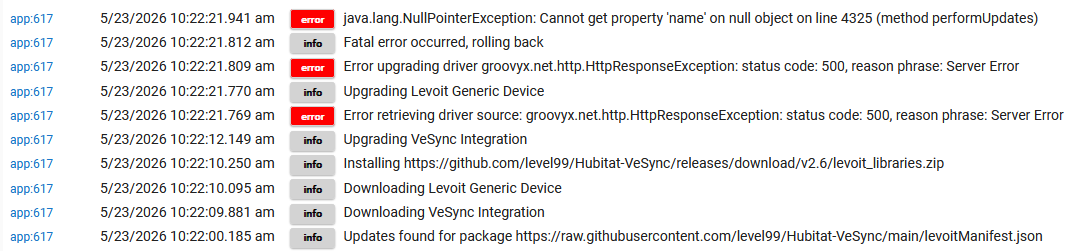
1 Like

v2.4.2 is live β€” HPM library install hotfix

Released: Release v2.4.2

To update: HPM β†’ Update β†’ "Levoit Air Purifiers, Humidifiers, and Fans". Existing devices upgrade in place; no re-pairing.

Bug fixes

  • Drivers errored on #include level99.LevoitDiagnostics after a fresh HPM install or upgrade. The v2.4 manifest used a packaging field that Hubitat Package Manager silently ignored, so the diagnostic library was never installed on your hub. Existing users whose hubs already had the library from an earlier cycle weren't affected. The library now ships as a Hubitat bundle, which HPM installs correctly.

Release notes Β· CHANGELOG Β· ROADMAP for v2.5

v2.5 is live β€” auto-on fix, EverestAir timer, Sup6000S attribute renames

Released: Release v2.5

To update: HPM β†’ Update β†’ "Levoit Air Purifiers, Humidifiers, and Fans". Existing devices upgrade in place; no re-pairing.

Bug fixes

  • Auto-on from off-state. Calling setSpeed, cycleSpeed, setMistLevel, or setMode on an off device now turns the device on first, then applies the command. Previously some commands silently sent the value to the cloud while the device stayed physically off β€” most noticeable in Room Lighting "Activate" actions and Rule Machine "Set Speed" / "Set Level" steps. Fixed across Core 200S/300S/400S/600S, Tower Fan, Pedestal Fan, and the Classic-family humidifiers (Classic 200S/300S, Dual 200S, LV600S, OasisMist 450S). Note: setMode on V2-line humidifiers, Vital line, and fans intentionally does NOT auto-on β€” those devices reject mode changes while off.
  • Core 300S/400S/600S aqi attribute reporting null since v2.3. Dashboards and Rule Machine rules referencing AQI now report the correct value.
  • Vital 200S log message said "mist level" instead of "fan level" β€” now logs the correct device class.
  • Core line display event now fires immediately when the display state changes, instead of waiting up to 30 seconds for the next poll. Affects Core 200S/300S/400S/600S.
  • captureDiagnostics dump no longer reports driver version as "unknown".

New features

  • EverestAir setTimer / cancelTimer commands. Schedule the EverestAir to turn off (or on) after a delay. Examples: setTimer(3600) turns it off in 1 hour; setTimer(3600, 'on') turns it on in 1 hour; cancelTimer clears a pending timer. Brings EverestAir to parity with Tower Fan's timer feature.

NOTE: Breaking Changeβ€” Superior 6000S attribute renames

If you have a Superior 6000S humidifier, three of its attributes were renamed to better support cross-driver standardization:

  • display β†’ displayOn
  • autoStopConfig β†’ autoStopEnabled
  • autoStopActive β†’ autoStopReached

Rule Machine actions calling setDisplay('on') or setAutoStop('on') are NOT affected β€” those commands kept their names.

What to check and update:

  • Dashboard tiles bound to one of the old attribute names will show null. Edit the tile and pick the new attribute name.
  • Rule Machine triggers or conditions that read those values (e.g., IF Sup6000S display = on, When autoStopActive changes) will never fire or always evaluate false. Edit the rule and replace the attribute reference.
  • Maker API or external integrations (Home Assistant, Grafana, custom scripts) polling the old attribute names will get null. Update the consumer.

Release notes Β· CHANGELOG Β· ROADMAP for v2.6

Thank you for picking up the slack! :slight_smile:

2 Likes