[Release] HubDuino v1.1.9 - Hubitat to Arduino / ESP8266 / ESP32 / ThingShield Integration (ST_Anything)

Yes, I have used it many times with my NodeMCU ESP8266. The basic instructions are the same as those found in this tutorial, except no need to use their example sketches. Just use one of my ESP8266 example sketches as your starting point and it should 'just work'.

It does require that you have Python 2.7 installed within Windows for it to work.

Thanks again to Dan G Ogorchock & Daniel J Ogorchock

The Hubduino code is just so cool !!!

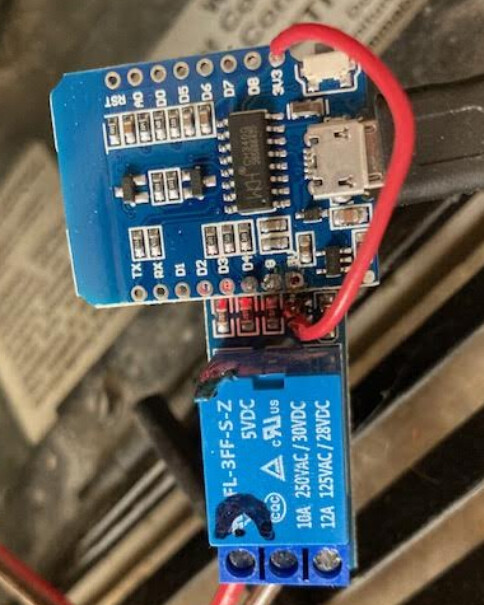
I just added remote control of my fireplace and it was so quick and easy (once I figured out where to connect into the fireplace). One interesting thing I learned is that the gas fireplace does not need power for the gas valve as it generated enough current from the pilot light fire via a thermocouple. I used a Wemo D1 mini (8266). The other interesting thing that I learned is that for the 5v relay board (active low) to work you have to power it with 3.3v, if you power if with 5v, then it will not operate but at 3.3 it works great

I am using a contact off the Arduino to tell the hubitat to tell the arduino to operate a relay for a magnetic door latch. It all works except that it is slow. I mean the contact takes about 2 seconds to react and then another couple of seconds to operate the relay. Is there any way to speed this up?

Please explain where exactly you're seeing the ~2 second delay. I use hard-wired contact sensors connected to an Arduino MEAG 2560 + W5500 Ethernet shield to trigger Hubitat lighting automations. The delay is less that ~300ms.

Need some more detail regarding this as well... :thinking: A HubDuino board controlling a relay should operate nearly instantly once the command is sent from the Hubitat hub to the microcontroller board.

Please provide some additional details regarding your hardware, the sketch you're using, and the logic on the Hubitat side of things. We need to track down where the delay(s) are coming from.

If the logic for this is simple and straightforward, then you could perform the logic locally within the sketch by using the built-in callback() routine. Please explain your requirements in more detail and I would be happy to help you implement Arduino-side local control if this would meet your requirements.

Hi Daniel, Thanks for the reply.

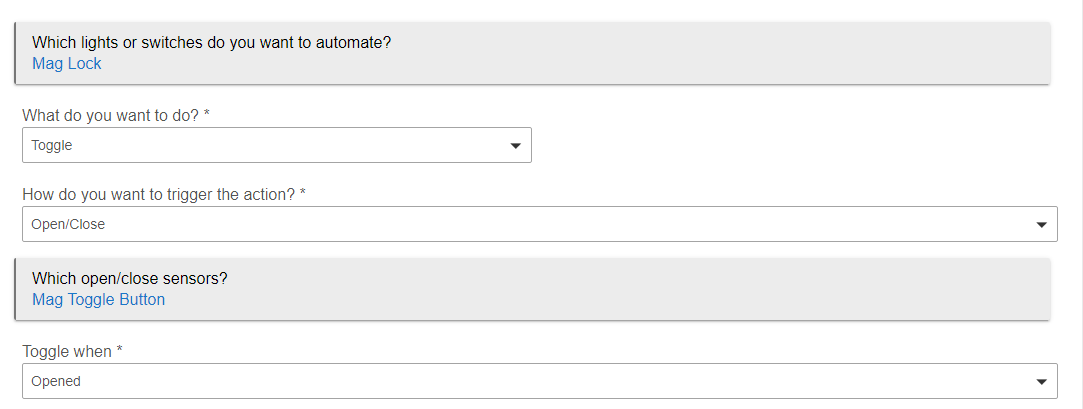
I have a mechanical button connected to a contact input on the Hubduino, in the Hubitat I have a RM that watches that contact. The RM controls a relay to energize/deenergize the Mag lock. The button that I use is near the door so I can operate it as I need to when entering and exiting. I have the relay wired so that if the power fails the mag lock is released. Doing this from within the sketch would be great, as long as I could get a status of the relay for hubitat to let me know when the door is secure, also to be able to operate the strike

Thanks for the additional information. I have more questions...

  1. What microcontroller are you using to run HubDuino on?
  2. It would be helpful to see a copy of your sketch (please remove/obscure your WiFi credentials before posting the sketch. also, please be sure to use the Preformatted Text option to make the code readable in the forum.)
  3. Can you please post a screenshot of your RM rule?
  4. How long should the relay be energized for when the manual button is pushed? As long as the button is held? Or would you prefer the relay stay on for a predetermined amount of time, even if the manual button is released? This would allow a simple button push and the relay could be automatically kept on for a few seconds, and then turned off by the Arduino board (without Hubitat needing to be involved, but would still be informed.)

OK Here is my Sketch

//******************************************************************************************
//  File: ST_Anything_Multiples_EthernetW5100.ino
//  Authors: Dan G Ogorchock & Daniel J Ogorchock (Father and Son)
//

//  Summary:  This Arduino Sketch, along with the ST_Anything library and the revised SmartThings 
//            library, demonstrates the ability of one Arduino + Ethernet W5100 Shield to 
//            implement a multi input/output custom device for integration into SmartThings.
//            The ST_Anything library takes care of all of the work to schedule device updates
//            as well as all communications with the Ethernet W5100 Shield.
//

//******************************************************************************************
// SmartThings Library for Arduino Ethernet W5100 Shield
//******************************************************************************************
#include <SmartThingsEthernetW5100.h>    //Library to provide API to the SmartThings Ethernet W5100 Shield

//******************************************************************************************
// ST_Anything Library 
//******************************************************************************************
#include <Constants.h>       //Constants.h is designed to be modified by the end user to adjust behavior of the ST_Anything library
#include <Device.h>          //Generic Device Class, inherited by Sensor and Executor classes
#include <Sensor.h>          //Generic Sensor Class, typically provides data to ST Cloud (e.g. Temperature, Motion, etc...)
#include <Executor.h>        //Generic Executor Class, typically receives data from ST Cloud (e.g. Switch)
#include <InterruptSensor.h> //Generic Interrupt "Sensor" Class, waits for change of state on digital input 
#include <PollingSensor.h>   //Generic Polling "Sensor" Class, polls Arduino pins periodically
#include <Everything.h>      //Master Brain of ST_Anything library that ties everything together and performs ST Shield communications
#include <PS_DS18B20_Temperature.h>  //Implements a Polling Sesnor (PS) to measure Temperature via DS18B20 libraries 
#include <PS_AdafruitBME280_TempHumidPress.h> //Implements a Polling Sensor (PS) to measure Temperature, humidity, and Pressure using BME280 via I2C
#include <PS_TemperatureHumidity.h>  //Implements a Polling Sensor (PS) to measure Temperature and Humidity via DHT library
#include <PS_Water.h>        //Implements a Polling Sensor (PS) to measure presence of water (i.e. leak detector) on an analog input pin 
#include <IS_Contact.h>      //Implements an Interrupt Sensor (IS) to monitor the status of a digital input pin
#include <IS_DoorControl.h>  //Implements an Interrupt Sensor (IS) and Executor to monitor the status of a digital input pin and control a digital output pin
#include <IS_Button.h>       //Implements an Interrupt Sensor (IS) to monitor the status of a digital input pin for button presses
#include <EX_Switch.h>       //Implements an Executor (EX) via a digital output to a relay
#include <S_TimedRelay.h>    //Implements a Sensor to control a digital output pin with timing/cycle repeat capabilities
#include <IS_Smoke.h>        //Implements an Interrupt Sensor (IS) to monitor the status of a digital input pin
//**********************************************************************************************************
//Define which Arduino Pins will be used for each device
//  Notes: Arduino communicates with both the W5100 and SD card using the SPI bus (through the ICSP header). 
//         This is on digital pins 10, 11, 12, and 13 on the Uno and pins 50, 51, and 52 on the Mega. 
//         On both boards, pin 10 is used to select the W5100 and pin 4 for the SD card. 
//         These pins cannot be used for general I/O. On the Mega, the hardware SS pin, 53, 
//         is not used to select either the W5100 or the SD card, but it must be kept as an output 
//         or the SPI interface won't work.
//         See https://www.arduino.cc/en/Main/ArduinoEthernetShieldV1 for details on the W5100 Sield
//**********************************************************************************************************
//"RESERVED" pins for W5100 Ethernet Shield - best to avoid
#define PIN_4_RESERVED            4   //reserved by W5100 Shield on both UNO and MEGA
#define PIN_1O_RESERVED           10  //reserved by W5100 Shield on both UNO and MEGA
#define PIN_50_RESERVED           50  //reserved by W5100 Shield on MEGA
#define PIN_51_RESERVED           51  //reserved by W5100 Shield on MEGA
#define PIN_52_RESERVED           52  //reserved by W5100 Shield on MEGA
#define PIN_53_RESERVED           53  //reserved by W5100 Shield on MEGA


//Analog Pins
//#define PIN_WATER_1               A0  //SmartThings Capability "Water Sensor"
//#define PIN_WATER_2               A1  //SmartThings Capability "Water Sensor"

//Digital Pins

#define PIN_CONTACT_1             38  //SmartThings Capability "Contact Sensor"
#define PIN_CONTACT_2             39  //SmartThings Capability "Contact Sensor"
#define PIN_CONTACT_3             40  //SmartThings Capability "Contact Sensor"
#define PIN_CONTACT_4             41  //SmartThings Capability "Contact Sensor"
#define PIN_CONTACT_5             42  //SmartThings Capability "Contact Sensor"
#define PIN_CONTACT_6             43  //SmartThings Capability "Contact Sensor"
//#define PIN_TEMPERATUREHUMIDITY_1 5  // DHT22
//#define PIN_TEMPERATUREHUMIDITY_2 6  // DHT22
//#define PIN_TEMPERATUREHUMIDITY_3 7  // DHT22
//#define PIN_TEMPERATUREHUMIDITY_4 20 // DHT22
#define PIN_SMOKE_1               13  

//Relay Outputs
#define PIN_SWITCH_1             22  //"Relay 1--Veg Lites"
#define PIN_SWITCH_2             23  //"Relay 2--Flower Lites"
#define PIN_SWITCH_3             24  // "Relay 3--Pool Pump"
#define PIN_SWITCH_4             31  // "Relay 10--Bedroom Heat"
#define PIN_SWITCH_5             32  // "Relay 11--Bathroom Heat"
#define PIN_SWITCH_6             33  // "Relay 12--Solar Valve""
#define PIN_SWITCH_7             35  // "Relay 13--Water Valve"
#define PIN_SWITCH_8             34  // "Relay 14--DHW Relay"
#define PIN_SWITCH_9             25 // "Relay 4 Flower Room Heater"
#define PIN_SWITCH_10            26 
#define PIN_SWITCH_11            27 
#define PIN_SWITCH_12            28 
#define PIN_SWITCH_13            29  
//#define PIN_SWITCH_14          30 

//Garage Door Pins 
#define PIN_DOORCONTROL_CONTACT_1 44  //"Door Sensor North Door" 
#define PIN_DOORCONTROL_RELAY_1   36  //"Door Control North Door" 
#define PIN_DOORCONTROL_CONTACT_2 45  //"Door Sensor South Door"  
#define PIN_DOORCONTROL_RELAY_2   30  //"Door Control South Door" Switched pin 30 & 37 because the relay connected to pin 37 is bad -- Relay 16

//******************************************************************************************
//W5100 Ethernet Shield Information
//****************************************************************************************** 
byte mac[] = {0x06,0x02,0x03,0x04,0x05,0x06}; //MAC address, leave first octet 0x06, change others to be unique //  <---You must edit this line!
IPAddress ip(192, 168, 1, xx);               //Arduino device IP Address                   //  <---You must edit this line!
IPAddress gateway(192, 168, 1, 1);            //router gateway                              //  <---You must edit this line!
IPAddress subnet(255, 255, 255, 0);           //LAN subnet mask                             //  <---You must edit this line!
IPAddress dnsserver(192, 168, 1, 1);          //DNS server                                  //  <---You must edit this line!
const unsigned int serverPort = 8090;         // port to run the http server on

// Hubitat TCP/IP Address
IPAddress hubIp(192, 168, 1, xx);    // hubitat hub ip //  <---You must edit this line!

//Hubitat Hub TCP/IP Address: UNCOMMENT line that corresponds to your hub, COMMENT the other
const unsigned int hubPort = 39501;   // Hubitat hub port


//******************************************************************************************
//st::Everything::callOnMsgSend() optional callback routine.  This is a sniffer to monitor 
//    data being sent to ST.  This allows a user to act on data changes locally within the 
//    Arduino sktech withotu having to rely on the ST Cloud for time-critical tasks.
//******************************************************************************************
void callback(const String &msg)
{
  //Uncomment if it would be desirable to using this function
  //Serial.print(F("ST_Anything_Miltiples Callback: Sniffed data = "));
  //Serial.println(msg);
  
  //TODO:  Add local logic here to take action when a device's value/state is changed
  
  //Masquerade as the ThingShield to send data to the Arduino, as if from the ST Cloud (uncomment and edit following line(s) as you see fit)
  //st::receiveSmartString("Put your command here!");  //use same strings that the Device Handler would send
}

//******************************************************************************************
//Arduino Setup() routine
//******************************************************************************************
void setup()
{
  //******************************************************************************************
  //Declare each Device that is attached to the Arduino
  //  Notes: - For each device, there is typically a corresponding "tile" defined in your 
  //           SmartThings Device Hanlder Groovy code, except when using new COMPOSITE Device Handler
  //         - For details on each device's constructor arguments below, please refer to the 
  //           corresponding header (.h) and program (.cpp) files.
  //         - The name assigned to each device (1st argument below) must match the Groovy
  //           Device Handler names.  (Note: "temphumid" below is the exception to this rule
  //           as the DHT sensors produce both "temperature" and "humidity".  Data from that
  //           particular sensor is sent to the ST Hub in two separate updates, one for 
  //           "temperature" and one for "humidity")
  //         - The new Composite Device Handler is comprised of a Parent DH and various Child
  //           DH's.  The names used below MUST not be changed for the Automatic Creation of
  //           child devices to work properly.  Simply increment the number by +1 for each duplicate
  //           device (e.g. contact1, contact2, contact3, etc...)  You can rename the Child Devices
  //           to match your specific use case in the ST Phone Application.
  //******************************************************************************************
//Polling Sensors 
//st::PS_DS18B20_Temperature() constructor requires the following arguments
//- String &name - REQUIRED - the name of the object - either "temperature1" for a single sensor, or "temperature" for multiple sensors
//- long interval - REQUIRED - the polling interval in seconds
//- long offset - REQUIRED - the polling interval offset in seconds - used to prevent all polling sensors from executing at the same time
//- byte pin - REQUIRED - the Arduino Pin to be used for the One-Wire DS18B20 sensor conenction
//- bool In_C - OPTIONAL - true = Report Celsius, false = Report Farenheit (Farentheit is the default)
//- byte resolution - OPTIONAL - DS18B20 sensor resolution in bits.  9, 10, 11, or 12.  Defaults to 10 for decent accuracy and performance
//- byte num_sensors - OPTIONAL - number of OneWire DS18B20 sensors attached to OneWire bus - Defaults to 1
//- byte sensorStartingNum - OPTIONAL - Starting number for sending temperature sensor data when using multiple sensors on one pin - Defaults to 1
 
  static st::PS_DS18B20_Temperature sensor1(F("temperature"), 60, 0, 11, false, 10, 6, 1);  //DS1820 Sensors 1 -6 
  //static st::PS_DS18B20_Temperature sensor2(F("temperature"), 60, 5, 12, false, 10, 6, 7); //DS1820 Sensors 7 -12 
  //static st::PS_DS18B20_Temperature sensor3(F("temperature"), 60, 10, 13, false, 10, 6, 13); //DS1820 Sensors 13 -18 
  //static st::PS_AdafruitBME280_TempHumidPress sensor4(F("BME280_1"), 60, 0, "temperature9", "humidity1", "pressure1", false, 100, 0x77);  
  //static st::PS_TemperatureHumidity sensor2(F("temphumid1"), 90, 21, PIN_TEMPERATUREHUMIDITY_1, st::PS_TemperatureHumidity::DHT22,"temperature7","humidity1");
  //static st::PS_TemperatureHumidity sensor3(F("temphumid2"), 90, 42, PIN_TEMPERATUREHUMIDITY_2, st::PS_TemperatureHumidity::DHT22,"temperature8","humidity2");
  //static st::PS_TemperatureHumidity sensor4(F("temphumid3"), 90, 53, PIN_TEMPERATUREHUMIDITY_3, st::PS_TemperatureHumidity::DHT22,"temperature9","humidity3");
  //static st::PS_TemperatureHumidity sensor9(F("temphumid4"), 90, 64, PIN_TEMPERATUREHUMIDITY_4, st::PS_TemperatureHumidity::DHT22,"temperature10","humidity4");
//Interrupt Sensors 
  static st::IS_Contact sensor5(F("contact1"), PIN_CONTACT_1, LOW, true, 500); //Back DoorBell
  static st::IS_Contact sensor6(F("contact2"), PIN_CONTACT_2, LOW, true, 500); //Front Doorbell
  static st::IS_Contact sensor11(F("contact3"), PIN_CONTACT_3, LOW, true, 500); //Solar Valve 
  static st::IS_Contact sensor12(F("contact4"), PIN_CONTACT_4, LOW, true, 500);
  static st::IS_Contact sensor13(F("contact5"), PIN_CONTACT_5, LOW, true, 500);  
  static st::IS_Contact sensor14(F("contact6"), PIN_CONTACT_6, LOW, true, 500);
  //static st::IS_Smoke sensor3(F("smoke1"), PIN_SMOKE_1, HIGH, true, 500);  
  static st::IS_DoorControl sensor7(F("doorControl1"), PIN_DOORCONTROL_CONTACT_1, LOW, true, PIN_DOORCONTROL_RELAY_1, LOW, true, 1000);
  static st::IS_DoorControl sensor8(F("doorControl2"), PIN_DOORCONTROL_CONTACT_2, LOW, true, PIN_DOORCONTROL_RELAY_2, LOW, true, 1000);
    
//Executors
  static st::EX_Switch              executor1(F("switch1"), PIN_SWITCH_1, LOW, true);
  static st::EX_Switch              executor2(F("switch2"), PIN_SWITCH_2, LOW, true);
  static st::EX_Switch              executor3(F("switch3"), PIN_SWITCH_3, LOW, true);
  static st::EX_Switch              executor4(F("switch4"), PIN_SWITCH_4, LOW, true);
  static st::EX_Switch              executor5(F("switch5"), PIN_SWITCH_5, LOW, true);
  static st::EX_Switch              executor6(F("switch6"), PIN_SWITCH_6, LOW, true);
  static st::EX_Switch              executor7(F("switch7"), PIN_SWITCH_7, LOW, true);
  static st::EX_Switch              executor8(F("switch8"), PIN_SWITCH_8, LOW, true);
  static st::EX_Switch              executor9(F("switch9"), PIN_SWITCH_9, LOW, true);
  static st::EX_Switch              executor10(F("switch10"), PIN_SWITCH_10, LOW, true);
  static st::EX_Switch              executor11(F("switch11"), PIN_SWITCH_11, LOW, true);
  static st::EX_Switch              executor12(F("switch12"), PIN_SWITCH_12, LOW, true);
  static st::EX_Switch              executor13(F("switch13"), PIN_SWITCH_13, LOW, true);
  //static st::EX_Switch              executor14(F("switch14"), PIN_SWITCH_14, LOW, true);
  
 
//*****************************************************************************
//  Configure debug print output from each main class 
//*****************************************************************************
  st::Everything::debug=true;
  st::Executor::debug=true;
  st::Device::debug=true;
  st::PollingSensor::debug=true;
  st::InterruptSensor::debug=true;

  //*****************************************************************************
  //Initialize the "Everything" Class
  //*****************************************************************************
  
  //Initialize the optional local callback routine (safe to comment out if not desired)
  st::Everything::callOnMsgSend = callback;
  
  //Create the SmartThings EthernetW5100 Communications Object
    //STATIC IP Assignment - Recommended
    st::Everything::SmartThing = new st::SmartThingsEthernetW5100(mac, ip, gateway, subnet, dnsserver, serverPort, hubIp, hubPort, st::receiveSmartString);
 
    //DHCP IP Assigment - Must set your router's DHCP server to provice a static IP address for this device's MAC address
    //st::Everything::SmartThing = new st::SmartThingsEthernetW5100(mac, serverPort, hubIp, hubPort, st::receiveSmartString);

  //Run the Everything class' init() routine which establishes Ethernet communications with the SmartThings Hub
  st::Everything::init();
  
  //*****************************************************************************
  //Add each sensor to the "Everything" Class
  //*****************************************************************************
  st::Everything::addSensor(&sensor1);
  st::Everything::addSensor(&sensor2);
  st::Everything::addSensor(&sensor3);
  st::Everything::addSensor(&sensor4);
  st::Everything::addSensor(&sensor5);
  st::Everything::addSensor(&sensor6); 
  //st::Everything::addSensor(&sensor7);
  //st::Everything::addSensor(&sensor8);
  //st::Everything::addSensor(&sensor9);
  st::Everything::addSensor(&sensor11);
  st::Everything::addSensor(&sensor12);
  st::Everything::addSensor(&sensor13); 
  st::Everything::addSensor(&sensor14);


  //*****************************************************************************
  //Add each executor to the "Everything" Class
  //*****************************************************************************
  st::Everything::addExecutor(&executor1);
  st::Everything::addExecutor(&executor2);
  st::Everything::addExecutor(&executor3);
  st::Everything::addExecutor(&executor4);
  st::Everything::addExecutor(&executor5);
  st::Everything::addExecutor(&executor6);
  st::Everything::addExecutor(&executor7);
  st::Everything::addExecutor(&executor8);
  st::Everything::addExecutor(&executor9);
  st::Everything::addExecutor(&executor10);
  st::Everything::addExecutor(&executor11);
  st::Everything::addExecutor(&executor12);
  st::Everything::addExecutor(&executor13);
//  st::Everything::addExecutor(&executor14);
 
 
  //*****************************************************************************
  //Initialize each of the devices which were added to the Everything Class
  //*****************************************************************************
  st::Everything::initDevices();
}

//******************************************************************************************
//Arduino Loop() routine
//******************************************************************************************
void loop()
{
  //*****************************************************************************
  //Execute the Everything run method which takes care of "Everything"
  //*****************************************************************************
  st::Everything::run();
}
I am using a Arduino Mega256. Here is the screenshot of the rule

I would prefer the operation to toggle with each button press. If the lock is engaged then disengage and vice versa. Being able to operate it from the hubitat is desireable as well.

Which input is connected to the manual Button? Which output is connected to the relay?

The sketch you provided does not compile. Perhaps you confused it with another one?

@ogiewon perhaps a bizarre question, but how could I go about using an existing hubduino device to make an WiFiClient call? I tried to figure out how it's doing it from the Hubdunio libraries that are included, but couldn't figure it out. I assume it would need to happen after

st::Everything::run();

Would st::st_client do the trick? I want to essentially do a GET on a MakerAPI to refresh a device when the device is powered back up, thus indicating that power was out and has been restored.

This is in my old code:

(http.begin(client, "http://192.168.1.xxx/apps/api/8/devices/752/refresh?access_token=xxx-xxxx-xxxx-xxxxx-xxxxx")) {  // HTTP
      Serial.print("[HTTP] GET...\n");
      // start connection and send HTTP header
      int httpCode = http.GET();

Thanks!

just a little odd... :wink:

By default, all http client and server functionality is abstracted away from the sketch in the appropriate "SmartThings..." library (specific to the microcontroller one is using.)

Can you explain in a little more detail, please? The network communications on the Arduino side of things is established completely within the sketch's setup() routine. Thus, if you want the Arduino to send a one-time http GET when the Arduino board is powered on, you could perform it within the setup() routine. This will keep your logic simple as the loop() routine would require special logic to prevent making the http GET call every time loop() runs.

What happens if your Arduino board is up and running much, much quicker than your Hubitat hub, or the rest of your home network, after a power outage? The Arduino will be up and running within a few seconds. As long as your network and Hubitat hardware is all on a UPS, then it may still work... :thinking:

I did build into the HubDuino Parent device a "Presence" capability, that will change state based on whether or not the HubDuino board has sent any data within a user-selectable window of time. Perhaps this would meet your needs instead? You could have Rule Machine use the HubDuino Parent device's presence status as a trigger to have RM make the refresh() call on the device.

Also, you could use RM to make the refresh() call on the device each time the hub is restarted, using the hubstartup location event.

@elentz - I have a modified version of your sketch working with local control on the relay based on your requirements above. I still need to know if this is the correct sketch, and if so, which contact sensor and switch devices should be used for this local control?

I knew you would ask those questions. The relay is gpio29 and the button is on gpio42

Ok, here is what I have come up with per your requirements. Again, the sketch you provided would not compile as-is, so I had to make some tweaks. Also, I only have an Arduino Ethernent 2 Shield handy, so I modified this sketch to use the newer "SmartThingsEthernetW5x00" library, which is supposed to work with all W5x00 series of shields. You may need to update your ST_Anything code from my GitHub if it has been a while since you've done so.

Hope this helps! Enjoy!

//******************************************************************************************
//  File: ST_Anything_Elentz_EthernetW5x00.ino
//  Authors: Dan G Ogorchock & Daniel J Ogorchock (Father and Son)
//

//  Summary:  This Arduino Sketch, along with the ST_Anything library and the revised SmartThings 
//            library, demonstrates the ability of one Arduino + Ethernet W5100 Shield to 
//            implement a multi input/output custom device for integration into SmartThings.
//            The ST_Anything library takes care of all of the work to schedule device updates
//            as well as all communications with the Ethernet W5100 Shield.
//

//******************************************************************************************
// SmartThings Library for Arduino Ethernet W5x00 Shield
//******************************************************************************************
#include <SmartThingsEthernetW5x00.h>    //Library to provide API to the SmartThings Ethernet W5100 Shield

//******************************************************************************************
// ST_Anything Library 
//******************************************************************************************
#include <Constants.h>       //Constants.h is designed to be modified by the end user to adjust behavior of the ST_Anything library
#include <Device.h>          //Generic Device Class, inherited by Sensor and Executor classes
#include <Sensor.h>          //Generic Sensor Class, typically provides data to ST Cloud (e.g. Temperature, Motion, etc...)
#include <Executor.h>        //Generic Executor Class, typically receives data from ST Cloud (e.g. Switch)
#include <InterruptSensor.h> //Generic Interrupt "Sensor" Class, waits for change of state on digital input 
#include <PollingSensor.h>   //Generic Polling "Sensor" Class, polls Arduino pins periodically
#include <Everything.h>      //Master Brain of ST_Anything library that ties everything together and performs ST Shield communications
#include <PS_DS18B20_Temperature.h>  //Implements a Polling Sesnor (PS) to measure Temperature via DS18B20 libraries 
#include <PS_AdafruitBME280_TempHumidPress.h> //Implements a Polling Sensor (PS) to measure Temperature, humidity, and Pressure using BME280 via I2C
#include <PS_TemperatureHumidity.h>  //Implements a Polling Sensor (PS) to measure Temperature and Humidity via DHT library
#include <PS_Water.h>        //Implements a Polling Sensor (PS) to measure presence of water (i.e. leak detector) on an analog input pin 
#include <IS_Contact.h>      //Implements an Interrupt Sensor (IS) to monitor the status of a digital input pin
#include <IS_DoorControl.h>  //Implements an Interrupt Sensor (IS) and Executor to monitor the status of a digital input pin and control a digital output pin
#include <IS_Button.h>       //Implements an Interrupt Sensor (IS) to monitor the status of a digital input pin for button presses
#include <EX_Switch.h>       //Implements an Executor (EX) via a digital output to a relay
#include <S_TimedRelay.h>    //Implements a Sensor to control a digital output pin with timing/cycle repeat capabilities
#include <IS_Smoke.h>        //Implements an Interrupt Sensor (IS) to monitor the status of a digital input pin
//**********************************************************************************************************
//Define which Arduino Pins will be used for each device
//  Notes: Arduino communicates with both the W5100 and SD card using the SPI bus (through the ICSP header). 
//         This is on digital pins 10, 11, 12, and 13 on the Uno and pins 50, 51, and 52 on the Mega. 
//         On both boards, pin 10 is used to select the W5100 and pin 4 for the SD card. 
//         These pins cannot be used for general I/O. On the Mega, the hardware SS pin, 53, 
//         is not used to select either the W5100 or the SD card, but it must be kept as an output 
//         or the SPI interface won't work.
//         See https://www.arduino.cc/en/Main/ArduinoEthernetShieldV1 for details on the W5100 Sield
//**********************************************************************************************************
//"RESERVED" pins for W5x00 Ethernet Shield - best to avoid
#define PIN_4_RESERVED            4   //reserved by W5x00 Shield on both UNO and MEGA
#define PIN_1O_RESERVED           10  //reserved by W5x00 Shield on both UNO and MEGA
#define PIN_11_RESERVED           11  //reserved by W5x00 Shield on UNO
#define PIN_12_RESERVED           12  //reserved by W5x00 Shield on UNO
#define PIN_13_RESERVED           13  //reserved by W5x00 Shield on UNO
#define PIN_50_RESERVED           50  //reserved by W5x00 Shield on MEGA
#define PIN_51_RESERVED           51  //reserved by W5x00 Shield on MEGA
#define PIN_52_RESERVED           52  //reserved by W5x00 Shield on MEGA
#define PIN_53_RESERVED           53  //reserved by W5x00 Shield on MEGA

//Analog Pins
//#define PIN_WATER_1               A0  //SmartThings Capability "Water Sensor"
//#define PIN_WATER_2               A1  //SmartThings Capability "Water Sensor"

//Digital Pins

#define PIN_CONTACT_1             38  //SmartThings Capability "Contact Sensor"
#define PIN_CONTACT_2             39  //SmartThings Capability "Contact Sensor"
#define PIN_CONTACT_3             40  //SmartThings Capability "Contact Sensor"
#define PIN_CONTACT_4             41  //SmartThings Capability "Contact Sensor"
#define PIN_CONTACT_5             42  //SmartThings Capability "Contact Sensor"
#define PIN_CONTACT_6             43  //SmartThings Capability "Contact Sensor"
//#define PIN_TEMPERATUREHUMIDITY_1 5  // DHT22
//#define PIN_TEMPERATUREHUMIDITY_2 6  // DHT22
//#define PIN_TEMPERATUREHUMIDITY_3 7  // DHT22
//#define PIN_TEMPERATUREHUMIDITY_4 20 // DHT22
#define PIN_SMOKE_1               13  

//Relay Outputs
#define PIN_SWITCH_1             22  //"Relay 1--Veg Lites"
#define PIN_SWITCH_2             23  //"Relay 2--Flower Lites"
#define PIN_SWITCH_3             24  // "Relay 3--Pool Pump"
#define PIN_SWITCH_4             31  // "Relay 10--Bedroom Heat"
#define PIN_SWITCH_5             32  // "Relay 11--Bathroom Heat"
#define PIN_SWITCH_6             33  // "Relay 12--Solar Valve""
#define PIN_SWITCH_7             35  // "Relay 13--Water Valve"
#define PIN_SWITCH_8             34  // "Relay 14--DHW Relay"
#define PIN_SWITCH_9             25 // "Relay 4 Flower Room Heater"
#define PIN_SWITCH_10            26 
#define PIN_SWITCH_11            27 
#define PIN_SWITCH_12            28 
#define PIN_SWITCH_13            29  
//#define PIN_SWITCH_14          30 

//Garage Door Pins 
#define PIN_DOORCONTROL_CONTACT_1 44  //"Door Sensor North Door" 
#define PIN_DOORCONTROL_RELAY_1   36  //"Door Control North Door" 
#define PIN_DOORCONTROL_CONTACT_2 45  //"Door Sensor South Door"  
#define PIN_DOORCONTROL_RELAY_2   30  //"Door Control South Door" Switched pin 30 & 37 because the relay connected to pin 37 is bad -- Relay 16

//******************************************************************************************
//W5x00 Ethernet Shield Information
//****************************************************************************************** 

//NOTE - If your shield came with a MAC address sticker - please use that MAC address!
byte mac[] = {0x06,0x02,0x03,0x04,0x05,0x06}; //MAC address, leave first octet 0x06, change others to be unique //  <---You must edit this line!

IPAddress ip(192, 168, 1, xxx);               //Arduino device IP Address                   //  <---You must edit this line!
IPAddress gateway(192, 168, 1, 1);            //router gateway                              //  <---You must edit this line!
IPAddress subnet(255, 255, 255, 0);           //LAN subnet mask                             //  <---You must edit this line!
IPAddress dnsserver(192, 168, 1, 1);          //DNS server                                  //  <---You must edit this line!
const unsigned int serverPort = 8090;         // port to run the http server on

// Smartthings Hub Information
//IPAddress hubIp(192, 168, 1, 149);  // smartthings hub ip       //  <---You must edit this line!
//const unsigned int hubPort = 39500; // smartthings hub port

// Hubitat Hub Information
IPAddress hubIp(192, 168, 1, xxx);    // hubitat hub ip         //  <---You must edit this line!
const unsigned int hubPort = 39501;   // hubitat hub port

//******************************************************************************************
//Local Processing Variable Declarations
//******************************************************************************************
st::EX_Switch* lockRelay;
String strCommand;

//******************************************************************************************
//st::Everything::callOnMsgSend() optional callback routine.  This is a sniffer to monitor 
//    data being sent to ST.  This allows a user to act on data changes locally within the 
//    Arduino sktech withotu having to rely on the ST Cloud for time-critical tasks.
//******************************************************************************************
void callback(const String &msg)
{
  //Uncomment if it would be desirable to using this function
  //Serial.print(F("ST_Anything_Miltiples Callback: Sniffed data = "));
  //Serial.println(msg);
  
  //TODO:  Add local logic here to take action when a device's value/state is changed
  
  //Masquerade as the ThingShield to send data to the Arduino, as if from the ST Cloud (uncomment and edit following line(s) as you see fit)
  //st::receiveSmartString("Put your command here!");  //use same strings that the Device Handler would send

  if (msg == "contact5 closed") {
    strCommand = lockRelay->getName() + " " + (lockRelay->getStatus() == HIGH ? F("off"):F("on"));
    Serial.print(F("Toggling lockRelay status. command = "));
    Serial.println(strCommand);
    lockRelay->beSmart(strCommand);  //Call the beSmart function of the proper executor object to either turn on or off the relay
    strCommand.remove(0); //clear the strCommand buffer
  }

}

//******************************************************************************************
//Arduino Setup() routine
//******************************************************************************************
void setup()
{
  //******************************************************************************************
  //Declare each Device that is attached to the Arduino
  //  Notes: - For each device, there is typically a corresponding "tile" defined in your 
  //           SmartThings Device Hanlder Groovy code, except when using new COMPOSITE Device Handler
  //         - For details on each device's constructor arguments below, please refer to the 
  //           corresponding header (.h) and program (.cpp) files.
  //         - The name assigned to each device (1st argument below) must match the Groovy
  //           Device Handler names.  (Note: "temphumid" below is the exception to this rule
  //           as the DHT sensors produce both "temperature" and "humidity".  Data from that
  //           particular sensor is sent to the ST Hub in two separate updates, one for 
  //           "temperature" and one for "humidity")
  //         - The new Composite Device Handler is comprised of a Parent DH and various Child
  //           DH's.  The names used below MUST not be changed for the Automatic Creation of
  //           child devices to work properly.  Simply increment the number by +1 for each duplicate
  //           device (e.g. contact1, contact2, contact3, etc...)  You can rename the Child Devices
  //           to match your specific use case in the ST Phone Application.
  //******************************************************************************************
//Polling Sensors 
//st::PS_DS18B20_Temperature() constructor requires the following arguments
//- String &name - REQUIRED - the name of the object - either "temperature1" for a single sensor, or "temperature" for multiple sensors
//- long interval - REQUIRED - the polling interval in seconds
//- long offset - REQUIRED - the polling interval offset in seconds - used to prevent all polling sensors from executing at the same time
//- byte pin - REQUIRED - the Arduino Pin to be used for the One-Wire DS18B20 sensor conenction
//- bool In_C - OPTIONAL - true = Report Celsius, false = Report Farenheit (Farentheit is the default)
//- byte resolution - OPTIONAL - DS18B20 sensor resolution in bits.  9, 10, 11, or 12.  Defaults to 10 for decent accuracy and performance
//- byte num_sensors - OPTIONAL - number of OneWire DS18B20 sensors attached to OneWire bus - Defaults to 1
//- byte sensorStartingNum - OPTIONAL - Starting number for sending temperature sensor data when using multiple sensors on one pin - Defaults to 1
 
  static st::PS_DS18B20_Temperature sensor1(F("temperature"), 60, 0, 11, false, 10, 6, 1);  //DS1820 Sensors 1 -6 
  //static st::PS_DS18B20_Temperature sensor2(F("temperature"), 60, 5, 12, false, 10, 6, 7); //DS1820 Sensors 7 -12 
  //static st::PS_DS18B20_Temperature sensor3(F("temperature"), 60, 10, 13, false, 10, 6, 13); //DS1820 Sensors 13 -18 
  //static st::PS_AdafruitBME280_TempHumidPress sensor4(F("BME280_1"), 60, 0, "temperature9", "humidity1", "pressure1", false, 100, 0x77);  
  //static st::PS_TemperatureHumidity sensor2(F("temphumid1"), 90, 21, PIN_TEMPERATUREHUMIDITY_1, st::PS_TemperatureHumidity::DHT22,"temperature7","humidity1");
  //static st::PS_TemperatureHumidity sensor3(F("temphumid2"), 90, 42, PIN_TEMPERATUREHUMIDITY_2, st::PS_TemperatureHumidity::DHT22,"temperature8","humidity2");
  //static st::PS_TemperatureHumidity sensor4(F("temphumid3"), 90, 53, PIN_TEMPERATUREHUMIDITY_3, st::PS_TemperatureHumidity::DHT22,"temperature9","humidity3");
  //static st::PS_TemperatureHumidity sensor9(F("temphumid4"), 90, 64, PIN_TEMPERATUREHUMIDITY_4, st::PS_TemperatureHumidity::DHT22,"temperature10","humidity4");
//Interrupt Sensors 
  static st::IS_Contact sensor5(F("contact1"), PIN_CONTACT_1, LOW, true, 500); //Back DoorBell
  static st::IS_Contact sensor6(F("contact2"), PIN_CONTACT_2, LOW, true, 500); //Front Doorbell
  static st::IS_Contact sensor11(F("contact3"), PIN_CONTACT_3, LOW, true, 500); //Solar Valve 
  static st::IS_Contact sensor12(F("contact4"), PIN_CONTACT_4, LOW, true, 500);
  static st::IS_Contact sensor13(F("contact5"), PIN_CONTACT_5, LOW, true, 500);  
  static st::IS_Contact sensor14(F("contact6"), PIN_CONTACT_6, LOW, true, 500);
  //static st::IS_Smoke sensor3(F("smoke1"), PIN_SMOKE_1, HIGH, true, 500);  
//  static st::IS_DoorControl sensor7(F("doorControl1"), PIN_DOORCONTROL_CONTACT_1, LOW, true, PIN_DOORCONTROL_RELAY_1, LOW, true, 1000);
//  static st::IS_DoorControl sensor8(F("doorControl2"), PIN_DOORCONTROL_CONTACT_2, LOW, true, PIN_DOORCONTROL_RELAY_2, LOW, true, 1000);
    
//Executors
  static st::EX_Switch              executor1(F("switch1"), PIN_SWITCH_1, LOW, true);
  static st::EX_Switch              executor2(F("switch2"), PIN_SWITCH_2, LOW, true);
  static st::EX_Switch              executor3(F("switch3"), PIN_SWITCH_3, LOW, true);
  static st::EX_Switch              executor4(F("switch4"), PIN_SWITCH_4, LOW, true);
  static st::EX_Switch              executor5(F("switch5"), PIN_SWITCH_5, LOW, true);
  static st::EX_Switch              executor6(F("switch6"), PIN_SWITCH_6, LOW, true);
  static st::EX_Switch              executor7(F("switch7"), PIN_SWITCH_7, LOW, true);
  static st::EX_Switch              executor8(F("switch8"), PIN_SWITCH_8, LOW, true);
  static st::EX_Switch              executor9(F("switch9"), PIN_SWITCH_9, LOW, true);
  static st::EX_Switch              executor10(F("switch10"), PIN_SWITCH_10, LOW, true);
  static st::EX_Switch              executor11(F("switch11"), PIN_SWITCH_11, LOW, true);
  static st::EX_Switch              executor12(F("switch12"), PIN_SWITCH_12, LOW, true);
  static st::EX_Switch              executor13(F("switch13"), PIN_SWITCH_13, LOW, true);
  //static st::EX_Switch              executor14(F("switch14"), PIN_SWITCH_14, LOW, true);
  
 
//*****************************************************************************
//  Configure debug print output from each main class 
//*****************************************************************************
  st::Everything::debug=true;
  st::Executor::debug=true;
  st::Device::debug=true;
  st::PollingSensor::debug=true;
  st::InterruptSensor::debug=true;

  //*****************************************************************************
  //Initialize the "Everything" Class
  //*****************************************************************************
  
  //Initialize the optional local callback routine (safe to comment out if not desired)
  st::Everything::callOnMsgSend = callback;
  
  //Create the SmartThings EthernetW5x00 Communications Object
    //STATIC IP Assignment - Recommended
    st::Everything::SmartThing = new st::SmartThingsEthernetW5x00(mac, ip, gateway, subnet, dnsserver, serverPort, hubIp, hubPort, st::receiveSmartString);
 
    //DHCP IP Assigment - Must set your router's DHCP server to provice a static IP address for this device's MAC address
    //st::Everything::SmartThing = new st::SmartThingsEthernetW5100(mac, serverPort, hubIp, hubPort, st::receiveSmartString);

  //Run the Everything class' init() routine which establishes Ethernet communications with the SmartThings Hub
  st::Everything::init();
  
  //*****************************************************************************
  //Add each sensor to the "Everything" Class
  //*****************************************************************************
  st::Everything::addSensor(&sensor1);
//  st::Everything::addSensor(&sensor2);
//  st::Everything::addSensor(&sensor3);
//  st::Everything::addSensor(&sensor4);
  st::Everything::addSensor(&sensor5);
  st::Everything::addSensor(&sensor6); 
  //st::Everything::addSensor(&sensor7);
  //st::Everything::addSensor(&sensor8);
  //st::Everything::addSensor(&sensor9);
  st::Everything::addSensor(&sensor11);
  st::Everything::addSensor(&sensor12);
  st::Everything::addSensor(&sensor13); 
  st::Everything::addSensor(&sensor14);


  //*****************************************************************************
  //Add each executor to the "Everything" Class
  //*****************************************************************************
  st::Everything::addExecutor(&executor1);
  st::Everything::addExecutor(&executor2);
  st::Everything::addExecutor(&executor3);
  st::Everything::addExecutor(&executor4);
  st::Everything::addExecutor(&executor5);
  st::Everything::addExecutor(&executor6);
  st::Everything::addExecutor(&executor7);
  st::Everything::addExecutor(&executor8);
  st::Everything::addExecutor(&executor9);
  st::Everything::addExecutor(&executor10);
  st::Everything::addExecutor(&executor11);
  st::Everything::addExecutor(&executor12);
  st::Everything::addExecutor(&executor13);
//  st::Everything::addExecutor(&executor14);
 
 
  //*****************************************************************************
  //Initialize each of the devices which were added to the Everything Class
  //*****************************************************************************
  st::Everything::initDevices();

  //*****************************************************************************
  //Local processing variable assignments
  //*****************************************************************************
  lockRelay = &executor13;
  strCommand.reserve(20); //Allocate strCommand buffer one time to prevent Heap Fragmentation.

}

//******************************************************************************************
//Arduino Loop() routine
//******************************************************************************************
void loop()
{
  //*****************************************************************************
  //Execute the Everything run method which takes care of "Everything"
  //*****************************************************************************
  st::Everything::run();
}

Thanks! I will probably upload this tomorrow when I have more time to play with it. I will need to update the code for the shield. It has been a long time . I'll report back what happens

Thanks again Dan!

It’s another measure to deal with zigbee bulbs. Half of my home is on a generator, other half isn’t, so there is a number of bulbs that will come back on at different times depending on if the generator kicks in for those circuits or not. So I have a few different areas where I need to a lot for triggering a bulb refresh. Since I already have a hubduino device plugged in, I figured I’d use that a a bulb refresh trigger which would then restore the states using SmarterBulbs. Hubitat shouldn’t ever go offline as it’s on a UPS and generator circuit, so the speed in competing with is the time it take a bulb to come back on vs an arduino device.

So I have a working sketch that controls blinds that have a motor controller,esp8266 and a top switch to detect the up position. I'm not smart enough to create but modified someone else code (there is links in the code). I would like to convert the code to the hubduino model and have been studying the TimedValve and DoorControl code and not sure what is the right approach. I'm looking for suggestions on the right approach. I somehow have to match up with a defined capability like doorcontrol or valve or actuator/contact sensor ...right? I'm going to attach the code for what its worth... One of the reasons I want to convert to Hubduino is so that I can add a light sensor and motion sensor to the esp8266 which will aid in deciding to open shade or not.
btw, the shade goes up until switch closes but is just timed for going down.

Arg .. i can't figure out how to post code....i thought I clicked the </> but that does not work

Question, The Hubduino instructions say no need for MAC address anymore, but farther down it says I need a MAC address for a W5500 ethernet connection. So do I need one? If not what are the changes to this line for a Mega With W5500 shield.

st::Everything::SmartThing = new st::SmartThingsEthernetW5x00(mac, ip, gateway, subnet, dnsserver, serverPort, hubIp, hubPort, st::receiveSmartString);

If I remove "mac" it doesnt compile.