Hi I'm using the contact sensor on a switch on my 3d printer extruder to tell that the printer is active... in some cases it generates a lot of open and close's when the printer is extruding and retracting.
What i "want" is an on-off pulse once a minute if there were any pulses during that minute ...my driver is monitoring for activity and that would be sufficient to say the printer is active.
The IS_Contact class has something called numReqCounts would that parameter enable what I want (guessing not but doesn't hurt to ask : )
If that didn't do such, would it be possible to create an IS_ActivityContact ? I looked at IS_Contact and InterruptSensor but I admit I got confused...
Note the way it is is working I just think I'm generating more activity to the hub than is necessary.
Thx Tim

The numReqCounts is used to aid in debouncing a digital input. It basically determines how many consecutive passes through the Arduino Sketch’s “loop()” routine that a digital input has to be a different state before ST_Anything will change the state of the device and send an update to Hubitat.
How exactly are you using a contact sensor input device to determine if your printer is running? How do you have it wired? Need more info to know exactly what problem your experiencing in order to suggest possible solutions.
Have you looked at the PS_PulseCounter device? It counts pulses up for a period of time and then transmits that count to the HE Hub each period. It actually uses true HW interrupts, as it was designed for high frequency pulse counting.
hmmm...that is a very interesting idea .. I can certainly try that !!
Here is a picture of my setup on 2 printers
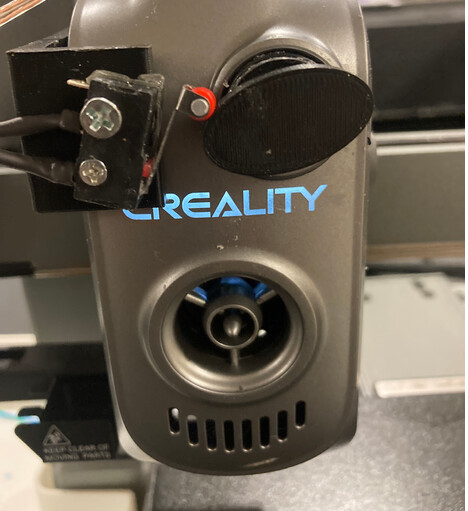
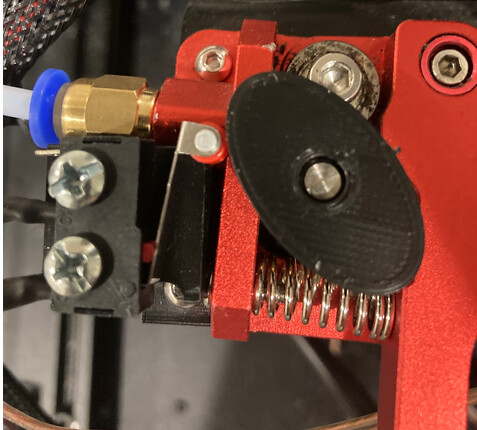
basically its an ellipse that opens and closes the switch 2x a revolution
I had issues where the printer would get an error and I had a hard time detecting that..
I had tried vibration and other sensors and realized the best way to know if printer stopped is when it stops extruding
this works but it generates a lot of events ...so i just need to boil it down to ...did I have any pulses in the last minute or so....if so printer is running..
I will try the pulse counter...thx for the idea
Can I have multiple PS_PulseCounters?
When I did, the pulses went to the wrong device
I switched back to contact devices and confirmed the wiring and the contacts open and close but when I setup the PulseCounters they all counted on power2
//IS_Contact(const __FlashStringHelper *name, byte pin, bool iState, bool internalPullup = false, long numReqCounts = 0);
static st::IS_Contact sensor1(F("contact1"), CR10_1SW, LOW, false, 500);
static st::IS_Contact sensor2(F("contact2"), CR10_2SW, LOW, false, 500);
static st::IS_Contact sensor3(F("contact3"), CREALHI_SW, LOW, false, 500);
unsigned int interval = 10;
//Interrupt Sensors
//static st::PS_PulseCounter sensor1(F("power1"), interval, 0, CR10_1SW, FALLING, INPUT, 1, 0,true,true);
//static st::PS_PulseCounter sensor2(F("power2"), interval, 0, CR10_2SW, FALLING, INPUT, 1, 0,true,true);
//static st::PS_PulseCounter sensor3(F("power3"), interval, 0, CREALHI_SW, FALLING, INPUT, 1, 0,true,true);
Note I modified the pulsecounter code to have an option to not send repeated zeros to reduce noise but I'm convinced that has nothing to do with the wrong device
Pretty sure only one pulse counter device per microcontroller is going to work. Probably due to how the hw interrupts works. It has been a long time since I have looked at that code.
I think I've confirmed your suspicion : )
I might have missed it but is that mentioned anywhere ?
I'm trying to write a PrinterMonitor class ...if I include everything.h can I use
Everything::sendSmartString(myName + " " + newState)
without using addsensor and initdevices?
Probably not quite that easy, but... There may be a much simpler way for you.
ST_Anything was designed to be used as a simple way for end users to incorporate a microcontroller's "devices" into Hubitat (well, originally it was for SmartThings, using the original Zigbee ThingShield!) As such, it is designed in such a way as to want things to follow the standard "ST_Anything" sketch design paradigm.
However, there is a much easier way for you to incorporate an existing Arduino Sketch into Hubitat without using ST_Anything. You can simply use the "SmartThings" communication library, the same one that ST_Anything uses behind the scenes.
If you look at the following example sketch, which should already be on your computer in the Arduino\libraries\SmartThings\Examples folder, you'll see how easy it is to write your own sketch.
This sketch is a revised version of the original SmartThings ThingShield sketch, which was how my son and I got started with the ST_Anything project. You can take this sketch and tear it apart as you see fit. However, in order for it to work properly with the HE hub side HubDuino parent and child drivers, you must make sure that you send the correct strings like "contact1 open", "contact1 closed", etc... The HubDuino parent driver requires that naming syntax to be followed exactly. Don't get fancy and use mixed case, forget the trailing number, etc... The example sketch linked above does NOT follow these naming requirements, as it is not part of the ST_Anything/HubDuino architecture. You will see where it simply sends "on" and "off", instead of "switch1 on" and "switch1 off". The original SmartThings Device Type (i.e. Driver) code knew how to deal with those simple strings. What my son and I did was add more structure and standardization in order to create ST_Anything/HubDuino.
Hope this helps!
And just in case maybe this my programming exersize may help you:
//******************************************************************************************
//
//  Summary:  This is Lr Balcony Door Actuator Controller Arduino Sketch
//            for the direct integration with Hubitat Elevation (HE) hub
//
//  Change History:
//
//    Date        Who                   What
//    ----        ---                   ----
//    08-24-2025  Vitaliy Kholyavenko   Original Creation
//
//******************************************************************************************

//******************************************************************************************
// SmartThings Library for ESP32WiFi
//******************************************************************************************

// SmartThings Libraries
#include <SmartThingsESP32WiFi.h>

// WiFi Credentials
#include "credentials.h"

//======================================
// ESP32 Pins Definition
//======================================

// On Board LED Pin
// This is System Heart Beat LED
#define HB_LED_PIN            2

// Actuator Control Pins
#define ACTUATOR_EXTEND_PIN  27
#define ACTUATOR_RETRACT_PIN 14

// Status Report pins
#define SENS_1_IN_PIN        15
#define SENS_2_IN_PIN         4

// Actuator Busy Detection
#define ADC1_CH0_PIN         36

//******************************************************************************************
// ESP32 WiFi Information
//******************************************************************************************

// Get Credentials from the credentials.h file
const char* str_ssid     = mySSID;
const char* str_password = myPASSWORD;

IPAddress ip       (192, 168, 20, 55); // Device IP Address //  <---You must edit this line!
IPAddress gateway  (192, 168,  20, 1); // Router Gateway    //  <---You must edit this line!
IPAddress subnet   (255, 255, 255, 0); // LAN Subnet Mask   //  <---You must edit this line!
IPAddress dnsserver(192, 168,  20, 1); // DNS Server        //  <---You must edit this line!
const unsigned int serverPort = 8090;  // Port to run the HTTP Server on

// Hubitat Hub TCP/IP Address
IPAddress hubIp   (192, 168, 20, 91);  // Hubitat Hub IP    //  <---You must edit this line!

// Hubitat Hub TCP/IP Address
const unsigned int hubPort = 39501;    // Hubitat Nub Port

// Callout function forward decalaration
SmartThingsCallout_t messageCallout;

//Create a SmartThings Ethernet ESP8266WiFi object
st::SmartThingsESP32WiFi smartthing(str_ssid,
                                    str_password,
                                    ip,
                                    gateway,
                                    subnet,
                                    dnsserver,
                                    serverPort,
                                    hubIp,
                                    hubPort,
                                    messageCallout
                                   );


//*****************************************************************************
// Global Variables
//*****************************************************************************

// Sensor Debounsing Timer in uS
const uint8_t sensorTimeout = 150000;

// Sensors Control Parameters
volatile uint8_t Sense1_DebounceCntr;
volatile bool    Sense1_State;
volatile bool    Sense1_LastState;

volatile uint8_t Sense2_DebounceCntr;
volatile bool    Sense2_State;
volatile bool    Sense2_LastState;

// Actuator Busy ADC Variables
int ADC1_CH0_Raw;
int ADC1_CH0_i;
int ADC1_CH0_Fltr;

#define ADC_ACTUATOR_OFF 2600
#define ADC_ACTUATOR_ON  2575

// ADC-1, CH-0 Averaging Buffer
#define  ADC1_CH0_Fltr_Len 20
uint32_t ADC1_CH0_Raw_Buffer[ADC1_CH0_Fltr_Len] = {0};

// Timer-0 Interrupt Period in uS
#define Timer0_IRQ_Period 10000

// Timer-1 Interrupt Period in uS
#define Timer1_IRQ_Period 1000

// Heart Beat LED Period in uS
#define HB_LED_Period     1000000
uint16_t HB_LED_Counter;

// Timer Flags
volatile bool Timer_Flag_1mS;
volatile bool Timer_Flag_10mS;
volatile bool Timer_Flag_1S;

// Controller Commands
bool cmdOpenDoor;
bool cmdCloseDoor;
bool cmdOpenAutoClose;

// Timeouts
#define ACTUATOR_TIMEOUT_CLOSING 15 // Seconds
#define ACTUATOR_TIMEOUT_OPENING 14 // Seconds
#define ACTUATOR_TIMEOUT_ACTIVE   5 // Seconds
uint8_t Actuator_Timeout_Cntr;
uint8_t Actuator_Timeout_OpenPartially;

// Actuator States
enum {RESET,
      cmdWait,
      doorOpening,
      doorOpenPartially,
      doorClosing,
      actuatorWaitOff
     };

// Door Status State Machine State Variable
unsigned char actuatorState;

//======================================
// ESP32 Timer-0 ISR
//======================================

// Timer-0 Period is 10mS
void Timer0_ISR(void* arg)
{
  Timer_Flag_10mS = true;
}

//======================================
// ESP32 Timer-1 ISR
//======================================

// Timer-0 Period is 1mS
void Timer1_ISR(void* arg)
{
  Timer_Flag_1mS = true;
}

//======================================
// Setup a Periodic ESP Timer
//======================================

esp_timer_handle_t setupPeriodicTimer(void (*callback)(void*),
                                      uint64_t period_us
                                     )
{
  esp_timer_handle_t timer;
  const esp_timer_create_args_t args =
  {
    .callback = callback,
    .arg = nullptr,
    .dispatch_method = ESP_TIMER_TASK,
    .name = "user_timer"
  };
  esp_timer_create(&args, &timer);
  esp_timer_start_periodic(timer, period_us);  // in microseconds
  return timer;
}

//******************************************************************************************
// Arduino Setup()
//******************************************************************************************
void setup()
{
  // Configure IO Pins
  pinMode(HB_LED_PIN, OUTPUT);

  pinMode(ACTUATOR_EXTEND_PIN, OUTPUT);
  pinMode(ACTUATOR_RETRACT_PIN, OUTPUT);

  pinMode(SENS_1_IN_PIN, INPUT_PULLUP);
  pinMode(SENS_2_IN_PIN, INPUT_PULLUP);

  // Turn OFF On-Board LED
  digitalWrite(HB_LED_PIN, LOW);

  // Reset Actruator Control Pins
  digitalWrite(ACTUATOR_EXTEND_PIN, LOW);
  digitalWrite(ACTUATOR_RETRACT_PIN, LOW);

  // Configure ADC Inputs
  analogReadResolution(12);
  analogSetAttenuation(ADC_11db);

  // Reset all variables to the default values

  // Reset Timer Flags
  Timer_Flag_1mS     = false;
  Timer_Flag_10mS    = false;
  Timer_Flag_1S      = false;

  // Sensors Control Parameters
  Sense1_DebounceCntr = 0;
  Sense1_State        = digitalRead(SENS_1_IN_PIN);
  Sense1_LastState    = !Sense1_State;

  Sense2_DebounceCntr = 0;
  Sense2_State        = digitalRead(SENS_2_IN_PIN);
  Sense2_LastState    = !Sense2_State;

  // Actuator Busy Detection ADC Variables
  ADC1_CH0_i       = 0;
  ADC1_CH0_Raw     = analogRead(ADC1_CH0_PIN);
  ADC1_CH0_Fltr    = ADC1_CH0_Raw;

  for (uint8_t i = 0; i < ADC1_CH0_Fltr_Len; i++)
  {
    ADC1_CH0_Raw_Buffer[i] = ADC1_CH0_Raw;
  }

  // Controller Commands
  cmdOpenDoor      = false;
  cmdCloseDoor     = false;
  cmdOpenAutoClose = false;

  // Actuator Activity Timeout
  Actuator_Timeout_Cntr          = 0;
  Actuator_Timeout_OpenPartially = 0;

  //Actuator SM Initial State
  actuatorState = RESET;

  // Initialize RS232 Port for PC Communication
  Serial.begin(115200);
  while (!Serial);

  // Initialize Timers
  setupPeriodicTimer(Timer0_ISR, Timer0_IRQ_Period);
  //setupPeriodicTimer(Timer1_ISR, Timer1_IRQ_Period);

  //Run the SmartThings init() routine to make sure the ThingShield is connected to the ST Hub
  smartthing.init();

  // Controller is Ready
  Serial.print("Controller is Ready");
  Serial.println();
  Serial.println();
}

//******************************************************************************************
// Arduino Loop()
//******************************************************************************************
void loop()
{
/*
  // 1mS Timer Flag
  if (Timer_Flag_1mS == true)
  {
    Timer_Flag_1mS = false;

  }
*/

  // 10mS Timer Flag
  if (Timer_Flag_10mS == true)
  {
    Timer_Flag_10mS = false;

    // Blink Heart Beat LED
    // (This is on-bord Blue LED)
    HeartBeatLED();

    // Check Sensors State
    checkSense1_State();
    checkSense2_State();

    // Periodic Read ADC1 CH0 and Average ADC Data
    checkADC1_CH0();
  }

  // 1S Timer Flag
  if (Timer_Flag_1S == true)
  {
    Timer_Flag_1S = false;

    actuatorStateSM();
  }

  // run smartthing logic
  smartthing.run();
}

//*****************************************************************************

// ***** Heart Beat LED *****
void HeartBeatLED()
{
  if (HB_LED_Counter < (HB_LED_Period / Timer0_IRQ_Period))
  {
    HB_LED_Counter++;
  }
  else
  {
    Timer_Flag_1S  = true;
    HB_LED_Counter = 0;
    digitalWrite(HB_LED_PIN, !digitalRead(HB_LED_PIN));
  }
}

//*****************************************************************************

// ***** Message from Hubitat *****
void messageCallout(String message)
{
  String HE_Command       = "";
  String HE_Command_Value = "";

  Serial.print("Received Message from HE: '");
  Serial.print(message);
  Serial.println();

  // Remove leading/trailing spaces
  message.trim();

  uint8_t spaceIndex = message.indexOf(' ');

  if (spaceIndex != -1)
  {
    // Space found: split into Letters and Numbers
    HE_Command       = message.substring(0, spaceIndex);
    HE_Command_Value = message.substring(spaceIndex + 1);
  }
  else
  {
    // No Space: only Letters
    HE_Command       = message;
    HE_Command_Value = "";
  }

  Serial.print("HE Command is : " + HE_Command);

  int StringIsNumber = HE_Command_Value.toInt();

  if (StringIsNumber != 0)
  {
    Serial.print(" ");
    Serial.println(HE_Command_Value);
    Actuator_Timeout_OpenPartially = StringIsNumber;
  }
  else
  {
    Actuator_Timeout_OpenPartially = 0;
  }

  Serial.println();

  // ***** Command Processor *****
  // Ignore a Refresh Command
  if (HE_Command.equals("refresh"))
  {
  }
  else if (HE_Command.equals("OpenDoor"))
  {
    cmdOpenDoor = true;
  }
  else if (HE_Command.equals("CloseDoor"))
  {
    cmdCloseDoor = true;
  }
  else if (HE_Command.equals("OpenAutoClose"))
  {
    cmdOpenAutoClose = true;
  }
  // Command is not recognised
  else
  {
    Serial.print("Illigal Command");
    Serial.println();
  }
}

//*****************************************************************************

// ***** Curren Sensor ADC *****

// Read and Average ADC-1 Channel-0
void checkADC1_CH0()
{
  // Periodic Read ADC1 CH0 and Average ADC Data
  ADC1_CH0_Raw  = analogRead(ADC1_CH0_PIN);
  ADC1_CH0_Fltr = ADC1_CH0_Avg(ADC1_CH0_Raw);
}

// ----------------------------------------------------------------------

// ***** ADC1 CH0 Average *****
uint32_t ADC1_CH0_Avg(int ADC1_CH0_Raw)
{
  int i        = 0;
  uint32_t Sum = 0;

  ADC1_CH0_Raw_Buffer[ADC1_CH0_i++] = ADC1_CH0_Raw;

  if (ADC1_CH0_i == ADC1_CH0_Fltr_Len)
  {
    ADC1_CH0_i = 0;
  }

  for (i = 0; i < ADC1_CH0_Fltr_Len; i++)
  {
    Sum += ADC1_CH0_Raw_Buffer[i];
  }

  return (Sum/ADC1_CH0_Fltr_Len);
}

//*****************************************************************************

// ***** Check Sensor-1 State *****
void checkSense1_State()
{
  Sense1_State = digitalRead(SENS_1_IN_PIN);

  if (Sense1_State != Sense1_LastState)
  {
    if (Sense1_DebounceCntr < (sensorTimeout / Timer0_IRQ_Period))
    {
      Sense1_DebounceCntr++;
    }
    else
    {
      Sense1_LastState    = Sense1_State;
      Sense1_DebounceCntr = 0;

      if (Sense1_LastState == LOW)
      {
        Serial.println("HE : Contact Sensor-1 Closed");
        smartthing.send("contact1 closed");
      }
      else
      {
        Serial.println("HE : Contact Sensor-1 Opened");
        smartthing.send("contact1 open");
      }

      Serial.println();
    }
  }
  else
  {
    Sense1_DebounceCntr = 0;
  }
}

// ----------------------------------------------------------------------

// ***** Check Sensor-2 State *****
void checkSense2_State()
{
  Sense2_State = digitalRead(SENS_2_IN_PIN);

  if (Sense2_State != Sense2_LastState)
  {
    if (Sense2_DebounceCntr < (sensorTimeout / Timer0_IRQ_Period))
    {
      Sense2_DebounceCntr++;
    }
    else
    {
      Sense2_LastState    = Sense2_State;
      Sense2_DebounceCntr = 0;

      if (Sense2_LastState == LOW)
      {
        Serial.println("HE : Contact Sensor-2 Closed");
        smartthing.send("contact2 closed");
      }
      else
      {
        Serial.println("HE : Contact Sensor-2 Opened");
        smartthing.send("contact2 open");
      }

      Serial.println();
    }
  }
  else
  {
    Sense2_DebounceCntr = 0;
  }
}

//*****************************************************************************

// Actuator Control State Machine
void actuatorStateSM()
{
  switch (actuatorState)
  {
    // ***** Reset/PowerOn *****
    // Reset Actuator Control Pins and State
    case RESET:

      Actuator_Timeout_Cntr          = 0;
      Actuator_Timeout_OpenPartially = 0;

      digitalWrite(ACTUATOR_EXTEND_PIN, LOW);
      digitalWrite(ACTUATOR_RETRACT_PIN, LOW);

      Serial.println("HE : Contact Sensor-3 Closed");
      smartthing.send("contact3 closed");

          actuatorState = cmdWait;

    break;

    // Wait for Command
    case cmdWait:

      if (cmdOpenDoor == true)
      {
        cmdOpenDoor = false;
        digitalWrite(ACTUATOR_EXTEND_PIN, HIGH);

        Serial.println("HE : Contact Sensor-3 Open");
        smartthing.send("contact3 open");

          actuatorState = doorOpening;
      }
      else if (cmdCloseDoor == true)
      {
        cmdCloseDoor  = false;
        digitalWrite(ACTUATOR_RETRACT_PIN, HIGH);

        Serial.println("HE : Contact Sensor-3 Open");
        smartthing.send("contact3 open");

          actuatorState = doorClosing;
      }

    break;

    // Door is Opening
    case doorOpening:

      Serial.print("ADC A : ");
      Serial.print(ADC1_CH0_Fltr);
      Serial.println();

      if (Actuator_Timeout_OpenPartially != 0)
      {
        actuatorState = doorOpenPartially;
      }
      else if (Actuator_Timeout_Cntr >= ACTUATOR_TIMEOUT_ACTIVE)
      {
        Actuator_Timeout_Cntr = 0;

          actuatorState = actuatorWaitOff;
      }
      else
      {
        Actuator_Timeout_Cntr++;
      }

    break;

    // Wait for Actuator to become Inactive
    case actuatorWaitOff:

      Serial.print("ADC B : ");
      Serial.print(ADC1_CH0_Fltr);
      Serial.println();

      if ((ADC1_CH0_Fltr >= ADC_ACTUATOR_OFF) ||
          (Actuator_Timeout_Cntr >= ACTUATOR_TIMEOUT_OPENING))
      {
        Actuator_Timeout_Cntr = 0;

          actuatorState = RESET;
      }
      else
      {
        Actuator_Timeout_Cntr++;
      }

    break;

    // Open Door Partially
    case doorOpenPartially:

      if (Actuator_Timeout_Cntr >= Actuator_Timeout_OpenPartially)
      {
        Actuator_Timeout_Cntr = 0;

          actuatorState = RESET;
      }
      else
      {
        Actuator_Timeout_Cntr++;
      }

    break;

    // Door is Closing
    case doorClosing:

      if ((Sense1_LastState == LOW) ||
          (Actuator_Timeout_Cntr >= ACTUATOR_TIMEOUT_CLOSING))
      {
        Actuator_Timeout_Cntr = 0;

          actuatorState = RESET;
      }
      else
      {
        Actuator_Timeout_Cntr++;
      }

    break;

    // ***** Processing Undefined States *****
    default:

      actuatorState = RESET;

    break;
  }
}

//*****************************************************************************
WOW Thank you BOTH ...
Thanks Dan for describing that so well .. I was definitely going down the wrong rabbit hole.
FYI...I've been updating Hubitat parent to recognize new devices, I will add printerMonitor.
Thanks vitaliy_kh for the code.
Can't wait to try it after work today!
Tim
Do I need smartthing,run() because its causing watchdog timers when that line is executed
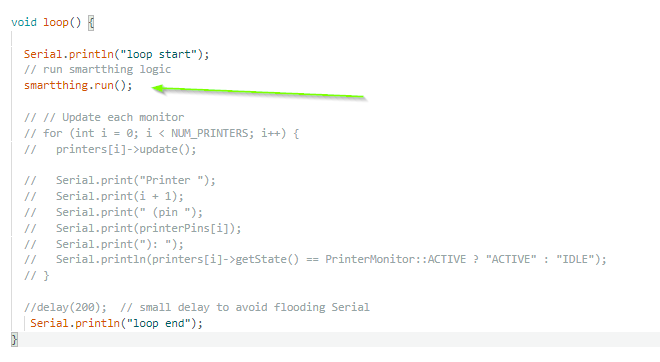
Yes, it is required as it handles all of the network communications.
Please make sure there are no any blocking statements (such as DELAY, etc) in the Main Loop.
Hi,
Firstly, thanks so much for this awesome integration between hubitat and Arduino. It's so powerful and opens up a boatload of opportunity.
I have a simple on off child switch defined in hubitat and the corresponding arduino code. When I press the on button in hubitat the message gets received by the arduino code, but then a couple of minutes later I get the same message sent to arduino from hubitat even though I didn't press the button. I'm not sure why hubitat is sending the switch 1 on command again when I haven't pressed it. If I manually set it to off, it doesn't send anything again.
If there some acknowledgment to send back to hubitat that the message was received and not to send the same message multiple times?
Thanks
Michael
There is nothing on the Hubitat side of things that would cause it to send the same command to the microcontroller multiple times.
However, on the microcontroller side, ST_Anything does periodically send status updates to Hubitat, to ensure that the HE hub always has the correct status of all of the devices defined in the Arduino sketch. IIRC, the default refresh rate may be something like once every ~5 minutes. Perhaps this is what you’ve observed? It is harmless. If desired, you can change the rate of the periodic refresh, or even disable it, by modifying the constants.h file.
So this is the message I'm getting in the microcontroller, the last message was sent to the microcontroller without a state change in Hubitat: Everything: Sending: switch1 off
Data Recieved = switch1 off
This is the log file in Arduino, it's causing the off state to be executing again which is a powered toggle so it's causing the appliance to turn on again.
Everything: Free Ram = 238316
Everything: Free Ram = 238316
Everything: Free Ram = 238576
Everything: Free Ram = 238576
Everything: Sending: switch1 off
Data Recieved = switch1 off
Without seeing/understanding what you’re doing on the Hubitat side with this device, as well as the Arduino sketch, I can’t really help troubleshoot. Please provide more details.
- is the Arduino child switch device being used in any Hubitat apps/automations? If yes, please share screenshots of these apps/rules.
- Are you using Alexa with this child switch device? If so, make sure Alexa Hunches is disabled.
- Please share your Arduino sketch (redact you WiFi credentials if needed)
- How exactly are you using this switch device to control the actual physical real-world device? What does the wiring look like?
I do not understand how turning off a switch that is already off could cause a change in the physical world. Please share as many details as possible to help us understand exactly what you’re trying to achieve.
So I figured out the crashing...i was indexing a variable off the end of an array.
Interestingly, with the smartthings.run() commented out I still got messages at hub but OTA did not work...with it uncommented OTA started working : )
I now have a working Child Printer Monitor showing active and idle
Uncommenting the DISABLE_REFRESH worked. Thanks for responding, I really appreciate it and the app is designed so well, great job.
In the Github under the "Items to be aware of" it says;
"When using a ESP32 board ... GPIO 6-11 are reserved for FLASH. Do not use these!"
Is that an old note or remains true?
If true, then that means a ESP32 S3 18 pin super-mini unit has barely any usable pins left.
Whats driving that, the ST_Anything setup?