Yep it could be. Everything works now and I have to just check that I do not connect anything else to those outlets.
By the way.. this happens every time when I see your nickname. I read it as "Darkprincess". 
Silly question... But are all the sketches for relays timed? Other than set the duration very high, are there any ways to have relay/digital output with no timer?
Just use the “EX_Switch” example devices, instead of the timed relay. A “switch” device sets an output either on or off until you change it.
1 Like
Makes sense.. But for some reason I was thinking switch was an input style switch.. Similar to a button but just latching.
So apart from the timer on the relay, they are the same? Hubitat doesn't see anything differently I guess? One thing I see useful for the relay with timer is for my irrigation where a command may not be received.. Although I will have loops for that if the state hasn't changed so I don't have a very wet lawn/flowerbed
Yes, Hubitat sees both devices as a "Switch". The Timed Relay just happens to turn itself off, although Hubitat can also turn it off before the timer expires.
1 Like
Relay not always responding....
My servo motor blinds with hubduino have been solid as a rock. As in I don't recall them ever not responding and they operate every day with sunrise and sunset at minimum, plus change angle based on time of day..
But for some reason the relay one hasn't responded a few times and I need to push a few times. This is from the device page and the state doesn't change. I didn't notice anything in the log, but I have in no way thoroughly checked this and need to make sure I turned the parent and child debug on.. Just it's not plugged in and may not be for a day or two.
Wrost case is I'll set loops that continue if the state hasn't changed.. Perhaps it's because I was sending the commands too close together... Perhaps it's because my esp is rebooting because the digital pin or the actual relay itself is drawing too much current..
I'm assuming there aren't any known problems with relays not responding and it's likely a thing at my end?
Correct - no known issues.
How do you have the relay wired? Here is how I would recommend wiring it (ignore the two reed switches in this diagram.)
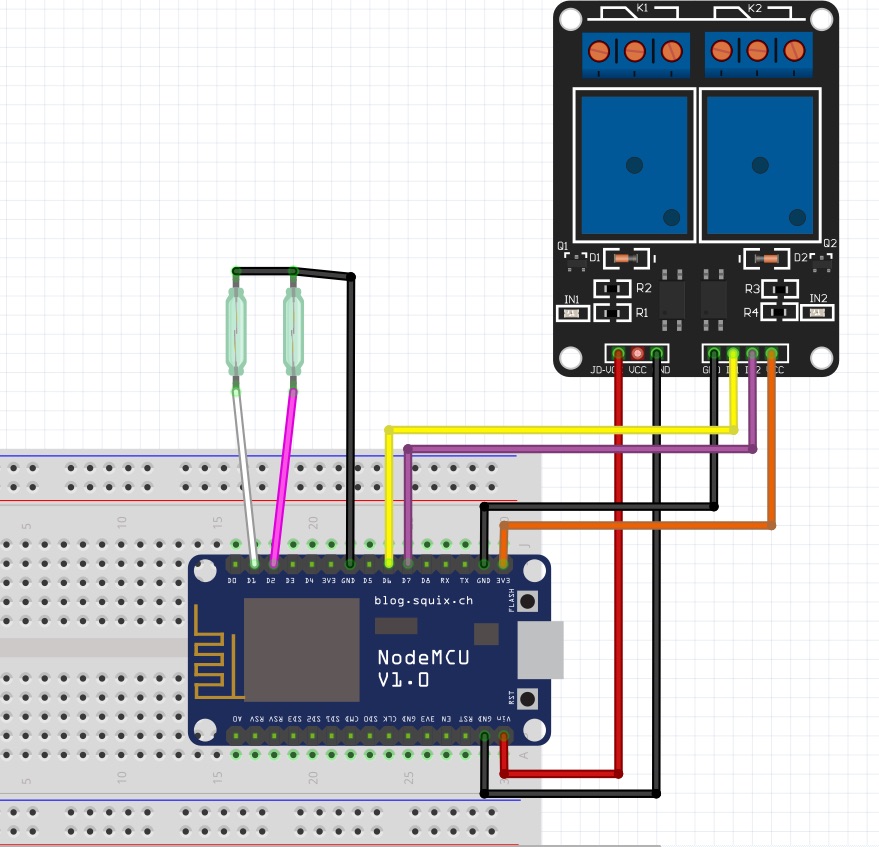
You could also power the relay coils (lower black/red pair of wires) from a separate power supply.
1 Like
Thanks I appreciate this lies outside this topic. I think thats how I have it. Well similar anyway but my relay only has the vcc input but supposedly has an optocoupler.
https://www.amazon.com.au/dp/B07P73PHQY/ref=cm_sw_r_cp_apa_glt_fabc_6H7T4FZSXCBEGQB0DRRG
I have the 3.3V pin from the wemos mini connected to the relay to power the coils on vcc. And switching with the digital out directly to the in of the relay..
I would use the 5v pin for poweting but I had challenges soldering to it... So used the 3.3V pin. Both voltages are ok for the specs of the relay and it switches with 2.5V.. But I have heard that the 3.3V from some clone wemos use a small regulator so perhaps the voltage of supply is dropping.. But then again I would think the digital state would change before rebooting (due to power requirements from the relay) before the reset? So that theory may not be right
In saying all this.. It seems that hubduino is not the cause here so maybe I should go and do some debugging/effort.. I'll report back.
1 Like
how are you powering the board? through usb? or through external 5V? an external 5V might be needed in this case to power the board and relay. i'm using a 3.3v relay in my smart dog bowl and it works no issues (i'm using an external 5v power supply)
Power pack with 2.1A output.
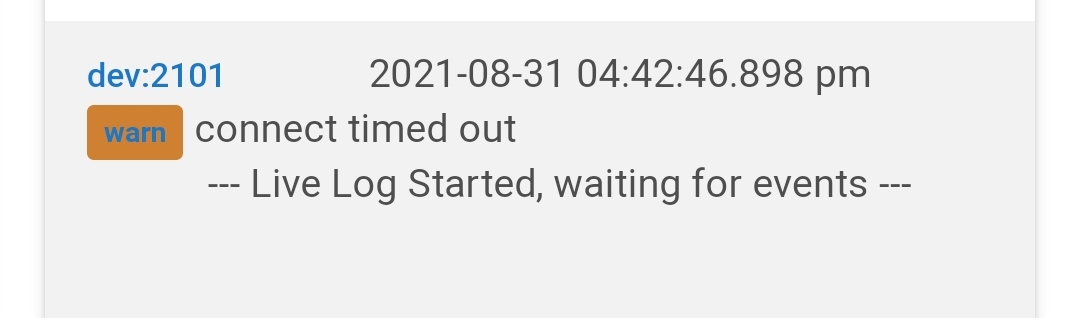
It is simply an indication that the Parent Device tried to connect to the HubDuino Microcontroller, but could not, and thus timed out. If I power off one of my microcontrollers, and then click REFRESH on the Parent Device, I get the exact same warning message in the logs on the HE hub.
So, if you're seeing this message in your logs, I would troubleshoot why the microcontroller is is not able to respond to the Hubitat hub in a timely manner. Is there a power issue? A WiFi signal strength issue? Etc...
1 Like
So I think it may be because the 3.3v may not supply enough in these clone wemos mini..
So I changed over to a nodemcu and changed the IP on the existing parent device.. Then it created 2 new child devices. So I removed them.. And yes things have gone pear shaped..
Now the child devices won't populate, well the parent device isn't recognised in hubitat.
How do I recover from this? Is this because a device hasn't been properly removed?
Before I make a full meal of it I won't go editing the DNI just yet..
Error below.
dev:21342021-09-03 06:34:41.492 pm errorjava.lang.IllegalArgumentException: A device with the same device network ID exists, Please use a different DNI on line 261 (method updated)
Each HubDuino Parent Device needs to have a unique IP address assigned to it. This IP address is then converted into hexadecimal and used as the Device Network ID (DNI) of that parent device. Device Network IDs must be unique for all devices. In the case of a LAN connected device, like HubDuino, the DNI is what the Hubitat platform uses to match incoming traffic with a Hubitat device, in order to know which device's parse() routine to call with the data.
I am not exactly sure what steps you used... In general, if one is simply replacing one microcontroller (Wemos Mini) with another microcontroller (NodeMCU), all that is necessary is to unplug the first one, and plug in the second one, using the exact same IP address and Arduino sketch with the same devices declared. This way, the HubDuino Parent won't even know that the microcontroller has been swapped out. I designed it this way to greatly simplify the process of replacing/upgrading a HubDuino Microcontroller board, without having to redo all of the rules/apps on the Hubitat hub.
Hope this helps!
1 Like
Thanks that helps a lot. So maybe because I used this one for a project I never finished... However that device isn't in hubitat as far as I am aware, maybe I removed it I can't recall. I had the ip already static in my router as 192.168.1.48 for this device so changed the ip in the device page to 192.168.1.48... Seems that's where things went wrong. I'll change IP over and see how that goes then.
Unfortunatrelt still lost...
Removed all static IP assignments for the wemos and nodemcu on my router. Tried assigning the nodemcu as the same ip as the original wemos.. Same error. Then tried a new IP never used. New deice.. Same error still.
Think I've really lost the plot now. The device ID seems different and assigned before I put the IP in on the device page during setup. Hmm. I am sure there is something obvious I'm not following.
Seems my device ID is based on the MAC address shown in the logs? Could that be the problem? Perhaps time to update to 1.17? Will that break my blinds that are on 1.15 (servo motors only)
After entering an IP address and Port in the Parent device, make sure you click SAVE. This will cause the Device Network ID (DNI) to be updated.
I am not sure exactly what the issue is that you’re experiencing. If you have two parent devices that are trying to use the same IP Address, when you click save on the second one it will throw an error due to trying to create a device with a duplicate DNI.
Why not just remove the HubDuino devices from Hubitat (not your old ones that should still be working) and start fresh? It sounds like you’ve got things a little messed up. Starting over might help.
I have deleted all Hubduino devices related to this mess up. Seems every time I create a new one I get the same problem. Either with a newly allocated IP or using the original IP. I can ping the device on that IP..
Is it possible the device ID is based on the MAC address in 1.15? So the device ID I see in the logs stay the same? The last line seems to be the MAC address of this device
dev:21362021-09-04 08:47:56.574 am errorjava.lang.IllegalArgumentException: A device with the same device network ID exists, Please use a different DNI on line 261 (method configure)
dev:21362021-09-04 08:47:56.564 am debugsetting deviceNetworkID = DC4F22103256

