I've got a hue motion sensor, is there a way to get LUX to be sent to another hub via HubConnect?
You can also do this via the built-in Hub Mesh (assuming going from Hubitat to Hubitat hubs...)
1 Like
Wow thanks, didn't realize that was native to Hubitat. Does this eliminate or reduce the need for HubConnect with respect to Hubitat to Hubitat needs?
Absolutely! My setup utilizes 2 hubs; a C5 for logic/rules and a C7 for devices. No more fixing all my rules after a device failure. Swap out the failed device on the C7, switch the Mesh link on the C5 to the new device, and relax.
3 Likes
I'm new to Hubitat and I'm sure I'm missing something here. Trying to set up HubConnect V2. I think I've got everything mostly configured properly for the HubConnect Server to talk to the client running on my SmartThings Hub. I've gotten to the point where both are connected, but in the smart app on SmartThings (or both hubs for that matter) no devices are available to select. The Device Handler is installed in ST and Driver Code in HE. I'd really appreciate it if anyone might be able to suggest what I'm missing.
Weird. I had them right away after I managed to install all needed in right order. There's a plenty of different sections to choose your devices from. Are you sure you opened all different categories to see if missing devices are there?
One thing that I have problem is HE log reporting error:
"Received cloud request for App 498 that does not exist, path: /ping from 52.213.77.15"
Ip address changes but they all are from amazon aws.
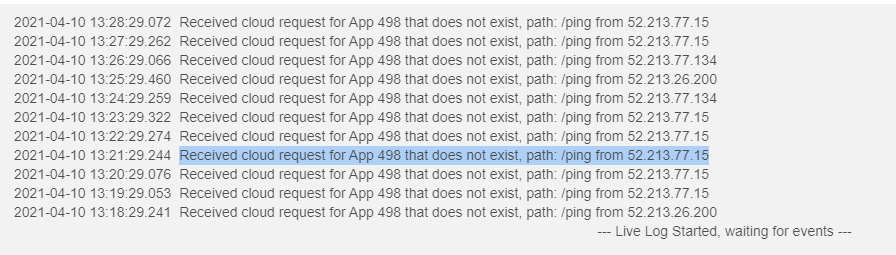
Earlier I had this:
"Received cloud request for App 471 that does not exist, path: /ping from x.x.x.x/xx"
So app number changed. There is no 498 or 471 installed and I do not know what are those. I got rid off first error by setting ST app to offline (removed all settings/server). After that add server settings, key and etc. again and it stopped error for new days. Now it's back with a different app number but exactly the same problem.
What are those cloud connections which points to application that does not exist? What should I do to get rid off them?
This started after I installed hubconnect and stops by removing hubconnect.
Every time you create a Remote Hub on the server hub, a new App number is created too. That gets transferred inside the KEY that you paste. Then the HubConnect Remote Client for SmartThings can begin sending heath reports via /ping. It would also be true of a HubConnect Remote Client for Hubitat that was via the Internet.
Said another way... you have one or more Remote Clients that have been deleted from HubConnect Server. No matchie. If you delete the instance and then create another vs Disconnect, you can open the opportunity to have a mismatch.

Is there a way to prevent it happen? Those first errors came after first install. There was no install made before.
I'm not sure if this is a problem..or is this just a extra log lines per minute and it is not causing any issues?
It is a problem.
"/ping" is a component of HubConnect BUT it may not be the ONLY App that uses those letters. You have a configuration, out on the Internet, that is trying to reach your hub, and is doing so successfully. There's just nothing on your hub anymore that wants to communicate back. I interpret the logs to indicate it's an "abandoned" HubConnect instance. (Exists in a ST setup, deleted from the Hubitat Hub.)
You need to remove the abandoned instances from ST.... or whatever internet service is sending the "/ping" message. MakerAPI, Alexa, etc. all use a similar mechanism (App number plus token) to allow communications. It might not be HubConnect, but again, the word: "/ping" is one that HubConnect does use and therefore, I'd focus there first.
So if I understand hubconnect instructions right I need to have one instance of "shackrat : HubConnect Remote Client" smartapp and one instance of device handler "shackrat : HubConnect Remote Hub for SmartThings". There really is no additional installations and I did not removed anything at the beginning.
If no one else having same issue then it's definitely something in my installation that is wrong but I really can't remove anything. If I remove smartpp or device handler then it is byebye for the hubconnect.
Could it be that there is some ■■■■ left somewhere hidden that can't be seen from IDE. I really don't know anything else that could explain this.
the IDE is just for loading the code out on your slice of the ST Cloud. It really has nothing to do with the ST hub !!! til you Install it via the Mobile App.
Every Remote... be it ST or Hubitat, needs two pieces of code.. one App, one Driver. The ST ones both end in "SmartThings":
- HubConnect-Remote-Client-SmartThings <-- App
- HubConnect-Remote-Hub-SmartThings. <-- Driver
For Hubitat Remote hubs, it's similar names (no SmartThings):
- HubConnect-Remote-Client <-- App
- HubConnect-Remote-Hub <-- Driver
Just for completeness, I'll spell out the Server code pieces too:
- HubConnect-Server <-- Parent App
- HubConnect-Server-Instance <-- child App
- HubConnect-Remote-Hub <-- Driver
Once one full set of Server pieces are added, OAuth enabled and Installed PLUS one full set of Remote pieces are added, OAuth enabled and Installed, you then define a remote inside Server and paste the Key into that remote.
I have installed just one smartapp in ST and it's called Hubitat Home (online). I have installed those two codes app and driver.
So this far everything goes by the book. ST is remote.
About the server side in Hubitat. I do not have "hubconnect remote hub" installed. That seems to be something I'm missing...everything works though.
So:
Full set of server pieces installed..nope.
Full set of remote pieces added, remote defined inside server and key pasted into remote, yes.
If this is because I'm missing hubconnect remote hub..then I need to install it. If it is not then I have done everything like you wrote and I do not have more than one smartapp installed in ST side.
Well first of all I installed "hubconnect remote hub". Then I removed ST smartapp by using ST mobile client. Now followed instructions once again to configure hubconnect and at the moment it seems that there is no errors in log. Still have to wait a day because last time it took few hours when it started to create error lines to log.
As I configured hubitat side I noticed one mistake that I earlier did.
Under Apps->Hubconnect Server for Hubitat, there's a button "connect a hub". It asks client side ip and earlier I added hubitat's ip address there. There should be ST's ip address as it is remote hub. That is probably what caused error to log but even without right ip address connection between the remote and server was working which is weird.
Thanks for your help @csteele so far!!!
1 Like
So I seem to be making some progress. Eventually devices did show up in SmartThings, I've selected them and installed the drivers listed at the bottom in Hubitat, but I still don't have any devices pulling in to HE from ST.
Any suggestions would be appreciated.
I have a question about two hubs sharing the Amazon connection. For some reason (don't remember how or why) I have one hub with the Amazon App and the other has Amazon Skill. Is this a problem? Should I have only one hub with the Skill and nothing on the other?
C-5 hub latest version and no ST hub.
Trying to set Hubconnect to control an AC WIFI Kit by Samsung that is showing up on Smartthings hubless app on my Iphone.
I have installed all apps and drivers.
Running the server app on Hubitat entering '1' as IP (I do not have ST hub) and then chosing Smartthings from the list and not checking the "Is there a Smartthings hub connected", I get the Connection Key and when I paste it on the Smartthings app on my Iphone I get a NEXT button. Pressed once, twice and at the third time it get stuck.
Restarting ST app on the Iphone and I see the Hubitat app but it says OFFLINE.
Looking at Hubitat log i see:
For Server app -

and for the Server Instance app I get:

Can someone figure this out?
Are you using HubConnect 2.0? This would be obtained from the HubConnect website, not GitHub (where version 1.x lived and the 2.x drivers still do, but not the apps). If so, you shouldn't need to specify an IP for ST at all if you don't actually have an ST hub; this was one of the new features. The second screenshot suggests to me that this might be the problem (as trying to connect to "1" would certainly fail), but I've never tried that setup so can't say for sure.
1 Like
I am using version 2.0 and got the code from the website.
I see what you mean but if you do not fill any value in the IP field you do not get to move to the next stage to choose the hub you wish to connect to.
Even if I enter '1' and then choose Smartthings and then delete the '1' - the Smartthings is not showing anymore and I get the same error message in the log
IIRC the IP is only used when a local connection is attempted, but ST is not local so it doesn’t matter what you put in there; think I used 127.0.0.1 


