I’m on version 1.0.2813 and it does NOT do that here.
Same version here.

@jpage4500 I updated to Android 17, and now my HD+ notifications coming via firebase are extremely unreliable. I get 1 out of every 10 if I'm lucky. Do you know what's going on?
EDIT: Seems to be working now - I wonder if Google or Hubitat cloud has issues at the time.
I haven’t noticed anything myself but if there was I think it’d be Google as push notifications go from the Hub → Google → Phone
I have notifications from both the native Hubitat Android app and HD+ (the Hubitat ones come in as silent so I don’t get notified twice but just have it to ensure HD+ doesn’t miss anything). It’s been setup for years and I haven’t noticed any missing but I’ll keep an eye out just in case
This issue still occurs. Got home today and realized HD+ was showing the garage door open, so I waited until I could see it and the door was definitely closed. Pulls down on the dashboard to refresh, and the garage door icon didn’t change. But HD+ knew it was actually closed. The culprit is using something else to close the door, in this case the wireless remote in my car. I normally do it through Android Auto, but I was running late and the backup camera was using the screen in the car so I just used the remote.
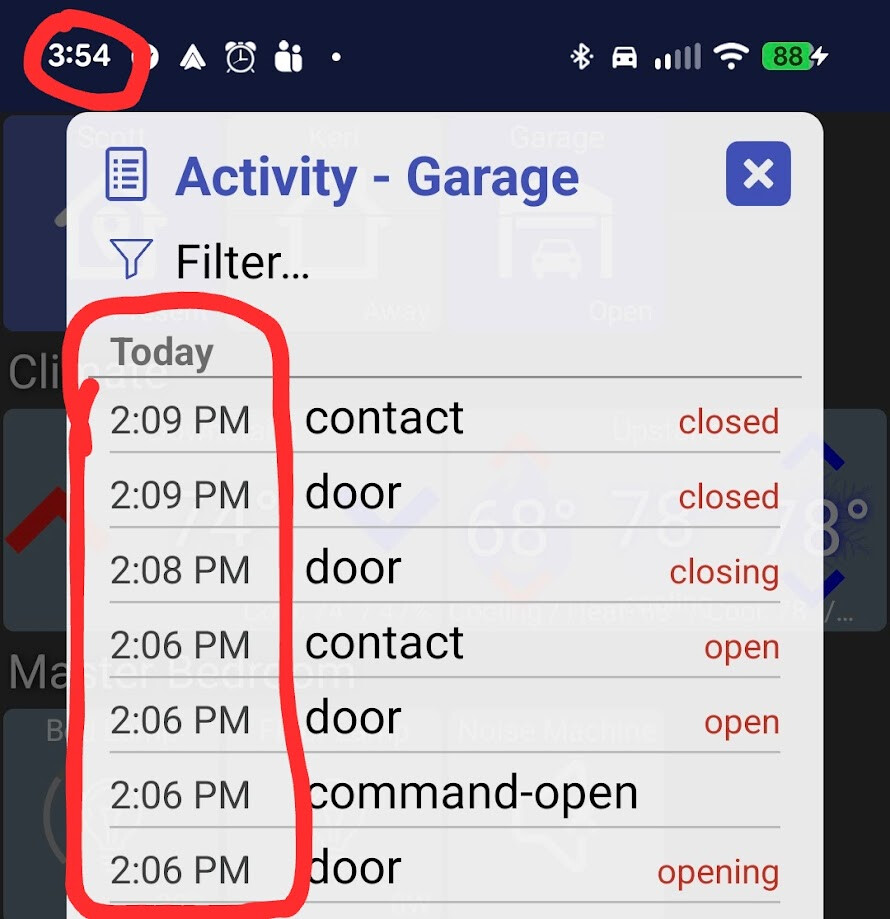
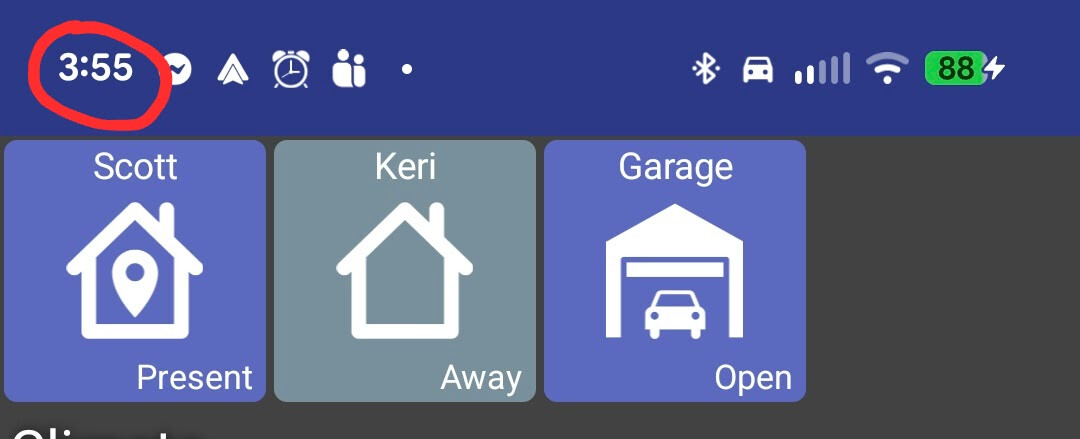
I looked at this - and also asked AI to try and figure this one out. Neither found anything obvious why this would occur – just wanted to ask some follow-up questions and maybe get some extra logging.
The activity dialog shows results directly from a Hub API call where the main screen comes from a different API (devices/all) so that doesn’t help too much.
What’s the garage door device driver? I have MyQ but because the MyQ driver doesn’t work anymore I ended up using a contact sensor.. so just want to check if there’s something going on there too.
As for HD+ the only way to really know would be to see the logs when the app is in debug mode. If you’re close to home maybe the phone is between wifi and cellular data? I know I have to do some extra work for geofencing because leaving the house there’s often a dead zone where your phone still thinks you’re on wifi and won’t switch to cellular yet
The Zooz Garage Door Opener. It creates a virtual device using the relay the controls the door and a contact sensor (I use a tilt sensor for this).
I can PM you the log file. I ran this particular instance through chatGPT and it seems to think the issue might be connection stability. But in the past I’ve had it happen while I was at home the whole time.
Here’s what chatGPT said (Sidenote: There used to be a way to highlight text and choose an option that hid most of it in a collapsible box so your post wouldn’t be super long…. The new forum design either doesn’t have that or it’s not obvious… wondering if @gopher.ny knows anything about that):
Yes — a few things jump out, and they line up with the exact symptom you saw.
The most suspicious issue is that the same garage device appears with conflicting state data within about a minute:
At 15:54:42, when you long-pressed/opened the garage device details, the dashboard log shows the device attributes as:
door: closed
contact: closed
So the detailed device view agreed with reality: the garage door was closed.
But at 15:55:53, another long-click log for the same device shows:
door: open
contact: open
Same device ID
44, same labelGarage - Garage Door, same displayed dashboard tile, but now the cached/visible state is open.That suggests the problem is probably not the physical sensor reporting wrong to Hubitat at that moment, because the device detail view had the correct closed state. It looks more like the dashboard app had a stale or incorrect tile/device-state cache.
There are also multiple signs of connection/session instability around the same time:
At 15:54:39, you started a pull-to-refresh. At 15:54:42, the app switched to local mode and created a local endpoint to the Hubitat hub.
Then at 15:56:14, the WebSocket failed with:
reason: Socket closedAnd again at 15:57:53, another WebSocket failure occurred:
reason: Socket closedThose WebSocket failures matter because dashboards often rely on live push updates to keep tiles current. If the WebSocket dropped or reconnected at the wrong time, the main dashboard tile could easily be showing stale state while the detail/properties view had fresher data.
One more notable item: there was an earlier command at 14:06:22 to open the garage door, followed by a failed update at 14:06:27 showing:
door: opening
contact: closed
Then the WebSocket failed at 14:06:29.
That earlier sequence could have left the app with a bad intermediate/cached state like “open/opening,” especially if the subsequent “closed” update did not make it cleanly to the dashboard tile.
My read: the log points more toward an app/dashboard state synchronization bug or stale cache issue, not a Hubitat device/sensor problem. The strongest evidence is the contradiction where the garage device details showed
closed/closed, while shortly afterward the dashboard representation showedopen/openfor the same device.The entries I’d flag for the app developer are:
06/19 15:54:42 ... handleDeviceLongClicked ... "door":"closed","contact":"closed" ...
06/19 15:55:53 ... handleDeviceLongClicked ... "door":"open","contact":"open" ...
06/19 15:56:14 ... connectWebSocketInternal:onFailure ... reason:Socket closed
06/19 15:57:53 ... connectWebSocketInternal:onFailure ... reason:Socket closed
The likely bug report summary would be:
The main dashboard tile showed the garage door as open even though the physical door was closed. Pull-to-refresh did not fix the tile. Opening the device details showed the garage as closed. Logs show conflicting states for the same garage device ID
44, plus WebSocket disconnects around the same time, suggesting the dashboard tile retained stale state while the device detail view had updated state.