This approach works in general, although some drivers unfortunately filter device events on their own instead of letting the platform manage the filtering.
Thanks for pointing that out, and for the doc link. I did look at filterEvents: false early on, and the caveat you mentioned is the main reason I went another way. A lot of drivers dedupe before calling sendEvent() Those quiet but healthy devices are exactly the ones DHM has trouble with.
It would also mean possibly subscribing to every attribute on every monitored device with filtering off, which adds a lot of event traffic on hubs with power-reporting devices.
v1.7.0 takes a different approach. It reads Z-Wave and Zigbee activity straight from the hub's radio data, so it doesn't depend on how a driver handles events. Mains devices also get a paced check through the hub radio, and three misses in a row mark them Offline.
Thank you for your feedback on it.
I encourage you and everyone in this community to let driver maintainers know driver-side dedup breaks a useful platform feature and should be avoided - unless the device is incredibly chatty and some amount of throttling becomes necessary, in which case the default no-dedup behaviour could be changed via preferences.
Just be aware that this doesn't always help in practice. Two concrete examples:
I currently have a Moes ES1 mmWave mains-powered radar that reports as "healthy" with a lastMessage timestamped just moments ago but with a lastActivity timestamp that is two weeks old. Despite the fact that it is still sending Zigbee frames to the hub, I can assure you the device is "not healthy" and needs a power-cycle.
Similarly I have found my Visonic contact sensors will stop reporting well before they stop sending Zigbee frames. They can continue to periodically send frames up to a month before the battery finally gives up the ghost. Yet the device was effectively dead already, failing to report any IAS zone status updates.
In my experience, (patterns of) activity has been a much better predictor of device "health".
Release: Device Health Monitor v1.7.1 with HPM ID fixed
Dying battery devices no longer sit at Good, the Locations Move picker no longer shows stale picks, and the HPM package is back to updating DHM in place.
Problem:
A battery device that's nearly dead can still squeak out the odd radio message, which keeps its check-in timing looking normal. A Zigbee button reporting a battery of 0% was showing Good and Verified, with nothing to point you at the real problem.
On the Locations page, after moving devices with Move or Add, the device and location pickers could come back showing your previous picks until the page was refreshed.
The v1.7.0 package was missing its app ID, so HPM lost track of the DHM you already had installed. Updating could install a second copy of DHM's code beside the one you're running.
The Fix:
A Zigbee, Z-Wave, or Matter device reporting a battery of 5% or lower now shows Poor at best, whatever its timing says, with a " Battery 0%" note in the Summary, Needs attention, Device actions, the web portal, and notifications. It clears on its own once a new battery reports. No extra pings are sent to sleeping devices; it only uses the battery level the device last reported. LAN and virtual devices (like EVs or phones) are left out.
The Locations pickers now start fresh after every move.
The package's app ID is restored, so future updates land on your existing install again.
IMPORTANT: Action needed:
If you're on v1.7.0, do this before updating, so HPM updates your existing DHM instead of installing another copy:
Open HPM → Match Up, select Device Health Monitor, and let it finish.
Then HPM → Update, select Device Health Monitor. It updates your current install to 1.7.1.
Optional cleanup: if Apps Code shows more than one Device Health Monitor, delete the extras. Hubitat won't let you delete the one in use, so you can't remove the wrong one. Your settings and history are safe either way.
If you're on v1.6.0 or earlier, just update through HPM as usual.
Everyone: after updating, open DHM and tap Force scan now on the Summary page so dead batteries show up right away.
Sorry for the extra steps on this one. The missing ID in 1.7.0 was a packaging slip, and it's fixed going forward.
A few things already on the list for a future update:
Battery Monitor 2.0 link: DHM catches the emergency (a battery at 0%, a device going quiet), while Battery Monitor shows it coming weeks earlier with trends, drain rates, and replacement tracking. A link between the two apps will make it easy to use them together.
Clearer status when a battery is dead: right now a device can show Poor with a green Verified pill next to it, which reads a little mixed.
A Force scan button on the main page, so you don't have to open the Summary first.
What would make DHM more useful on your hub? Tweaks, missing device types, false alarms you're still seeing, wording that's unclear, anything. Reply here and I'll fold the good ones into the next release.
hiya @JdThomas24 Thanks for sharing this app!
Historically my monitoring of devices was a sort of hodge-podge of solutions. Some devices can actually report true status, others like battery endpoints have a scheduled reporting. Still others report very little and tools in the past had to rely on lastActivity.
I recently wrote a driver set for all my zigbee GE/Jasco, MS01 ts600, and Third Reality drivers. This subset of drivers covers maybe 80% of all my phsyical devices.
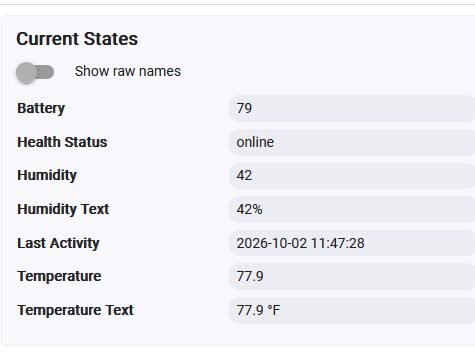
This allowed me to get off the ping/pong stuff, and focus on the devices actual supported features for watching over them. The result is I store into 'healthStatus' (or Health Status).
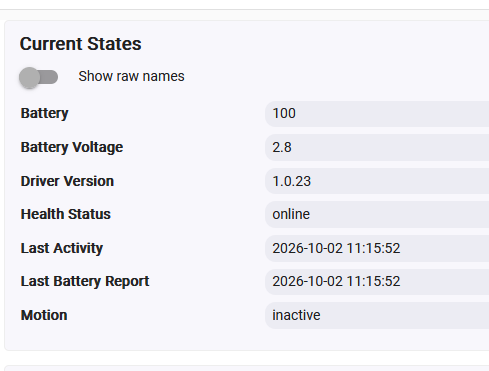
Here's one example:
The Last Activity and Last Battery are driver/device reported - NOT hubitat events - thats why they are here - the device itself is pushing this data during its internal polling - it is coincidental that there is a lastActivity value in HE.
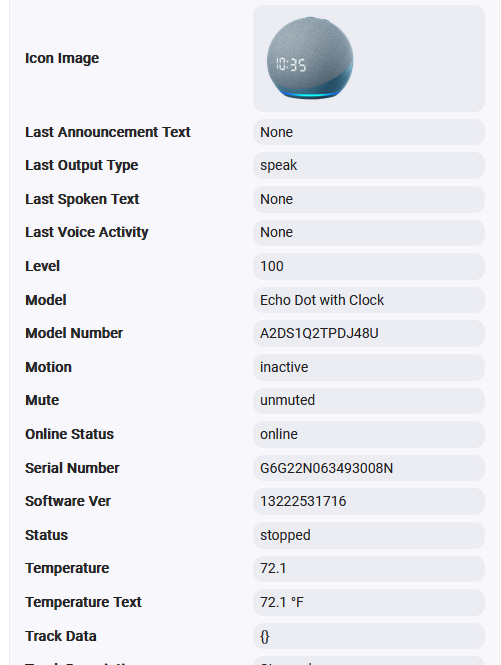
For amazon devices - they don't report a Health Status but rather an Online Status field (defined in the amazon library - not HE):
So - per your request for feedback and additions - if Health Status and Online Status were watched it would be a massive benefit for me!
Using the basic 'lastActivity' (from the hub) does get a large part of my environment. However, I'm down rev on the HE OS, so I don't get the newest stuff related to my TPLink and KASA switches and dimmers from @djgutheinz . I have 4 of them that sit in out of the way places and they show up in my inactivity Monitor which is currently set to 72 hrs of no activity before they hit my monitor (which is what your tool will be replacing!). My solution is a rule - that runs every other day to flip them on/off. It's a total kludge. Maybe you could provide an IP based TCP/ICMP echo feature?
f your app has a way to force a device - maybe a pick list with a schedule like I do with a rule currently - that would be a bonus area covered and huge to me as I try to get off rules.
Lastly, feedback - I notice none of your drop downs (at least the ones I saw) have a 'select all/deselect all' feature. As I was going through the implementation, it was a bit painful - especially in the 'location' thing which I really do not yet understand. Is Location supposed to be for people with multiple hubs ? I created a location 'Dundee House' and assigned all the devices to it, wasn't sure what I was supposed to do for that.
It would be really useful to have a method to choose what is monitored about a device - like "lastActivity", "Health Status", "Online Status", "Ping/Pong", "IP/Ping"...
Now that I'm on board with 2 of your tools - what does the future look like for tiles used to report monitoring data?
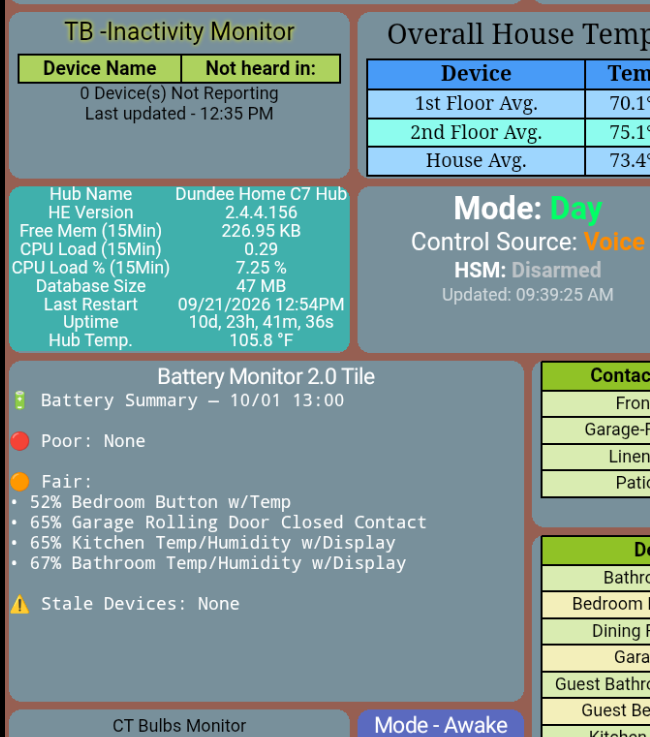
My current environ is: (I rely on @garyjmilne fine Tile Builder tool - and a Notifcation tile I write your Battery info to as seen below)
Thanks for taking the time to write all this up, this is exactly the kind of feedback I was hoping for.
Health Status / Online Status: Great idea, and it's going into the next release. DHM will watch both. If a driver reports offline, the device gets flagged as Poor right away with a note saying the driver reported it, and DHM checks it with its own data before calling it Offline. That way a good driver gets you faster warnings, but a buggy one can't cause false alarms or hide a real problem.
Locations: Sorry, that page needs a better explanation, and the next release adds one. Locations are just for grouping devices by room or area (Kitchen, Garage, Upstairs) so the Summary and notifications are easier to read. They're optional and have nothing to do with multiple hubs. One location with everything in it won't hurt anything, but it won't help either, so feel free to remove it or split it into rooms. That should also take care of most of the select-all pain, since there's no need to assign every device anywhere.
Choosing what's monitored per device: The goal with DHM is for it to figure that out on its own, so you don't have to set it up device by device. Health Status and Online Status will just become part of what it looks at automatically.
IP ping and scheduled on/off: Not planning these right now. I'd rather not have DHM flip switches, since a monitor turning lights on and off could surprise someone. For your Kasa devices, updating your hub when you're able may help on its own, since you mentioned the newer TP-Link support isn't on your version yet.
Tiles: Looks like you've got a great setup with Tile Builder already. I don't have plans for a DHM tile right now, but if enough people ask I'll take a look.
I had to do an unmatch first, before a match, otherwise, HPM said I needed Device Health Monitor and installed a separate copy anyways. For anyone who runs into this issue:
DHM now reads the Health Status your drivers report, Force scan moved to the main page, and the Locations page explains what locations are for.
Problem:
Many drivers track their own device's health and publish it as Health Status (or Online Status for Echo devices), but DHM ignored it. A driver could already know a device was offline while DHM still showed it as healthy.
To run a scan, you had to open the Summary page, then a separate Force Scan page, then come back.
The Locations page didn't say what locations are for, so it wasn't clear whether they were meant for rooms or for multiple hubs.
A device with a dead battery could still show a green Verified pill next to its Poor rating, which looked like a contradiction.
The Fix:
Health Status and Online Status are now used as a supporting signal, not the final word:
If a driver reports offline, the device shows Poor at best, with a "Driver reports offline" note in the Summary, Needs attention, the web portal, and notifications.
Z-Wave and Zigbee devices go straight to the front of the hub radio check. Three missed checks in a row means Offline. If they answer, they're cleared.
If the device is still active or answers the hub radio, DHM trusts that over the driver, and the note changes to "Driver reports offline, but device is responding."
These attributes never count as activity, so a driver flipping to offline can't make a dead device look freshly active.
Everything clears on its own once the driver reports online again.
Force scan now is the first row under Settings on the main page, with your last scan time beside it. Tapping it scans right there, without leaving the page. The Summary page's Force scan button stays on Summary too.
Locations now has a short explainer: they're optional room or area groupings that make the Summary, portal, and notifications easier to scan. They have nothing to do with multiple hubs, and you can skip them entirely.
The Verified pill grays out while a device's battery is dead.
A Battery Monitor 2.0 card was added to Help & Support.
Action needed: Update through HPM, open DHM, then tap Force scan now on the main page so driver-reported statuses show up right away.
Problem:
On Hubitat’s dark theme, DHM’s report cards, Settings list and page cards stayed white and light blue, and some pages were hard to read.
The Fix:
The app now follows the hub’s light or dark theme on Hubitat 2.5.3 and later, and keeps its current look on older firmware.
Every page inside the hub was updated, including Summary, Verification, Locations, Device actions and Tips.
Status pills and message boxes now read clearly on both themes.
The web portal keeps its own dark theme, and monitoring works exactly as before.
Action needed: Update in HPM. If you installed by hand, the app file has moved to the main Device Health Monitor folder on GitHub, and the Import button in Apps Code now points there.
Problem:
The web portal only came in dark mode, which is hard to read for some eyes.
The Fix:
New Portal theme setting under Settings → Web portal: Dark (default), Light, or Follow device.
A new ◐ button on the portal switches between light and dark, and each browser remembers its choice, so one person can use light without changing it for everyone.
 Battery 0%" note in the Summary, Needs attention, Device actions, the web portal, and notifications. It clears on its own once a new battery reports. No extra pings are sent to sleeping devices; it only uses the battery level the device last reported. LAN and virtual devices (like EVs or phones) are left out.