Thanks for the report. I'm not sure what's going on, but it really seems like HPM didn't update the app code for some reason. I've released an update just now that might help -- I did a clean install on a new hub, and I didn't have any problems, so if nothing else, I still suspect a "Repair" would too (but, of course, the bundle ZIP should work too).
CoCoHue v5.4.0
Added mDNS discovery (previous versions used SSDP only) to enable automatic discovery of Bridge Pro
See notes above for 5.3 if you missed it since there were some notable but hopefully silent changes there as well.
Please tell me you got a Hue Bridge Pro and have started testing on it already. Mine is on the way and I'm hopeful that the migration isn't too painful on the Hubitat side. Do you know if I'm looking at having to swap out old child devices for new devices? Based on Home Assistant forums, it seems that the Hue Migration is keeping all the same IDs from the old Bridge to the new One.
Any thoughts on how this will play out with CoCoHue? Will users need to change out their devices for any automation already in place? I'm just curious as to how much time I'm going to need to block off for the migration. I appreciate any insight you might have!
After migrating your Hue Bridge, just use the Edit Bridge IP, re-authorize, or re-discover under Advanced and select your Hue Bridge Pro instead of your current/old Bridge (or change the IP if you disabled the discovery option in favor of specifying a "static" IP -- or if you did that and the old and new are the same, it should just work).
Thanks Robert! This was quick and painless with the migration to the Hue Bridge Pro. Everything seems to be working from my end. I appreciate the quick updates to CoCoHue!
I'm now seeing issues after migrating from old hue bridge to new bridge pro.
Yesterday I installed a new bridge pro, moved the devices from the old bridge to the new one (on Hue). I reset the old bridge and started to configure Cocohue. I added the new bridge with its own IP address, so I had the same lights, scenes, groups and switches from both bridges at the same time (several hundred in total) in Cocohue. When the lights etc. worked with the new bridge from Cocohue, I removed the old Hue bridge from Cocohue. So all that was left was the lights, groups etc. that were used via the new bridge.
Then the problems started couple hours later. Hubitat started to behave in such a way that only some of the owntracks location updates went through. The lights and automations worked fine all the time. Later today I noticed that Hubitat is behaving really slowly anyway. I disabled Cocohue, and after disabling Cocohue, Owntrack started working normally again. The Hubitat management interface also works normally fast. Now Cocohue is enabled again and everything works, but I need to see what happens next. So something has happened with the bridge change, either by me or for some other reason.
I have disabled the "poll bridge every" setting, and I have not checked the box "if polling enabled then use V1". Is there something wrong here?
I don't see anything, but there's no harm in leaving the V1 polling setting enabled (it will still use it for a "refresh" on the Bridge, and it has more usable data than V2 for Hubitat at the moment) -- or polling in general, both of which are recommended.
Fix for automatic discovery of changed Bridge IP address (via mDNS or SSDP) after selecting new/different Bridge, e.g., after migrating.
This issue would normally only come up if you migrated (e.g., from a Bridge V2 to a Pro) and don't have a reserved or static IP address for your Bridge. In such cases, if/when the IP address changes, CoCoHue might not catch on because it's still looking for the old Bridge ID instead of the new one. If you've already migrated and might be affected, I'd suggest going back to the Edit Bridge IP, re-authorize, or re-discover screen and re-selecting your Bridge like you had to with the initial migration. (Again, not an issue if it won't ever change on your network -- or if you're using a manually specified IP address instead of automatic discovery. This also fixes it for new migrations going forward.)
Yeah my issues were my issues. Not sure what was the cause but everything works normally now.
I kind of a asked this one already but I'm going to ask again. I do not see any events on the hub when motionaware triggers. Do you have information about motionaware and if there would be possibility to get events when Hue senses motion?
It looks like that should be possible based on the API, but I have not tried yet. No guarantees on when. (I don't even have my Pro in use yet--been using it to test a bunch of things, like how I discovered the above problem, instead.)
I am getting my lights flipping on all hours of the day and night on there own since I migrated to Hue Pro and CocoHue at the same time last week. I have verified no hunches or guard is running in alexa. Here are some logs showing produced by is cocohue. I am running the latest Cocohue just upgraded this morning by doing a repair. This is driving us crazy as its waking us up at night time. here are some screen shots of 2 bedrooms and the bathroom vanity mirror event logs. Any ideas would be extremely helpful. I am also on the very latest beta hubitat release. The top picture is the bedroom light going on int he middle of the night waking us up and using alexa to turn it off. The middle just happened at 12:25 and the bottom was another bedroom same time.
CoCoHue does not send on or off commands to devices on its own; that would have to be an app or driver on your hub -- or something else that integrates with your Hue Bridge. The screenshots you have show that it's unlikely to be anything on your hub (though it could still be if they are members of a Hue group you've added to your hub; check those for command history, too).
Since you mentioned Alexa, that's my #1 guess. Did you disable Alexa Hunches? This "feature" has been known to cause problems like this (and is on by default).
I have disabled hunches. routines, ultrasound and checked the Alexa logs in alexa privacy settings. There is no call being made by the app to turn on the lights. I have no saved groups or routines on the hue pro bridge. I have tried CoCo integration and Hubitat Native hue integration. I have removed and rebuilt Alexa and Hue integration. The lights do not turn on or off on their own till Hubitat is added to the mix. I am ready to toss the whole Hubitat system out the window. This has been going on for over a week.
And the device will also show the command in the "Events" tab of the device detail page, though with Hue devices it could be the light itself, a group (room/zone) it's in, or a scene it's a part of, any of which may or may not be added to Hubitat but would require looking at all possibilities if it is. From the above, I don't see any commands being sent, which means it can't be the hub -- at least not for the device in that screenshot.
Sounds like that device (on your hub) doesn't exist anymore (on the bridge). Go to the page to add/manage a light, group, sensor, or whatever kind of device this is in the CoCoHue app, and you'll see a match up of what you have and what is or isn't found on the bridge.
I've noticed that if you remove all devices from a room in the Hue mobile app, it creates a new ID when you add devices back into it -- even though you didn't remove the room in the meantime. (This would result in the outcome above.) This happened to be recently when I replaced some of my bulbs with the newer models. Just one guess as to what it could be for you!
since i am having hue issues my one hub running std hue drivers built in.
i decided to check the other
using cocohue..
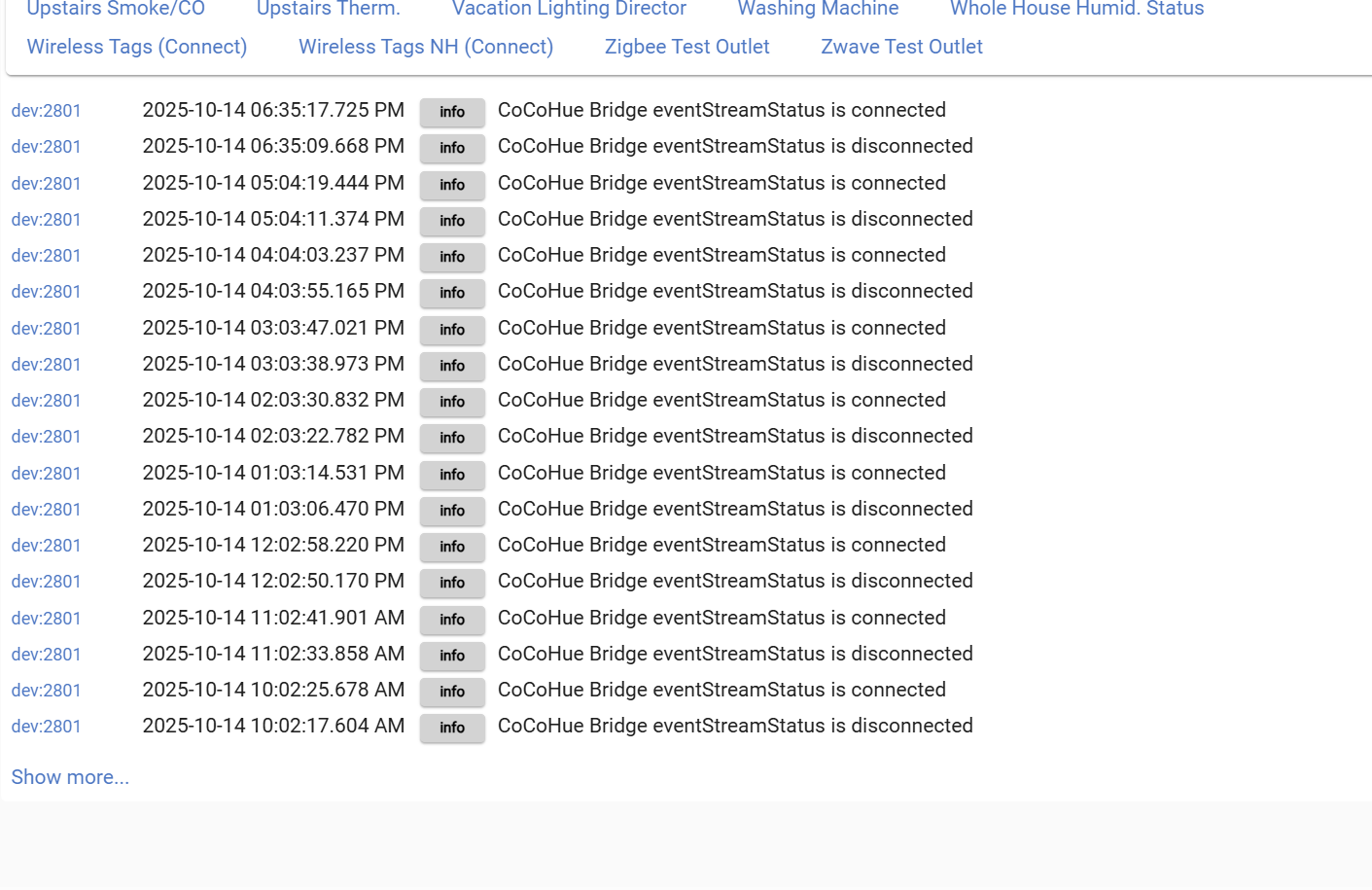
getting this message in the logs every 12 secs.
There is some discussion of this above, but basically, it's more or less expected despite some effort the driver makes to suppress quick, seemingly spurious, disconnects.
 Mine is on the way and I'm hopeful that the migration isn't too painful on the Hubitat side. Do you know if I'm looking at having to swap out old child devices for new devices? Based on Home Assistant forums, it seems that the Hue Migration is keeping all the same IDs from the old Bridge to the new One.
 (I don't even have my Pro in use yet--been using it to test a bunch of things, like how I discovered the above problem, instead.)