Just updated to v. 2.4.16 and now getting this error after selecting "Done" on the main page.
2026-04-28 08:33:26.622 PMerrororg.codehaus.groovy.runtime.metaclass.MissingMethodExceptionNoStack: No signature of method: user_app_jdthomas24_Battery_Monitor_2_0_883.version() is applicable for argument types: () values: []
Possible solutions: run(), run(), iterator(), every() (version)
Report Button Improvements Report buttons now show bold titles with a brief description of what each page contains, replacing the default "Click to show" placeholder text that Hubitat displays when no description is set.
Hotfix — Version Display Error Fixed an error on the main page caused by app.version() not being supported in Hubitat's app sandbox. The version number is now hardcoded and displays correctly in the Diagnostics section without throwing an error.
Important — 5-Day Pending Gate Notice With the introduction of firstSeenDate in 2.4.13, devices go through a one-time 5-day learning window before health ratings are assigned. I forgot this was in play when releasing the recent updates — each update was resetting the gate for users still in that window.
Once the 5-day gate clears and devices show a health rating, future updates will no longer affect the days gate and you can update freely.
Unless a critical bug comes up, I will be holding off on any further releases until the 5-day gate has had time to expire. This gives everyone's devices a chance to clear Pending and establish health ratings without interruption.
Well - I said i would not update UNLESS there was a bug--- well there's a bug.. SMH
Battery Monitor 2.0 — Released: v2.4.19
Bugfix — Days Progress Bar Stuck at 0/5d The firstSeenDate field introduced in 2.4.13 to anchor the 5-day Pending gate was silently failing to persist in Hubitat's state storage due to a Groovy nested map mutation issue. The field was being set correctly in memory but not actually saved, causing the Days bar to always show 0/5d.
Fixed in 2.4.19 using an explicit HashMap copy which forces Hubitat to recognize and persist the change. After updating, click Done once to trigger the migration — the Days bar should begin advancing correctly from that point.
Updated a few minutes later: Sorry for posting prematurely. I just checked package manager and I saw that v 2.4.19. included a comment about fixing an issue that looks like the problem I am having.
Original post - please ignore
The battery report continues to show 0-days under battery health for all but 2 devices. I upgraded to version 2.4.15 a couple of days ago, so I am not sure why it continues to show 0-days.
click the (i) up top right. Scroll down to state details. copy and send to me via DM.
Verify the version your on as well.
@jshimota - I need more details of your "Tile"
The error is in their notification device driver, not BM 2.0. Check which device is dev:681 in your Hubitat device list and update that driver. If it's a community driver, check for an update. If it's a built-in driver, it may be a platform bug worth reporting to Hubitat support.
What driver are you using?
@JdThomas24 You were absolutely right! Not an issue at all with Battery Monitor - it was the notification tile driver I use.
Quoting Gemini Pro:
"The error is occurring because removeLast() was introduced in Java 21, but the Hubitat environment runs on an older version of Groovy/Java where that method doesn't exist for an ArrayList.
In the version of Groovy Hubitat uses, you have to use the index-based removeAt() method to target the end of the list."
I've rectified this and am uber happy - thank you!
Orphaned Replacement History Cleanup When a device is removed from the Battery Monitor monitored devices list and you tap Done, its replacement history entries are now automatically purged. Previously, history entries for removed devices would accumulate indefinitely — showing as (device removed) in the Replacement History page. Now they are cleaned up automatically when settings are saved.
This is particularly useful when replacing a physical device with a new one (new Hubitat device ID) — the old history is pruned cleanly without any manual action needed.
Note: Legacy history entries without a stored device ID (from versions prior to v2.4.15) are preserved as-is and will not be auto-purged. Only entries with a tracked device ID are eligible for cleanup.
How to Update
Install via HPM or paste the updated code into Apps Code. Tap Done once after updating to trigger the cleanup pass.
Battery Monitor 2.0 — v2.4.21 This is an internal reliability update. No changes to health scoring, drain calculations, notifications, or any user-facing screens.
What's improved:
Drain model outlier protection — the app now ignores single bad readings before they can skew your drain average. If an incoming sample is 4× higher than your device's rolling average, it's silently discarded. This covers the real-world cases: a signal dropout that briefly reports a wrong level, a driver glitch, or a one-off firmware quirk. Only kicks in once a device has 3 or more established samples — early learning is unaffected. Your existing samples are never touched.
Reset Drain History — safer write — drain resets now write all fields in a single atomic operation instead of one at a time. This prevents a partial reset if something interrupts mid-way. Your last known battery level and accumulated timing data are preserved — only the drain samples and health score reset, exactly as before.
Manual Replacement — safer write — the same atomic write pattern has been applied to manual replacement logging. All replacement fields are set together in one operation.
What's not affected: All existing device history, drain samples, health scores, replacement logs, battery catalog entries, and notification settings are fully preserved. No re-learning required. Users updating from any prior version will see no behavioral difference under normal conditions — these fixes only matter at the edges.
Something changed with this last release. I have 2 devices that now show that their the batteries have been replaced and stats are now pending. The app shows that this was an automatic replacement. The thing is, I haven’t touched these devices at all.
Only thing I did today was update the app and my hub.
It's not a huge deal. It's possible something may have occurred while I was not home earlier, but I have no indications of such. I will leave things as is and see what happens when the 5 day period passes.
Quick patch for a false positive in automatic replacement detection.
What happened: Reported issue after updating the app or rebooting their hub, some devices were incorrectly flagged as "Recently Replaced" with stats reset to Pending. This is a HomeKit-integrated device issue and with imported Ecobee sensors, which can report 100% battery often — when the app reinitializes and oldLevel gets reset, a 100% reading against a near-zero prior level trips the replacement threshold.
The fix: Auto-detection now requires at least 2 prior drain samples before it can fire. This means the app needs to have actually observed the device draining before it can conclude a battery was swapped. Manual replacement always works regardless of this guard.
If you were affected by the false positive in 2.4.21: The device(s) will remain in Pending for up to 5 days while the gate clears — there is no way to retroactively undo a fired replacement. You can delete the false entry from Battery Replacement History if you want to keep the log clean.
All existing history, samples, health scores, and settings are fully preserved — no re-learning required.
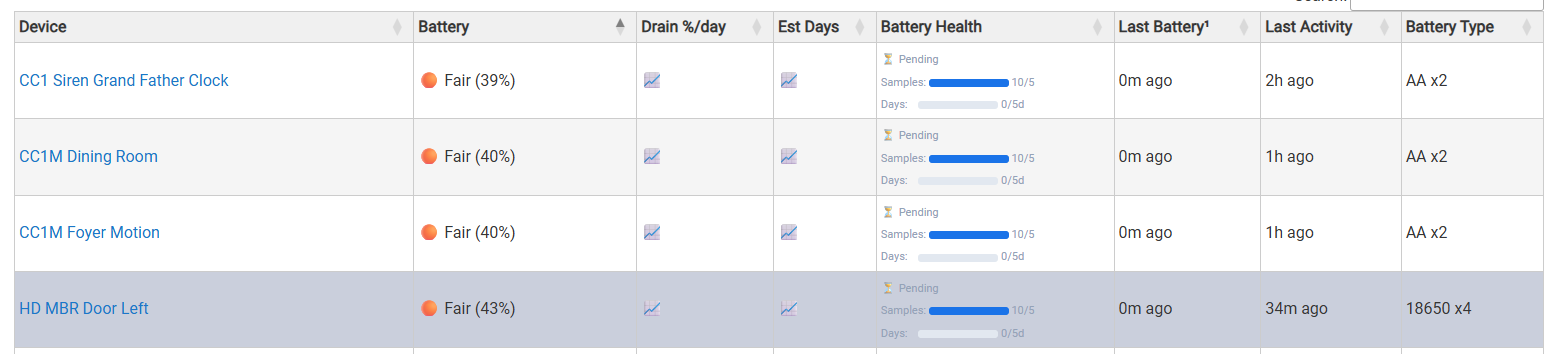
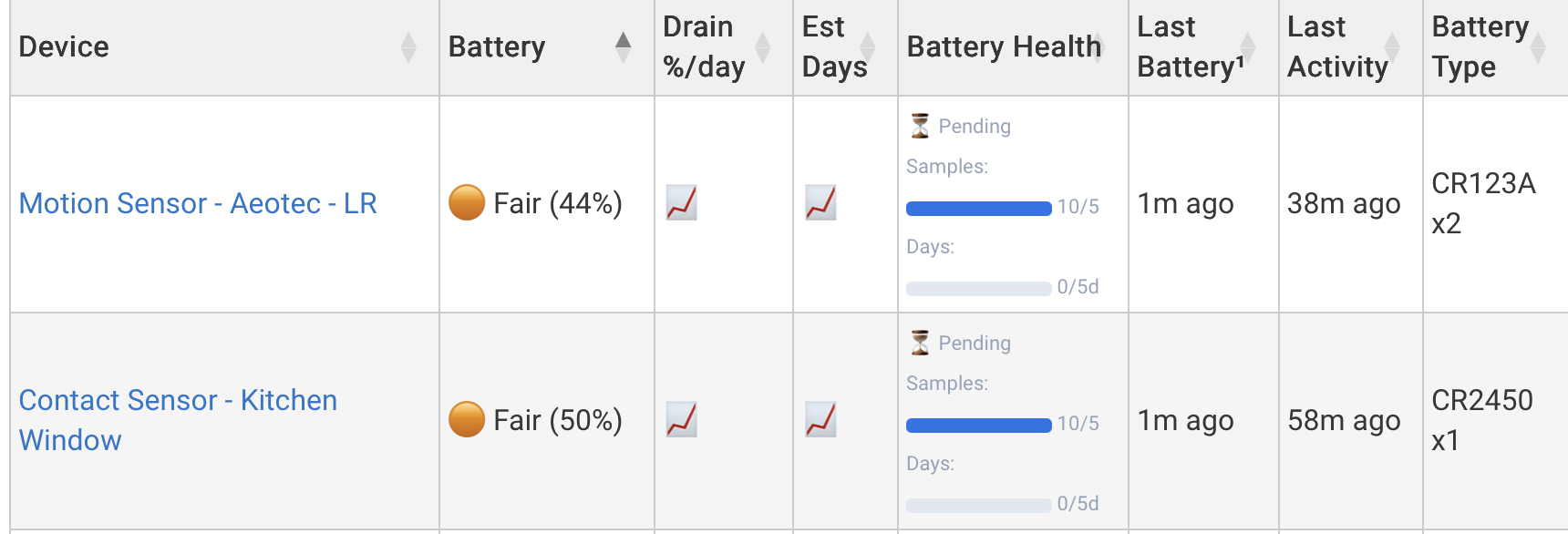
All of my devices are showing 10/5 samples, 0/5 days, no drain %, and no set days. Some of the devices have had the number of samples increase until they are now all at 10/5. But days always remains 0. This has been true for the last several updates of the app.
Can you just confirm that this is correct and I need to keep being patient?
I really appreciate the app, and have one suggestion.
When I'm looking at the battery summary, the typical workflow is that I will want to do actions on the devices within Battery Monitor, not go from Battery Monitor to the device configuration page. Typically, devices are configured once when added to Hubitat, but management is an on-going process.
It would be great to have fields or link navigation from the Battery Monitor Summary page that would make the workflow for battery (rather than device) management easier.
Offhand, I can envision two ways to update the interface:
On the Summary page, add a checkbox per-row for manual battery replacement (with the current timestamp auto-populated), and make the battery type column a drop-down menu, to allow battery types to be assigned directly from the summary screen.
If that is not possible, there could be a choice (an app setting, or a radio button just on the Summary page) to define the behavior when clicking on a then name of a device (link) on the Summary page. The choices would be:
"go to device configuration page" (the current default)
and
"manage device attributes within Battery Monitor" (going to a per-device page to assign battery type and indicate manual battery replacement)
 Battery Monitor 2.0 — Released: v2.4.18
 Report Button Improvements Report buttons now show bold titles with a brief description of what each page contains, replacing the default "Click to show" placeholder text that Hubitat displays when no description is set.
 Hotfix — Version Display Error Fixed an error on the main page caused by
  Important — 5-Day Pending Gate Notice With the introduction of