Hello everyone,
I’m excited to share a project I’ve been working on to solve a major annoyance with smart vacuums. Most robot vacuums—even the high-end ones—operate in a bubble. They have basic schedules and maybe integrate with a mode change, but they don't actually know what’s happening in your house.
I wanted to stop treating my vacuums like scheduled appliances and start treating them as part of a holistic Building Management System (BMS). The system needed to be proactive, reactive, and completely autonomous, while still giving me ultimate ad-hoc control.
Today, I’m releasing the Advanced Robot Vacuum Controller. It is brand-agnostic, hyper-aware of its environment, and handles the actual "thinking" so you never have to worry about a dirty floor or a vacuum interrupting your life again.
Here is a deep dive into what this application can do.
 Core Features & Highlights
1. Hardware Abstraction Layer (Brand Agnostic) You aren't locked into one ecosystem. The app features a driver abstraction layer allowing you to select different hardware profiles. You can run a Roborock (via the community driver) as your primary, and an iRobot Roomba, Dreame, or Ecovacs as your secondary. The app translates its advanced logic into the specific commands your driver needs.
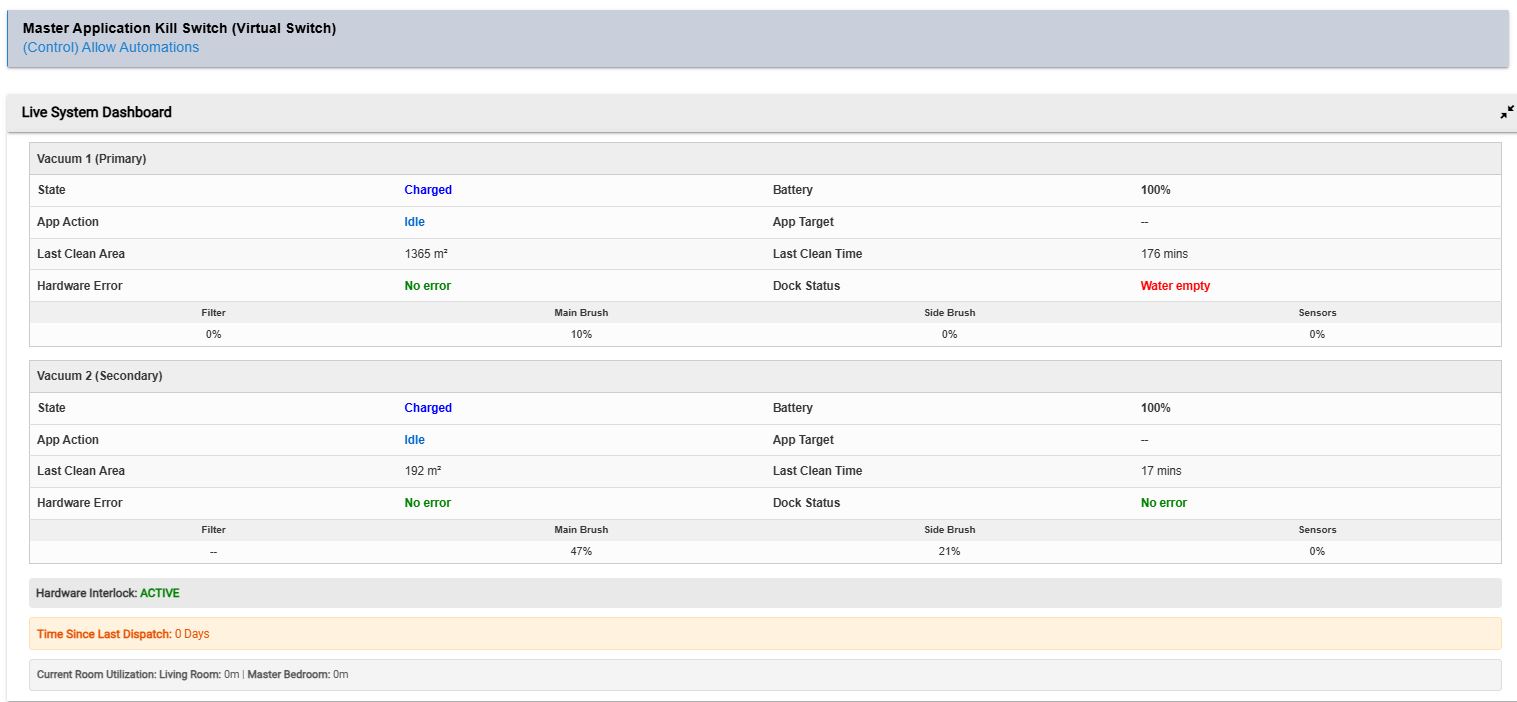
2. The Phantom Draw Assassin & ROI Tracker Vacuums pull phantom power while sitting on their docks (Roborocks pull around 3-4W; Roombas can pull 7W+). You can tie your docks to smart plugs within the app. Once the vacuum reports a 100% battery and a "charged" state, the app kills power to the dock. The built-in Live Dashboard calculates your exact localized energy savings and financial ROI over time.
3. Proactive Micro-Climate Blocking Vacuums and water don't mix. You can bind humidity sensors (like Ecowitt devices) to specific rooms, such as bathrooms. If the humidity spikes above your defined threshold (e.g., 75% after a shower), the app proactively blocks the vacuum from entering that room until the exhaust fan clears the moisture, saving your vacuum's internal motor and paper filters from destruction.
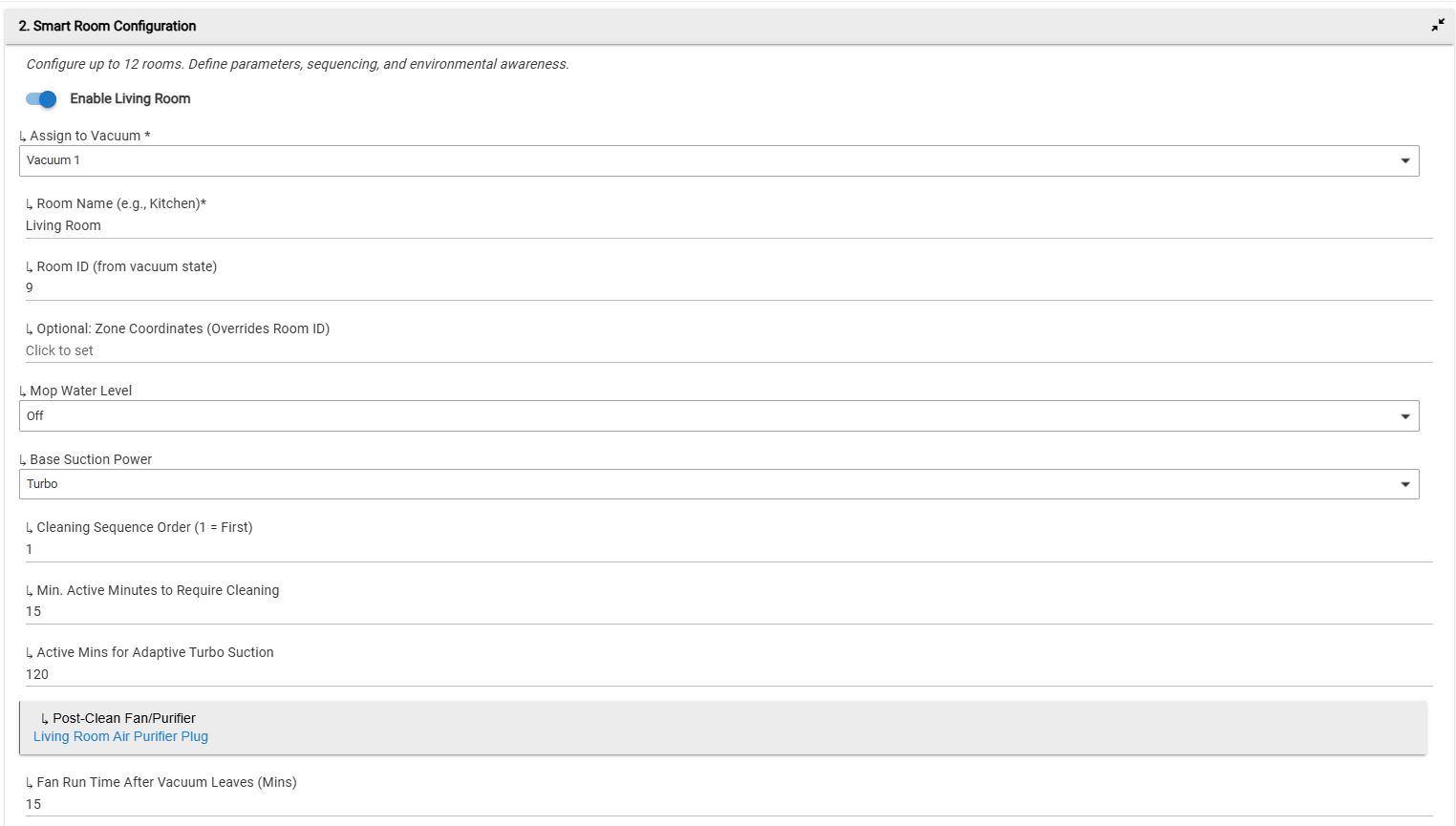
4. Reactive Acoustic Avoidance Vacuums ruin the vibe. You can bind media players (like Sonos speakers) to individual rooms. As the vacuum evaluates its queue, it checks the playback state. If music or a podcast is actively playing in the Living Room, the app dynamically overrides your standard settings and drops the vacuum to Quiet suction for that specific room, ramping back up when it leaves.
5. Dedicated Mop-Only Routines Hard floors need frequent mopping, but running the vacuum motor every single time causes unnecessary wear and tear. You can schedule dedicated "Mop-Only" days where the app forces the vacuum into a Suction: Off and Water: High configuration for high-traffic hard floor zones.
6. Overdue Deep Clean Catcher Because the app relies on occupancy and smart skipping, what happens if a room gets completely ignored for days? The app features an Overdue Catcher. If the system has sat idle for a user-defined number of days, it waits for an allowed time window and forces a global Deep Clean (Suction: Max, Water: High), bypassing standard occupancy thresholds.
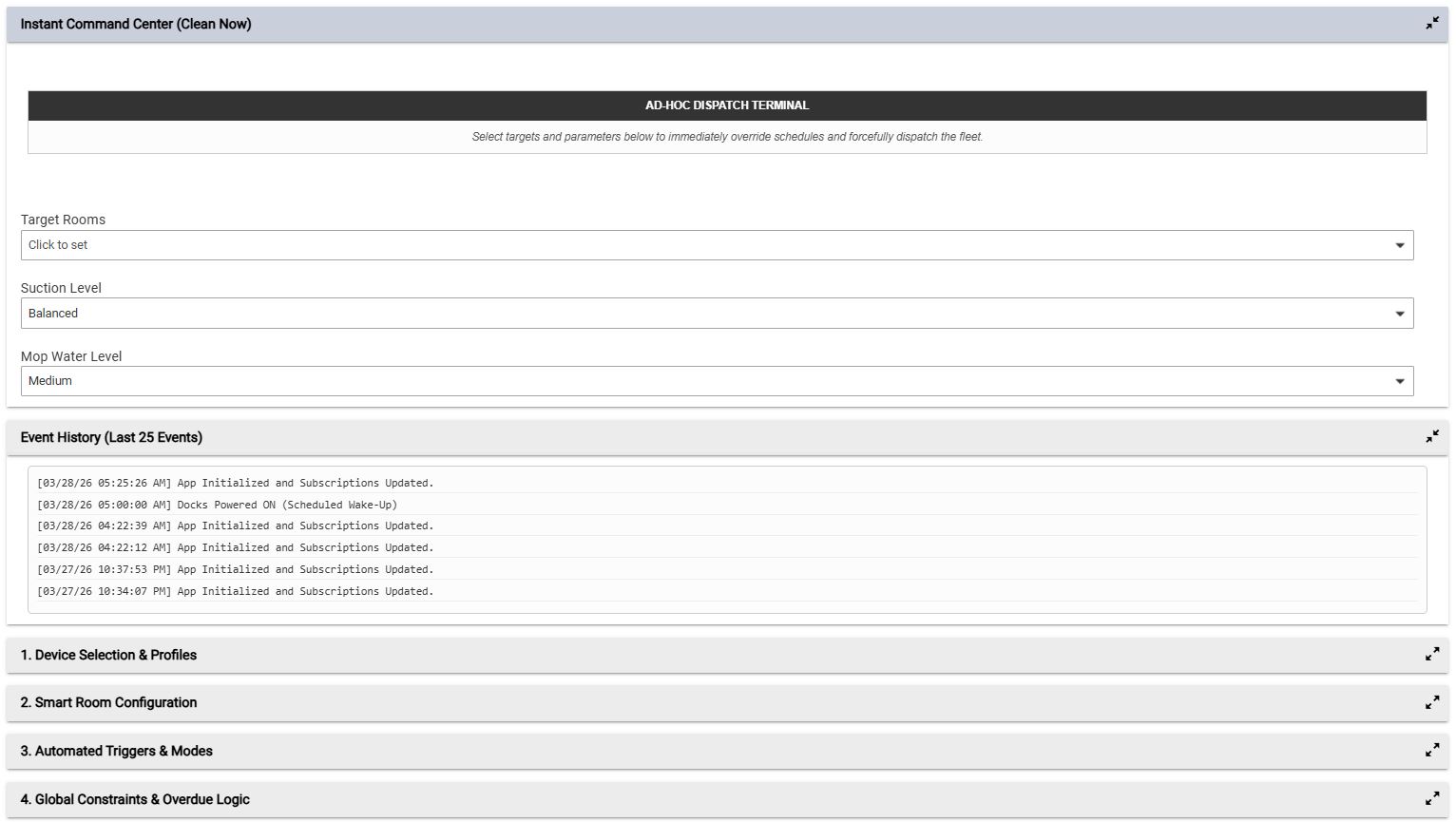
7. Live Dashboard & Instant Command Center The app generates a clean, HTML-based dashboard right in the Hubitat UI. It provides live telemetry across your fleet (Battery, Status, Hardware Errors, Dock Errors, Last Clean Area/Time, and Consumable Lifespans). It also features an Ad-Hoc Command Terminal allowing you to immediately dispatch the fleet to multiple rooms with custom suction and water parameters, bypassing all schedules.
 The Decision Engine: How It Actually Works
The core of this app is how it decides when and where to clean. It completely replaces the vacuum's native scheduling. Here is the exact logical flow the app runs through when a trigger (like a Good Night mode, a School Drop-off switch, or a timer) fires:
Step 1: The Global Gatekeeper Before doing anything, the app checks the Master Kill Switch, Allowed Operating Modes, and Quiet Hour Time constraints. If the house is in the wrong state, the run is aborted.
Step 2: Room-by-Room Evaluation The app iterates through your configured rooms (up to 12) and subjects each to a rigorous checklist:
- Perimeter Check: Is an exterior door (Contact Sensor) open? If yes, skip the room to prevent escape.
- Climate Check: Is the humidity too high? If yes, skip to protect the motor.
- Occupancy Tally: Has the room seen enough human traffic (measured in accumulated active minutes) to warrant a clean? If no, skip the room to save hardware wear.
- Active Presence: Is someone physically in the room right now (Motion/Lights)? If yes, skip the room for now.
Step 3: Dynamic Parameter Adjustment For the rooms that survive the checklist, the app determines how to clean them:
- Is media playing? -> Force Quiet Suction.
- Has the room seen incredibly heavy traffic today? -> Force Turbo Suction.
- Otherwise -> Use the room's baseline configuration.
Step 4: Queueing, Dispatch, and Dust Settling The app sorts the surviving rooms by your preferred sequence order. It dispatches the primary and secondary vacuums simultaneously to their assigned zones. Before the vacuum enters a room, the app can optionally turn on an air purifier or ceiling fan. Once the vacuum finishes that room, the app runs a countdown timer to let the airborne dust settle before turning the fan/purifier back off.
If someone walks into a room while the vacuum is actively cleaning it, the app instantly sends a pause command. Once the room clears, a user-defined grace period (e.g., 2 minutes) ticks down before the app automatically sends a resume command to finish the job.
 Open Source & Free to Use
I built this to scratch a massive itch in my own smart home, and I want the community to benefit from it.
This application is 100% free and open-source. You are completely free to use it, dissect it, rip code from it for your own projects, or fork it to add your own features.
I’d love to hear how it works for your setups and if you have any ideas for new environmental triggers we could add to the BMS logic!
 Feature Update: Precision ROI Tracking & UI Refinements
 Enhanced Financial & Energy ROI
 Live Dashboard Improvements
