[RELEASE] Advanced Rain Detection - A Predictive Meteorological Engine for Ecowitt

Hey everyone,

I wanted to share a custom weather application I built to solve a very specific, annoying problem: Standard smart rain gauges are reactive, not proactive. If you are relying on a physical rain gauge to trigger your smart home rules (like closing windows, retracting awnings, or pausing irrigation), you usually have to wait for the physical "bucket" to tip. By the time that happens, your patio cushions are already wet, and a light, misty drizzle might never tip the bucket despite ruining your outdoor plans.

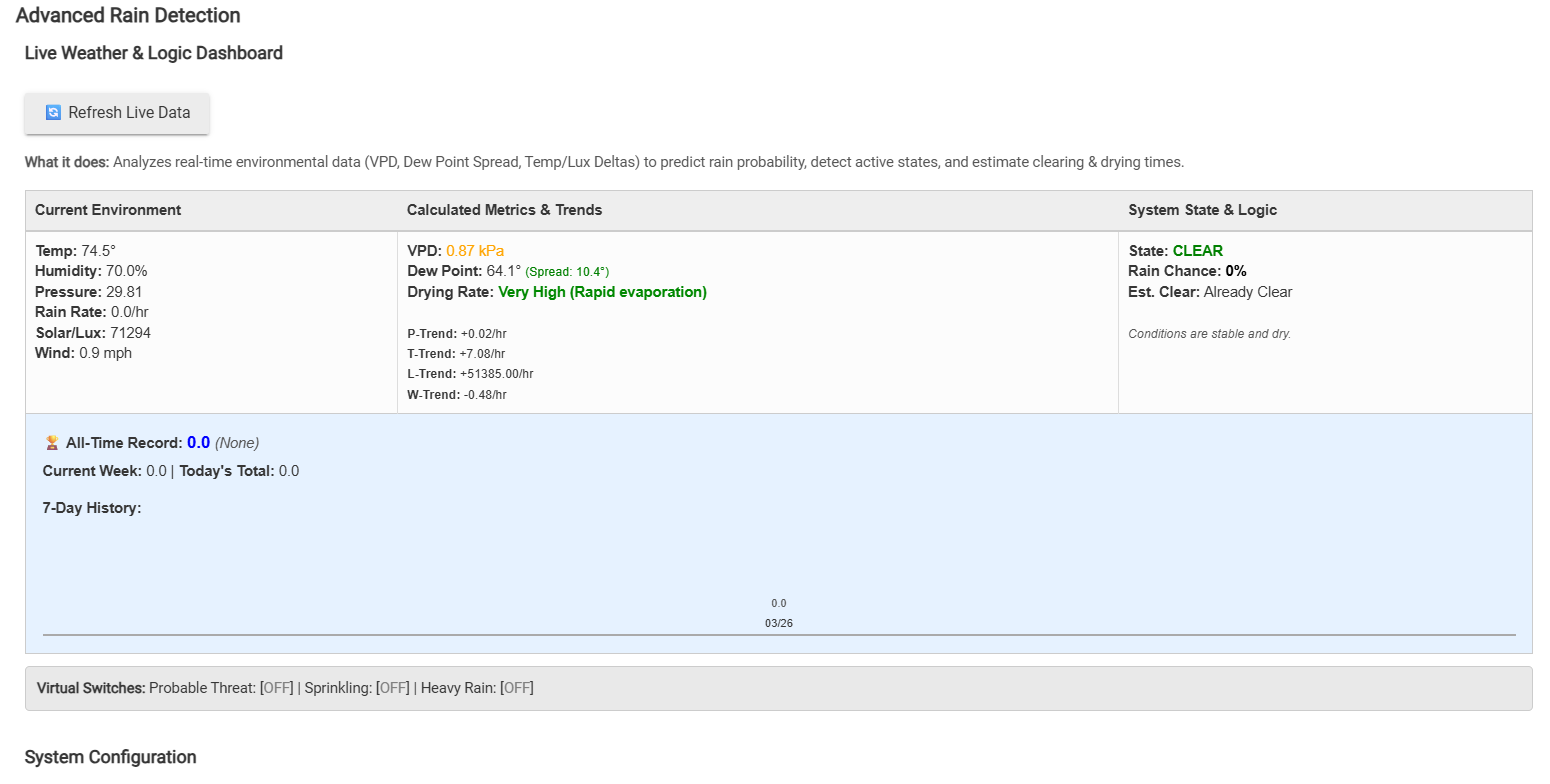
Advanced Rain Detection is a predictive logic engine that acts as the meteorological brain for your hub. It takes standard local data from your Ecowitt sensors (Temp, Humidity, Pressure, Lux, Wind) and applies advanced meteorological math to predict rain, track mist/drizzle before it registers on a gauge, and calculate exactly when the ground will dry afterward.

Here is a breakdown of what it does, the science behind it, and how you can use it.


Key Features & Home Automation Use Cases

1. Mutually Exclusive "Precipitation State" Virtual Switches The app exposes two virtual switches: Sprinkling and Heavy Rain. Only one can be active at a time.

  • Use Case: Tie your Rule Machine rules to these switches. If Heavy Rain turns on, close the motorized windows and retract the awning. If Sprinkling turns on, just change the LED strip colors on the patio to blue to warn guests.

2. Built-in State Debounce Weather is erratic. The app uses a customizable debounce timer (e.g., 5 minutes) for downgrading states. Upgrades (Clear -> Raining) are instant, but if the rain stops for 30 seconds and starts again, the app won't rapidly flip your virtual switches.

  • Use Case: Prevents your motorized awnings from grinding themselves to death by opening and closing repeatedly during a passing, patchy shower.

3. Predictive Probability Setpoints & Notifications You can set a custom "Rain Probability Setpoint" (e.g., 75%). When the internal math decides a storm is highly likely, it sends a push notification before the rain actually starts.

  • Use Case: Get a notification on your phone saying "Rain probability has reached 80%" so you have 10 minutes to bring the dog inside before the bottom falls out.

4. 7-Day History, Midnight Rollovers & All-Time Records The app has a custom dashboard UI that builds a CSS bar graph of your last 7 days of rainfall. It handles midnight rollovers natively (since Ecowitt resets daily totals at midnight) and keeps a permanent log of your "All-Time Record" rainfall day.

  • Use Case: Gives you an instant visual of how saturated your yard is over the last week without needing to export data to Grafana or InfluxDB.

The Science: How the Engine Actually Works

To make this hyper-accurate, the app doesn't just look at humidity; it actively tracks the rate of change across multiple data points over rolling 1-to-3-hour windows.

Dew Point Spread (The Ultimate Predictor) Relative Humidity is a flawed metric because it changes with temperature. Instead, the app calculates the exact Dew Point using the Magnus-Tetens formula. It then tracks the Spread (Temperature minus Dew Point). When the spread drops below 1.5°F, the air is physically saturated.

  • The Magic: If the spread is near zero, the app will trigger the Sprinkling switch even if the physical rain gauge reads 0.0. It successfully detects dense mist, fog, and drizzle that standard rules completely miss.

Cloud Front & Gust Front Detection The app tracks 10-minute historical deltas for Solar Radiation (Lux) and Wind.

  • If Solar Radiation plummets by >60% in a few minutes while the sun is still up, a thick storm cloud just rolled over.
  • If the wind spikes by >10mph simultaneously, the app recognizes a thunderstorm "gust front." Rain probability skyrockets instantly.

Rapid Cooling & Pressure Drops A sudden temperature drop of 6°F or more within 15 minutes, paired with a barometric pressure drop of >0.03 inHg/hr, is a textbook indicator of a severe storm downdraft. The app catches this and warns you.

Evapotranspiration & Drying Potential What happens after the rain stops? The app uses VPD (Vapor Pressure Deficit)—a scientific measurement of how much moisture the air can absorb—combined with wind speed and solar radiation to calculate the live "Drying Rate."

  • If the rain stops but the air is still totally saturated with no wind, the dashboard will display Very Low (Ground stays wet). If the sun comes out and the wind picks up, it changes to Very High (Rapid evaporation). This is incredibly useful for knowing exactly when to un-pause your irrigation schedules!

Open Source & Free to Use

I built this to solve a problem on my own hub, and I want the community to have it.

This application is 100% open source, completely free to use, and free to dissect. Please feel free to copy the code, tear it apart, reverse-engineer the math, and adapt the logic into your own custom apps, drivers, or weather projects.
raw.githubusercontent.com/ShaneAllen334/Hubitat_Apps/refs/heads/main/Advanced_Rain_Detection/Advanced_Rain_Detection.groovy

4 Likes

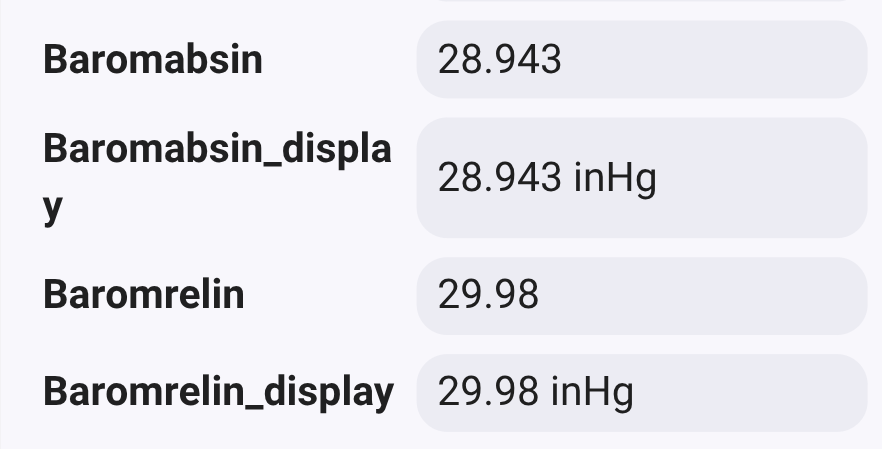
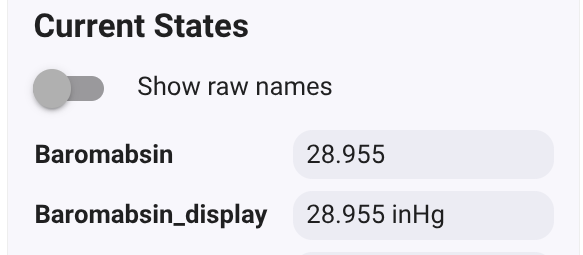
Thanks, I'm using an Ambient weather station. I can get all of the sensors readings except pressure. The Ambient console displays that as Baromabsin. It doesn't show up in the Barometric Pressure drop down. Any idea as to howto make that available?
image

Ill issue an update to the code today to support that attribute.

1 Like

Looking further, I have these four pressure attributes available. Looks like baromrelin is what I need.

1 Like

Here is a breakdown of all the major features and logic engines we just added:

:earth_africa: 1. Hardware Independence (Multi-Station Support)

The app is no longer locked to Ecowitt. It now features a robust multi-attribute fallback system.

  • Universal Compatibility: Whether you use a Tempest, Ambient Weather, or Ecowitt station, the app will dynamically hunt for standard attributes (pressure, temperature, rainRate) and seamlessly fall back to custom ones (Baromrelin, tempf, hourlyrainin).
  • Auto-Sanitization: If your driver accidentally passes a string with the unit attached (like 29.98 inHg), the app automatically strips the text out to prevent float casting errors and keeps the logic engine running smoothly.

:droplet: 2. Instant "First Drop" Detection (The Hardware Hack)

Traditional weather stations require enough rain to tip a bucket, meaning light sprinkling completely bypasses the system for several minutes.

  • The Solution: You can now map a standard, cheap Zigbee/Z-Wave water leak sensor to the app. Place it outside on a slight angle under the open sky. The microsecond a single raindrop bridges those contacts, it bypasses all the math and forces the system into the "Sprinkling" state with 100% probability.

:shield: 3. Dew & Frost Rejection (False Positive Prevention)

The problem with putting a bare leak sensor outside is that morning dew will trigger it, making your house think it's raining at 6:00 AM.

  • Smart Rejection: The app now cross-references the leak sensor with your other environmental data. If the sensor reads WET, but the Solar Radiation is low, the wind is calm, and the Dew Point Spread is tight, the app classifies it as condensation. It ignores the sensor, prevents false automations, and displays DEW/IGNORED on the dashboard.

:zap: 4. Local Polling Override (Bypass Cloud Delays)

If your driver only pushes data every 10–15 minutes, predictive math is useless.

  • Active Polling: You can now enable a custom cron-scheduler to force your devices to refresh as fast as every 1 minute. (Note: Only use this if you are using a local LAN driver, like an Ecowitt gateway, to avoid cloud API rate limits!)

:brain: 5. Bulletproof Hub Reliability

To ensure this app never bogs down your hub, two major safeguards were added:

  • State Memory Optimization: With 1-minute polling, history arrays grow fast. The app now trims history not just by time, but by size (Max 60 data points), ensuring the database stays incredibly lean and fast.
  • Stale Data Protection: If a sensor battery dies or drops off the network, the app won't get stuck calculating a ghost storm based on frozen data. It checks the heartbeat and will flag the dashboard with a red :warning: OFFLINE warning after a user-defined timeout.

:gear: 6. Clean UI & Algorithm Tuning

As the app has grown, the UI needed a cleanup.

  • All configuration options are now tucked away in neat, collapsible drop-down menus.
  • Algorithm Toggles: You now have complete control over the predictive engine. You can independently toggle the Dew Point Spread, VPD, Pressure Trends, Rapid Cooling, Wind Gusts, and Cloud Cover logic ON or OFF to tune the sensitivity perfectly to your specific microclimate.

The Live Dashboard has also been updated to show your active prediction models, the status of your "First Drop" leak sensor, and any offline flags so you can see exactly what the logic engine is thinking in real-time.

Let me know what you guys think, and please share any edge cases or feedback as you test it out!

raw.githubusercontent.com/ShaneAllen334/Hubitat_Apps/refs/heads/main/Advanced_Rain_Detection/Advanced_Rain_Detection.groovy

1 Like

This looks promising. I'm curious how I can use info from the apps dashboard in SharpTools as a device with it's info plugged in?

Right now i dont have a way, but the application lets you link a Virtual Switch for Rain, Sprinkling and Rain Probable.

Im not using sharp tiles as ive built my own app for local dashboard control that pulls information from all my apps, but i can look into adding this functionality.

What exactly would you like to see?

Would it be possible (useful) to create a companion device with derived attributes for current states and metrics that could then be used in rules.

Definitely. I can work on that. Ill just expose all the calculations and attributes.

2 Likes

By doing this, it'll remove the need to have both virtual switches since the status of an attribute could be used instead in either a rule or WebCoRE.

1 Like

Im going to add the option to create a device that will expose all the attibutes the application calculates and monitors, but i will be leaving the switch capability also.

2 Likes

Major Update: Advanced Rain Detection now features a Custom Information Device!

Hey everyone,

I’ve just pushed a significant architectural update to the Advanced Rain Detection engine. Up until now, the app has been doing some heavy lifting in the background—calculating VPD, dew point spreads, and atmospheric trends—but routing that output strictly to simple on/off virtual switches.

While those switches are great for basic automations, cramming rich meteorological data into binary states leaves a lot of value on the table, especially if you are pulling rapid local data from an Ecowitt gateway or an Ambient console.

To fix this, I've introduced the Advanced Rain Detector Information Device.

What's New?

  • Dedicated Child Device: You can now generate a single custom virtual device directly from the app UI. This device acts as a centralized hub for all the advanced calculations the logic engine produces.
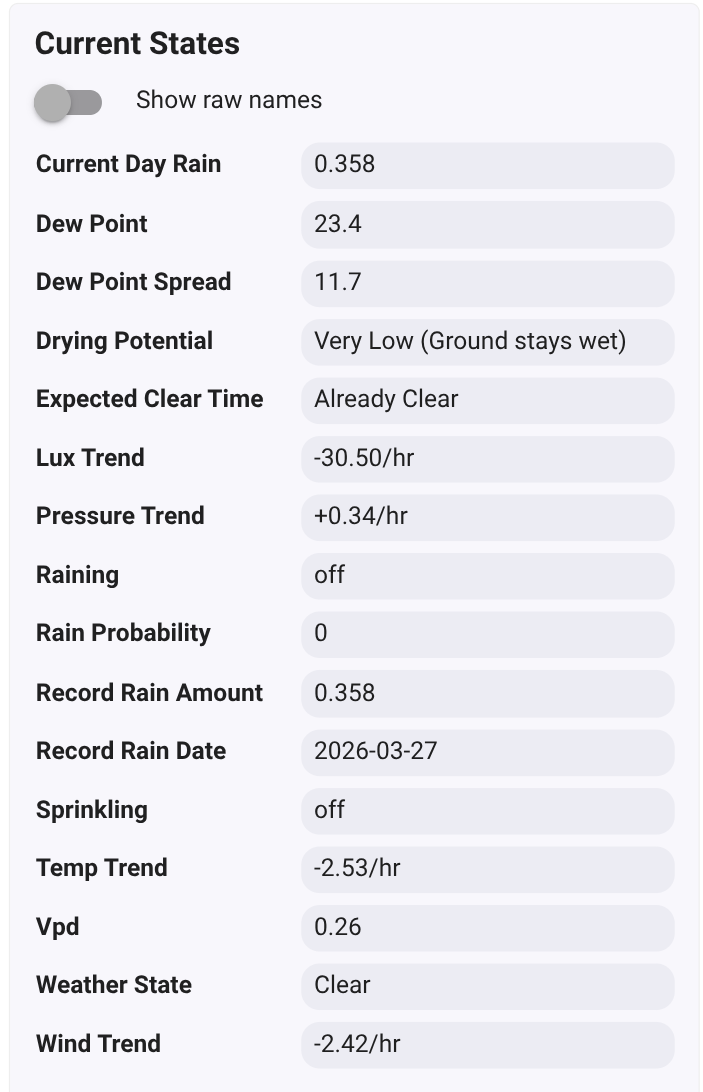
  • Massive Attribute Exposure: The app now pushes all of its granular data directly to this device, including:
    • rainProbability (%)
    • expectedClearTime
    • dryingPotential
    • vpd, dewPoint, and dewPointSpread
    • pressureTrend, tempTrend, luxTrend, and windTrend
    • Accumulation history (currentDayRain, recordRainAmount)
  • Native Sprinkling & Raining Attributes: I've added sprinkling and raining directly as string attributes to the driver. This means you no longer have to set up separate virtual switches just to track these states (though the legacy virtual switch mapping is still fully supported for standard integrations like Alexa or Simple Automation Rules!).

Why use the new Information Device?

1. Next-Level Rule Machine Logic Instead of just triggering an automation when it starts sprinkling, you can now build highly nuanced rules. For example, you can tell your irrigation system to skip a cycle only if rainProbability is > 85% AND dewPointSpread is < 2.0°.

2. Much Cleaner Dashboards You can now map dashboard tiles directly to specific attributes on this single device. Drop a tile to show your current dryingPotential or tempTrend without having to dig through the app's action logs to see what the engine is thinking.

How to Upgrade

  1. Install the new driver code: Advanced Rain Detector Information Device in your Drivers Code section.
  2. Update the main SmartApp code.
  3. Open the app, scroll down to the new Child Device Integration section, and click :heavy_plus_sign: Create Rain Detector Information Device.
  4. The app will automatically build the device and start syncing data on its next evaluation cycle.

Let me know how this works for everyone's dashboards and rules!

App: raw.githubusercontent.com/ShaneAllen334/Hubitat_Apps/refs/heads/main/Advanced_Rain_Detection/Advanced_Rain_Detection.groovy

Driver:
raw.githubusercontent.com/ShaneAllen334/Hubitat_Apps/refs/heads/main/Advanced_Rain_Detection/Advanced_Rain_Detector_Information_Device.groovy

1 Like

Perfect and easy to install. Thanks.
Is there a way to set update interval?

I'm actually working on that now. I totally forgot about the push interval to the device.

1 Like

What’s New:

  • Customizable Sync Intervals: You can now choose how often the app heartbeats data to the child device. Options include 5, 10, 15, 30, or 60-minute intervals to suit your needs.

  • "Smart Sync" (Delta Pushing): Instead of flooding your event logs with the same data, the app now uses a payload comparator. If any metric—like VPD, Dew Point, or Pressure Trends—changes between cycles, it pushes the update instantly.

  • Hybrid State Logic: To ensure your "Close the Windows" or "Shed the Pergola" automations never lag, the app bypasses all timers for major weather state changes. If the engine detects a shift from Clear to Sprinkling or Raining , the child device is updated the millisecond it happens.

  • Improved Efficiency: By only pushing data when it matters (or on your preferred schedule), your hub's database stays leaner and your event history remains meaningful.

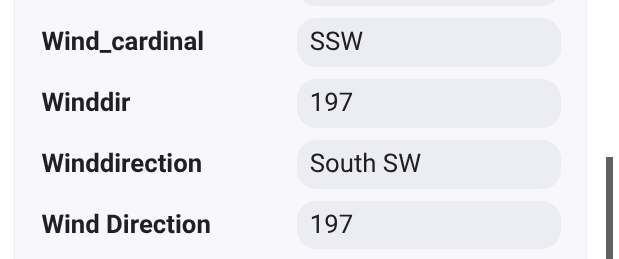
Wind direction?
From Ambient. Wind_cardinal is sufficient for me.
image

Your asking that i pull in and expose the Wind Direction?

Yes, If that is readily doable. It affects open windows and the impact of rain. Depending on the orientation or one's yard the position of tree lines and buildings can change drying.

Yea, let me do alittle research and see how i can integrate wind direction into the application to make the algorithm use it in a productive way, and expose it to the driver.

I can pull the attribute from my weather station for my purposes.