Hey everyone!
I'm working on releasing all the applications I've created over the past year and a half to the community so they can use them. I hope this helps even just 1 user out!
Introducing the Advanced Meteorologist Report. This application is designed to generate a TV-anchor style meteorologist report by combining live local weather station data with macro-forecast APIs. It's highly customizable, fully automated, and comes with a companion device driver that creates beautiful HTML tiles for your dashboards.
 Key Features
- TV-Anchor Style Script Generation: The app dynamically writes a conversational weather script that can be broadcasted via TTS speakers or sent to notification devices. You can view the latest generated script directly in the app's dashboard.
- Time-of-Day Profiles: * Morning Report Profile: Configures what the anchor talks about during the morning hours, usually focused on the day ahead. You can include today's highs/lows, rain amounts, UV index, and more.
- Evening/Night Report Profile: Configures what the anchor talks about during the evening, usually focused on overnight lows and tomorrow.
- Hyper-Local & Macro Data Fusion: Select your personal weather station to pull hyper-local temperature, humidity, and wind speed. The app seamlessly blends this with the Open-Meteo API for macro-forecasts like apparent temperature ("feels like"), wind gusts, and daily conditions.
- Pollen & Moon Phase Integration: By entering your zip code, the app queries Pollen.com to include the current pollen index and category in your reports. It also calculates and announces the current moon phase.
- Granular Broadcast Triggers: Automate your anchor's reports exactly how you want:
- Up to 3 scheduled time triggers.
- Up to 3 mode-based triggers with allowable start/end time restrictions.
- A manual virtual switch trigger that automatically turns itself off after use.
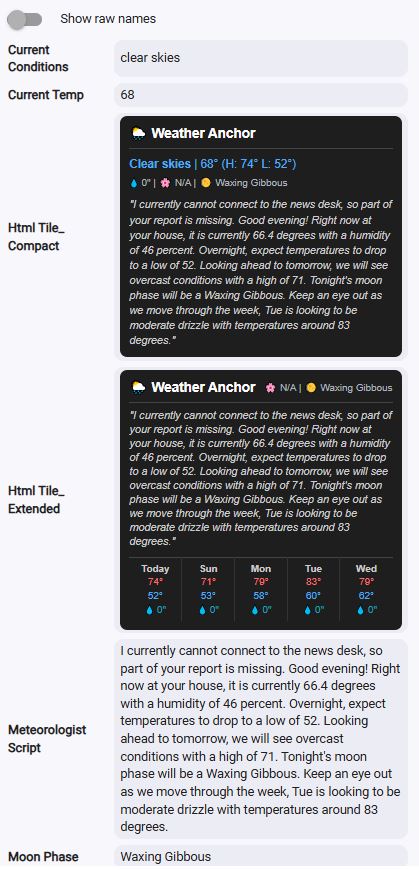
- Rich HTML Dashboard Device: The app automatically creates a companion child device called "Advanced Meteorologist Report Device". This device generates a "Weather Anchor" tile in both Compact and Extended HTML formats , displaying a 4-day forecast, temperatures, rain expectations, moon phase, pollen, and the actual anchor script.
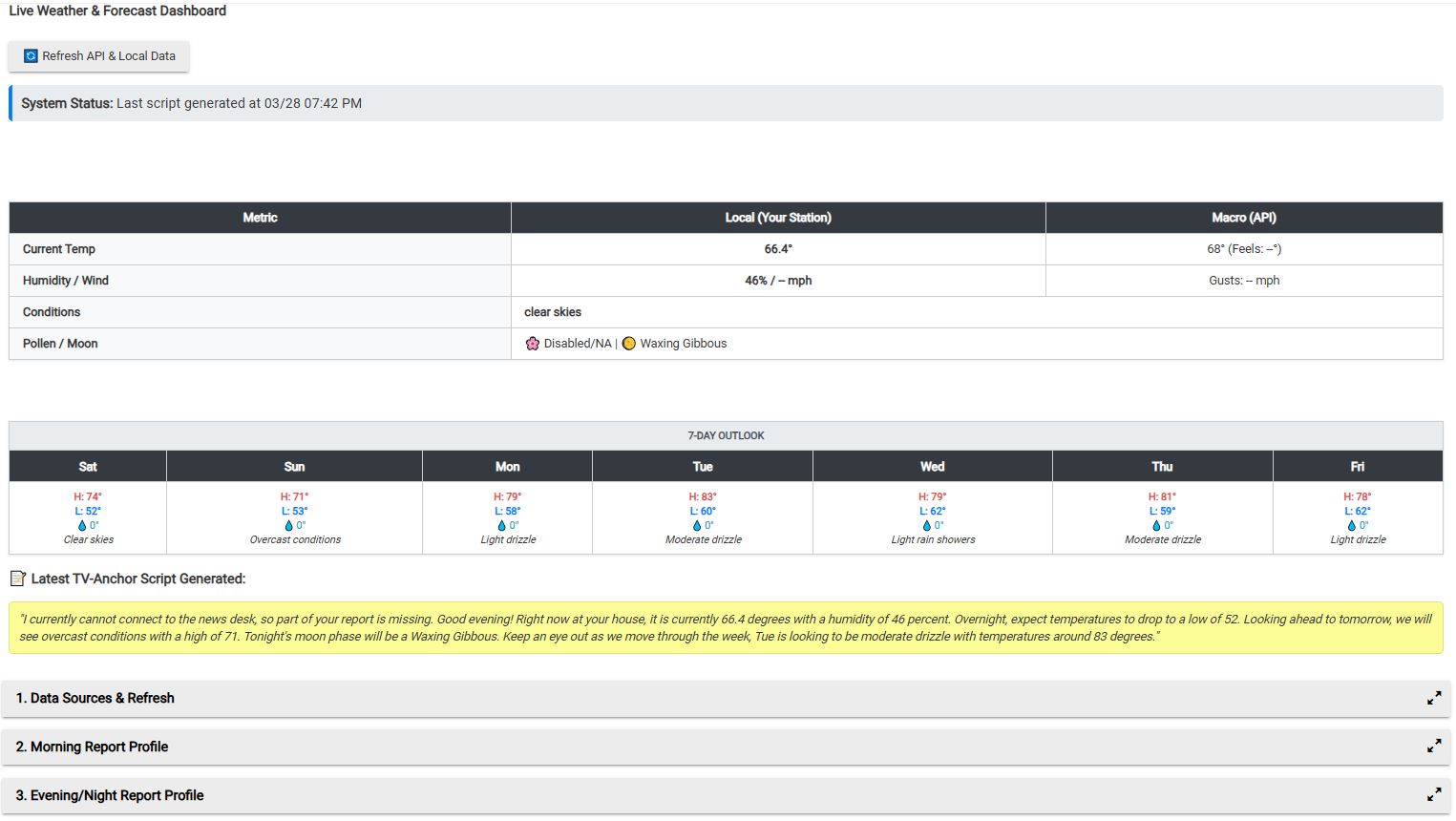
- In-App Live Dashboard: The main SmartApp page features a "Live Weather & Forecast Dashboard" that gives you a side-by-side comparison of your local station vs. the macro API, alongside a 7-day outlook.
- Offline Protection: Includes a circuit breaker that detects internet drops. If the network goes down, it enters a 15-minute cooldown to prevent API spam and will generate a modified offline script utilizing whatever data is available.
 Installation & Setup
- Install the Advanced Meteorologist Report Device driver code first.
- Install the Advanced Meteorologist Report app code.
- Open the app, select your personal weather station, enter your zip code (required for pollen), and choose your background sync interval (15, 30, or 60 minutes).
- Navigate to Outputs and click "Create & Sync Child Device" to spawn the dashboard device.
- Configure your Morning/Evening profiles and set up your preferred triggers.
This app and driver are open source, completely free to use, and the code can be gutted or repurposed for your own other projects. If anyone needs assistance, please feel free to ask because I plan on supporting my apps for the foreseeable future. Enjoy!
 Feature Update: Personalization & Precision Triggers
 Personalized Family Profiles (Up to 4 Users)
 Expanded Manual Triggers with Logic
 Advanced Scheduling
 Enhanced Setup Experience
