Hey everyone,
I’m excited to share a new project I’ve been working on: the Advanced Game Room High Score Announcer.
Most of our smart home apps are designed to run invisibly in the background. For this one, I wanted to build the exact opposite. I wanted an app that actively engages guests, hypes up the room, and brings some fierce, friendly competition to family game nights.
Instead of just automating the power to your arcade cabinets or pinball machines, this app turns your Hubitat hub into a live sports-caster. When a player turns on a machine, the room announces the game, the #1 Overall Champion, and the #1 Weekly Champion, giving everyone in the room a target to beat.
Here is a breakdown of what the app does and how I built it.
 How It Works
- The Power-Up Hype: When a machine’s smart plug/switch turns ON, the app instantly queues a TTS announcement: "The last game played on Arcade Cabinet was Pac-Man. The overall high score is 1,500,000, held by John. This week's current leader is Sarah with a score of 450,000."
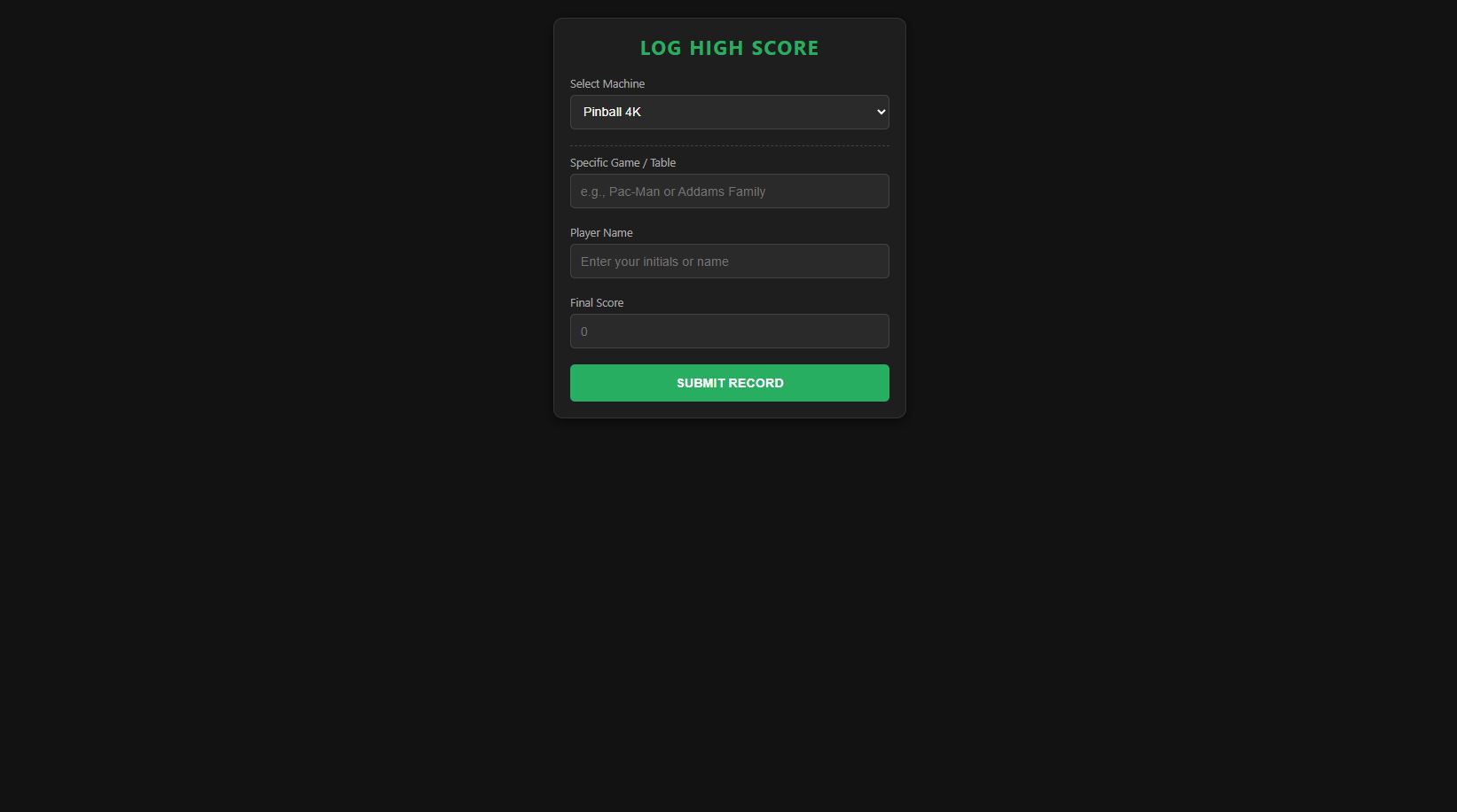
- The Player Portal: Guests use a mobile-friendly Web Portal (hosted directly by the app via OAuth) on their phones or a mounted tablet to log their scores.
- The Interruption: If a player logs a score that breaks the #1 Overall or Weekly record while the machine is on, the app instantly interrupts the room: "Alert! Shane just logged a massive new score of 1,600,000 on Pac-Man. New #1 Overall High Score!"
 Key Features
- External Web Logging (OAuth Portal): Players don't need access to your Hubitat dashboards. The app generates a secure, dark-mode HTML webpage. You can share the link via QR code or embed it in an iframe on an existing dashboard tablet.
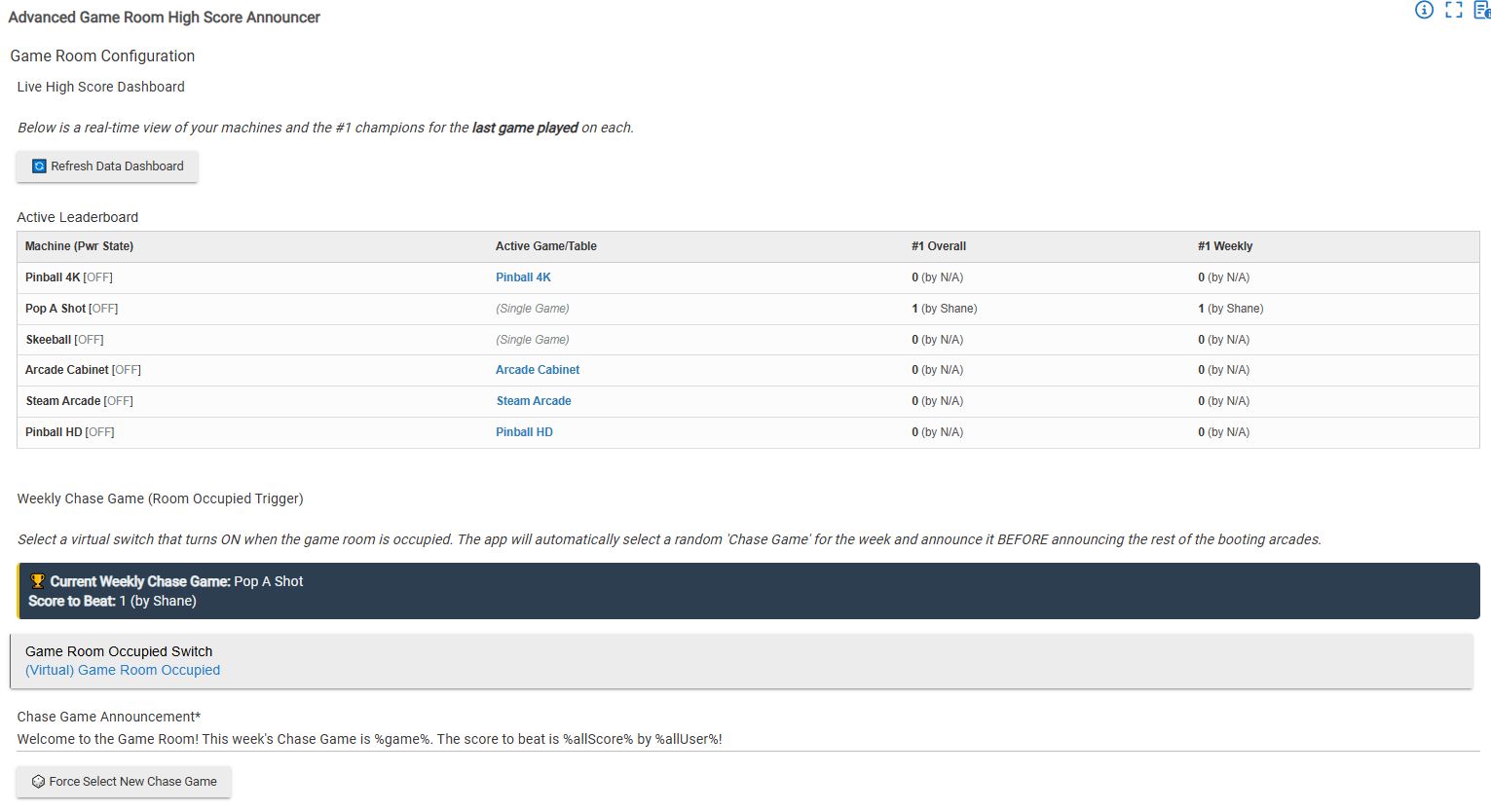
- Single vs. Multi-Game Dynamic Logic: You can set a machine as a "Single Game" (like Pop-A-Shot or Skeeball) or "Multi-Game" (like a Virtual Pinball or MAME cabinet). If it's a Multi-Game, the web portal uses JavaScript to dynamically drop down a text box asking the player which specific game or table they just played, seamlessly expanding your database.
- The "Weekly Chase Game": Link the app to your Game Room's "Occupied" motion switch. When the room becomes active, the app randomly selects one game from your database that has a logged score and announces it as the Weekly Chase Game before any other arcades finish booting, giving the room an immediate focal point.
- Live HTML Leaderboard Tiles (Child Devices): The app can generate a dedicated Child Device for each machine. Whenever a score is logged, it compiles the Top 3 Overall and Weekly scores into a sleek, formatted HTML string and pushes it to the child device, ready to be dropped into your dashboards.
- Bulletproof TTS Queuing (
atomicState): We all know the pain of turning on a power strip and having 5 devices trigger simultaneously, causing the hub's TTS to talk over itself or drop messages. This app uses staggered micro-delays andatomicStatequeuing. If you boot up 5 arcades at once, it puts them in an orderly line and announces them one by one. - Large Number Parsing: Pinball scores get huge. The database strictly parses scores as
Longintegers (up to 9 quintillion) and auto-injects commas so your TTS engine reads "1,500,000" naturally instead of reading individual digits. - Guest Mode & Quiet Hours: Having a party and don't want the room constantly yelling every time someone flips an arcade switch? Turn on the Guest Mode virtual switch. It suppresses all the standard boot-up announcements, but will still interrupt the room if someone actually logs a record-breaking score.
 Installation Notes
Because this app generates a Web Portal for your players to use, you must enable OAuth in the Hubitat App Code editor before opening the app for the first time. Once enabled, the app will hand you the local and cloud URLs inside the configuration page.
 Open Source
I built this to make my game room a lot more fun, but the code solves a few tricky Hubitat hurdles (like the asynchronous TTS race condition and dynamic HTML tile generation).
This code is completely open-source and free to use. Feel free to install it, dissect it, rip out the TTS queue engine, or steal the HTML payload logic for your own personal projects.
Enjoy, and let the games begin!