You are my hero
Awesome!! Thanks very much 
I'm trying to write a webcore piston to send my S9 Roomba to clean a specific room, to turn the lights on in that room while its cleaning, and then turn them off again when it returns to its dock to charge above 80% before setting off to the next room. When I input {"ordered": 1,"pmap_id":"JD0AyGD8QticstMx6t_33A","regions":[{"region_id": "1","type":"rid"}],"user_pmapv_id":"231230T204459"} into the "Clean Room" function of the driver, the roomba sets off to that room as it should, but when I set this in the "Clean Room" value of the piston, it throws an error (java.lang.IllegalArgumentException: Text must not be null or empty on line 118 (method cleanRoom)).
Has anyone successfully used the clean room function in webcore (or any other method to track Roomba activity by specific rooms) to achieve ordered cleaning, and therefore room by room lighting control? My alternative is to simply have all the lights on while the Roomba does it's thing, but that seems pretty unnecessary.
Is there a way of exposing the active region id in the event log? I could then use this to activate the correct room lighting as it moves around the map at night.
To the first question, perhaps the input to webcore needs to be quoted, so that it is sent as a strong? I have not tried from WebCore.
To the second part about exposing the current room, I'm not sure. Will play with this and get back to you.
Thanks. Just thinking out loud, but is it possible to expose the favourites from the app as activation commands? I'd like to be able to set the roomba to carry out certain "favourite" cleaning cycles based on different conditions, for instance, low power (quieter) cleaning when the hub kick's into night mode, or full power cleaning when Away mode activates etc. It seems I can grab the "favourite_id" from the api/local/info/state query, and think I just need the command field exposing so I can enter the various id's using webcore? Does this make sense?
Interesting use case... Again I'll look into it... As far as commands go, we may be limited by what is exposed by dorita980 and it's rest980 counterpart.
Great, thanks very much
That is a cool scenario, I definitely could see me using this integration to kick off cleaning based on state with this.
Right now I use it for status and turning on/off lights for cleaning, but have been scheduling set in the iRobot app instead given WAF and her access to that easy app. If I could mix presence with other states this would be killer.
Can this be installed on Ubuntu? I've tried, but I'm getting a lot of warnings. FYI, my linux is very limited.
xxxx@ThinkCentre:~$ sudo npm install -g dorita980 --save
npm WARN deprecated har-validator@5.1.5: this library is no longer supported
npm WARN deprecated request-promise@4.2.6: request-promise has been deprecated because it extends the now deprecated request package, see https://github.com/request/request/issues/3142
npm WARN deprecated uuid@3.4.0: Please upgrade to version 7 or higher. Older versions may use Math.random() in certain circumstances, which is known to be problematic. See There’s Math.random(), and then there’s Math.random() · V8 for details.
npm WARN deprecated request@2.88.2: request has been deprecated, see https://github.com/request/request/issues/3142
added 126 packages, and audited 127 packages in 19s
4 packages are looking for funding
run npm fund for details
8 vulnerabilities (4 moderate, 4 high)
To address all issues (including breaking changes), run:
npm audit fix --force
Run npm audit for details.
The warnings should technically be ok - not blocking anything from installing or running. It's been a while since I set this up from scratch, so I don't have any recent advice
In the past week I resurrected an old Atom-based PC I had laying around by installing the dietpi distribution (OK, not the same as ubuntu, but similar), as an investigation into setting up a new docker server. Yesterday I installed the dorita980 and res980 on it, and yes, got the deprecation notices as well.
However, this didn't seem to matter, as I was able to use this app to control my roomba and braava. Works just fine.
1 Like
Still having some issues. I have a j6+ and an i7. Trying to get the Roomba password. The first attempt I don't think I held the button long enough. The second time I held it longer until it beeped and got a different result, but neither has "blid". I've attached both attempts for the j6+ below. The result for the j7 is at the bottom. Any idea what I'm doing wrong?
j6+
xxxx@ThinkCentre:~$ get-roomba-password 192.168.50.23
Make sure your robot is on the Home Base and powered on (green lights on). Then press and hold the HOME button (or DOCK+SPOT on some models) on your robot until it plays a series of tones (about 2 seconds). Release the button and your robot will flash WIFI light.
Then press any key here...
events.js:291
throw er; // Unhandled 'error' event
^
Error: Client network socket disconnected before secure TLS connection was established
at connResetException (internal/errors.js:609:14)
at TLSSocket.onConnectEnd (_tls_wrap.js:1557:19)
at Object.onceWrapper (events.js:420:28)
at TLSSocket.emit (events.js:326:22)
at endReadableNT (_stream_readable.js:1241:12)
at processTicksAndRejections (internal/process/task_queues.js:84:21)
Emitted 'error' event on TLSSocket instance at:
at emitErrorNT (internal/streams/destroy.js:92:8)
at emitErrorAndCloseNT (internal/streams/destroy.js:60:3)
at processTicksAndRejections (internal/process/task_queues.js:84:21) {
code: 'ECONNRESET',
path: undefined,
host: '192.168.50.23',
port: 8883,
localAddress: undefined
}
xxxx@ThinkCentre:~$ get-roomba-password 192.168.50.23
Make sure your robot is on the Home Base and powered on (green lights on). Then press and hold the HOME button (or DOCK+SPOT on some models) on your robot until it plays a series of tones (about 2 seconds). Release the button and your robot will flash WIFI light.
Then press any key here...
Robot Data:
undefined
events.js:291
throw er; // Unhandled 'error' event
^
Error: connect EHOSTUNREACH 192.168.50.23:8883
at TCPConnectWrap.afterConnect [as oncomplete] (net.js:1138:16)
Emitted 'error' event on TLSSocket instance at:
at emitErrorNT (internal/streams/destroy.js:92:8)
at emitErrorAndCloseNT (internal/streams/destroy.js:60:3)
at processTicksAndRejections (internal/process/task_queues.js:84:21) {
errno: 'EHOSTUNREACH',
code: 'EHOSTUNREACH',
syscall: 'connect',
address: '192.168.50.23',
port: 8883
}
j7
xxxx@ThinkCentre:~$ get-roomba-password 192.168.50.22
Make sure your robot is on the Home Base and powered on (green lights on). Then press and hold the HOME button (or DOCK+SPOT on some models) on your robot until it plays a series of tones (about 2 seconds). Release the button and your robot will flash WIFI light.
Then press any key here...
events.js:291
throw er; // Unhandled 'error' event
^
Error: connect EHOSTUNREACH 192.168.50.22:8883
at TCPConnectWrap.afterConnect [as oncomplete] (net.js:1138:16)
Emitted 'error' event on TLSSocket instance at:
at emitErrorNT (internal/streams/destroy.js:92:8)
at emitErrorAndCloseNT (internal/streams/destroy.js:60:3)
at processTicksAndRejections (internal/process/task_queues.js:84:21) {
errno: 'EHOSTUNREACH',
code: 'EHOSTUNREACH',
syscall: 'connect',
address: '192.168.50.22',
port: 8883
}
My Roomba S9+ randomly (during the day, or at 2am) will play tunes like its restarting or errored or something. I temporarily stopped the REST980 Docker to see if it continues or if that's what's causing it. Not sure at this point. Other than not being able to see its actions live or display a map it works fine.
Currently have iRobot Scheduler setup/configured correctly and Hubitat is able to communicate with my Roomba's as should. Raspberry Pi 4 setup with dorita980/rest980 (two instances of rest980, one for each Roomba). Both of my Roombas are J5's and have the latest firmware/software version (23.37.5).
I'm having an odd issue that I haven't been able to fix. When I run a clean command from Hubitat or Postman, it will work one time. For instance, I send to rest980 a command for a single room, the request looks something like this:
{
    "ordered": 1,
    "regions": [
        {
            "region_id": "16",
            "type": "rid"
        }
    ],
    "pmap_id": "6_9UWjCsQ-6TUYRBkyveLw",
    "user_pmapv_id": "240216T205652"
}
pmap_id and user_pmapv_id are retrieved from the Roomba's state right before the command is sent. The Roomba starts cleaning and all is wonderful.
After it completes, I start another cleaning. However, this time, the Roomba reports and error and tells me to refer to the app for more details. More details:
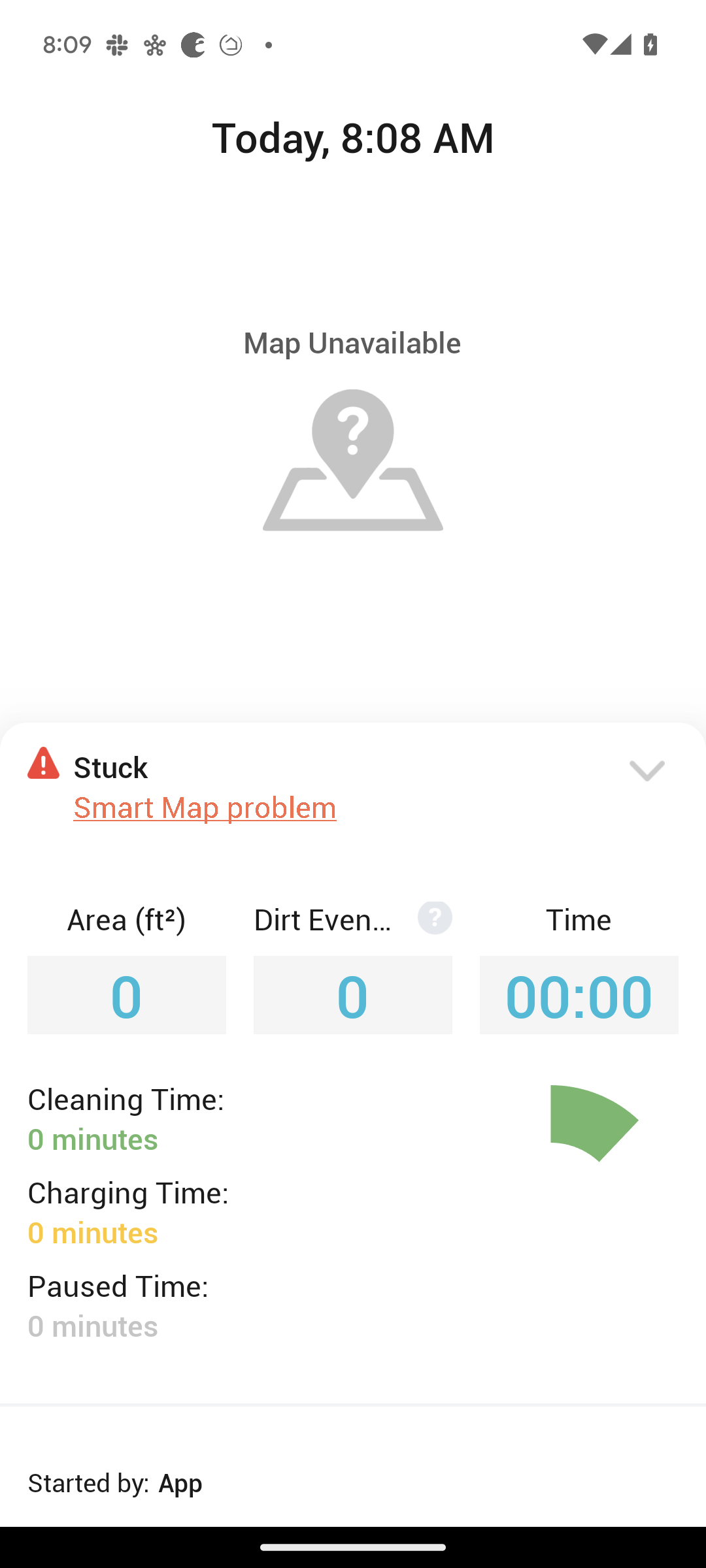
Stuck - Smart Map problem - j Series Error 32 - Smart map version on robot does not match map saved on App.
However, if I start a new job via the iRobot app, it works just fine. The help article also goes on to tell me to reboot and "clean everywhere/clean all". After the Roomba completes cleaning everywhere 2 hours later, commands from Hubitat/Postman will work again, but only once. The cycle repeats, clean commands from Hubitat/Postman fail with the same error until I reboot the Roomba and tell it to clean everywhere. This is occurring on both Roombas.
My hunch is this may be related to the fact that I'm running the latest firmware version, but can't confirm. Any idea what's going on?
Hey @dkilgore90, I've had this working for quite awhile now--been loving it. Then yesterday the HE device was stuck with Switch "ON" and cleanStatus "cleaning". The battery value was also stuck.
The iRobot mobile app is acting normal. rPi acting normal too.
HE logs show an error: java.lang.NullPointerException: Cannot invoke method currentValue() on null object on line 1353 (method updated)
Any idea what this means and where I should look?
I'm suspicious because iRobot just released a firmware update, so worried something broke. Anybody else having problems?
Best guess, the app failed to successfully retrieve data from your rest980 server - ip:3000/api/local/info/state (or if not on port 3000, use the correct port for your deployment). Don't know just from that entry if it was a transient or continuing issue... Suggest you try checking the rest980 URL above in your browser, to see if it is returning any data.
Sorry I should have said that the URL works fine.
Re-reading, you did mention rPi working normally.
Do you mind DMing me the json from the rest980 URL, and a snapshot of the current states for your Device in Hubitat? I'll take a scan to see if it lines up...
1 Like
Summarizing here for folks who come later with a similar issue...
Putting the mentioned "state" URL in a browser returned an empty json object {} - indicating that rest980 was internally not collecting data from the Roomba. Found that the robotIP in config/default.json for rest980 on the rPi was not aligned with the Roomba. Once these were aligned, restart the rest980 service on rPi using command: sudo systemctl restart roomba.service
General recommendation is to set a static IP / DHCP reservation on your router for the Roomba so that it does not change
1 Like