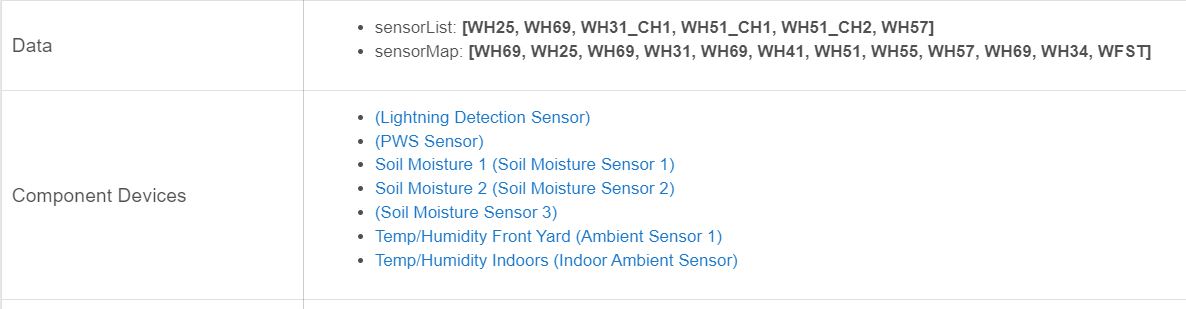
I have it connected via the Ecowitt gateway, and on the "PWS" sensor it shows the following:


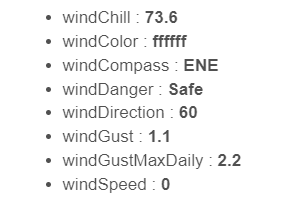
These are the sensors that are found under the Ecowitt gateway...I was surprised, I was not aware that the 2902C had a lightning detector. Missed that.
I have it connected via the Ecowitt gateway, and on the "PWS" sensor it shows the following:
These are the sensors that are found under the Ecowitt gateway...I was surprised, I was not aware that the 2902C had a lightning detector. Missed that.
Wow, thanks @kahn-hubitat, I'll look at integrating your changes sometime soon. Great job!!
Thanks for the reply. Got it working, here's some guidelines for the next newbie. The port on the second screenshot must be 39501. The IP address is the IP address of your Hubitat hub. On the Hubitat side I used the MAC address. Do not use the colons in the MAC address.
Thanks @1a7dc3c08d03c361e0c5, documentation isn't always my forte, I'll try and cleanup the documentation for these drivers included the new user steps you pointed out.
At the minute i only have a rain gauge and temp sensors. I plan on buying a WS68. Can anyone tell me can the LUX sensor be used in rule machine?
I want it to control my outside lights if that's possible?
Thanks
You mean a wh68 yes it shows up as an illuminace attribute. Any attribute can be used in a rm rule regardless. The only rule I use lux/light on is my "front door light with motion rule " but I use my hue outdoor motion for that. For the remainder I find it easier and more efficient just to use sundown-30 to sunrise etc in the rule.
Thanks for your help. I totally missed the setup in the gateway. The default port there is 80 so your screenshot made me track down the 39501 port where I found other clues.
No problem I understand. As a programmer myself I found commenting as coding the only thing I would do. Going back after the fact is something most hate doing.
 I am thankful for @sburke781 for maintaining this driver and for all of his help!
Thanks again for the feedback @1a7dc3c08d03c361e0c5. I have updated the Readme for the drivers, calling out the specific settings required for the Weather Service configured in the WS View app. I also took the opportunity to tweak a few more details while I was there, such as suggesting people use HPM.
Anyone know.if you can have more than one ws1000 on same hub. With multiple.parent devices? Reason I asked is I know the ecowitt control app.has the port number. I.would.need to set a port forward with that number for a ws1000 outside my local network? But what would happen because I don't think two can listen on the same port and I don't see a port config or even used in the ecowiitt hubitat parent driver
oh well not working.. was trying to get my ecowitt station in fl to report to my local hubitat here in nh.
i sucessfully got on the vpn there with open vpn and set the config to goto one of my routers with port 39500 which is then forwarded to 39501
set up the ecowitt device panel on the phone app via the vpn in fl to goto that router .. but i dont see any packets coming in in the firewall which also has a rule for that port opened..
Sorry @kahn-hubitat , I meant to come back to this. I'll see what I can make out in the code, but my suspicion would be no ...
mmm, did not see these last couple posts and ordered a second GW1100 but it's for internal use. I wanted a second wired temperature monitor for my other freezer. This made the most sense. Looking in the gateway driver but not seeing any reference to a particular port. Seems to me if you have to enter port 39501 on the Ecowitt side it's got to be coded 39501 on the Hubitat side. Right?
I can't claim any personal experience myself but I wonder if any http call backs or streams of data like this come in on that port. Hopefully others can correct or confirm, or I can find out sometime soon...
May have some clues here. I probably won't get my 2nd gateway until next Monday. I might mess around and change 39501 to nothing or 45000 and see what happens with each.
https://github.com/gjr80/weewx-gw1000/blob/master/bin/user/gw1000 dot py
default_port = 45000
default_broadcast_address = '255.255.255.255'
default_broadcast_port = 46000
.
.
.
    # for port number we have a default value we can use, so if port is not
    # specified use the default
.
.
.
    # for port number we have a default value we can use, so if port is not
# specified use the defaultDoing a quick search for "39501" here on the Community, this is the port that the HE hub listens on for HTTP traffic in general (I think), so not a device or driver specific thing. The thing I am unsure about is how the hub determines where the traffic is meant to be directed, i.e. which device...
So it sounds like the port setting can't change, but it doesn't rule out whether we can still have more than one EcoWitt gateway. And even if the current driver doesn't support it, I would like to think there would be something in the data being sent that would allow us (me) to direct that data to different devices for each Gateway.
I'll see what I can find out before you get your new Gateway...
For unsolicited inbound traffic on port 39501, the device DNI must match either the IP address or MAC address of the sending device (the Ecowitt, here) in hex with no separators. That's how Hubitat matches the traffic up with the device, and you'll see a warning in the hub logs if such traffic comes in but no matching device is found via either match-up method.
So, more than one such device should be totally fine as long as you do the same thing for the rest that you did for the first. In your case, it looks like the driver is doing that automatically based on the preferences the user puts in for MAC, so users shouldn't have to worry about anything.
ya my problem was not that hubitat was ignoring the traffic when i put a rule in my firewall to allow port 39500 traffic from the device outside my local networkk the firewall was not seeing any traffic..
either the orbi in the condo was blocking it or the ecowitt is set to not traverse outside the local network.
If that's not a typo: that was the SmartThings port, IIRC. Hubitat is 39501, so that would be the issue. 
no you misunderstand.. that is the public ip port that is getting forwarded to private ip/hub on port 39501 .. that is how port forwarding works.
but i should still see packets coming i non that port which i opened in my firewall which i do not..
Download the Hubitat app