Yeah that’s where I got lost.
I get no reply on Authorize. Blink API says ‘executing Auth’ in logs but the device says ‘STEP3 exception status=401’, Status
|
| STEP6 RefreshToken missing |
|---|

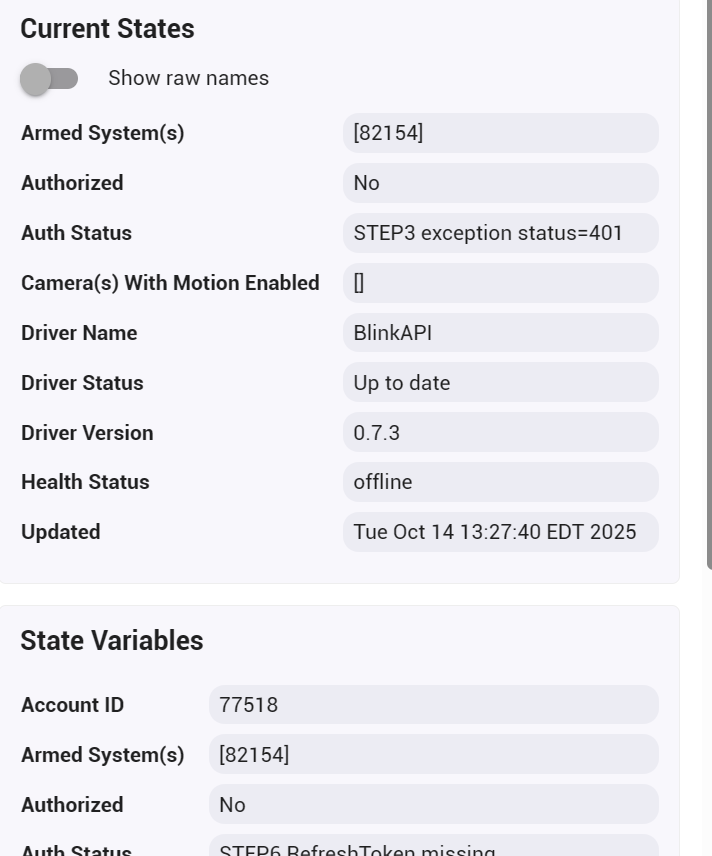
Is that a comms issue?
It means that when it tried to submit your email and password, the Blink servers returned an “Unauthorized” response.
The multiple steps in there are not related to the user’s steps, but the steps the code has to take to get the authorization token. Blink made it much more difficult to use the API than it used to be but thankfully @Bloodtick_Jones figured out the code for it to work again in December. Hopefully this is not another breaking change they have made.
Can you set the parent to Trace logging and message me (DO NOT POST) the logs from when you attempt to authorize again? You can replace the email/password entries in it with XXXX or something.
Thanks. I figured detail logs were required.
I even changed the password in Blink and logged in again with 2FA to confirm the password.
All good now.
Had to hit Homescreen twice before anything showed up, just a bit of sweat. 
Sometimes GetHomescreen can be a bit delayed the first time because it has a lot of data. It can also be useful to do “GetInfo” on specific cameras or such you will use right away (to make sure they have a NetworkID).
I am glad to hear this solved it!
Updated Version(s):
Change(s):
Greetings @snell -
What are the latest versions of the individual driver codes? HPM has not updated the codes on my C8 Pro since Jan. 2026. Thanks…
Per what is posted in the BlinkManifest.json (which tells HPM what the latest is)…
Those are the same as what is in my own versions.json file that the devices themselves check every day to see if an update is available (there should be a “DriverStatus” notice if an update is available on any device that uses that particular driver). All of my active drivers have this daily checking mechanism built in (they have no capability to self-update, but the devices should let you know at least). If you DO update, they will not actually report the change until you Save Preferences OR the next day when it does the daily check again. Hubitat does not have a way for devices to know that their driver code has been updated to trigger (that I have ever found), and I do not want to spam my webserver, so they only do it once a day.
Additionally, all of my drivers have the Import URL filled in. So if you go to the Drivers Code, you can always Import the latest.
The links in the very first post on all my driver project threads are always to the latest version as well.
The one caveat with the Import or copy/pasting them in using the links is that it is all browser based. So there is a chance (if you are trying to get an update quickly after you previously updated) that your browser will have cached the page and could copy the previous one even if you KNOW there is a newer one. Just perform a clean refresh the page (Shift-Refresh for most browsers) and it should do an non-cache refresh of the page if you see a discrepancy like that (it is rare, but it DOES happen).
I’ve tried to find the answer to this question in the thread and failed.
So I wanted to add an 11th and 12th camera. The approach was to add a second Sync Module 2 and call it “Inside Group” and renamed my original Sync Module 2 “Outside Group” with the intention of separating the cameras and eventually being able to arm the inside cameras separate for the outside cameras. So far I added the new module and one old XT2 camera to the new group. The BlinkAPI seems to have picked up the new module but even after a half hour the new camera called “Study Camera” hasn’t shown up.
Can I do what I’m trying to do to overcome the 10 camera limit? Is there something I need to do to get the “new cameras” to show up? They seemed to magically appear in the past.
Thanks,
Jay
Can’t help with resolving the issue at the moment, but just wanted to chime in that you absolutely can do what you are trying to do. I assign cameras to sync modules based on what arming characteristics I want, and then arm/disarm at the sync module level.
Thanks. Yes all is good now. It takes more than an hour for the devices to sync, but they are getting sorted out. I divided up the “Inside Cameras” from the “Outside Cameras” and now have broken the 10 camera limit and can control which ones are armed by type. I was just impatient!
I have exactly that. 9 cameras on 2 sync modules - Indoor and Outdoor.
Works great by just flipping a whole sync module on/off rather than disabling each camera in some use cases.
Updated Version(s):
Change(s):
Hi - I’m trying to install this for the first time. I’ve gone through the steps a few times now but after doing the verify PIN command, the logs keep giving me this error: Blink - No RefreshToken, Authorization needed
Searching this thread for that error gives 0 results. Additionally, if I click “get homescreen” the auth status changes to this: STEP6 RefreshToken missing and the logs throw the following:
trace Blink - getControlToken() response is [status:401, reason:Unauthorized]
trace Blink - Homescreen Params = [uri:https://rest-prod.immedia-semi.com/api/v3/accounts/null/homescreen, headers:[Authorization:Bearer null, User-Agent:Blink/2511191620 CFNetwork/3860.200.71 Darwin/25.1.0, Content-Type:application/json]]
error java.lang.Exception: No response data exists for async request on line 1112 (method ProcessGetTier)
error Blink - Bad Request for Homescreen
I see that you just did an update related to this; is there a current issue with authorization?
Sent you a message with a modified driver to see if that helps.
Just a quick observation.
I am on the latest beta and I have noticed the last few days I am getting Unauth like the refresh isn't working - 3 hours.
I find I have to re-auth twice. Once gets me to STEP3B OK but stays offline/Not Auth.
A second time gets me to STEP6 and Auth.
I'll put on Trace logs next time this happens.
If you could shoot me the logs in a message. There was some stuff brought up in the beta area due to the changes to HTTP/S that Hubitat is making, but they were supposed to be worked out. Or if you want to raise it in the beta thread. Whatever the changes have included it has caused lots of "fun".
I'll PM you if it happens again.
I get a little grief sometimes when I post a issue that is related to a community driver under a beta release as it's really not a HE beta platform issue. 
Except in this case the HTTP changes have caused the issue with something that worked before. That is the trouble here, what can I change further in the driver to account for unclear changes.
I just got some of the 2K outdoor camera's and the battery reports as %25 percent. Are they doing battery different that the other camera's?