Thanks.
I only use it twice a day on mode changes so I just preface the start of the piston with this for now.
I'll delete the Refresh when an update gets implemented.
Cheers 
Update is planned to come tonight if it does not have issues. Right now I am in the "wait" state between early attempts and the final attempt. The problem with multi-hour timings. If it was a local thing, I could fake it... but since it is going to their API there is no way to mess with the time.
Hey, take a break.
The PM says you have until midnight. 
That's when it affects your bonus.
Updated Version(s):
- BlinkAPI.groovy = 0.7.1
Change(s):
- Attempts to RefreshToken whenever a normal refresh or DailyCheck is performed.
- Checks for the token (getControlToken) every time a command is performed to get the AuthToken, which can also trigger a RefreshToken if it is determined it is needed. Previously, it just relied on the state.AuthToken, assuming it is valid.
Note(s):
- Obviously, the optimal refresh of authorization and such is something that is still being figured out, but the above measures will hopefully alleviate problems for most people. I am continuing to watch mine for any trouble that might happen.
EDIT: Maybe not.
I just noticed this even though I did the update.
I remember now that it doesn't take immediately until I do something to refresh the code.
Head scratcher. I even rebooted and I can't get the code to change to .7.1 even though that's what's in the driver code library.
Tried my old link solution but Auth again but still old code, at least in the Current States.
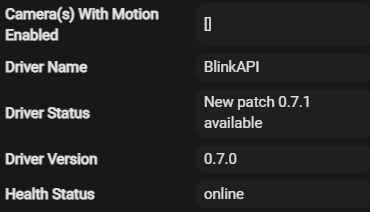
Lots of these babies last night and today.
I'll put my manual Refresh back for now and see.

The version should update when it performs the Daily Check OR if you Save Preferences. You can always check the driver code if you really want to make sure (in case you are worried your browser cached the old version). I do not have it set to do it more frequently than that (limited value) AND there is not a trigger I know of for the code itself when a driver is updated.
As for the refresh... What do you have your Refresh Rate set for in the parent device's Preferences?
It's up-to-date this morning in the Current status so something finally clicked. My code has always been the newest version, it was just the Current States leading me to believe I was out of date.
Refresh is set for 3 Hours.
Let me know if you hit the unauthorized at all. Mine is set for 1hr and no problems in the logs. I just did a camera Take (over 12 hours since the last specific command like that) and had no issues.
I wish there was a better way to do the version and status... but I do not want it to check every time someone is doing a refresh or very common method. So I relied on the DailyCheck and Save Preferences opportunities. It would be interesting (for my purposes at least) if Hubitat could provide an "newCode" trigger or something, like the install/uninstall functions.
I'll let you know if 3 hours is good. I don't think I changed it so that was the default?
The version number just gets confusing for the people who actually look at this merde. 
Maybe a note in the fist post Caveats or Added Notes that this notification is not indicative of the actual version running and will refresh on DailyCheck and Save Preferences.
The default for Refresh Rate is "1 hour", but it would not override the value if you had already set it.
Seems ok at 3 hours so far but one anomaly last night.
I reset all my global vars at 02:00 and make sure the front door camera is on; sometimes I turn it off if I'm doing yard work etc. and forget to turn it back on.
It never throws a code re-enabling even if it's already enabled.
Maybe the 3 hours had elapsed at this point; all the cameras disabled with no logs this morning so a Refresh probably happed in-between.
I'll change the rate to 1 hour.
dev:3182025-12-27 02:00:00.673error BlinkAPI - Unauthorized, attempted [Method:Enable Motion Detection, ID:1260785, Type:Camera, Device:Camera-1260785]
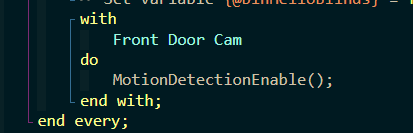
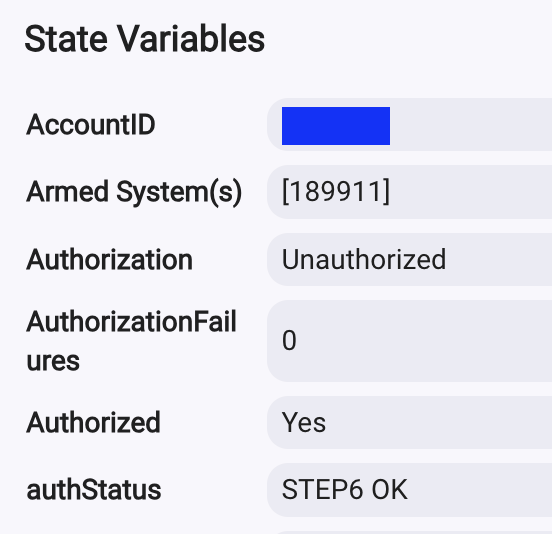
Just updated, set refresh back to 1hr, did refresh token, authorize, got pin, entered it and seems to be good to go!
I am thinking that the next update will include reducing the maximum refresh duration... with how short they seem to want the tokens to last now, just better to keep it within that 1 hour limit.
Token is good for 8 hours. I would suggest preventing any token refresh under an hour to not draw attention. It seems like extra traffic isn’t something taken lightly.
Strange that the 3 hour Refresh Rate seemed to have trouble then. I thought I still had longer ones (6 & 12 hours)... Looking back at the history I can see that there had been previous authorization frequencies of 12 and 18 hours. Oh how the times have changed.
I moved back to 3 after the Token reply and so far it has been ok.
Question: is there a way in rules to check the state of the device to see if it’s armed or disarmed?
My automation arms or disarms and then sends a message to my phone, but the message gets sent even if arm or disarm failed. Anybody have any examples?
Sure. Use custom attribute of the sync module you want to make sure is Armed.

Question
All I do is arm / disarm the system. Is the a way to get rid of the camera devices? I delete them but they come back. I have tried to rename them so it would be easy to identify them when selecting devices for automation, but they revert to original names.