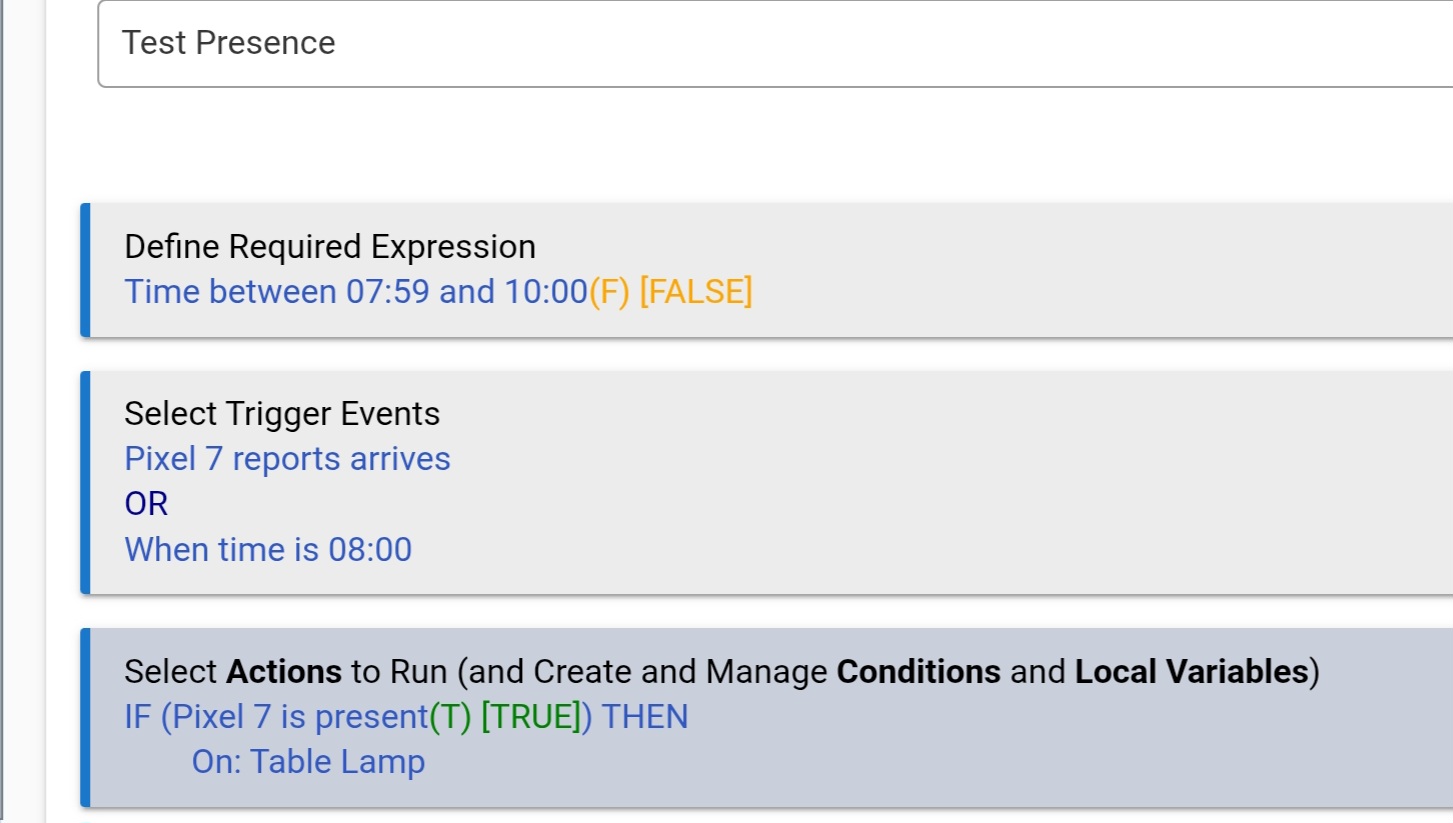
The issue I'm having is that Hubitat rule engine appears to be trigger based, not truly presence based. Meaning I have to "arrive" for the rule to be triggered to turn the switch on.
What I want is for Hubitat to check to see if I'm present (via mobile app on my phone), and turn switch on. This is probably polling, not triggered.
For example, between 8:00 AM and 10:00 PM, if presence is detected, turn switch on.
If I am already present before 8:00 AM, I still want the switch to turn on at 8:00 AM.
Rule machine allows you to choose changed as a trigger when you're using sensors.
Then you create an if-then statement in your rule - if presence changed to "whatever state you want," do what you want.
I think you'll need one rule. Two triggers: 1. Presence changes, and 2: Time becomes 8pm. Just set it up so it turns on the light if you're present between 8:00 and 10:00 p.m., and turns off the light at 10:00 p.m. even if you're present. Assuming that's what you want.
If I am understanding you correctly, I think the issue you're facing is that Rule Machine (and Hubitat in general) primarily does EVENT-based automation. While what you're looking for is STATE-based automation.
Depending on the precise automation you are seeking, it may be possible to achieve something that meets your needs using Rule Machine.
I have a rule like this. It has two triggers, one is a conditional trigger set at a specific time (8:00 am in your case) only if (the presence state you want) and the other trigger is on the event.
The actual rule is also dependent on the day of week. I don't turn the switch on every day.
Trying to make an easy example...
I want the switch ON weekdays between 8:00 AM and 10:00 PM, and OFF on weekends.
However, if I'm present on Friday and stay for Saturday, I want the switch ON, but only between 8:00 AM and 9:59 PM.
RULE:
Present report arrives - ONLY IF (Time between 8:00 AM and 10:00 PM TRUE)
I believe what will happen is Friday at 10:00 PM the switch is turned ON.
Saturday, there's no event trigger to turn the switch ON, even though I am present.
To make the presence work, I would have to trigger it by leaving and then arrive.
So it's not really a presence feature, since it isn't detecting my presence, but it's really detecting me arriving/departing.
My hope is there's a feature for true presence detection.
Maybe the phone app can send presence information to the hub every X minutes (via WiFi or mobile network if I'm within the geofence).
Maybe the hub can detect my phone.
Maybe the hub can know I didn't leave! [This seems to be the simplest and most feasible].
The hub reports whether or not a user is at home (within the geofence) or away from home (outside of the geofence.) There is no reason for the hub to constantly poll your phone to see if it is still inside the geofence of the house.
You can use the device's ARRIVAL and DEPARTURE events as triggers for a rule/app. You can use the value of the device's presence attribute as a conditional within a rule.
This is exactly what @Ricktronic demonstrated at a high level, using two triggers for the rule. As long as the geofencing is working properly on your phone to report its 'presence' status to the HE hub, the logic provided is sound. If you arrive (first trigger) between 8am and 10pm, the switch is turned on. If the time becomes 8am (second trigger), and your current presence status is 'present', the light turns on.
The rule still needs additional logic added for days of the week, turning off the switch at 10pm, etc...
Have a look at [UPDATED] iPhone WiFi Presence Sensor. You can ignore that it says iPhone in the title as it works fine with the Android operating system. It basically causes Hubitat to ping a specific/reserved IP address to see if it is present. It can serve as the bases to help with determining overall presence or potentially serve your needs. I want to say the ping is every three minutes or so and is user configurable.
Lots of us combine the WiFI presence app with [RELEASE] Combined Presence to help determine overall presence in a location.
Sounds like you may want to have a couple of rules set up, making one more complex rule is often setting yourself up for painful days to follow.
It's all doable, nothing crazy fancy in what you want to do.
First rule:
Second rule:
If you're on iPhone there are several options to get home arrival and departure notifications, fewer on Android (I think) but also some good options. Owntracks does both iPhone & Android, community app here in the forum. HE Android & iOS apps can report arrival ("presence") and departure. You really don't need "presence," per se, to accomplish your goals, you just need reliable arrival and departure events.
Your phone is treated as a switch device on the Hubitat hub. You will find it listed with all the other devices. But instead of reporting on/off like a switch device, it reports present/not-present. The only thing that is different from other switches is that the phone app is the only way of turning it on and off (present/not-present)
The app on the phone knows where you are (using GPS), and it considers that you are home, if your GPS location is within the boundaries of the geofence you set up.
When you move outside the geofence, the App sends a message to the hub to switch the "phone device" to "not-present" . When you return to inside the geofence, the App sends a message to the hub to switch the "phone device" to "present"
You can use the status of this "phone device" to create rules like you would uses any other device. For example if presence changes to "present" then trigger a rule to turn on a light. Or you can check if the device is already present at 8 am to turn on a switch.
So the Hub doesn't do any polling to determine the presence of the phone. The phone sends a single message when it returns inside the geofence and another message when it leaves the geofence. The hub remembers the last reported position of the app.
Of course it's possible that some transmissions from the app get lost, so if your life depends on this being accurate then you could always use a second means of determining presence.
Create a Virtual Switch. Mine is "VPresence". When ANY of 3 devices arrive, it will turn ON. When ALL of the devices leave it will turn OFF. If you arrive Thursday and are still there on Saturday, the switch will still be ON. Condition your other rules using this switch.

 Edited above, thank you, my humble editor.