I understand the logic of POE for use in wifi cams- long runs to areas without AC outlets. But I don't understand the logic for using it on a HE. Just curious as to why?
Fewer plugs, remote power cycle capability.
I have (literally) over 30 things plugged in at my main rack. Removing plugs is a good thing.
And ability to power cycle the hub, if needed, can make the difference of your automations staying dead while you are on vacation or not if you have a hub issue...
2 Likes
Also, less wear on microUSB port of HE. Like @ogiewon said “remote power cycle”.
Well the remote power cycle I understand. My workaround was to use a wifi plug in any device I might need to do that for. How do you power cycle using ethernet though?
Turn poe off/on on that port at the switch.
1 Like
A plus as I see it for mine is that all my ports offer PoE, so I can just plug in the network cable and be done for any of my hubs anywhere. Plus it acts as a UPS for them because the network switch itself is on a UPS. Can still put a USB battery pack after it to act as a further UPS just to keep the Z-Wave and ZigBee going a bit longer even without any network connection to control it.
If things are out long enough that ALL that is no longer useful... I have bigger problems going on to deal with and will not be so worried about the HA not working anymore.
Well i am about to buy a poe splitter but the only problem is my switch only does 802.3at poe or poe+ will these above mentioned splitters still work?
The switch i will be using it with is usw24poe by ubiquiti.
I use multiple US-8-60W (802.3af PoE) throughout my house with the POE splitter I linked above. No issues whatsoever for the last ~8-10 months.
Looking at the specs for your switch, I think it will be fine...
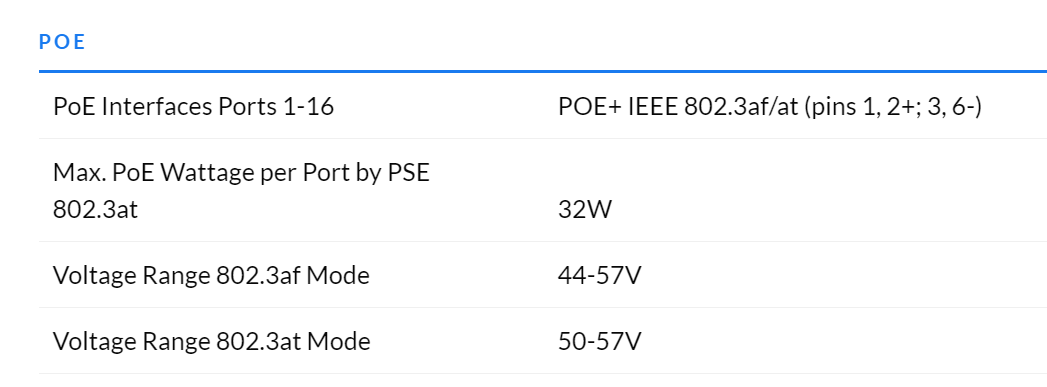
Found at UniFi Switch 24 PoE – Ubiquiti Inc.
2 Likes
I was able to clear a plug from my UPS and actually use the PoE from my switch. Looking at the values as well, I'm using less power.
5V | 1A plug = 5W
I used a smart plug connected to my hub, so I was always able to power cycle it 
That is what the power supply is rated to handle, not how much it is actually consuming. The device that is being powered will consume the same amount of power either way.
1 Like
I'm using the plug @csteele linked Poe for c7 - #2 by csteele
1 Like
Thank you @ogiewon i appreciate the help and the effort.
1 Like
One thing to be wary of with POE is that some switches kill the power on the ports if they happen to reboot.
This has caught me out a few times e.g. if a firmware update is applied automatically by the central management software. Definitely worth checking the switch behaviour when that happens so that you can plan accordingly.
Or if the switch does a "warm restart" for whatever reason, see what happens to the POE output. I've had that a few times over the years on D-Link and HP switches and the POE drops.
I also got bitten last year by a Cisco POE switch dying and of course that in turn dropped power to a number of hubs and RPIs ..... not much fun trying to recover from all of that.
I do still use POE a lot but nowadays tend to limit it to cameras, WiFi APs and other things that a hard power cycle has little chance of killing.
Just something to bear in mind because you're essentially creating a single point of failure for a lot of devices if you're hanging critical systems off POE!
4 Likes
That is where the USB battery pack between the PoE and the Hubitat (or RPi) can be useful.
But then you list the remote power cycle ability. 
1 Like
The problem with these is that:
a) They often don't draw enough current to get the POE receiver to turn on the POE output on the switch
b) A lot of USB battery packs can't charge and discharge simultaneously (pass-through)
c) Some will stop drawing power on the POE receiver once they've charged and then they discharge, before drawing power again (see point a)
d) Some will cycle the outputs when power returns - so they look like they are working as a mini-UPS if the power drops (great!) but then when the power returns, the output "blips" momentarily, which is enough to drop the power to the RPi
e) You don't tend to get any notification that they are "on battery" .... so your POE could suffer an issue, your RPi will carry on but eventually the battery will die
All in all, great if you can get a magic combination that works across all scenarios, just be wary that it's a challenge!
Just remembered I had this sitting around:
- IPCamPower PPoE switch, supports 802.3af/at (max 30W, total 65W).
Basically this, but the previous model:
http://ipcampower.com/ipcp-4p2g-af2
I assume this will work w/a splitter to provide power/ethernet to the C7? It appears to be compatible - 3af.
It looks like it should work. Plenty of power available as the hub comes with a 5 Watt (5vdc/1Amp) power supply.
1 Like
POE (af) = up to 15w per port as needed/up to the switches max.
POE+ (at) = up to 30w per port as needed/up to the switch max.
considering you only need 5w to power HE either standard will be fine. You only need to be concerned if your pushing the switch over it's max power output (with multiple devices connected), which you listed as 65w for that switch.
1 Like