I purchased a Hue Outdoor Motion sensor a couple of weeks ago, paired it to my Hue hub, then added it to Hubitat (C-7 2.4.0.151) using the Hue Bridge integration. I am using the V2 Hue api setting in the integration. The sensor was discovered immediately and device was setup in Hubitat with no problems.
The motion sensor's software has been updated in in the Hue app and shows SML004 | 2.77.35 | 100b-11b.
My objective was to use the lux and temp values from the hue sensor as a hyper-local alternative to the OpenWeatherMap-Alerts Weather Driver. What I'm finding, though, is that the lux and temp values from the hue sensor are far out of line with any other source. For example: actual outdoor temp (reported correctly by OpenWeatherMap) is 77 but hue sensor is reporting 91; lux value in OpenWeatherMap is 6,483; hue sensor reports 33,628.
The hue sensor is in full sun. I am trying to figure out if this unit is defective or is something misconfigured. Does anyone else have a similar experience with the hue outdoor sensor? Thanks...
The driver takes the raw values reported by the Hue Bridge (V2 API) and scales them in accordance with Philips' documentation for this reading:
Light level in 10000*log10(lux) +1 measured by sensor. Logarithmic scale used because the human eye adjusts to light levels and small changes at low lux levels are more noticeable than at high lux levels. This allows use of linear scale configuration sliders.
My interpretation of how to "reverse" that is: 10 ^ (rawValue-1)/10000), and that is what the driver reports.
It's possible that this math is wrong (please correct ) or that the "raw" value from the sensor would be more in line with these other sources (debug logging for the device will show you what's coming in before it's parsed into an event value if you wanted to take a peek, or reverse the calculation using the above descriptions). But if Philips is to be believed and the unit for this event intended to be lux (that much, it is...), I think this is right.
I doubt you're dealing with a defective sensor in any case, as I rarely see this kind of sensor from different manufacturers align well with each other (lux is supposed to be standardized, but I suspect many with this feature just do well enough to tell you whether it's bright enough to need artificial lighting or not -- the sensor being more of an "extra" for the device than a well calibrated, precise piece of technology that is part of its core function, IMHO). But I suppose it's possible.
I doubt it's defective.
I use one directly connected to HE and it's Lux right now is 15K.
I have found many Lux device top out at 1K or 10K or more depending on their random scale.
My older Aeon Lux devices only go to 1000 which is useless.
I had to mask them to reduce the light to make them useful.
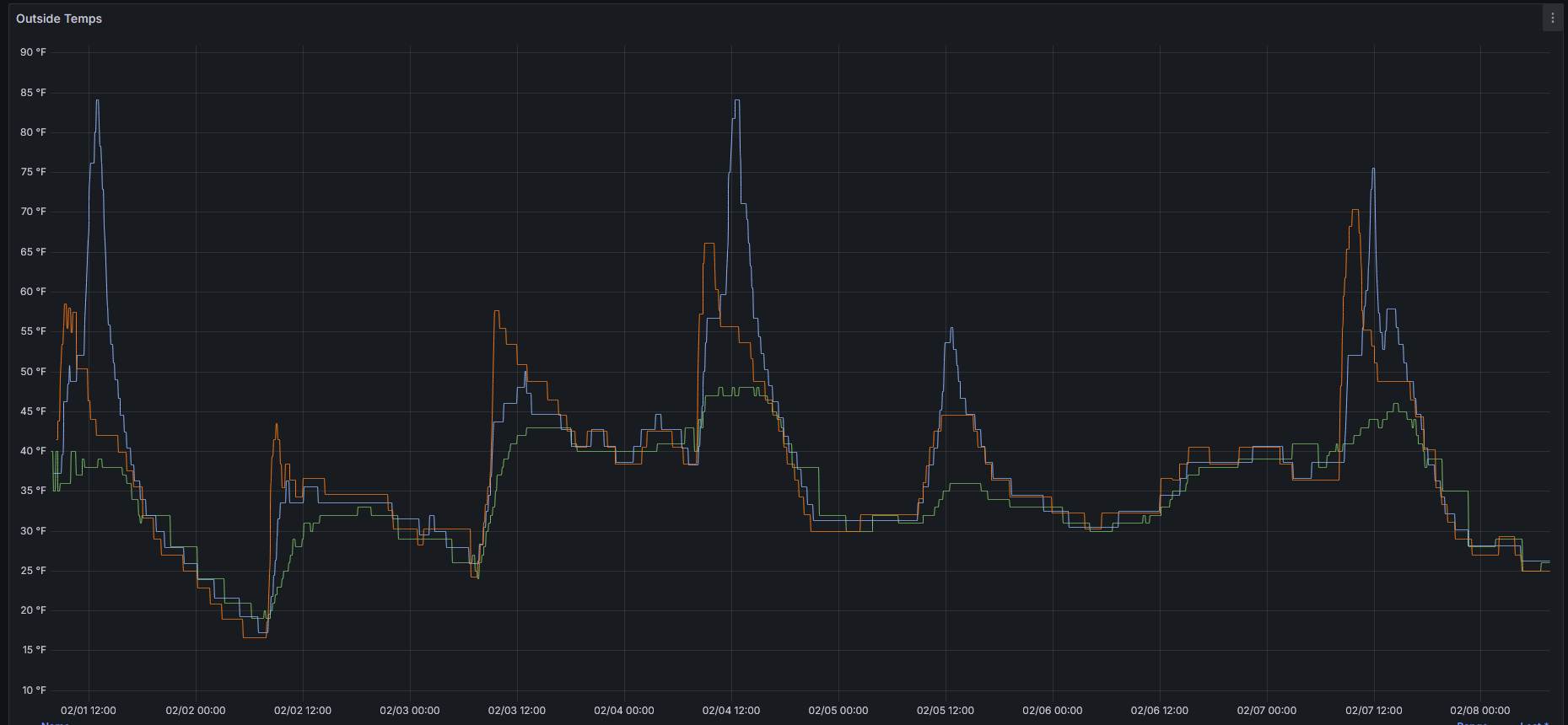
You need to have the sensor in the shade if you want an accurate temperature. I have 4 of these around the front and back of my house and use the minimum temperature reported among all 4 as my “outside temperature” using the Min/Max temperatures app on Hubitat’s github.
My Blink cameras (RIP) would get too hot on their own (if recording) to reliably use for temp sensing. BTW: The Min/Max temperature app is a gem for those of us who can’t code.
I moved the sensor to a shaded location just to test the temp & lux for a couple of days. I'm not sure yet if I can permanently position it so that it's shaded without compromising the motion detection. I still have a couple of weeks to decide on keep or return.
I’ve had 4 of these outside for several years now and they have been very dependable. I used to have them connected to the Hue bridge, but I moved them to my C-8 that I purchased the day it was announced (can’t remember when that was), and they have been solid there as well.
@kharrison I have one that I use for lux. Depending on the time of year, it may be in sun all day or shade all day. I use it to determine light levels inside the house. For the most part I want lights on in lower lux levels no matter what time of year it is. What I did was take note of the values the sensor was showing at various levels, and use those values in my rules. It doesn't agree with any other sensors, but it doesn't really matter because I'm not trying to compare it. I just let it do its thing. I tweaked the levels in my rule a few times until I was happy with the result. It's been running like that for a long time and it works great.
It's against the house, so temperatures are never going to be accurate.
Yep, all this... I really couldn't care less about lux/temp accuracy (well, within reason lol), but I just need it to report said values in a consistent manner.
Whatever "baselines" it wants to use for lux and temp is fine -- I just need them to be conssitent and predictable. And the Hue sensor is very reliable in that regard.
Yeah...I use lux # from one of these as input to a few automations. One is turning off my office light in the morning (turned on from motion of entering) once it's "bright enough" outside. I don't care WHAT the number is...I just played with a few days until I hit a number that for me I don't even notice the lights turning off anymore. I used to use sunrise+offset but the light level is very different on clear vs cloudy day so using the sensor has been awesome. The other is our foyer closet triggered with a contact sensor. It doesn't turn the light on if it's "bright enough" outside but will if it's below that threshold.
To basically repeat what others are saying, you can't really take most of these sensor inputs as gospel or compare them to other sensors (even from the same brand sometimes). They aren't calibrated or high enough quality for that. You just need to make your
numbers work for your situation, whatever they are. Averaging or min/max are your friend as well.
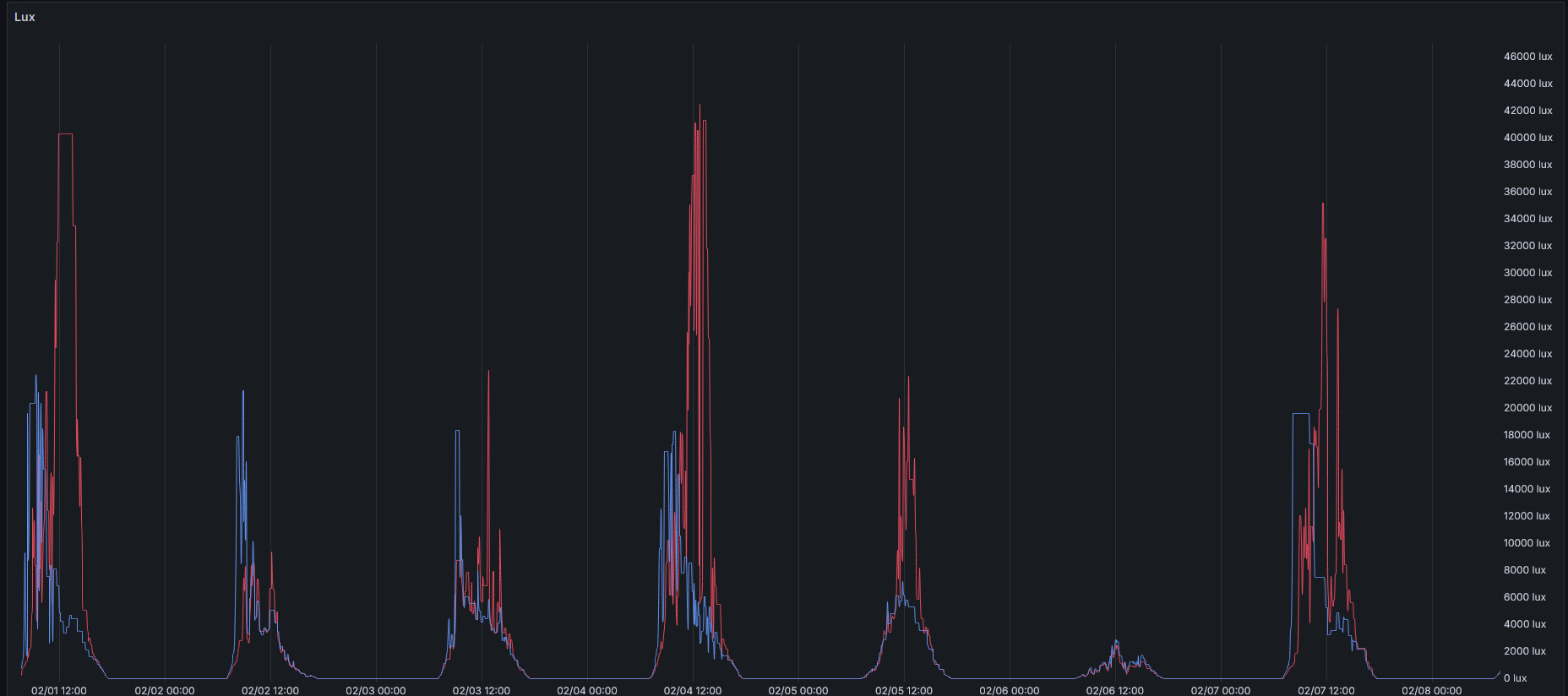
Here's the last week of lux from my 2 (blue is mounted on east wall of garage facing east, red is mounted to gutter downspout on south face of house facing west):
Mine have been exposed to the weather (since Aug '22) with no ill effects and I think I've only changed batteries in the one by house which lasted almost 2 years so far. Very happy with these purchased from the great recommendations of others here. They are not cheap but in this case I think you are getting what you pay for especially with something that lives outside.
For general outdoor lux I use a Hue indoor motion sensor paired directly to Hubitat positioned on a window sill looking out. It controls a couple of different illuminance virtual switches to use in rules. The readings are consistent.
 ) or that the "raw" value from the sensor would be more in line with these other sources (debug logging for the device will show you what's coming in before it's parsed into an event value if you wanted to take a peek, or reverse the calculation using the above descriptions). But if Philips is to be believed and the unit for this event intended to be lux (that much, it is...), I think this is right.